

Iterable
Connect Iterable so approved affiliates land in a list with dataFields for segmentation.

Rekomi's Iterable integration subscribes every approved affiliate to an Iterable list with first/last name + tags written into the user's dataFields for segmentation.
What syncs
When an affiliate is approved (or, optionally, when they apply), Rekomi calls POST /api/lists/subscribe with:
{
  "listId": 12345,
  "subscribers": [{
    "email": "...",
    "dataFields": {
      "firstName": "...",
      "lastName": "...",
      "tags": ["Rekomi affiliate"]
    }
  }]
}
Iterable returns HTTP 200 even on partial failure. Rekomi parses the response body (successCount, failCount, invalidEmails, failedUpdates), if failCount is non-zero or invalidEmails/failedUpdates carry entries, the sync is marked Failed with the reason.
Finding your API key
In Iterable:
- Integrations → API Keys.
- Click Create new API Key. Choose Server-side (NOT JS-Web SDK, JS keys 401 on the subscribe endpoint).
- Copy the key.
Region
Both Iterable data centers are supported: enter us for US-hosted accounts (api.iterable.com) or eu for European Data Center accounts (api.eu.iterable.com) in the Region field when connecting. Iterable keys are region-scoped, an EU key will not work against US and vice versa.
Connecting Iterable in Rekomi
- Go to Integrations in the dashboard sidebar.
- Click the Iterable card.
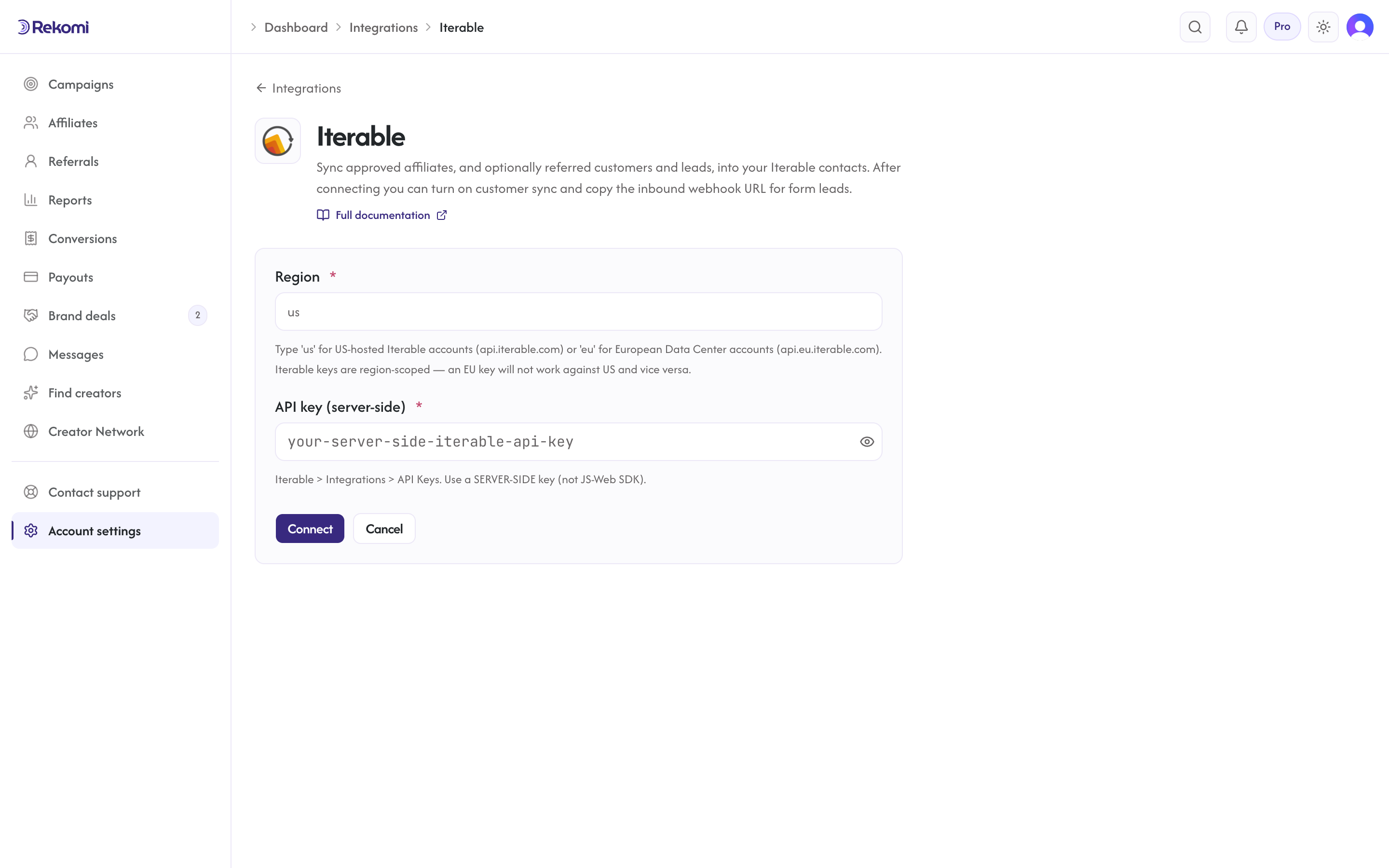
- Enter your region (
usoreu) and paste your API key. Click Connect. - Rekomi runs a test call against
GET /api/lists.
Tags
Iterable has no native tag primitive. Rekomi writes the tags array into dataFields.tags so you can build segments with rules like dataFields.tags contains "Rekomi affiliate". Note that a re-sync replaces the whole dataFields.tags array (Iterable's bulk update overwrites array fields), so don't store your own values in that field.
Referred customers and leads (optional)
Turn on Sync referred customers and leads on the integration page and every sale or lead Rekomi attributes to an affiliate is written to Iterable as well, matched on email so existing contacts are updated, not duplicated. Each one carries:
- a
rekomiobject on the user's data fields (rekomi.referral_link,rekomi.campaign,rekomi.referring_affiliate,rekomi.referring_affiliate_code,rekomi.last_event,rekomi.last_sale_amount) rekomi_tagsdata field withRekomi customerorRekomi lead(yourtagsfield is left alone)- Affiliates synced by the section above also get
Rekomi referral link,Rekomi campaignandRekomi affiliate statusin the same fields, so you can merge a partner's link into your emails.
Refunded, denied and fraud-quarantined conversions are never pushed, and imported historical conversions are skipped. It is off by default.
When sync fires
- Default: only
Approvedaffiliates sync. - Optional: turn on "Include applicants before approval" to also sync
Pending.
Per-campaign overrides
Each campaign can override the account-level configuration. From a campaign's detail page, open the Settings tab and scroll to the CRM sync for this campaign section.
Per-affiliate sync visibility
Open any affiliate's detail page. The CRM sync panel shows the per-CRM status. Resync clears prior jobs and re-fires the sync.
Troubleshooting
iterable_partial_failure, Iterable returned 200 but reported a failure in the body (failCountor a failed-update bucket). Inspect the affiliate's CRM sync panel for the body snippet.iterable_invalid_email, Email rejected by Iterable validation (it came back in the response'sinvalidEmailslist).iterable_failed_update:{bucket}, Iterable reported the update in afailedUpdatesbucket (the bucket name is appended, e.g.notSignedUp). Inspect the affiliate's CRM sync panel and re-fire the subscribe.- 401 on server-side key, Verify you copied a SERVER-SIDE key (not a JS-Web SDK key) and that the region matches where the key was issued. Repeated auth failures mark the integration "action needed" and trigger a reconnect email; after fixing, use Resync all on the Failed tile.
Disconnecting
From the Iterable connect page, click Disconnect. Integration row + per-campaign overrides are deleted. Sync history is preserved.
See the iterable integration overview on the marketing site for use-cases, persona fit, and unique automation patterns.
Flodesk
Connect Flodesk so approved affiliates land in a segment automatically. Sales are not credited through this connection, because Flodesk has nowhere to store which link a subscriber arrived from; the standard install path covers that.
Campaign Monitor
Connect Campaign Monitor so approved affiliates land in a subscriber list under a Client.