

Payouts
Fees, timing, methods, batches, minimums, and failure handling.
Rekomi runs affiliate payouts for you, globally. You fund a payout run and Rekomi disburses the net to each affiliate, handles the cross-border settlement, and keeps the tax reporting in sync. You never cut checks, wire money affiliate by affiliate, or collect their payout tax forms yourself (year-end 1099-NEC filing stays with you either way; Rekomi builds the candidates worksheet).
Payouts at a glance
One flat 3% platform fee (2.5% on Enterprise), all-in. New accounts fund payouts by bank transfer from any country; once Rekomi verifies your business you can also link a US, EU, UK, or Canadian bank debit. Affiliates get paid in 130+ countries. Money always clears before anyone is paid.
Fees and timing
Everything a payout costs, and how long each step takes, in one place.
| Fee | Who pays it | Amount |
|---|---|---|
| Platform fee | You (the brand) | 3% of the payout (2.5% on Enterprise) |
| Withdrawal fee, paid via Stripe Express | The affiliate | $2.25 per month + 0.25% of the payout |
| Withdrawal fee, paid via PayPal | The affiliate | 2% of the amount sent, capped at $20 |
Notes on the fees:
- The platform fee is all-in: Stripe's payment-processing cut is already baked into it, so funding by US bank debit or bank transfer costs exactly 3% (2.5% on Enterprise) on what you pay your affiliates, and nothing more. The one exception is the international debit line in the next note.
- The platform fee is charged on top of the gross commissions, never taken out of the affiliate's payout.
- Funding by an international bank debit (EU, UK, or Canadian bank) adds one labeled line to your receipt: international funding cost, at cost. This is not a Rekomi fee: it is Stripe's own currency-conversion charge passed through with no markup, currently about 1% of the charge, and Rekomi's 3% stays 3%. You can avoid it entirely by funding by bank transfer instead, which virtually every country can use.
- The affiliate withdrawal fee is a conventional pass-through cost that Rekomi takes no margin on. The flat $2.25 is charged just once per calendar month no matter how many payouts an affiliate receives; for affiliates paid via PayPal the withdrawal fee is 2% of the amount sent, capped at $20 (exactly PayPal's own sending cost), and PayPal deducts nothing on arrival; a currency conversion on the affiliate's Stripe or PayPal side, if any, is at that provider's own rate. See the affiliate-side fee breakdown for a worked example.
| Step | Typical time |
|---|---|
| Funding clears (US bank debit) | About 4 business days |
| Funding clears (EU / UK / Canadian bank debit) | About 6 / 3 / 5 business days |
| Funding available (bank-transfer balance) | As soon as your transfer arrives |
| Stripe Express settlement to the affiliate | 1 to 3 business days (U.S.), 3 to 7 (international) |
| PayPal delivery to the affiliate | Usually within minutes of dispatch |
PayPal payouts land in the affiliate's PayPal balance, and they withdraw to their bank through whatever options PayPal offers in their country.
Funding your payouts
Every payout run is funded by you first: Rekomi collects the gross commissions plus the platform fee, waits for the money to clear, and only then pays your affiliates. That order is deliberate. It means Rekomi never fronts money on your behalf, and your affiliates are never paid with funds that could bounce.
Fund payouts from virtually any country
Your business does not need to be in the US, and you never need a Stripe account of your own. Every new account funds by bank transfer, which works from any bank in almost any country with no extra fee. Your first payout run is funded by bank transfer whether or not you are verified. Once your account is verified and that first run has settled, the bank-debit options below open up as well, and you can set and forget them. The full country-by-country rail list is in Funding countries.
Here are all five funding options side by side. Bank transfer is available from day one and funds every account's first payout run; the four bank debits open once your account is verified and that first run has settled. Both modes are set up once under Settings › Billing › Funding:
| Option | Works from | Charged in | Fee | Money clears | |
|---|---|---|---|---|---|
 | US bank debit (ACH), once verified | US banks | USD | 3% platform fee, nothing else | ~4 business days |
 | EU bank debit (SEPA), once verified | Any SEPA-zone bank | EUR, at the day's mid-market rate | 3% platform fee + ~1% at-cost currency conversion | ~6 business days |
 | UK bank debit (Bacs), once verified | UK banks | GBP, at the day's mid-market rate | 3% platform fee + ~1% at-cost currency conversion | ~3 business days |
 | Canadian bank debit (PAD), once verified | Canadian banks | CAD, at the day's mid-market rate | 3% platform fee + ~1% at-cost currency conversion | ~5 business days |
 | Bank transfer | Virtually any country (sanctioned countries excepted) | USD, pushed by you (SWIFT, Wise, or domestic transfer) | 3% platform fee, nothing else | The moment your transfer arrives |
The 3% is the same platform fee every option pays (2.5% on Enterprise), never a location surcharge. The ~1% on the international debits is Stripe's own conversion cost passed through at cost, itemized on your receipt with no markup; bank transfer never incurs it.
Bank debit (set-and-forget, once verified)
Once your account is verified, link a bank account in your region and authorize a debit mandate through Stripe's secure flow. It is used from the run after your first one: the first funded run of every account is a bank transfer, so the money is already in before anything is paid out. From then on, every payout run (manual or scheduled) charges that account automatically; you never move money by hand. A bank debit linked before verification stays on file and is used once you are verified and your first run has settled.
Linking takes about a minute. On the US and Canadian flows, if your bank doesn't appear in the instant-login list you can choose enter bank details manually; a small verification deposit arrives within a business day or two, you confirm the code from it, and the mandate activates on its own. SEPA and Bacs authorize the mandate directly in the linking flow, with no deposit step.
Two notes on the debit rails:
- Bank debits are a verified-account feature, ACH included. Until Rekomi has verified your business (see Verification and payout reviews below), you fund payouts by bank transfer; once verified, link any debit rail here and every run charges it automatically.
- On the international rails, your receipt shows the exact foreign-currency amount debited ("Debited from your bank as €X") plus the at-cost international funding line, so your bank statement reconciles to the cent.
Bank transfer (every new account, from almost any country)
This is how every new account funds payouts, and it stays available after verification. No mandate at all: Rekomi gives you a dedicated USD account number, you push money to it whenever you like (domestic transfer, SWIFT wire, or a service like Wise), and payout runs draw from that balance the moment the money arrives. Your current balance and the transfer details live on the funding settings page. Owners and Admins see the account numbers there; Managers see the balance only.
There is no per-run bank fee and no international funding cost line: a brand in Türkiye, Brazil, India, Nigeria, Australia, or almost anywhere else pays the same flat 3% as a US brand. Until your account is verified, funded runs are capped at $2,500 per 30 days and dispatch 7 days after the money lands (see below); verified accounts have no cap and no wait. The only countries that cannot fund are internationally sanctioned ones; the exact list, and the rails available per country, are in Funding countries. If a run needs more than your balance holds, it stops cleanly and tells you the exact shortfall; nothing is charged and nothing moves until you top up and run it again.
Note the two sides are separate: this section is about where YOUR business can be. Where your affiliates can be paid is its own list, 130+ countries across Stripe Express, direct bank deposits, and PayPal; see Payout countries.
Which should you pick?
| You are | Fund with | |
|---|---|---|
| A US brand with a US bank | Bank transfer until verified, then US bank debit (ACH) if you prefer: link once and every run charges automatically. |
| An EU, UK, or Canadian brand | Bank transfer until verified, then your local debit rail (SEPA, Bacs, or PAD) for set-and-forget scheduled payouts, or keep pushing funds on your own schedule. |
| Anywhere else in the world | Bank transfer. Push USD from any bank (SWIFT or Wise included): no mandate and no international funding cost. |
Whichever you choose, every funded run produces a numbered RKM receipt with the full breakdown: gross commissions, platform fee, any at-cost international line, and the net each affiliate received. On US ACH and SEPA debits that RKM number also appears as the description on your bank statement; Bacs and Canadian PAD statements show the debit mandate reference instead, and bank-transfer funding shows whatever reference your own bank attached to the transfer, so the receipt is always the reconciliation anchor.
Verification and payout reviews
Rekomi moves real money on your behalf, so it follows the same rules every payout platform follows: the platform never fronts money, new accounts earn trust, payees are known before money lands, and anything that looks wrong is checked by a person before it goes out. In practice that means two account states and one review step.
Unverified (every new account). Three rules apply until Rekomi verifies your business:
- Prefund by bank transfer. Payout runs are funded from your bank-transfer balance. Bank debits (ACH, SEPA, Bacs, PAD) are not offered yet.
- A 7-day holding period. Affiliates are paid 7 days after your funding lands. The payouts page shows the date for each run.
- A $2,500 cap per 30 days on funded runs. The funding settings card shows how much of the window is left.
Everything else works from minute one: campaigns, tracking, affiliates, commissions and accrual. Most brands reach their first payout run weeks after sign-up, so there is time to get verified before it matters.
Getting verified. Open Settings › Billing › Payout funding source. The Get verified block has three lines, each with a tick and one button for whatever is missing:
- Your website. We confirm you control the domain you signed up with: the Rekomi tracking snippet on it is enough, and so is a verified custom Rekomi domain under it. Otherwise add one DNS TXT record (the card shows the exact name and value) and press Confirm website.
- A business email on that domain. If your login is already on that domain, this is done. Otherwise type an address ending in your domain and click the link we send. If your business has no mailbox on its domain you can skip this line, and a person always decides.
- One strong proof. Any one of: a connected sales platform with real history (Stripe, Shopify, Paddle, Chargebee, Lemon Squeezy, Polar, Braintree, PayPal, Wix, BigCommerce or WooCommerce), a bank account in your business's name (a verify-only link, nothing is debited and nothing is saved), or a one-time ID check.
Then press Submit for review. A person at Rekomi looks at it, usually within one business day, and emails you either way. Sometimes we ask for one more thing first; the card shows the question and a reply box. Verified accounts get every bank debit rail and instant dispatch: affiliates are paid the moment your funding settles, with no holding period and no cap. Two things apply to every account, verified or not: the first funded payout run is a bank transfer, and a person at Rekomi takes one look at the account before that first run goes out. From the run after it, a verified account's bank debit takes over and nothing waits.
If our automated checks flag an account as high risk, funding and payouts wait until verification is complete. Verification is the same few-minute flow under Settings, Billing, Funding.
No payouts on a trial. A brand-funded payout run needs an active paid subscription. During a trial, commissions keep accruing and the payouts page says "Payouts start once your subscription is active"; activate your plan, then get verified; your first run is funded by bank transfer and every run after it is instant (until verification the unverified rules above apply). Comped accounts and app-store-billed accounts (Shopify, Wix) pass through their own billing status.
The first-funding look. Before a new account's first payout run goes out, a person at Rekomi takes one look at the account, whatever the amount. That happens once, verified or not. For large brands it knows well, Rekomi can grant a higher tier (super verification) that lifts the first-run bank transfer and the look; it is granted by Rekomi, never requested.
The review step. A small number of runs are held for a quick check before they go out: a run where the brand and a paid affiliate share a device or sign-in address, where the funding bank's holder name matches nothing on the account, where hand-typed sales are paid to an affiliate who joined the same day, or a large first run on an unverified account. A held run has charged nothing and paid nobody. You see "This payout run is being reviewed before it goes out" on the payouts page, we review it within a business day, and we email you when it is on its way or if we could not send it. Nothing is ever approved automatically.
Where to manage payouts
/dashboard/payouts shows what you owe, what is settling, and what has been delivered, with three tabs: Being paid out, Paid, and Failed.
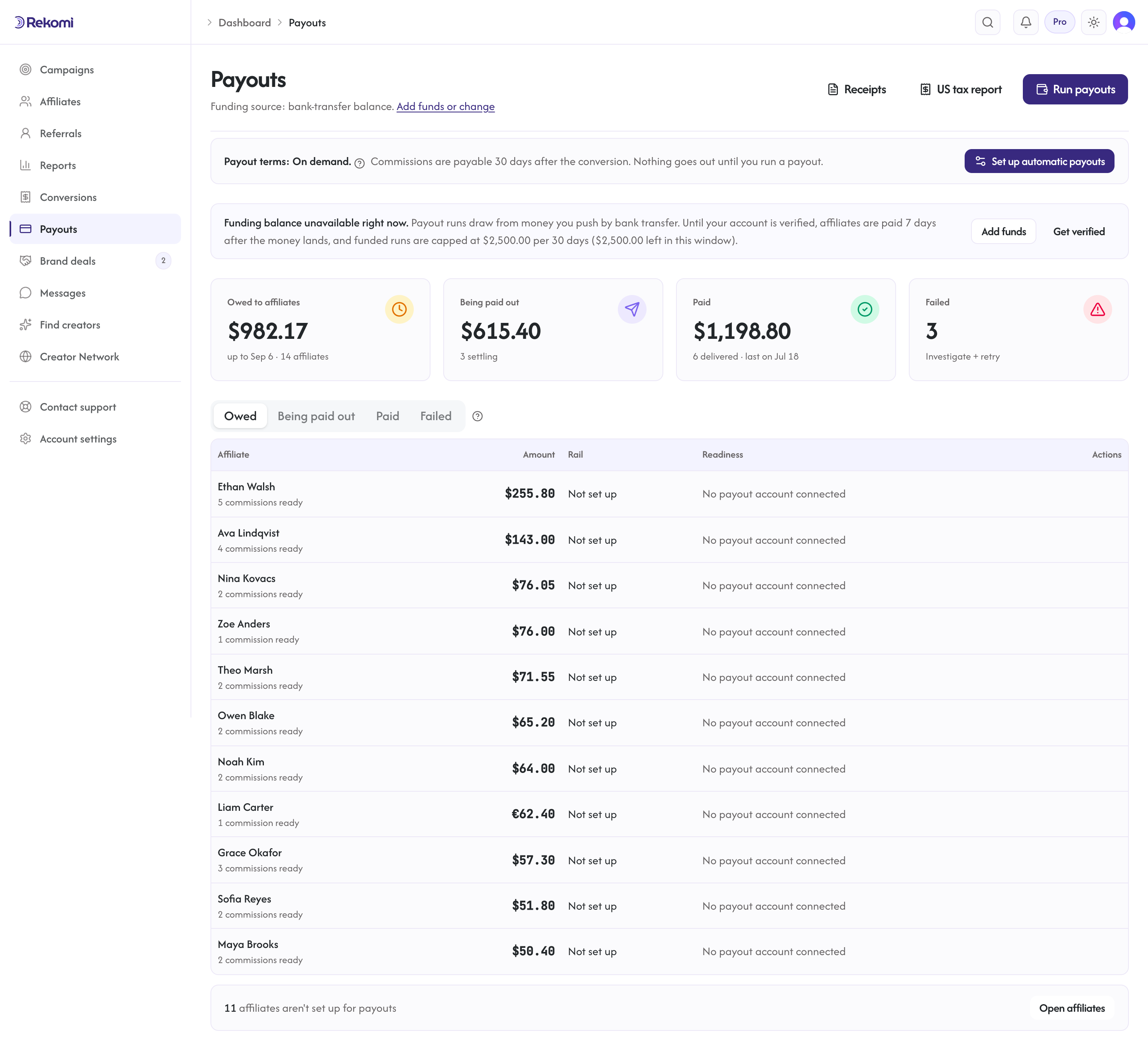
- Being paid out: payouts you have created that are funding and settling (status Pending or Processing).
- Paid: delivered payouts with affiliate, amount, method, and reference; expand a row to see the settled date.
- Failed: payouts that hit an error (closed Stripe Express account, KYC hold, dispute). Each shows
failureReasonfor triage.
Payout runs are funded by the funding source you set up once from billing settings (see Funding your payouts: a bank debit in your region, or a push-by-bank-transfer balance that works from any country). Every funded run produces a numbered RKM receipt available from the Receipts button. Until a usable funding source is in place, the Payouts page shows a banner that says which step applies to your account.
Methods and countries
Affiliates get paid through Rekomi's built-in payout methods:
| Method | Countries | How it works |
|---|---|---|
| Stripe Express | 42, including the US | Affiliates onboard once with Stripe Express and funds settle directly to their bank account. |
| Bank deposit | 60 more | Direct local-currency deposits via Stripe: affiliates add their bank details once on a Stripe-hosted form (plus a W-8) and are paid through the same runs. |
| PayPal | 30 more, for 130+ combined | Covers the countries the two Stripe methods do not reach. Affiliates add their PayPal email (and, outside the US, a W-8) and are paid through the same runs. |
You do not pick a per-affiliate payout method. Each affiliate is paid through whichever method covers their country; the full searchable list, with each country's method and fee, is in Payout countries.
Only account Owners and Admins can run, retry, or reverse a payout, and only from a signed-in dashboard session (never via an API key).
Running a payout batch
Payouts are consolidated through Rekomi: you fund one payout run and Rekomi pays every affiliate through its built-in payout methods. There is nothing to reconcile by hand and no separate system to maintain. (The old manual "mark as paid" option has been removed from the payout screens; consolidated payouts through Rekomi are the way to pay affiliates.)
- Open Payouts in the dashboard sidebar.
- Click Run payout. The dialog previews every affiliate with an eligible balance (approved commissions past your grace window, and a ready payout account) and the amount owed, with per-currency balances shown in their native amounts (non-USD balances convert to USD at the mid-market rate when the run executes, recorded on each payout). It also lists affiliates with an eligible balance who cannot be paid yet (for example, payout account not connected), so you know who to nudge.
- Select the affiliates you are paying in this batch.
- Confirm. Rekomi charges you the gross commissions plus the platform fee (see Fees and timing), deducts the affiliate's withdrawal fee from the gross, disburses the net to each affiliate through their payout method, and records the payout so balances, history, and tax totals stay correct.
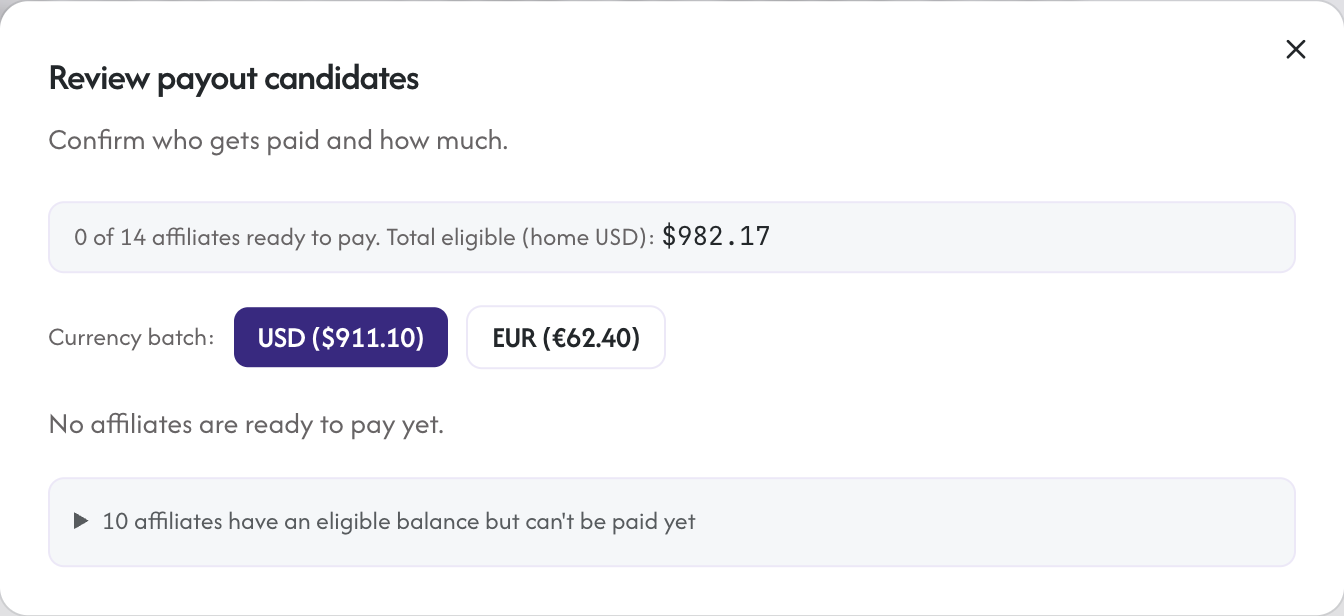
Each payout starts in the Being paid out tab, then settles through the payout method. You can run batches as often as you want.
Minimum payouts
Two minimums keep tiny balances from triggering payouts before you want them to, and they gate different things:
- Campaign minimum: set on each campaign, this is an eligibility floor. While an affiliate's balance from that campaign is under the floor, those commissions are not payable in any run, manual or automatic; they keep accruing until the balance crosses it.
- Account minimum: set in payout settings, this applies to automatic runs only. On a scheduled run, affiliates whose combined balance is under it roll forward to the next run. A manual batch can pay any eligible balance below the account minimum; the campaign floor still applies.
Both minimums are USD amounts. An affiliate's earnings in other currencies count toward them at their USD value on the run date (a 2,500 threshold means $25.00, whatever currencies the balance is made of).
The top of /dashboard/payouts shows a payout terms card that states your terms in plain sentences: your schedule (or "On demand"), when commissions become payable after the sale, your account minimum, and the next automatic run date. Your affiliates read the same terms, worded for them, in their own portal, so both sides see the same rules.
Included payout volume
Each plan includes a monthly partner-payout volume to help you pick the right tier: Starter $2,500/mo, Growth $15,000/mo, and Pro and Enterprise unlimited. It is measured per calendar month across all your campaigns.
This is a soft guide, not a hard cap. You are never blocked from paying your affiliates, and there is no overage fee: the flat platform fee applies to all payout volume regardless of plan. If you go over your plan's included volume, Rekomi simply suggests upgrading for more headroom; nothing about your payouts changes. Your billing page shows your payouts so far this month against your plan's included volume.
Payout statuses
| Status | Meaning |
|---|---|
| Pending | Created, not yet executed |
| Processing | Transfer initiated, waiting for settlement |
| Paid | Settled |
| Failed | Error during execution; triage in the Failed tab |
In the dashboard, Pending and Processing both display as Being paid out.
Schedules
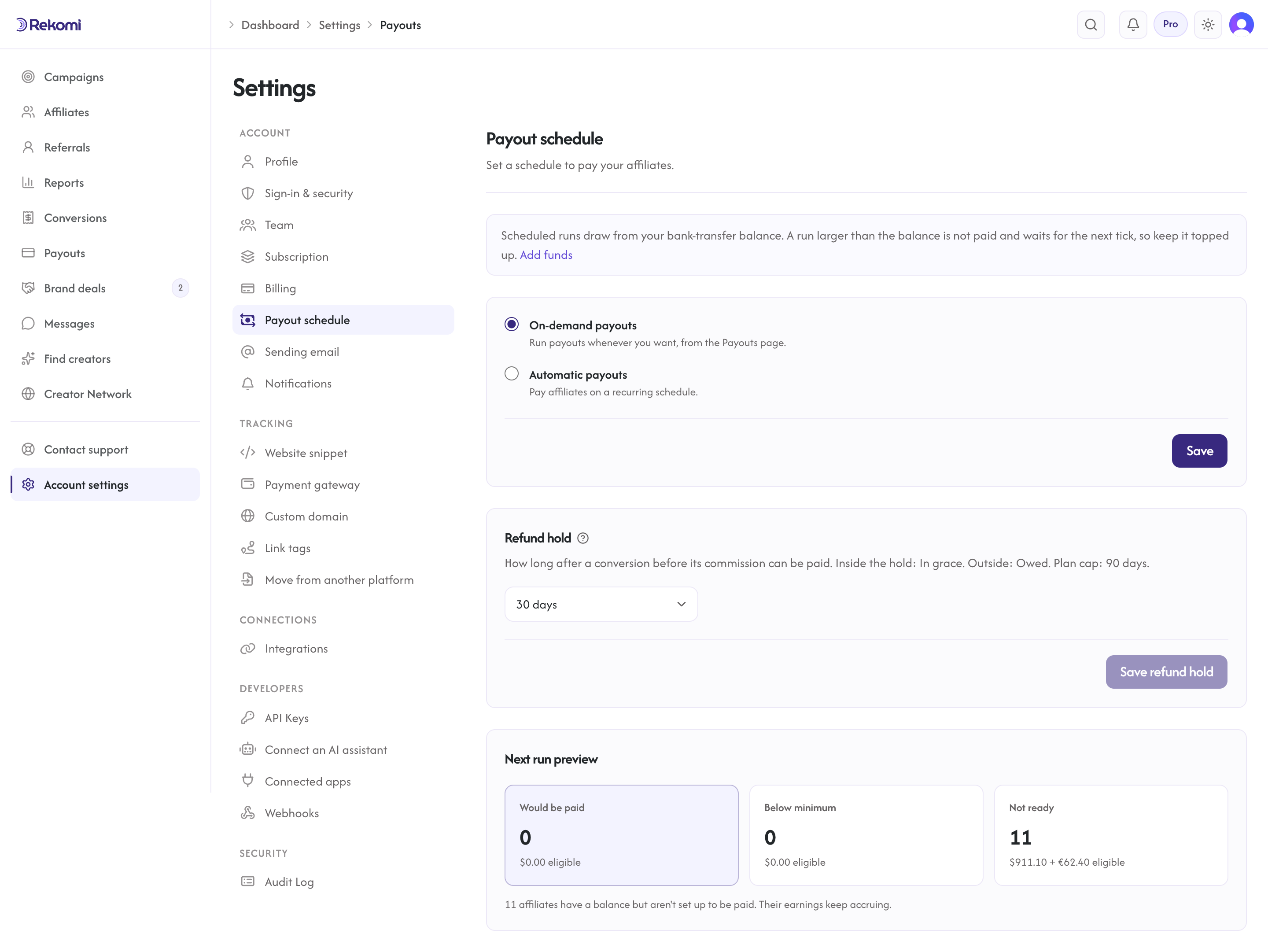
Payouts can run on demand or on a schedule. In /dashboard/settings/payouts you choose On-demand (you run each batch yourself) or Automatic, and for Automatic you set a Daily, Weekly, or Monthly cadence (weekly supports multiple days), plus the time of day it fires, in 30-minute steps. Scheduled runs fire within half an hour of your chosen time. The time is read in your account timezone, the same one set in Settings › Profile; changing it in either place changes it everywhere, so times across your account (report ranges, conversion timestamps, and this schedule) all stay consistent. The per-affiliate minimum applies to automatic runs. You can still run a payout batch any time from the Payouts page.
Refund hold and approval timing
By default, a sale's commission stays inside the grace window for 30 days after the sale. This covers the standard refund window. Once a commission is older than your grace window it automatically becomes available for payout; there is no manual step and nothing to wait for. Think of it as your net terms (net-30, net-60, net-90) for absorbing refunds before an affiliate gets paid.
Set the grace window to Instant, 7, 14, 30, 60, or 90 days under Settings, Payout schedule, Refund hold. Every plan starts at 30 days and can set any of those; the hold is a safety setting, not a plan feature. Shorter windows pay affiliates sooner but increase clawback exposure. The window is one number for the whole account, and a manual payout run respects it automatically: the run pays each affiliate's commissions that are already past the hold and leaves the younger ones in grace for a later run, so you never have to exclude them by hand.
Failed payouts
When a Stripe transfer fails, Rekomi:
- Marks the payout Failed and records a
failureReason(shown in the Failed tab and returned by the payouts API). - Emails your workspace billing contact that the payout failed, with the reason.
- Leaves the underlying sales in
Approved, so you can retry once the affiliate fixes their Stripe Express account.
Retry from the Failed tab. Click the failed payout, see the reason, contact the affiliate if needed, then click "Retry".
One exception: when the failure was the funding charge itself (your bank debit bounced or the charge was refused), the payout cannot be retried on its own, because no money ever came in. The sales go back to Owed to affiliates, the Failed row stays as the record and says so, and your next payout run (Run payouts at the top, or the automatic run) picks the sales up once your funding source is topped up.
Per-affiliate payouts
When an affiliate has money due (approved commissions past your grace window), a Pay out button appears in their detail page header showing the amount, and a Pay action appears on their row in the affiliates table. Either one takes you to the Payouts page with the run dialog already open and that affiliate pre-selected, so paying one person is two clicks.
For finer control, click any affiliate in /dashboard/affiliates and open the Payouts tab to manage that one affiliate end to end:
- A summary of what they are owed: due now vs still inside the grace window, plus what's already paid and their gross/net revenue, broken out per currency. Net is the amount that reaches the affiliate: the gross commission minus the affiliate's withdrawal fee. The platform fee is charged to you on top of the gross, never taken out of the affiliate's payout (see Fees and timing).
- Due / Pending / Paid / Refunded tabs listing every commission, with the customer and sale behind each.
- On the Due tab, tick individual commissions (or select all on the page with the header checkbox) and click Pay $X from N referrals to pay exactly that subset, or click Pay all due to pay their entire eligible balance in one shot, regardless of what's selected or which page you're on.
- The confirm dialog shows the net that will reach the affiliate through their payout method and asks you to type the amount to confirm.
- Below the manager, their full payout history: every batch, how many commissions it covered, the status, and any failure reason, with one-click Retry on failed payouts.
Only commissions past your grace window are payable; in-grace commissions show under Pending and become payable automatically once the window passes. A commission can only ever be paid once, even if two people click at the same time.
Reversing a paid payout
Sometimes a payout that already settled needs to come back, most often because a sale was refunded after the grace window. A refund that lands after a payout is not netted against the next run, so reversing is a deliberate action you take on the payout itself; when such a refund arrives, your workspace admins get a notification naming the paid commission, the amount now owed back and the payout to open. Open the payout from the Paid tab (click Detail) and choose one of two actions:
- Reverse selected commissions: tick the commissions tied to the refunded sales and reverse just those. The dialog lists each selected commission with an amount box that starts at what is left on it; leave it for a full refund, or lower it to the refunded share when the customer got a partial refund (a 30% refund claws back 30% of that commission). The affiliate's net share of those amounts is pulled back from their Stripe Express account, and your funding for them (those amounts plus the platform fee on them) is refunded to the bank that funded the run. Every other commission on the payout stays paid. A partly reversed line shows the amount reversed so far next to its total, and you can come back and reverse the rest later (it is then reversed on its own, not mixed with other lines). Lines reversed in full are marked and cannot be selected again, and you can reverse up to 50 commissions per request. If your selection covers the whole payout, use the full reversal instead.
- Reverse entire payout: claws back every commission on the payout in one action, after a confirm step that spells that out. Rekomi reclaims the full net from the affiliate's Stripe Express account and refunds your share of that payout's funding charge (the gross commission plus the platform fee for that one payout) to the bank that funded the run. On an international rail the refund is issued in the currency you were debited in (EUR, GBP, or CAD), prorated at the same exchange rate as the original charge, so it reconciles against your statement. The at-cost international line is not refunded, because Stripe does not return its own conversion charge; the same is true of the ACH pass-through on free-for-life accounts. Once any commission on a payout has been reversed, in full or in part, the whole-payout action is no longer offered for it; reverse the remaining commissions individually instead.
The receipt keeps the full audit trail either way: reversed commissions are marked on it, each fully reversed payout is marked, and once every payout on a run is reversed the receipt itself shows as reversed, with the credit detail in your fees ledger.
Both actions apply to Stripe Express payouts funded through Rekomi. Shopify-billed workspaces reverse a payout as a whole (the platform fee is credited per payout), and payouts that predate USD-settled runs also need a full reversal. A PayPal payout can only be recovered while the payment is still unclaimed by the affiliate (support cancels the unclaimed item and the funds return to your float); once a PayPal or bank deposit payout has reached the affiliate there is no clawback, and Rekomi does not net the amount against their future commissions either; settle it with the affiliate directly.
Either action requires an Owner or Admin in a signed-in dashboard session; neither is ever available to API keys. They are not yet available in the WordPress plugin's admin screen, so use the web dashboard.
Funding questions
Can I fund payouts with a card? No. Card payments carry chargeback exposure that does not mix with irreversible affiliate payouts, so funding is bank-only by design: a bank debit in your region or a bank transfer from anywhere.
I'm not in the US, EU, UK, or Canada. How do I pay affiliates? Bank-transfer funding, the same way every new account starts. Rekomi issues you a dedicated USD account you can reach from any bank worldwide, by SWIFT or through a service like Wise, and runs draw from that balance. There is no international funding cost line on it, and no cap once your account is verified. Country-by-country rail availability is in Funding countries.
Why was my run capped? Until Rekomi verifies your account, funded payout runs and deals together are capped at $2,500 per rolling 30 days, on every funding rail. The run dialog tells you how much of the window is left before you confirm. Get verified (Settings, Billing, Payout funding source) to remove the cap; a person looks, usually within one business day.
My funding bank changed. Open Settings › Billing › Funding and click Update to link the new account; the new mandate replaces the old one. If your bank revokes the debit mandate, Rekomi disconnects the source, pauses automatic payouts, and emails you so you can re-link.
Why is my payout funding paused? A bank dispute on a funding charge pauses payout funding while we review it. Automatic payouts are turned off and runs will not start. Contact support@rekomi.com and we will review and restore it; commissions keep accruing in the meantime.
Tax forms
A tax form is required before an affiliate's first payout on every rail: a W-9 for U.S. affiliates, a W-8BEN or W-8BEN-E for everyone else. An affiliate without one shows as "Tax form missing" in the payout dialog and is skipped until they upload it from their settings; nothing is withheld, the balance simply waits. Separately, before paying U.S. affiliates at or above the IRS reporting threshold in a calendar year ($2,000 for 2026 payments), that W-9 needs to be on file for the 1099. Affiliates paid through Stripe provide their tax details during Stripe Express onboarding (Stripe collects and holds the W-9); affiliates on PayPal or bank deposit upload a form to Rekomi. The Affiliates near the US tax threshold view on the Payouts page shows who is approaching the threshold, counted on payments made during the year rather than commissions earned. At year end the 1099-NECs go out through Stripe with Rekomi as the payer of record; the candidates worksheet is for your records. See Tax forms for the full flow.