

Earnings and performance
Your conversions ledger, refund handling, and what each status means.
Your earnings live on /a/performance, the Performance page that combines your conversions ledger with your analytics: a trend chart, summary cards, the full ledger of every commission credited to you across every campaign, and breakdowns by campaign. Older /a/earnings links redirect there automatically. It is the ground truth for "what have I earned and what is it doing right now".
What you see
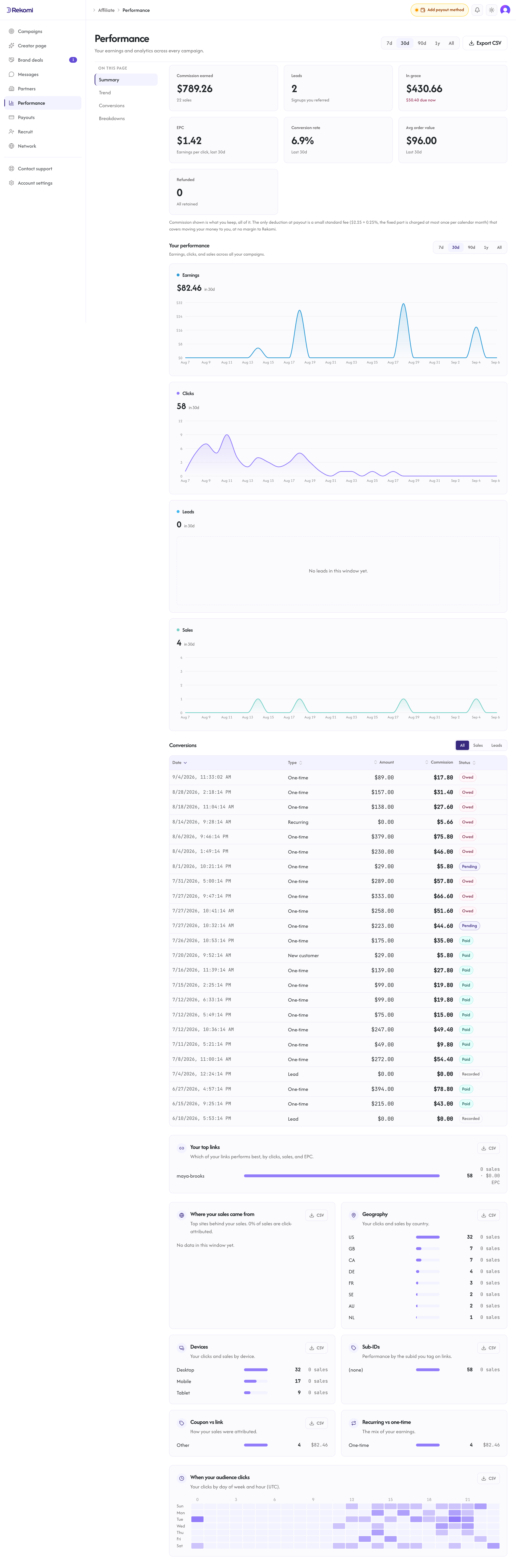
The conversions ledger has columns:
- Date: when the conversion was recorded.
- Type: what kind of conversion it is. New customer for a customer's first subscription payment, Recurring for renewals, One-time for single purchases, and Click, Lead, or Bonus for rewards that are not sales.
- Amount: what the customer paid the brand (in the brand's currency).
- Commission: what you earned on this conversion.
- Status: the current state of the commission (see below).
Click any column header to sort, including Status, which groups rows by state.
The ledger opens on All. Sales, Leads and Clicks filters appear above it once you have any of each, and the filter you pick is remembered in your browser; each campaign page's earnings table shares the same choice.
The ledger shows your most recent conversions, 50 per page. For your complete history, use Export CSV (see below).
Some brands also turn on a commission-earned email: when a commission lands, you get an email about it, capped at one per day so a busy day never floods your inbox. It is off unless the brand enables it, so no email never means no commission; this ledger is always the current truth.
Status meanings
A conversion moves through these states (the refund cases apply to sales, since a lead or click has no invoice to refund):
Pending
The sale was credited. It sits in the refund-hold window so the brand can claw back the commission if the customer refunds their first invoice. Default hold is 30 days from the invoice paid date.
You see the sale but cannot withdraw the commission yet.
Approved
The brand reviewed and confirmed the sale by hand. You do not need to see Approved to get paid: once the hold window passes, a Pending sale becomes payable automatically and is included in the next payout the brand runs. On a campaign page, an approved commission that is waiting for a payout shows as Owed.
Paid
The payout settled. The money is in your Stripe Connect account (or your PayPal, or your bank account, depending on payout method). You can spend it.
You keep 100% of your commission. The amount that lands is your commission net of a small standard withdrawal fee, a flat $2.25 plus 0.25%, charged just once per monthly payout. That covers the cost of moving money to you and Rekomi takes no margin on it. See Payouts for the full breakdown.
Refunded
The customer refunded their invoice within the hold window. A full refund reverses the whole commission. A partial refund reverses only its share, proportional to how much of the sale was refunded (a 40% refund subtracts 40% of the commission), and the rest of your commission stays payable; the sale only flips to Refunded once refunds add up to the full invoice. If the commission had already been paid out (rare with the default 30-day hold), the brand can reverse that paid commission: the amount is recovered from the payout or offset against your future earnings, as set out in the Affiliate Terms.
The refund date is included in the CSV export.
Recorded
A lead or click that does not pay on its own, either because the campaign does not pay for that leg or because it is a signup marker kept for attribution. It shows a muted Recorded status and never moves to Pending, Owed or Paid.
Denied
Rare. Manually denied by the brand. Typically only happens for disputed sales where the brand has evidence the affiliate did not actually drive the customer (proxy clicks, fraud, terms violation). If you believe a sale was denied in error, ask the brand or contact support.
Free month rewards
Some brands reward referrals with a free month of their product instead of cash. When you are a customer of that brand and a friend you referred pays their first invoice, the brand's billing platform gives you the credit, and it comes off your next invoice with them (on some platforms the next charge is skipped instead). On the campaign page you see Free months earned and Pending credits instead of money, and the ledger shows each referral as a free month with its status: pending, applied, or reversed if the friend's payment was refunded. Nothing about payouts applies to these rewards, so there is no payout method to set up and no tax form to send for them. If a credit is waiting on an account match, make sure the email on your account with the brand is the same one you joined the campaign with.
How to read the lifecycle
For most subscription products on the default settings (30-day hold, per-sale recurring), a typical sales lifecycle:
- Day 0: customer signs up via your link and pays first invoice. Sale created with
Status = Pending. - Day 0 to 30: customer can refund. If they do, sale flips to
Refunded. - Day 30: if no refund, the sale becomes payable. It stays Pending unless the brand marks it Approved by hand, and either way the brand can include it in a payout batch.
- Day 30 onwards (whenever the brand runs payouts): you get paid.
For recurring subscriptions, this lifecycle repeats per invoice. Customer pays month 2, you get another sale at the recurring rate. Customer pays month 3, another one. And so on.
Cap and delay settings
Brands can configure two settings that affect what you see:
- A time limit per customer: for example, if the brand sets 12 months, you earn on every payment in that customer's first 12 months from their first payment (12 payments on a monthly plan, one on a yearly plan), then stop. The limit follows the customer, so a cancel and resubscribe does not restart it. The customer keeps paying the brand; you stop earning.
- A skip of the first N invoices: for example, if set to 1, you only start earning from the customer's second invoice. Brands use this if they have a high first-invoice refund rate.
These are brand-side settings; if your recurring commissions stop or start later than expected, ask the brand whether a commission cap or an invoice delay applies.
What if a conversion is missing
If you drove a customer and the conversion is not showing up:
- Check the attribution window. Did the customer convert within the brand's window? The default is 60 days, but brands can set it shorter or longer.
- Check attribution model. If the brand uses LastTouch and another affiliate touched the customer more recently, they get credit.
- Check server-to-server (S2S) setup. If the brand uses server-side tracking (no edge redirect) and they haven't set it up correctly, conversions get dropped.
- Ask the brand. The conversion list at their
/dashboard/conversionsshows every conversion across all affiliates. They can see whether yours was attributed or not.
If after all that, the conversion is genuinely missing, chat with us and share the customer's email (or partial email) and the approximate date. We can trace through logs.
Export
Click Export CSV at the top of the page to download your earnings history, including refund dates, for your records or tax reporting. The export follows the filter you have picked on the ledger, so pick All for the complete history.