

Recruiting (sub-affiliates)
A 2-tier program, affiliates recruit affiliates and earn a bounded override, one recruiting level only. Not MLM.
Recruiting (sub-affiliate recruiting) lets an existing affiliate (A) recruit a new affiliate (B) through a personal recruitment link. When B converts a sale, A earns a small override on top of B's normal commission. B still earns the same headline rate they always did; the override comes out of your program budget, not B's pocket.
Use it when:
- You want your strongest creators to seed the program for you.
- Your audience is creator-adjacent (podcasters, YouTubers, course operators).
- You're willing to pay a finder's fee for high-quality referrals at the cost of a small extra commission line.
Not MLM. One recruiting level. Full stop.
This is the part to read carefully before turning it on.
- One recruiting level, hard-capped. A recruits B. A earns an override on B's sales. That's it. If B then recruits C, A earns nothing on C's sales. B earns nothing on C's recruits-of-recruits, because there are none to earn from beyond a single hop.
- No chain propagation. Overrides never cascade up a tree. The data model cannot represent more than one upstream recruiter per affiliate: each affiliate record stores at most a single recruiter reference.
- Single override layer. Each sale produces at most one override row, paired with at most one parent commission row.
- Primary earnings come from the affiliate's own sales. B earns commission on the sales B drives. A earns commission on the sales A drives. The override is a supplementary line, not the headline payout.
If you've seen pyramid-style affiliate programs before, this is structurally different: there's no downline beyond the one recruiting level, no recruiter-of-recruiter income, no compounding tiers. It's typically treated as a finder's fee (reportable on a 1099-NEC like any other commission) with a fixed depth, modeled in the database and enforced in the backend.
Setup (brand side)
Recruiting overrides are configured per campaign, not org-wide. Different campaigns can have different override percentages, or you can leave overrides off entirely on some campaigns.
- Open
/dashboard/campaigns/[id]for the campaign you want to enable. - Open the Affiliates tab and scroll to the Recruiting section.
- Toggle Enable sub-affiliate recruiting on.
- Set Override percentage (0-100), measured as a percent of the recruit's commission. Typical values are 5 to 15 percent.
- Save.
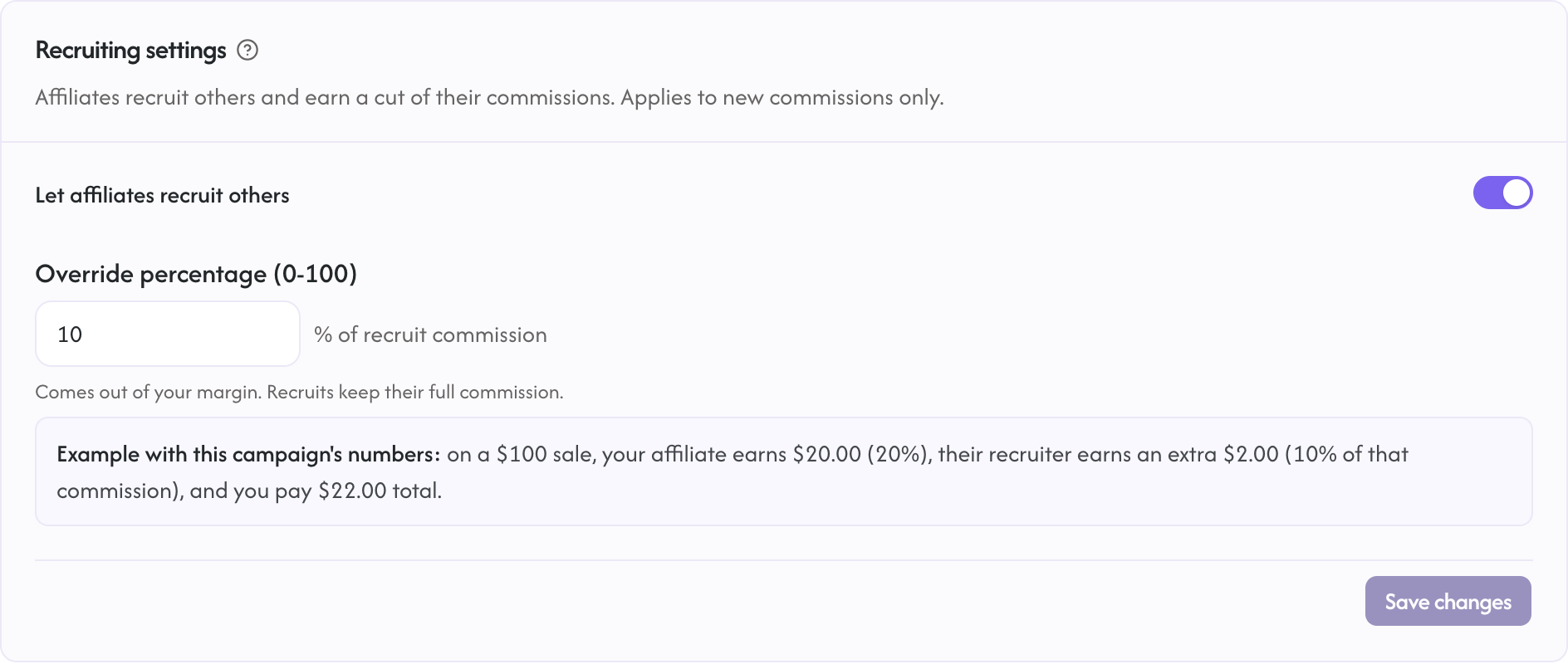
The override applies to new commissions only, never retroactively. Sales that landed before you turned the toggle on do not generate overrides after the fact.
Plan tier: included on every plan. (The affiliate-side recruitment link is unrestricted: if you turn this on, every approved affiliate in that campaign gets one automatically.)
Permissions: Owner role on the org. The change is audit-logged as program.sub_affiliate_config_changed.
What the math looks like
Imagine:
- Campaign override percent: 10%
- B's commission rate on the campaign: 20%
- Customer makes a $100 sale through B's tracking link.
What happens:
- B's commission row is created: $100 sale, $20 commission (20% of $100).
- An override row is created for A: $0 sale amount, $2 commission (10% of B's $20).
A's override is computed against B's commission, not against the underlying sale. If you raise the override percent, A earns more from the same B sale. If you lower B's commission rate, A's override drops proportionally even though the sale amount didn't change.
Affiliate experience
Every affiliate has a "Recruit" item in the left nav at /a/recruit. It is a hub with a campaign picker (only campaigns with recruiting enabled show up in it), the override terms, and the affiliate's personal link. A Recruit section also appears on the campaign detail page when recruiting is enabled for that campaign.
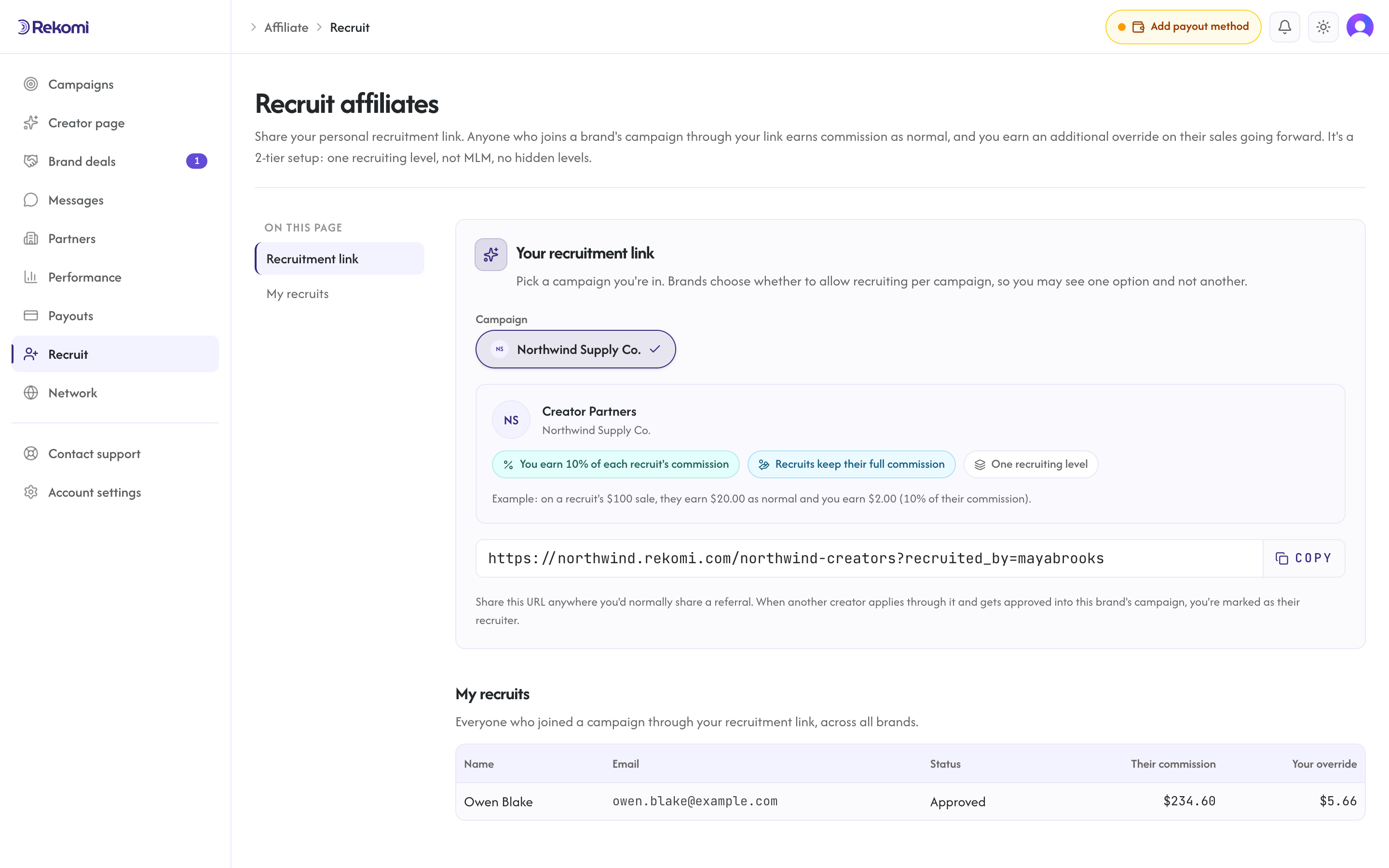
Approved affiliates get:
- A personal recruitment link in the form
https://{yourbrand}.rekomi.com/{campaignSlug}?recruited_by={token}(or your own domain, if you serve the public landing page there). The token is slug-first: it uses the affiliate's account-level?via=slug when they have one (for example?recruited_by=v6media), falls back to their per-campaign link slug, and only uses the raw affiliate id when neither slug exists. - A live count of who they've recruited and how much override they've earned.
- A copy-link button for sharing on social.
When a recruit (B) lands on the public apply page through that link, the token is forwarded as recruitedBy in the form submission and resolved to the recruiter on the new affiliate row. Once B is approved by you (or auto-approved by the campaign), every sale B drives produces both B's commission row and A's override row. B's commission is recorded first; A's override is written as a separate follow-on step, so a problem with the override can never block or roll back B's commission. If the override step fails, it is backfilled automatically when the source event is redelivered, and override creation is safe to retry, so redelivery never produces a duplicate.
Refund behavior
If a parent conversion (B's sale) is refunded in full, the override (A's row) is reversed in full at the same time.
If the parent conversion is partially refunded (only some of the sale amount comes back), the override is reduced proportionally. Example:
- Original B commission: $20 on a $100 sale.
- Original A override: $2.
- Customer is refunded $40 (40% of the sale).
- B's commission is clawed back by 40% ($8 reversed, $12 remaining).
- A's override is clawed back by 40% ($0.80 reversed, $1.20 remaining).
Both refund cascades trigger conversion.refunded webhooks for any subscribed endpoints.
Caveats
- Both sides must be Approved when the sale lands. While B is in
PendingorRejectedstatus, B's tracked clicks are still recorded for analytics but no commission rows fire, and no override fires for A. The same check applies to the recruiter: if A is not inApprovedstatus at the moment B's sale lands, no override is created for that sale. - Recruitment is one-directional and immutable. Once A recruits B and B is approved, the link cannot be transferred to a different recruiter, even by you as the brand. This is a deliberate audit-trail decision; if you need to fix a mis-recruit, contact support.
- Self-recruit is silently dropped. An affiliate cannot recruit themselves, and the check is broader than the affiliate id: if the applicant is the same Clerk account as the recruiter, or applies with the same email address, the application still goes through but the recruiter tag is silently dropped. The applicant becomes a normal affiliate with no recruiter attached.
- Recruiter and recruit share the campaign. The recruitment link points at one campaign's apply page, and the recruiter must be an Approved affiliate in that same campaign for the link to bind. The override percent used is that campaign's.
- Toggling off stops new overrides immediately. If you disable recruiting on a campaign, no new override rows are created from that moment on, even for existing recruits; override amounts already accrued are untouched. Recruiter-recruit relationships are kept, so re-enabling the toggle resumes overrides for future sales. While the toggle is off, applications through old recruitment links still succeed but no recruiter is attached. On the affiliate side, the
/a/recruitnav item stays visible; what disappears is the campaign in the recruit hub's picker and the Recruit section on the campaign page.
Tax handling
Override income IS taxable to the recruiter (A). It counts toward Rekomi's 1099-NEC USD candidate threshold ($600/year in USD-equivalent for U.S. affiliates, deliberately below the statutory $2,000 that applies to 2026 payments). If A earns $580 from their own sales and $100 in overrides in a calendar year, that's $680 total and crosses the threshold. Rekomi's tax-form flow already aggregates both lines for you.
See Tax forms for the full compliance flow.
Plan tier
| Surface | Required tier |
|---|---|
| Enable recruiting on a campaign | Every plan |
| Set override percent | Every plan |
| Affiliate sharing their recruitment link | Unrestricted (Free for the affiliate, regardless of your tier) |
| Override rows fire on sales | Unrestricted once the campaign is enabled |
Affiliates never pay anything. Recruiting is included on the brand side, on every plan, no gate on the toggle.
FAQ
Can I run this without telling my existing affiliates?
Technically yes. The /a/recruit page is always in the affiliate nav, and enabling recruiting on a campaign makes it appear in that page's campaign picker automatically, so you can flip it on and existing affiliates will discover it. In practice, send a one-line broadcast: "We just turned on a 10% recruit-and-earn bonus. Share your link from /a/recruit." Adoption is much higher when affiliates know it exists.
Can I set different override percents per affiliate?
Not today. The override percent is per-campaign. If you want a tiered structure, create separate campaigns with different override percents and route VIP affiliates into the campaign with the higher rate.
What if I want a deeper, multi-level program later?
You can't enable a deeper chain through configuration. It's a hard cap in the schema. Rekomi's recruiting feature is 2-tier by design: you, plus one recruiting level. It never becomes 3-tier or N-tier downlines. If your business requires a true multi-level model down the line, that's a feature request, not a setting flip. Open a support ticket and we'll talk through whether it's worth the regulatory complexity.
Will my affiliates see who recruited whom?
Affiliates only see their own downline. They cannot see who recruited them, and they cannot see anyone else's downline. The brand-side admin (you) can see the full graph.
Does this work with coupon-code attribution?
Yes. If B's sale is attributed through a coupon (rather than a click on a referral link), the override still fires for A as long as B is the affiliate who owns the coupon. The attribution path of the parent sale doesn't change anything about how the override is computed.
Does this work with pixel tracking and S2S?
Yes. Override rows fire on every Rekomi-attributed conversion regardless of which ingestion path produced the parent commission (Stripe webhooks, pixel, S2S).
See also
- Coupon-code attribution: the other alternative to link-only attribution.
- Manage affiliates: approval queue, affiliate lifecycle, override income shows up in the affiliate detail view.
- Sub-affiliate API: endpoint reference + webhook payload shape for override conversions.