

Campaigns
The central object in Rekomi. Create, configure, archive.
A campaign holds your affiliates, sales, commissions, and payouts. Most brands run one campaign. Some run multiple (per product line, per geography, per persona).
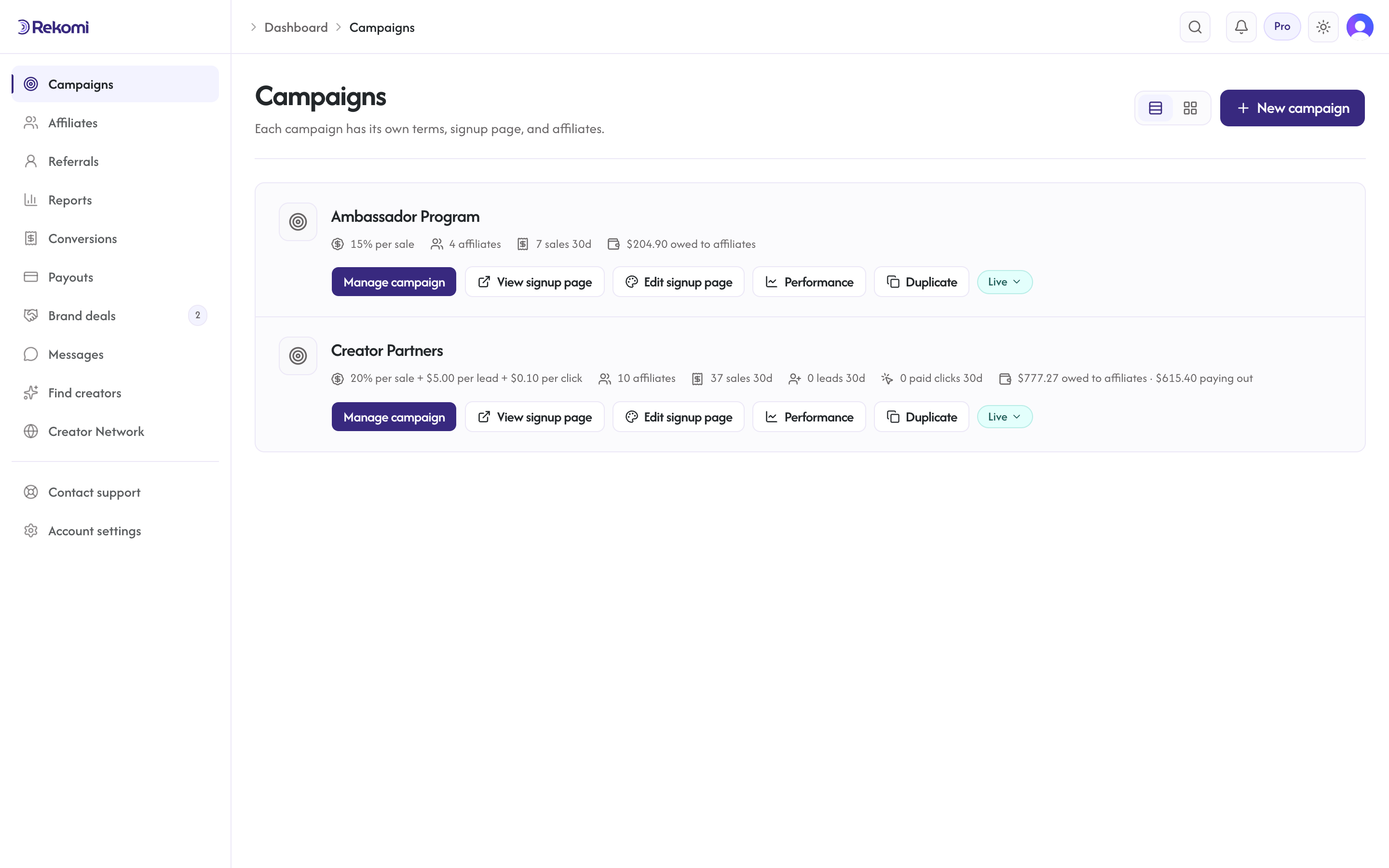
Note on naming: the dashboard and these docs call this concept a campaign (matching industry vernacular). The REST API uses /api/programs for the same object, so API examples reference programs.
Create a campaign
From /dashboard/campaigns, click "New campaign". Required:
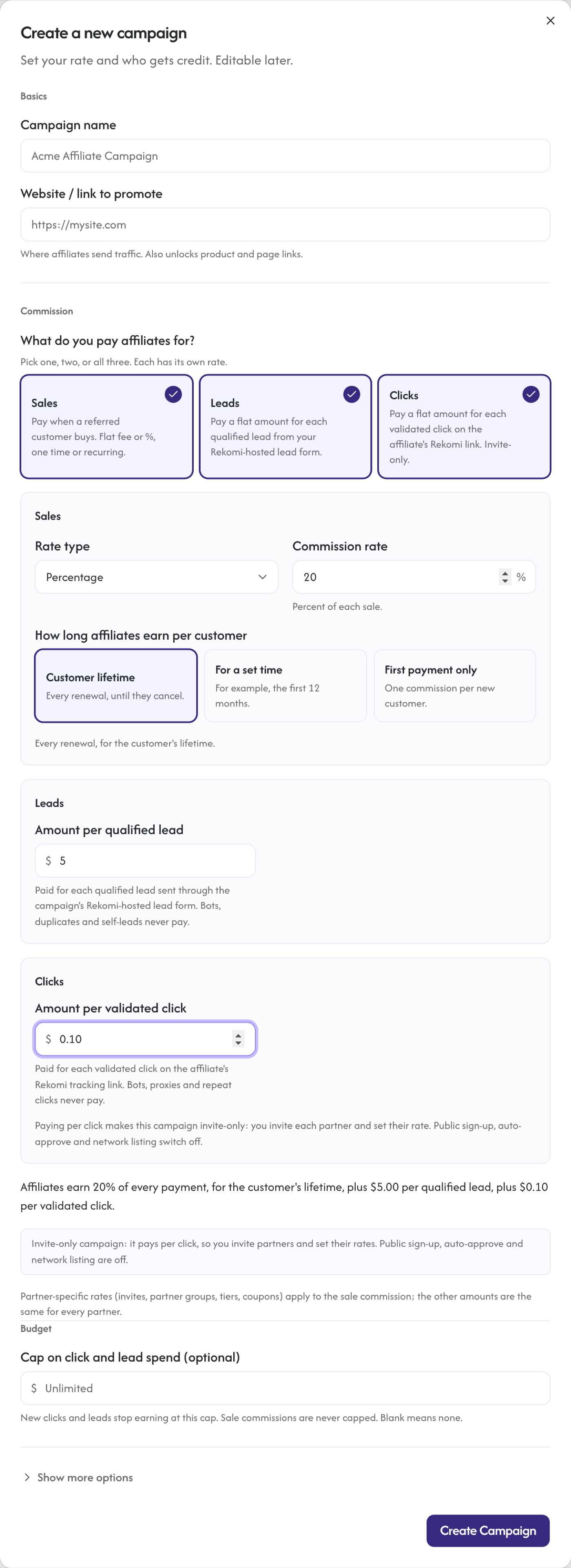
name(visible to affiliates)slug(URL-friendly identifier; used as the campaign's path on your portal,{yourbrand}.rekomi.com/{slug}; you can change it later and the old path redirects to the new one)referralDestinationUrl(the website or page affiliates promote; Rekomi appends?via={slug}to it to build each affiliate's copy-ready link). Campaigns in one organization can point at different websites, so a second site on the same billing account usually just means a second campaign; a different payment-processor account or a different brand means a second organization instead. Affiliates on sale-model campaigns can also create their own product & page links to other products or pages on the same site, up to 20 links per campaign including their main link; you can see every link they've created, with per-link clicks and sales, in the Performance tab's Links section (clicks only on pay-per-click campaigns, where the click itself is the paid unit; on Shopify stores links track clicks and sales with no setup, and coupon-code sales credit the affiliate's account as a whole). Leaving this URL empty turns the feature off, so set it early.defaultCommissionType(Percentage or Fixed)defaultCommissionValue(percent like 20, or a set amount like 10, paid as 10 units of the sale's currency: $10 on a USD sale, 10 EUR on a EUR sale; 0.50 for 0.50)defaultCommissionModel(the campaign's main payout leg: Cps for per sale, Cpc for per click, Cpl for per lead; legacy Cpa/RevShare/Hybrid still accepted for existing campaigns; see Commission models). A campaign can pay for any combination of sales, leads and clicks: in the form, tick more than one option under "What do you pay affiliates for?"; via the API addleadBountyCents(per lead),clickRewardCents(per click) orsaleCommissionType+saleCommissionValue(per sale on a click or lead campaign). See Combine sales, leads and clicks.cookieWindowDays(typically 30, 60, or 90)minPayoutCents(per-campaign minimum payout threshold; defaults to $50)
Optional at creation:
description(shown on the public application page)termsUrl(link to your affiliate terms; settable via the API today, shown on the public landing page and invite accept page)attributionModel(FirstTouch or LastTouch; default LastTouch)linkSlugStyle(Random or FirstName; default Random; see Affiliate link codes below)autoApprove(boolean; if true, applications are approved on submit). Not available on invite-only campaigns (any campaign that pays per click, or pays nothing per sale): auto-approve and the public application page are turned off automatically.- Creator network listing and search-engine listing toggles (whether the campaign appears in the Rekomi network directory and whether its public signup page is indexable). New campaigns start private. Turning the network switch on needs an active paid plan and a funding source for payouts on your account (a bank debit on file or bank-transfer funding enabled); until then it cannot be turned on and says why. See Apply to the curated network.
The campaign detail page
Once created, /dashboard/campaigns/{id} has nine sections in a left rail (a horizontal strip on small screens): Overview (the default view), Affiliates, Performance, Commission, Products, Coupons, Promo materials, Emails, and Campaign settings. Overview is a summary dashboard for the campaign. Affiliates holds your roster plus a Recruiting section for sub-affiliate setup. Performance groups Activity, Links, Sub-IDs, Leads, and Fraud into sections of one tab (the Leads section appears once the campaign has leads, or while it has no sales yet; stores connected through Shopify never see it). Sub-IDs lists the channel tags affiliates add to their links (?via=alex&sub=yt) with clicks, leads, sales, commission and earnings per click for each tag and affiliate; see Sub-IDs. Commission holds the campaign's rate configuration, Products holds the catalog and per-product rates, and Coupons holds coupon-code attribution. All three show on every campaign; where one doesn't apply (per-product rates on a pay-per-click or pay-per-lead campaign, coupons on a billing provider without coupon support), the tab explains what the feature does and what unlocks it instead of hiding. Promo materials holds the banners and ready-made posts you upload for affiliates. Emails holds the automated lifecycle-email switches for this campaign plus the broadcast composer (see Emails). The header shows your public signup page URL with Copy, Open, and Edit signup page actions beside it; the Edit button opens the signup page editor.
Inside Overview, the Activity view is the tracking check for that campaign. It shows what Rekomi has seen in the last 30 days as four counters: clicks, leads recorded (emails your site captured after an affiliate click), purchases your connected payment gateway delivered (every customer, credited or not), and sales credited to affiliates. Purchases with no leads is the signature of a hosted checkout whose email capture is not running; the panel says so and points at the install guide. On beehiiv, Kit, MailerLite, Ontraport and GoHighLevel a purchase with no lead can still be credited, because the platform connection looks the buyer up on the platform as the last step; sales credited that way are counted separately in the same view. Below the counters, Check a buyer's email tells you for one address whether Rekomi saw a lead, a purchase, a credited sale, or nothing, so you can test an install without a support ticket. Plus-addressed variants of one inbox (you+test@gmail.com and you@gmail.com) are treated as the same person.
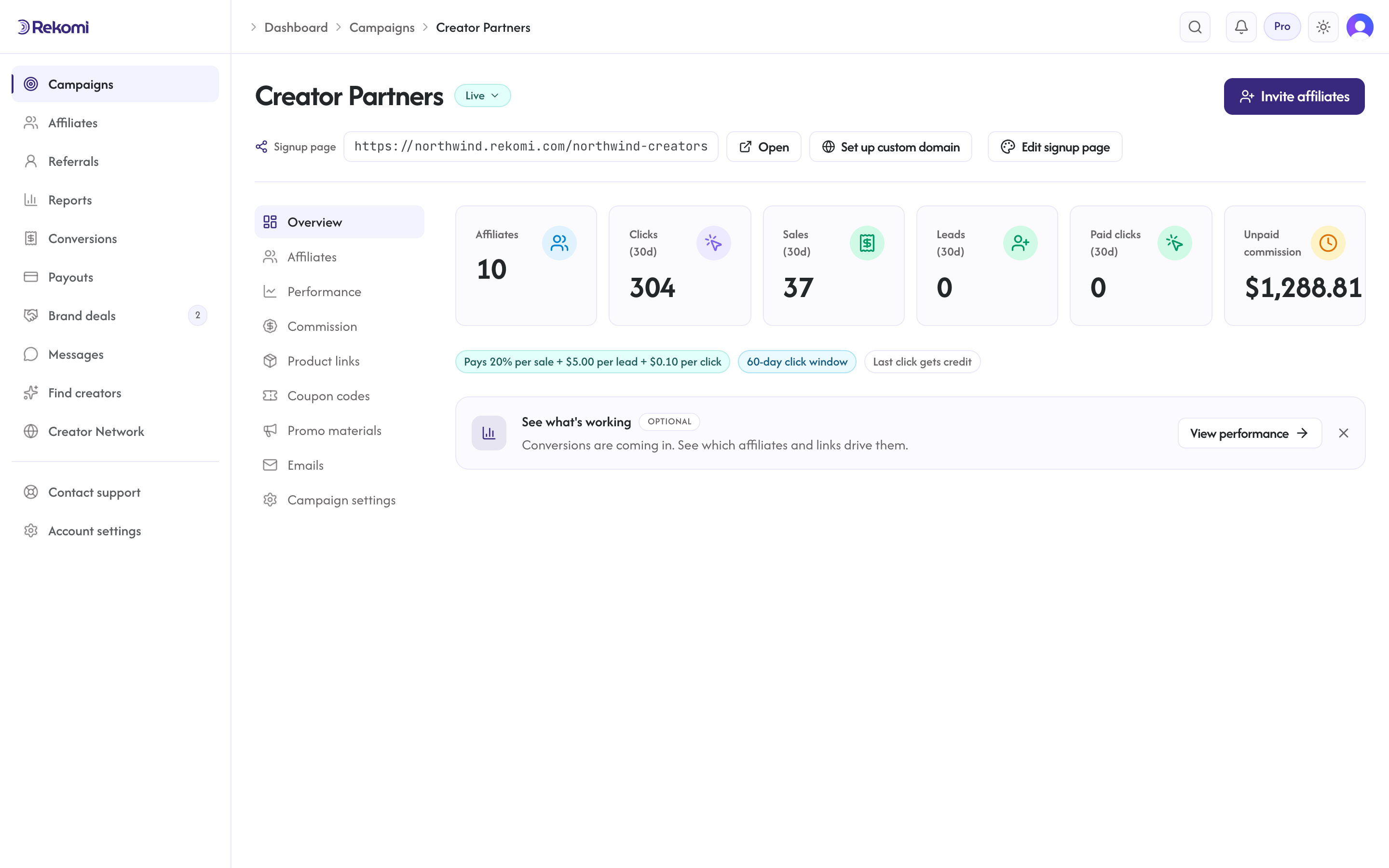 (The Commission tab hosts the default commission display, partner groups (rate tiers you assign partners to in bulk), and the performance tier editor. For campaigns that pay per click or per lead it also shows the live budget spent/remaining meter; the budget cap itself is set on the campaign form in Campaign settings. The Performance tab's Fraud section hosts the fraud review queue.)
Affiliates
Approved and pending affiliates for this campaign. Approve, reject, edit commission overrides per affiliate. A Recruiting section on this tab configures sub-affiliate recruiting; see Recruiting (sub-affiliates).
Commission
Default commission display (set in Campaign settings), partner groups for assigning rate tiers to affiliates in bulk, and the performance-based tiered commission editor (see Commission models). A Product commission rates card is also available on the Products tab on every sale campaign, letting you set a commission rate for a specific product; the rate applies wherever the payment provider reports what was bought: Shopify, Stripe, Gumroad, Lemon Squeezy, Polar, Creem, Dodo, Mollie (when the payment carries order lines), and Braintree subscriptions, ahead of the affiliate's base rate (everything else uses the campaign rate). See Per-product commissions.
Promo materials
Uploads of promotional material for your affiliates: banners and ready-made posts (swipe copy) you add here become visible to approved affiliates from their campaign page. See Creative assets.
Campaign settings
Edit all campaign fields, organized into section pills (General, Commission, Payouts, Tracking, Applications, Visibility, and CRM sync) that show one group at a time:
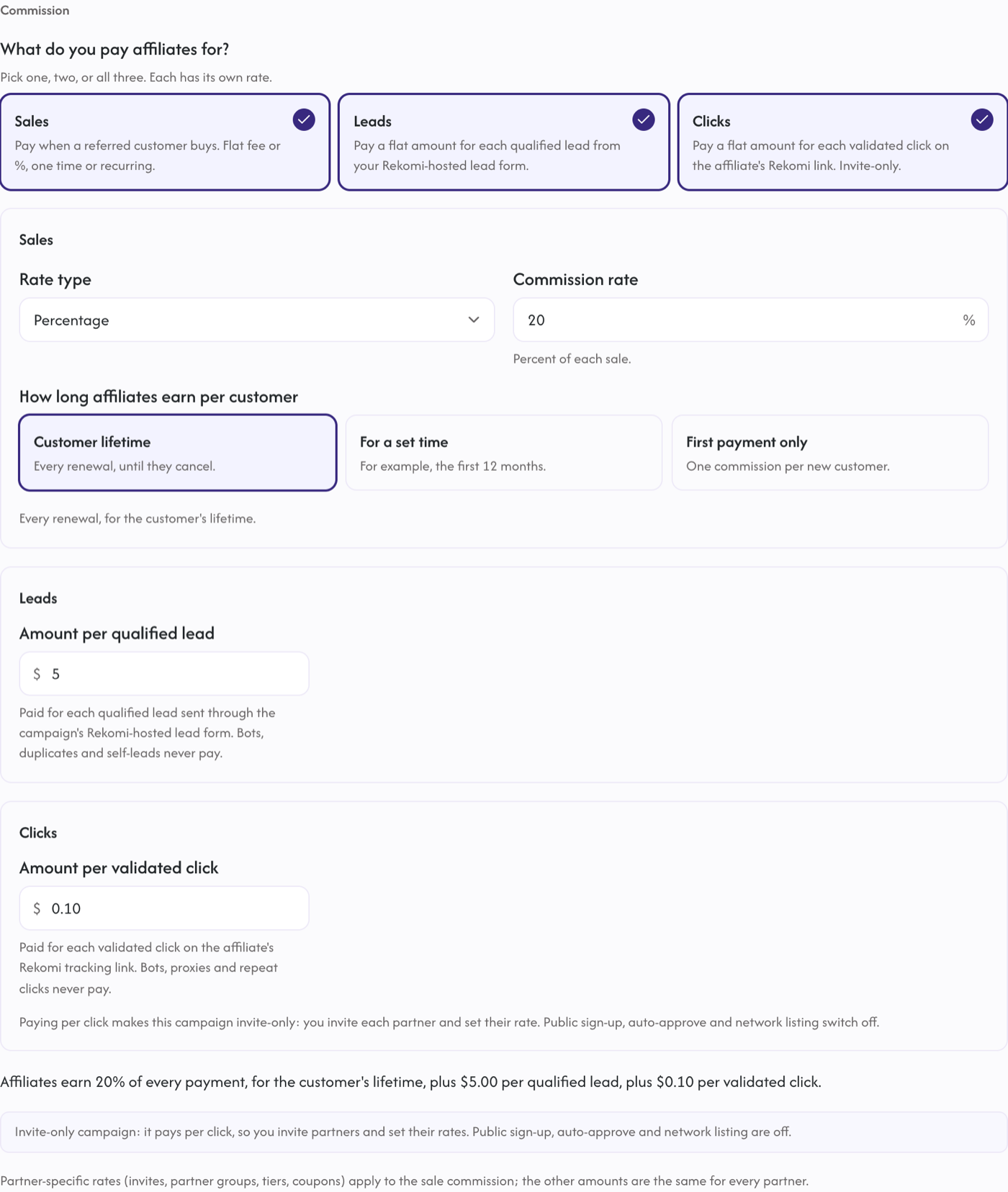
name,description(termsUrlis editable via the API only today)defaultCommissionType,defaultCommissionValue,defaultCommissionModelcookieWindowDaysrecurringMonths(cap recurring payouts; not set/null = lifetime, 0 = one-time, N = each customer's first N calendar months from their first payment)recurringDelayInvoices(skip the first N invoices before paying commission, useful for trial-heavy products)budgetCents(campaigns that pay per click or per lead; optional cap on click and lead spend, sale commissions are never capped; see Pay per click or lead)leadBountyCents,clickRewardCents,saleCommissionType+saleCommissionValue(the other payout legs a campaign can add to its main one; the form's "What do you pay affiliates for?" multi-select edits all three, see Combine sales, leads and clicks)attributionModel(FirstTouch or LastTouch)linkSlugStyle(Random or FirstName; see Affiliate link codes below)autoApprove(toggle)minPayoutCents(per-campaign minimum payout threshold; affiliates accrue until their balance reaches it, and it applies on top of your account-wide minimum)- Creator network listing and search-engine listing toggles (control whether the campaign appears in the Rekomi network directory and whether its public signup page is indexable). The network switch cannot be turned on, and a note says why, until your account has an active paid plan and a funding source for payouts. A campaign that is already listed stays listed: creators stop seeing it while either is missing, the switch shows a paused note, and it shows again on its own once both are back.
- Traffic from ads policy: what happens to a sale attributed to an ad-flagged click (an affiliate running paid ads to your site). Allow (the default) counts ad-driven sales like any other; Hold for review parks them in your fraud queue until you approve them; Block pays no commission on them.
- Public leaderboard ("Show a leaderboard to affiliates"): per campaign, off by default. When on, the affiliate campaign page shows the top earners with other affiliates' names masked; each affiliate sees their own row unmasked.
- Countries that can join (
allowedCountries): limit which countries affiliates may apply from. All countries are allowed by default; pick a subset in the searchable country list (under "Show more options" when creating a campaign, or in Campaign settings under Applications) and three things happen on your public signup page: visitors located outside the allowed countries see a "not available in your country yet" notice instead of the application form (based on their IP-derived location), the form's country picker only offers the countries you allow, and the server refuses applications whose country or location falls outside the list. Selecting every country (or clearing the field) returns the campaign to open-to-everyone. customSubdomain(every plan): publish your portal on a domain you own (e.g.affiliates.yourbrand.com) instead of the free{yourbrand}.rekomi.com. Each campaign keeps its clean path (affiliates.yourbrand.com/{slug}). See Settings → Custom affiliate-portal subdomain for the DNS-verification flow.
The URL slug can be renamed from the Campaign URL group in the signup page editor's Content tab (open it with Edit signup page). The old path automatically redirects to the new one, so links your affiliates already shared keep working.
Affiliate link codes
Every affiliate has a link code, the part of their referral link after ?via=. The Affiliate link codes setting in the Tracking section decides what a brand-new affiliate's code looks like when they join this campaign. Random code (the default) gives them a generated code. Affiliate's first name builds the code from the first name they applied with, so their link reads like yourstore.com/?via=olivia. When that name is already taken the code adds their last-name initial, and when that is taken too it adds a number. Every candidate is checked against Rekomi's reserved words and against every link code on the platform, not only your campaign, because an affiliate's code is shared across every brand they work with. The setting only shapes the code an affiliate starts with. Affiliates who already have a Rekomi code keep it when they join you, and any affiliate can still change their own code afterwards from their settings.
Recurring commission settings
For subscription products, the default commission applies to every renewal for the life of the subscription. The campaign form's "How long affiliates earn per customer" control sets this; the underlying field is recurringMonths:
- not set / lifetime (default): pay on every renewal as long as the subscription stays active.
recurringMonths = 0: one-time. One commission per new customer: their first subscription payment pays, renewals do not, and a cancel and resubscribe does not pay again. One-off orders with no subscription (a store checkout) always pay.recurringMonths = 12: pay on every payment in each customer's first 12 months, counted from that customer's first payment, then stop. On a monthly plan that is 12 payments; on a yearly plan it is the first payment only. Months are calendar months, so a mixed monthly and yearly catalogue needs one setting, not two. The window belongs to the customer: a cancel and resubscribe, or a plan change that replaces the subscription, stays inside the same 12 months.recurringMonths = 3: pay on the payments in each customer's first 3 months.
recurringDelayInvoices lets you skip the first N invoices. Common pattern: trial-to-paid products often refund the first invoice if a customer churns, so setting recurringDelayInvoices = 1 reduces clawback exposure.
Archive
Archiving hides the campaign and stops its links from accepting new clicks and sales. Existing records stay for historical reporting. Archiving cannot be undone from the dashboard today; contact support if you need a campaign restored. There is no hard delete. Via the API this is DELETE /api/programs/{id} (Owner role).
Public landing page
Every active campaign has a public landing page on your branded portal: your primary campaign at {yourbrand}.rekomi.com/ and every other campaign at {yourbrand}.rekomi.com/{slug}. On every plan, the same pages can serve from your own domain (affiliates.yourbrand.com/{slug}). Out of the box the page shows your logo, the campaign name and description, live stats (commission, cookie window, attribution model), a how-it-works section, the terms link, and the application form. The Landing page tab opens a full editor with layout options (centered, split, or hero banner), one-click theme presets including dark palettes, 1,900+ fonts, and content blocks including a product showcase; see Recruit affiliates for the full tour.
Migrating from Affonso
Move your Affonso program onto Rekomi with one API pull. Rekomi imports your affiliates (tracking ids preserved, PayPal emails, sign-up dates, groups, overrides and lifetime clicks), your leads and trials, and your commission history directly from Affonso's API; the file you originally imported into Affonso remains as a CSV fallback.
Commission models
How Rekomi's commission tracking works, percentage vs flat fee. Per sale (one-time, set period, or lifetime recurring), per click, and per lead. Plus tiered commissions.