

ActiveCampaign
Connect ActiveCampaign so approved affiliates land in your contact list and get tagged automatically.

Rekomi's ActiveCampaign integration adds every approved affiliate to a list you pick and applies tags so they're identifiable in your AC dashboard.
What syncs
When an affiliate is approved (or, optionally, when they apply):
- A contact is upserted via
POST /api/3/contact/syncwithemail,firstName,lastName. - The contact is subscribed to your chosen list via
POST /api/3/contactListswithstatus = 1. - Each configured tag is resolved by name (or created if missing) and applied via
POST /api/3/contactTags.
The "sync" endpoint is safe to retry: re-syncing the same affiliate updates the existing contact rather than creating a duplicate. All three calls are fully synchronous, so a "Succeeded" in Rekomi means the contact is actually in your list.
Finding your API key and URL
In ActiveCampaign:
- Click the gear icon in the top-right, then Developer in the left sidebar.
- The API Access page shows both the URL (e.g.,
https://your-account.api-us1.com) and the Key. - Copy both.
Connecting ActiveCampaign in Rekomi
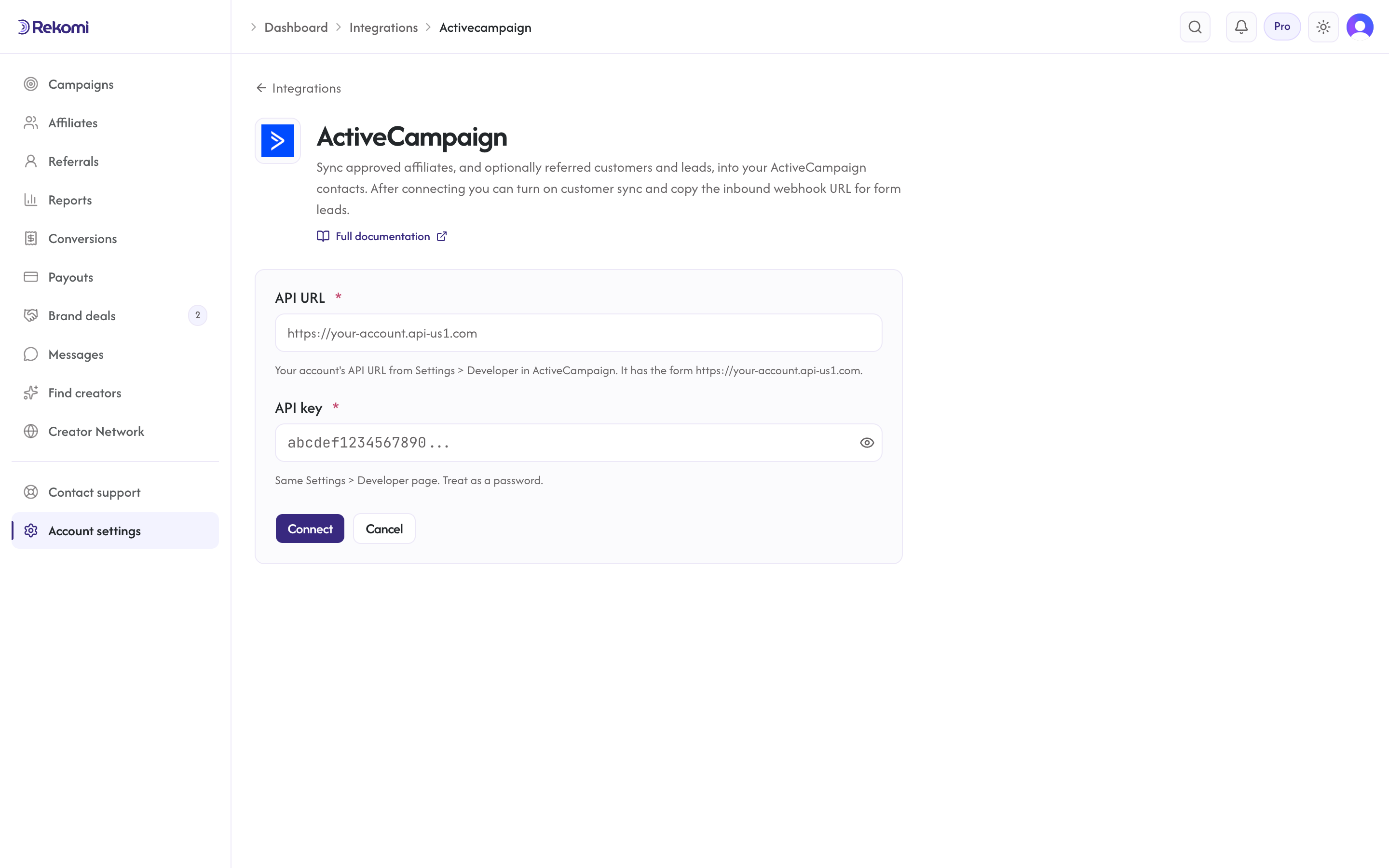
- Go to Integrations in the dashboard sidebar.
- Click the ActiveCampaign card.
- Paste the API URL and API key. Click Connect.
- Rekomi runs a test call against
GET /api/3/users/meto verify both credentials. If the URL is not onapi-us1.comor the key is invalid, the form rejects the connection with the actual ActiveCampaign error. - Once connected, pick a default list from the dropdown. The list is fetched from your AC account.
Tags
Comma-separated. Each tag name is resolved against GET /api/3/tags?search= (exact-name match). If a tag with that name doesn't exist, Rekomi creates it via POST /api/3/tags with tagType: "contact". Tags are then attached to the contact via POST /api/3/contactTags. The Rekomi affiliate system tag is always applied.
If applying a single tag fails, the subscribe is not undone (the contact is already in the list); the failure is logged so you can investigate.
Referred customers and leads (optional)
Turn on Sync referred customers and leads on the integration page and every sale or lead Rekomi attributes to an affiliate is written to ActiveCampaign as well, matched on email so existing contacts are updated, not duplicated. Each one carries:
- custom contact fields named
Rekomi referral link,Rekomi campaign,Rekomi referring affiliate,Rekomi referring affiliate code,Rekomi last event,Rekomi last sale amount(personalization tags%REKOMI_REFERRAL_LINK%and so on), created for you on first use and made visible on all lists - tags
Rekomi customerorRekomi lead, added without touching your other tags - Affiliates synced by the section above also get
Rekomi referral link,Rekomi campaignandRekomi affiliate statusin the same fields, so you can merge a partner's link into your emails.
Refunded, denied and fraud-quarantined conversions are never pushed, and imported historical conversions are skipped. It is off by default.
When sync fires
- Default: only
Approvedaffiliates sync. The job fires the moment an affiliate is approved (manual, bulk, or auto-approve). - Optional: turn on "Include applicants before approval" on the provider's settings card to also sync
Pendingaffiliates the moment they apply.
Per-campaign overrides
Each campaign can override the account-level configuration. From a campaign's detail page, open the Settings tab and scroll to the CRM sync for this campaign section to:
- Disable ActiveCampaign for this campaign.
- Send this campaign's affiliates to a different list.
- Add campaign-specific tags on top of the account defaults.
Per-affiliate sync visibility
Open any affiliate's detail page. The CRM sync panel shows the per-CRM status for that affiliate. The Resync button clears prior job rows and re-fires the sync end-to-end.
Troubleshooting
- "API URL must be on api-us1.com", ActiveCampaign's public API endpoint is always on
api-us1.comeven for EU/APAC migrated accounts. Re-copy the URL from Developer settings exactly. list_link_failed: http_404, The list ID Rekomi is trying to send to no longer exists. Pick a different list from the dropdown.- 429 rate limit, ActiveCampaign throttles at 5 req/sec per account. Rekomi paces its worker at one subscribe per second and the subscribe sequence makes 3+N(tags) calls; bursty re-syncs may trip this. The job retries automatically with
Retry-Afterrespected. - Sync fails with 401/403 after working before, The API key was revoked or regenerated. Rekomi marks the integration "action needed" and emails you a reconnect prompt once per breakage. Reconnect with fresh credentials, then use Resync all on the Failed tile of the integration page.
Disconnecting
From the ActiveCampaign connect page, click Disconnect. Rekomi:
- Deletes the integration row entirely (no soft-state stays behind).
- Deletes any per-campaign overrides pointing at it.
- Preserves historical sync records for audit.
Reconnect anytime; it starts from a clean slate.
See the activecampaign integration overview on the marketing site for use-cases, persona fit, and unique automation patterns.
ConvertKit (Kit)
Connect Kit once and it does two jobs. Approved affiliates land in a Kit form with tags, and sales, including Kit Commerce purchases, are credited to the affiliate whose link brought the subscriber.
beehiiv
Connect beehiiv once and it does two jobs. Approved affiliates land in your publication, and paid subscriptions are credited to the affiliate whose link brought the reader, with no script in the reader's browser.