

Quickstart for brands
From signup to a working affiliate or referral program in about fifteen minutes.
This guide walks you from a fresh signup through the 4-step setup checklist. Total time: roughly fifteen minutes.
1. Sign up and pick a plan
Go to rekomi.com/sign-up and pick "I run a subscription business". You sign in with Clerk (email + password, Google, or other configured providers).
After Clerk auth, you're routed straight to /sign-up/plan. Pick a tier (Starter $29, Growth $49, or Pro $99), pick monthly or annual billing, and optionally expand Have a coupon code? to apply a Stripe Promotion Code (validated via POST /api/billing/validate-promotion-code, rate-limited 5/min/user). Click Start 14-day free trial and you land in Stripe Checkout.
Enter your card. Stripe creates the subscription with TrialPeriodDays = 14, so you won't be charged for the first 14 days. On success, you redirect back to Rekomi and your organization is provisioned with SubscriptionStatus = Trialing and the plan you picked.
A card-on-file is required up front. The dashboard's onboarding gate redirects you back to /sign-up/plan if you try to reach /dashboard without an active subscription or trial. This is intentional: it ensures every brand on the platform has skin in the game from day one. One exception: invited team members are never asked to pick a plan or enter a card. They join through a dedicated invite sign-up and land directly in the inviting account, whose subscription already covers them (see Team management).
If you arrived from a specific pricing tier link (for example /pricing?plan=growth&period=monthly), /sign-up/plan pre-selects that tier and period.
2. Work through the setup checklist
Plan selection happens in the signup funnel (Clerk signup → /sign-up/plan → Stripe Checkout) before you can reach the dashboard, so the in-dashboard checklist starts at step 1 below. After checkout you land on /dashboard/setup, the checklist home. It is guidance, not a gate: the sidebar and every other page stay available the whole time, you can do the steps in any order or leave and come back, and the only thing ever required up front is the subscription itself. A "Getting started" card pinned in the sidebar tracks your progress everywhere in the dashboard; each step in it is clickable and jumps straight to that step's page.
- Create campaign. Name, slug, default commission, cookie window. Defaults are sensible if you're unsure.
- Branding. Brand name, primary color, timezone, logo, and the platform your website runs on (Rekomi fills it in when it can detect it from your site). These render across affiliate-facing emails and the public application page, and the platform decides what step 4 looks like.
- Connect payment gateway. Connect Stripe (or another supported gateway) so Rekomi can auto-track conversions from your billing webhooks. This is the sales-tracking side: it tells Rekomi which sales each affiliate drove. Payouts are then handled for you: Rekomi pays affiliates globally on Stripe Express (42 countries, including the US), direct bank deposits (60 more), and PayPal (30 more), 130+ countries combined. Rekomi takes a flat 3% on affiliate payouts (2.5% on Enterprise) and provides a year-end 1099-NEC candidate CSV. You can connect a gateway later from Integrations.
- Install tracking script. Lands on
/dashboard/setup/install, which leads with the one thing you need: your universal tracking snippet, with a dropdown that switches the paste form between HTML, Next.js, React, Vue/Nuxt, and Google Tag Manager. Below it, a "Not sure where to paste it?" searchable picker covers site builders, frameworks and code, and payment gateway guides, each opening a step-by-step recipe (42 platforms covered), plus a link to server-to-server tracking for any other backend and a one-line "Use your own domain" upsell. A Share with a developer button hands the whole step to whoever manages your site. Running a coupon-only program? A note at the top of the step says so: codes are attributed at checkout without the snippet, and Skip this step marks the step complete. If your website runs on beehiiv, Kit, MailerLite, Ontraport or GoHighLevel, this step changes shape: the platform connection under Integrations credits sales from the platform's own signup record, so the checklist asks you to connect the platform with Credit sales on instead of pasting a script (on MailerLite, plus one custom field Rekomi adds for you), and the script becomes an optional click-stats card that never blocks completion.
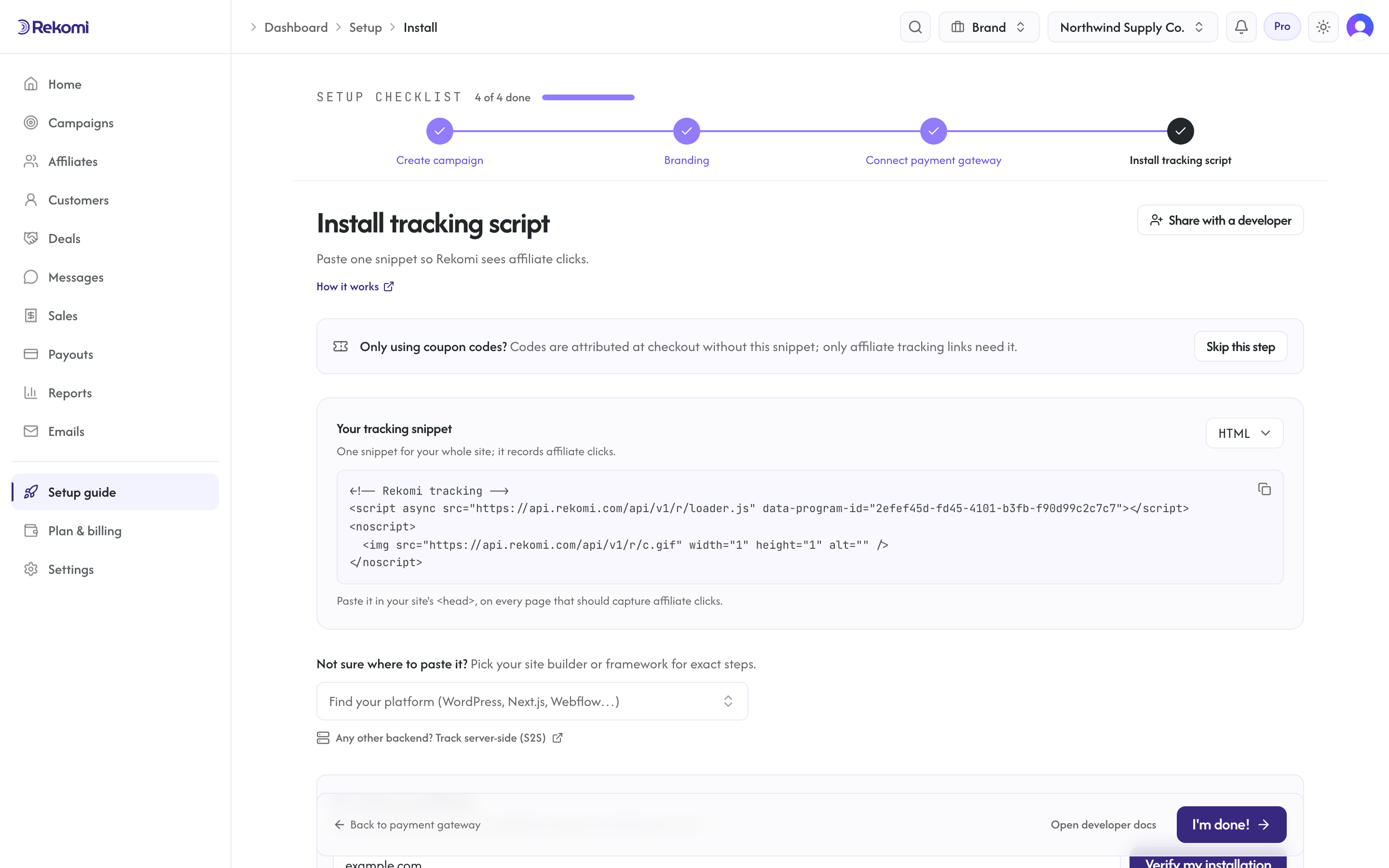
Steps check themselves off from real signals: a campaign that exists, branding that is saved, a payment gateway that is connected. The install step is the one exception, since Rekomi cannot know you pasted the snippet until a real click arrives; clicking I'm done! marks it complete, and the dashboard keeps a "verify tracking" nudge alive until the first real event lands. On the five hosted platforms above, the connect-the-platform step checks itself off once the connection is made with Credit sales on. Below the checklist you will also see an optional "Track clicks from your own domain" card: it points at the custom-domain setup (first-party tracking, included on every plan) and never blocks completion; skip it and it stays skipped. If you told Rekomi at sign-up that you already run a program elsewhere, the checklist also ends with an Import from row named for that platform (for example Import from Rewardful, or Import your affiliates when you picked Other) and tagged Optional: it opens the importer for that platform and checks itself off once an import brings affiliates in. It counts as a step until it is done or dismissed, and the X on its row takes it out of the count, so setup can finish without it. You can re-open /dashboard/setup any time from the sidebar's Setup guide; once every step is done that nav row retires and the page becomes a small hub for the two ongoing pieces (payment gateway and tracking script). Plan + billing changes live at /dashboard/settings/billing.
3. Connect Stripe (if you skipped step 3)
/dashboard/integrations shows your Stripe connection status. Click "Connect Stripe" and approve the Rekomi app for Stripe on the account you bill customers with. Rekomi requests read access to your subscriptions and invoices (for sales tracking). Payout runs are funded separately, from the payout method you save in Rekomi: you fund one payout run and Rekomi disburses the net to each affiliate.
Affiliates are paid on Stripe Express (42 countries including the US), by direct bank deposit (60 more), or on PayPal (30 more), 130+ combined. The rail is picked automatically from each affiliate's country; there is nothing for you to configure per affiliate.
4. Open your campaign for applications
From your campaign page, the slug controls the public application URL on your free branded subdomain: https://{yourbrand}.rekomi.com/{your-slug} (your root subdomain serves your primary campaign). Share this URL anywhere (email, Twitter, your homepage). Affiliates apply by filling in a short form, and are taken straight to create their Rekomi account (or to sign in) right after, so they never wait on an email to get started. If you set autoApprove=true, their referral link is live immediately. Otherwise their application lands in /dashboard/affiliates under the Pending tab for you to review, and their link unlocks the moment you approve. An approval email still goes out as a convenient one-click sign-in fallback.
Every brand gets the {yourbrand}.rekomi.com branded subdomain free on all plan tiers. On every plan you can also publish the public landing page on your own domain (e.g. affiliates.yourbrand.com), which doubles as first-party tracking. See Settings for the DNS-verification flow.
5. What's next
- Campaigns: edit settings, configure recurring payouts, change attribution.
- Commission models: per sale, per click, per lead, recurring payouts, tiered commissions, per-affiliate overrides.
- Reports: once you have data, see clicks, sales, leaderboard, traffic sources.
- Free signups and leads: if you have a free tier, credit affiliates for free signups that upgrade later.
If you only have ten minutes after signup, finish steps 1-4 and share your application URL. Install tracking can wait until you have affiliates lined up.