

Conversions
The Conversions page, its Sales, Leads and Clicks tabs, statuses per type, the refund flow, and external event IDs.
A conversion is anything Rekomi records for an affiliate: a sale (a natively tracked payment-processor event or a server-to-server event that produces a commission), a lead, or a click reward. The Conversions page at /dashboard/conversions (older /dashboard/sales links redirect there) is the source-of-truth view for commission tracking: everything that has been credited to an affiliate. It opens on All, remembers the tab you used last in this browser, and the Sales, Leads and Clicks tabs narrow it to one type.
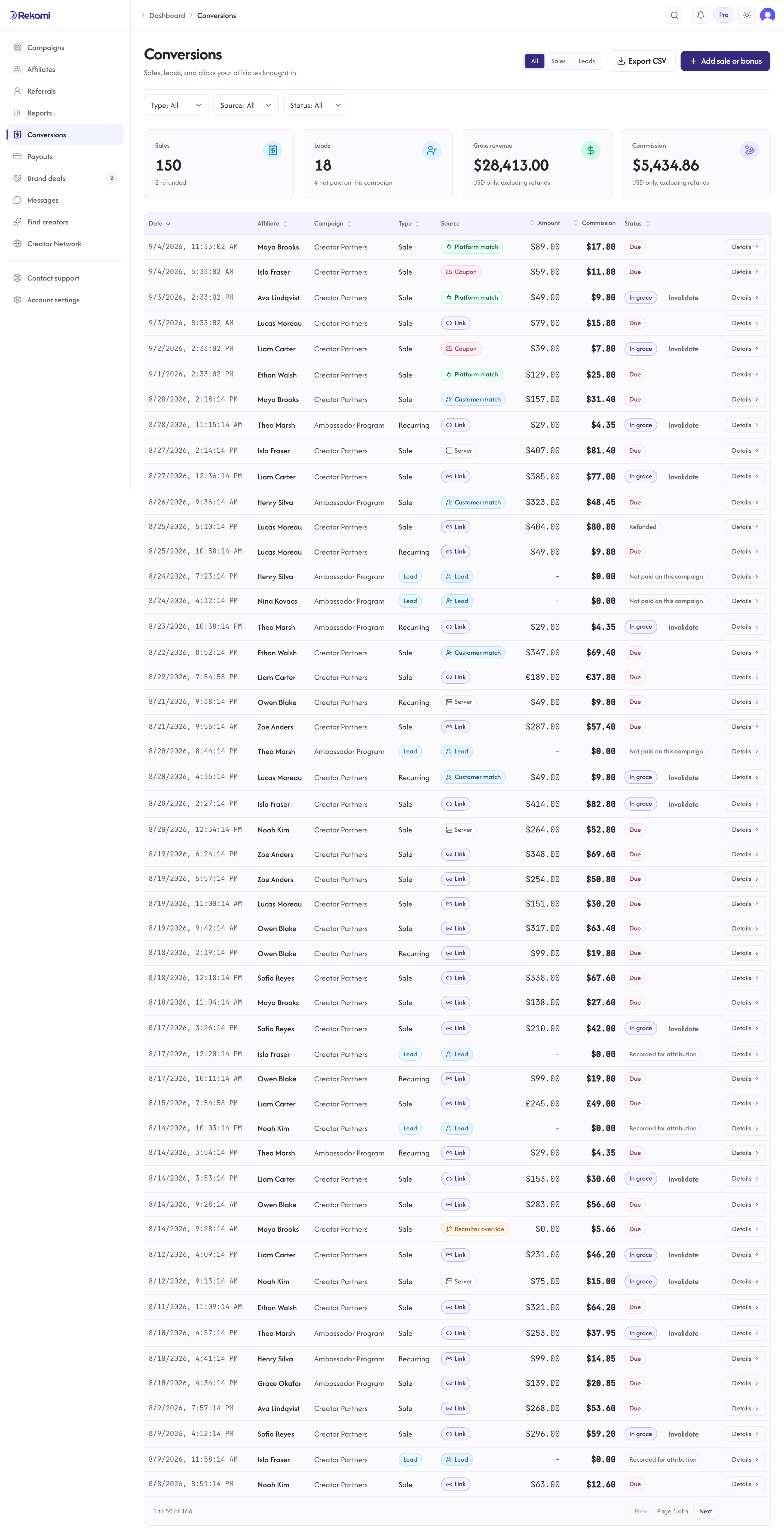
What you see
The conversions table has these columns:
- Date: when the conversion was recorded
- Affiliate and Campaign: who earned it and the campaign it belongs to
- Type: Sale, Recurring, Bonus, Lead, or Click
- Source: how the conversion was attributed (see below)
- Amount: the underlying order or invoice amount from the processor (or the amount you send via S2S)
- Commission: the calculated commission in your currency
- Status: per type. A sale reads In grace, Due, Paid, Refunded, Denied or Invalidated. A lead or click reads In grace, Due, Paid or Invalidated when the campaign pays for it, Not paid on this campaign when it does not, and Recorded for attribution when it is a free signup on a campaign that pays per lead (see Status meanings below).
- Stripe metadata: subscription ID, customer ID, external event ID (where applicable)
Tabs at the top switch between All, Sales, Leads and Clicks. The page opens on All and remembers the tab you used last in this browser. The Leads and Clicks tabs only appear once your account has recorded a lead or a click reward.
Source (how a conversion was attributed)
The Source column makes it obvious how each conversion was credited, so a coupon redemption is as visible as a link click. No setup is required; the tag is derived automatically from how Rekomi attributed the conversion:
- Coupon: a redeemed affiliate coupon code. The code is shown inline (for example "Coupon · SARAH20").
- Link: a tracked click, or referral metadata carried on the payment processor.
- Customer match: a returning customer or a prior lead matched to an affiliate.
- Click: a pay-per-click reward rollup.
- Lead: a lead or signup capture. A free identified signup carries no commission; on a per-lead (CPL) campaign, a qualified lead form submission earns the campaign's fixed per-lead fee.
- Override: a sub-affiliate recruiter override row.
- Server: a server-to-server (S2S) postback.
- Imported: migrated from another platform.
Status meanings
Sales and paid leads or clicks share one commission vocabulary. A lead or click that carries no money shows a plain note instead of borrowing a money status.
- Pending (shown as In grace): the normal state for a sale. The commission is calculated and becomes payable automatically once the refund-hold window passes, so the next payout run picks it up without anyone approving it. The pill keeps reading In grace; only an approved row reads Due. Default hold is 30 days from the date the sale was recorded; you can change the window in Payout settings (the grace window). Paid leads and clicks sit in the same window.
- Approved (shown as Due): explicitly approved (via the API or an import). Like a matured Pending sale, it is payable.
- Paid: appears on rows imported from another platform. For sales tracked in Rekomi, what has actually been paid out is shown on the affiliate's Payouts tab and in payout history rather than in this column.
- Refunded: Stripe refunded the customer; commission was clawed back.
- Denied: manually denied (via the API; the dashboard's manual controls are Validate and Invalidate). Rare. Typically only used for disputed sales where you have evidence the affiliate did not actually drive the customer.
- Invalidated: quarantined as invalid traffic. A fraud-scored click or lead is quarantined automatically, and you can invalidate any row still in grace by hand, whatever its type. Not payable. It shows an Invalidated badge with a Validate action that releases a false positive. On a sale or a paid lead or click, Validate puts the row back in grace and the affiliate is told about the commission. On a row that never carried commission (Not paid on this campaign or Recorded for attribution), Validate simply returns it to that note; nothing becomes payable. See Pay per click or lead.
- Not paid on this campaign: a lead or click recorded on a campaign that does not pay for that type. Rekomi keeps it for attribution (a later purchase by that lead is still credited to the affiliate), but it never carries a commission, so it never reads In grace or Due.
- Recorded for attribution: a free signup captured on a campaign that does pay per lead. The signup itself carries no commission; a qualified lead on that campaign is a separate row with its own commission.
Invalidate stays available on every row still in grace as a fraud tool, whatever its type.
How sales are created
Sale creation paths:
- Native processor webhook. Most sales. Stripe, Paddle, Braintree, Shopify, WooCommerce, Wix, Lemon Squeezy, Chargebee, Polar, Recurly, Gumroad, Creem, Dodo Payments, and Mollie all connect natively: when a paid event fires (for Stripe,
invoice.paid) for a customer referred by an affiliate within the cookie window, Rekomi creates aConversionrow automatically. - S2S API. For any other payment gateway, or events that do not flow through a connected processor. Your backend POSTs to
/api/tracking/s2swith anexternalEventId(for de-dup),affiliateSlug,amountCents,currency. See S2S tracking. - Manual. The Add sale or bonus button on the Conversions page (on an affiliate's detail page the same dialog opens from the New commission button on the Payouts tab, with that affiliate preselected) records a sale that happened outside your billing, or gives a one-off bonus commission. Pick the campaign and an approved affiliate (the seeded Test Affiliate is excluded so test rows never become payable), enter the sale amount, and Rekomi computes the commission from the campaign's rules; you can override the commission, capped at 5x the sale amount. Optional fields: customer email, a date (which backdates the record; a backdated sale already past your refund hold becomes payable right away), and a note. A bonus skips the sale amount and carries just the commission. Both follow your normal refund hold before becoming payable. Programmatically, the same action is
POST /api/conversions(see the API reference).
Not every signup is a paid sale on day one. Free signups are captured as leads (automatic for Stripe and Paddle, one line of code otherwise), so a later paid upgrade is still credited to the affiliate by email. See Track leads and signups.
External event IDs
externalEventId is the de-dup key. For Stripe webhooks it is the Stripe invoice ID. For S2S it is whatever you supply. Within an organization, the same externalEventId will never create two sales; the second call is a no-op and returns deduped = true. This makes retried webhooks and replayed S2S calls safe.
Refunds
When Stripe sends a refund webhook (charge.refunded or customer.subscription.deleted within the refund-hold window), Rekomi claws the refunded share of the commission back: a partial refund reverses its proportional share, and the sale moves to Refunded once the refunds cover the full invoice. The affiliate's pending balance drops by the clawed-back amount. If the commission had already been paid out (rare with the default 30-day hold), nothing is netted against the next payout run: your workspace admins get a notification naming the paid commission and the amount now owed back, and you reverse that commission, for the refunded share, from the payout's Detail page (see Reversing a paid payout).
The clawback happens automatically. There is no manual refund button in the dashboard because Stripe is the source of truth.
Inspecting Stripe metadata
Each sale row exposes the underlying Stripe identifiers (subscription ID, customer ID, invoice ID) so you can cross-reference in your Stripe dashboard. Useful for debugging "why was this affiliate credited" questions or for audit trails.
Export
The conversions table has a CSV export button in the top-right that downloads every row of the current tab (the Type, Source and Status filters narrow the table on screen, not the file); the file is named rekomi-sales, rekomi-leads, rekomi-clicks or rekomi-conversions to match the tab. The CSV includes attribution_method, coupon_code and sub_id as the last three columns, so coupon attribution and the channel tag survive the export. The table itself shows a Sub-ID column as soon as any loaded row carries a tag, and the API takes subId=yt (or subId=untagged) to filter by tag; see Sub-IDs. For programmatic exports, use the Conversions read API: GET /api/conversions?affiliateId=...&status=Approved&since=2026-01-01 returns paginated rows including attributionMethod and couponCode, and kind=sale, kind=lead or kind=click narrows it to one type the way a tab does. Pagination cursor take maxes at 200. (The page lives at /dashboard/conversions; older /dashboard/sales links redirect there.)
Reporting view
For aggregate metrics (clicks, sales, leads, conversion rate, top affiliates), see Reports. The Conversions page is the raw event log; Reports is the rollup. The campaign cards on the Campaigns page count sales only in their sales 30d figure, with separate leads 30d and paid clicks 30d figures when the campaign pays for those.