

Authentication
Bearer API keys, scopes, signing secrets, rotation, and revocation.
Every Rekomi API call needs a bearer key. Some calls (S2S tracking, webhook delivery) need an additional HMAC signature with a separate signing secret. This page covers both.
Generate an API key
Create your key from the dashboard: go to /dashboard/settings/api-keys and click "Create key".
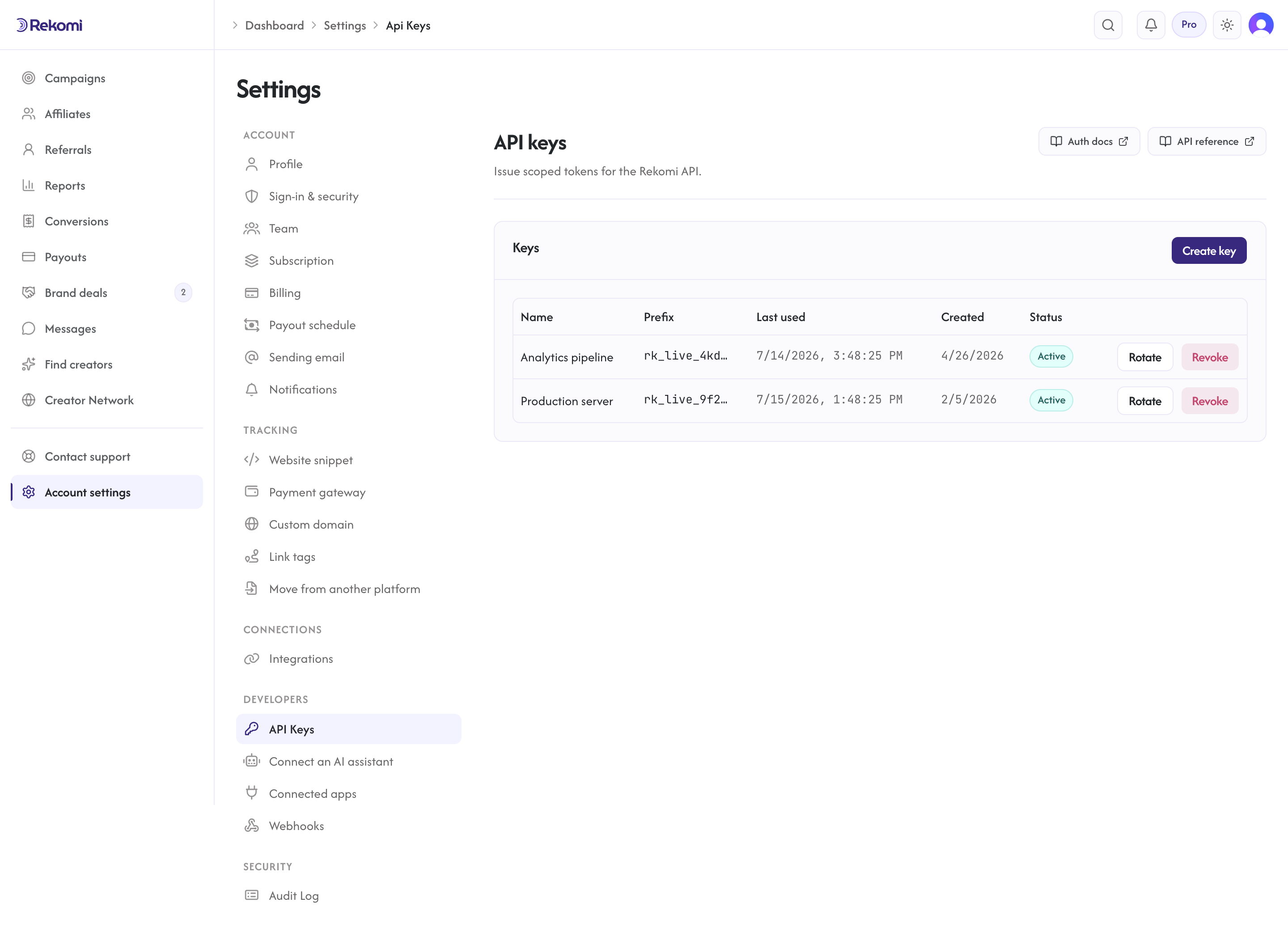
Only the workspace Owner can create, rotate, or revoke API keys. Creating and rotating a key require a Starter or higher plan; revoking works on any plan (so a downgraded brand can still clean up).
Required:
- Name: human-readable label like "Vercel production" or "data warehouse sync".
- Scope: choose Read (GETs only) and/or Write (create, update, delete).
Click Create. Two values appear in a modal, shown EXACTLY ONCE:
- Plaintext bearer: starts with
rk_live_. 32 random bytes, base64url-encoded. Copy now. - Plaintext signing secret: starts with
rks_. 32 random bytes. Used for HMAC on S2S endpoints. Copy now.
After you close the modal, the plaintext values are unrecoverable. The bearer is stored as a SHA-256 hash on our side. The signing secret is encrypted at rest.
If you lose your keys, rotate (below) or revoke and create new ones.
The entire key lifecycle (create, rotate, revoke) requires an interactive dashboard session: an existing API key or OAuth token can never mint, rotate, or revoke keys (403 interactive_session_required). The same applies to MCP connection tokens. A leaked credential therefore cannot escalate into fresh credentials.
Use the bearer
Set the Authorization header on every request:
GET /api/v1/programs
Authorization: Bearer rk_live_xxxxxxxxxxxxxxxxxxxxx
The bearer identifies your organization. We do not require a separate X-Org-ID header; the bearer encodes everything we need.
Scopes
A key's scopes is an array containing "read" and/or "write":
- read: GET endpoints only. Cannot create, update, or delete resources. Cannot rotate keys.
- write: create, update, and delete access on POST, PATCH, DELETE. Subject to per-endpoint role checks (some endpoints further require Owner or Admin role). A key without
writecannot mutate anything.
Neither scope can trigger payouts: running or retrying a payout requires a signed-in Owner dashboard session and always returns 403 interactive_session_required for API keys.
The literal "read_write" is also accepted and means the same as "write".
Pick a read-only key for any third-party tool you do not fully trust (analytics dashboards, BI tools, ETL jobs that only need to copy data out). Grant write for your own application code.
Rotate a key
Rotating swaps a key's bearer and signing secret without changing its name or scopes. Click Rotate next to any key. A new plaintext bearer and signing secret are shown EXACTLY ONCE. The old values stop working immediately. There is no grace period, so rotate during a maintenance window if you have many integrations to update.
Use rotation when:
- A team member with key access leaves.
- A key is accidentally committed to a public repo.
- Quarterly rotation as part of your security policy.
Revoke a key
Revoking permanently disables a key. Click Revoke. The key stops working immediately, and this cannot be undone. If you need access back, create a new key.
Audit trail
Every key change is tracked automatically, so you can always see who did what. Creation, rotation, and revocation are all logged in the audit log at /dashboard/settings/audit-log. The audit row includes the team member who did it. Creation rows include the key name and prefix (not the plaintext); rotation and revocation rows reference the key's id.
Where keys are visible
The list at /dashboard/settings/api-keys and GET /api/api-keys (dashboard-session only; this endpoint requires a browser sign-in session and cannot be called with an API key) shows each key as:
idnamekeyPrefix(first 16 characters of the bearer; safe to log)scopes(array containing"read"and/or"write")lastUsedAt(timestamp, null if the key has never authenticated)expiresAt(null if non-expiring)revokedAt(null if active)createdAt
The plaintext bearer is never recoverable after creation. We also do not return the IP a key was last used from on the API or dashboard list; IPs land in the audit log instead, where they're scoped to JWT Owner dashboard callers only and are stripped from API-key callers (see Reference).
Signing secret
The signing secret is used for HMAC-SHA256 signatures on S2S endpoints. Separate from the bearer because:
- The bearer authenticates "who is making this request".
- The signing secret authenticates "the body of this request was not tampered with in transit".
Some integrations need only the bearer (most CRUD endpoints). S2S tracking requires both.
See S2S tracking for the signature format.
Webhook signing secret
Webhook outbound endpoints (the ones Rekomi POSTs events to) have their own signing secrets, separate from the API key signing secrets above. When you create a webhook endpoint at /dashboard/settings/webhooks, you get a one-time-shown signing secret for verifying inbound payloads on your server.
The two secrets do not interchange. Use the right one for the right direction.
Best practices
- Store keys in a secrets manager (1Password, AWS Secrets Manager, HashiCorp Vault). Never commit to source control. We run gitleaks scans on our own repos; you should too.
- Use separate keys per environment (one for prod, one for staging). Use scopes (one
readfor monitoring, oneread_writefor app code). - Rotate quarterly even without incidents.
What if you lose a key
Rotate from the dashboard. If you cannot access the dashboard (account compromise), chat with us from any rekomi.com page (the messenger is in the bottom right, no login required) and we can revoke server-side.