

Sending email
Brand the emails Rekomi sends your affiliates and, optionally, send them from your own sub-domain with DKIM and SPF alignment.
Everything about the email your affiliates receive lives in Settings > Sending email: how the emails look (logo, From name, accent color) and, optionally, the domain they send from.
Email appearance
The Email appearance card controls the branding on every automated email and broadcast Rekomi sends your affiliates, with a live preview rendered by the exact template real sends use:
- From name: the display name in the inbox From line. On white-label plans it applies immediately on our shared sender, no DNS needed; a verified sending domain (below) keeps using it.
- Email logo: an email-only logo variant. Email bodies sit on a white card in every mail client, so a site logo drawn light-on-transparent disappears there; upload a dark or full-color version and emails use it while your site keeps its own logo. Without one, your site logo from Settings > Profile is used.
- Logo size: Small, Default, or Large.
- Accent color: buttons and accents follow your brand color from Settings > Profile.
Use Send me a test to get a real sample in your own inbox. In the Shopify, Wix, BigCommerce, and WordPress apps the same card lives under Settings > Email appearance.
Sending domain
By default, affiliate-facing email is sent from notifications@mail.rekomi.com. That works, but it has two costs: affiliates may flag it as unfamiliar and inbox placement is tied to Rekomi's shared sending reputation.
A custom sending domain solves both. Verify a sub-domain you own and Rekomi will send those emails from your domain with DKIM and SPF alignment (with DMARC recommended on top; see below). The brand keeps using Rekomi's underlying email infrastructure (Resend); only the visible sender changes.
Before you start
You need:
- A sub-domain you control (e.g.
partners.yourbrand.com). We recommend a sub-domain rather than the apex (yourbrand.com) so this setup never collides with email your team already sends. - DNS provider access (Cloudflare, Route 53, Namecheap, GoDaddy, etc.).
- About 15 minutes for DNS propagation.
You do not need:
- A Resend account. Rekomi pays for the underlying sending; this is included with your Pro plan at no extra cost.
- A dedicated sending IP. Sending uses Resend's shared pool today.
Connect your sender domain
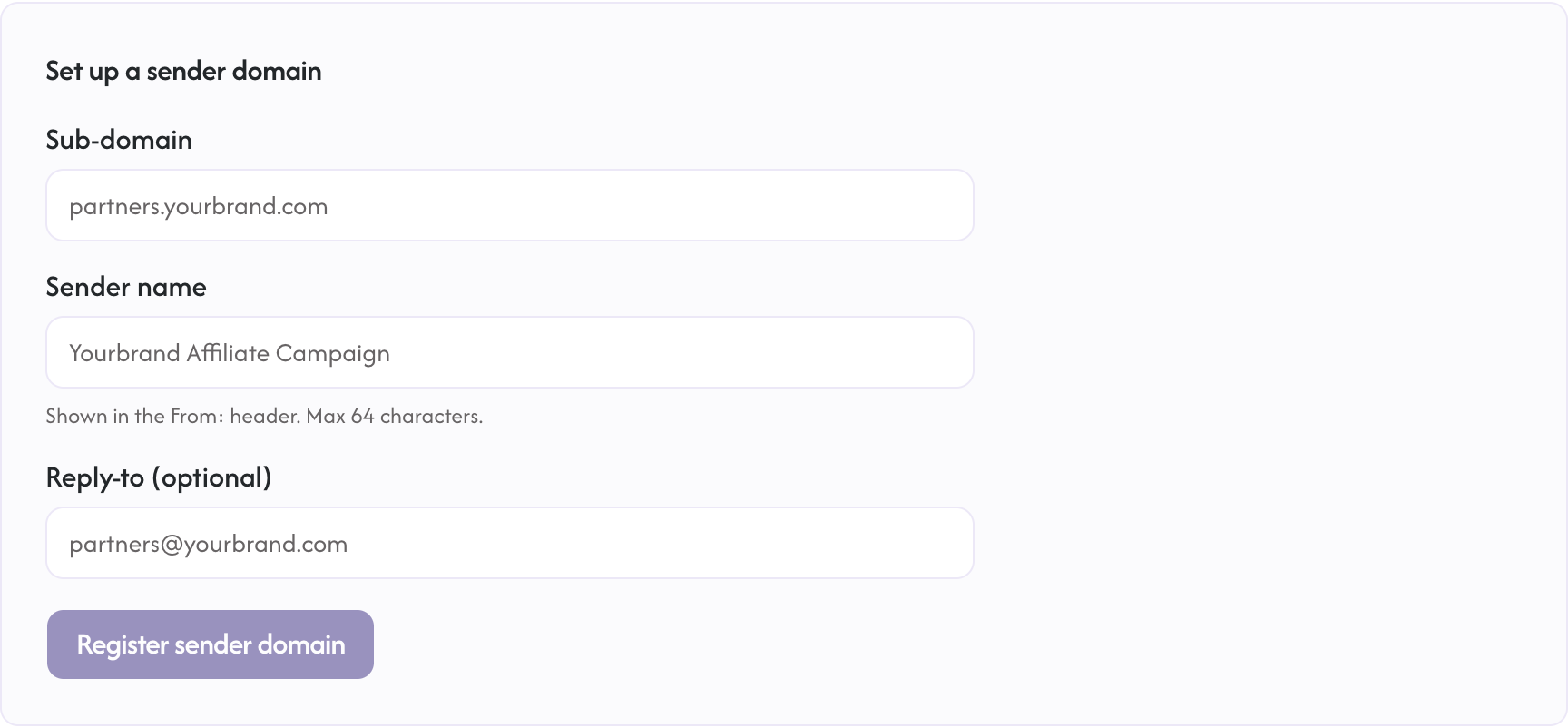
- Open Settings → Sending email (
/dashboard/settings/sending-domain) in the Rekomi dashboard. - Enter the sub-domain you want to send from (e.g.
partners.yourbrand.com). - Enter the sender name your affiliates will see (e.g.
Yourbrand Affiliate Campaign). - Optionally set a reply-to address. It applies from your next email, even while the domain is still verifying. When omitted, replies go to your account's billing email once the domain is verified, and to Rekomi support until then.
- Click Register sender domain.
Rekomi creates a domain entry in Resend and returns a small set of DNS records you need to add.
Add the DNS records
The records Rekomi provides cover:
- DKIM (CNAME or TXT). Cryptographically signs your outbound mail.
- SPF (TXT). Tells receivers that Rekomi's sending infrastructure is authorized.
DMARC is recommended but not included in the returned records: it defines policy when DKIM or SPF fails, and you add it yourself as a _dmarc TXT record on your sub-domain (a relaxed starting policy like v=DMARC1; p=none; is fine) once DKIM and SPF verify.
Copy each record's name and value into your DNS provider. Set TTL to "Auto" or 300 seconds.
Most DNS providers strip the trailing dot on the record name. Both forms work.
Verification
After you add the records, click Check now in the Rekomi dashboard. Rekomi asks Resend to re-check DNS and shows the result.
DNS propagation usually takes 5 to 15 minutes. Rekomi automatically polls every 30 seconds while the verification is pending, so you can leave the page open.
Once Resend confirms every record, the status flips to Verified and the dashboard shows a preview of how the From header will look to affiliates.
What gets sent from your domain
After verification, the affiliate-facing emails go from your domain:
- Affiliate invitations
- Payout sent notifications
- Application approved (welcome) emails
What still sends from Rekomi
A small set of emails continues to send from Rekomi's own sender:
- Payout failed notifications (these go to your billing contact, not the affiliate, so you can act on them)
- Sign-in flows (handled by our auth provider, not Rekomi)
- Trial expiry warnings (sent to you, not affiliates)
- Billing notifications from Stripe (handled by Stripe directly)
- Legal / compliance notifications (when we need to reach you as an account holder, not as a brand)
This split is intentional: your sender domain is for emails to affiliates. Account-level emails to you stay on the Rekomi infrastructure so you can always reach support and we can always reach you.
Troubleshooting
Status stays Pending for more than 30 minutes
DNS propagation can take longer for some providers. Check the records directly with dig or nslookup, using the exact record name shown in the dashboard:
dig TXT <record-name-from-dashboard>If the records do not return, double-check they were saved in your DNS provider. Some providers require you to wait a few minutes between save and propagation.
Status flips to Failed
Resend's DNS check found a problem. Look at the Status column in the records table. Records showing Failed are the ones that need attention. Common causes:
- Record value was pasted with extra whitespace or quotes
- DNS provider auto-appended your domain to the record name, producing a doubled name like
record.partners.yourbrand.com.partners.yourbrand.com - TTL set too high; lower to 300 seconds
After fixing, click Check now.
One record verified, another did not
Each record verifies independently. The domain as a whole only verifies when every record is confirmed. Check each row's status.
Disconnecting
To stop sending from your domain:
- Open Settings → Sending email.
- Click Disconnect.
- Type
DISCONNECT EMAIL SENDERto confirm.
The Resend domain entry is torn down and affiliate emails revert to sending from notifications@mail.rekomi.com on the next send. You can reconnect later.
FAQ
Does this cost extra?
No additional fee. The sending domain feature is included in the Pro tier alongside full white-label removal (remove Rekomi branding). For reference: the custom tracking domain (first-party tracking plus the affiliate-portal subdomain) and customer-facing webhooks are available on every plan. Starter and Growth tiers see a Pro upgrade prompt on the settings page for the sending-domain feature specifically; accounts still in the 14-day trial can use it during the trial.
Can I use the apex of my domain (yourbrand.com)?
We strongly recommend a sub-domain (e.g. partners.yourbrand.com or affiliates.yourbrand.com) so DKIM, SPF, and DMARC for your existing email never collide with the Rekomi-sent affiliate mail. The apex is accepted, but risky for exactly that reason.
What is the From address exactly?
<Your sender name> <noreply@<your-sub-domain>>. The local part is locked to noreply in v1; we may allow customization in a future release.
Can affiliates reply?
Yes. Replies go to whatever Reply-to you set during setup, from the first email after you save it, even while the domain is still verifying. If you left it blank, replies go to the billing email on your Rekomi account once the domain is verified, and to Rekomi support until then.
Will my domain reputation be affected?
Your domain inherits the deliverability characteristics of Resend's shared sending IPs. For 95% of brands this is a net improvement over the default. Dedicated IP isolation is on the roadmap.
Can I send marketing campaigns from this domain through Rekomi?
To your affiliates, yes. Rekomi sends both the automated affiliate lifecycle emails (invitations, approvals, payout notices, and the rest of the catalog on each campaign's Emails tab) and your broadcasts to affiliates, and all of them go out from your custom sending domain once it is verified. What Rekomi does not do is email your customers; for marketing to your customer list, use a dedicated tool (Customer.io, Loops, etc.).