

Custom domain
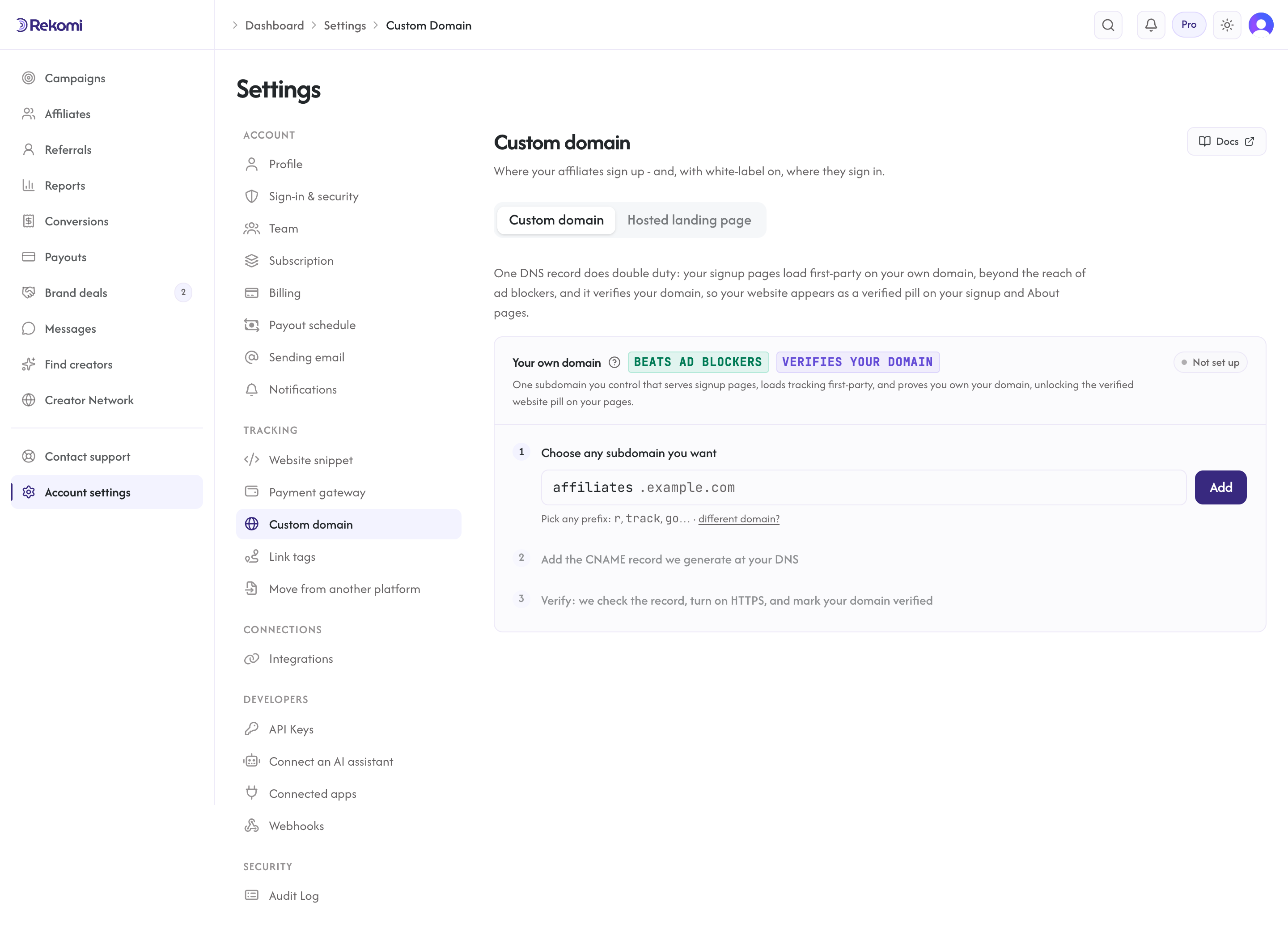
Serve the Rekomi tracking script from your own subdomain so it loads first-party and better survives tracker-blocking content filters.
Every brand already gets a free branded affiliate portal at yourbrand.rekomi.com on every plan, including Starter. Custom domain puts that same portal (and your tracking script) on a domain you own (e.g. affiliates.brand.com) instead of the rekomi.com subdomain, and it is included on every plan. Most affiliate platforms reserve first-party tracking for their most expensive plans; on Rekomi it comes with every plan. It swaps api.rekomi.com for the domain you control in the tracking script URL. The browser then treats every tracking request as first-party from your site's perspective, which:
- Sidesteps ad blockers that match generic patterns on third-party tracking hosts.
- Avoids Safari ITP's third-party cookie partitioning.
- Avoids Chrome's storage partitioning for embedded scripts.
A custom domain improves click capture and first-party cookie survival, which protects attribution for the sales your processor or server integration reports. Conversions themselves are recorded server-side (through your payment processor connection or the server-to-server API) and are never blocked by content filters, so the domain helps the click-tracking path rather than the conversion path. This is one unified feature: portal white-label plus first-party tracking on a single host you own. And if your org has white-label on (Pro), the same domain also serves your affiliates' sign-in at /login - your custom domain becomes the one place your affiliates ever go.
Prerequisites
- Any Rekomi plan (Starter and up all include it).
- DNS administrative access for the domain you want to use (e.g.
brand.com). - About 5 minutes for the setup, plus 30-60 seconds for our system to provision a TLS certificate on the brand's subdomain.
Setup
1. Pick your subdomain
In Dashboard > Settings > Custom domain, enter a subdomain you control. Most brands use affiliates.<their-domain> or go.<their-domain>. You can use any subdomain you own. This one subdomain does both jobs: it loads your tracking script first-party and hosts your affiliate signup pages (your primary campaign at the root, each campaign at /<campaign>). There are no separate per-campaign domains to set up. One subdomain covers your whole program.
Common choices:
affiliates.brand.comgo.brand.compartners.brand.comtrack.brand.com
Pick one that doesn't already point at another service. We'll show you the exact CNAME record to add in the next step.
2. Add the CNAME record
After saving the subdomain, the dashboard displays one CNAME record:
affiliates.brand.com CNAME cname.rekomi.comThe card also detects where the parent domain's DNS is managed and shows it ("Your DNS is managed at Cloudflare"), with a link into that provider's console.
If your DNS is at Cloudflare, you do not have to touch DNS at all. The card offers an Add it for me button: it opens Cloudflare's consent page, which shows exactly this one CNAME under Rekomi's name and logo. Approve it and Cloudflare creates the record for you, as DNS only and at the right subdomain, then sends you back to the card, which verifies the record automatically; there is nothing else to click. When one-click is available the card leads with it and tucks the copy-paste table behind an "Add it manually instead" link. The request is cryptographically signed, so Cloudflare checks it really came from Rekomi before showing the consent screen. One-click covers Cloudflare-managed DNS today; more providers are planned.
Everyone else adds the record by hand at their DNS provider (Namecheap, Route53, GoDaddy, Squarespace, or wherever you manage DNS for the parent domain). Save the record and wait for DNS propagation (usually under a minute, sometimes up to a few minutes).
If you add the record by hand at Cloudflare, set its proxy status to DNS only (gray cloud), not Proxied; the Add it for me flow already does this for you. Your subdomain needs to CNAME straight through to our edge (cname.rekomi.com); proxying it on your side puts another TLS layer in the way and breaks certificate issuance.
3. Verify
Click Verify in the dashboard. (If you used Add it for me, skip this: verification runs on its own as soon as you land back on the card.) We do a DNS lookup on your subdomain and check that the CNAME chain resolves to cname.rekomi.com (or an equivalent Rekomi-controlled target).
If verification passes, we automatically:
- Register your subdomain on our Cloudflare-for-SaaS edge.
- Issue a TLS certificate for it automatically.
- Update your install snippet to use your subdomain instead of
api.rekomi.com. - Mark your domain verified: adding the CNAME requires control of your DNS, which proves domain ownership, so your website appears as a verified pill on your signup and About pages (next to your verified socials).
The dashboard shows a "Provisioning certificate" indicator while the cert is being issued (~30-60s typical). During this window your install snippet stays pointed at api.rekomi.com so your site keeps working uninterrupted. Once the cert is active, the snippet auto-switches.
4. Re-copy your install snippet
If you pasted the install snippet on your site before verifying your custom domain, copy it again now. The new snippet uses your subdomain. If you call Rekomi.convert() to record signups, that code does not need to change; the loader picks up your domain automatically.
Affiliate signup on your custom domain
The same subdomain also serves your affiliate signup pages, so your whole program lives on one domain. There are no separate per-campaign domains to configure:
https://affiliates.brand.com/is your primary campaign's signup page.https://affiliates.brand.com/<campaign>is each campaign's own signup page.
Share these links with affiliates instead of the free yourbrand.rekomi.com versions. The page loads from your own domain, so it reinforces your brand and avoids the third-party look. Tracking and the signup pages share the one subdomain; nothing extra to set up per campaign.
How it works under the hood
- Your visitor loads
brand.com. - Your install snippet pulls
affiliates.brand.com/api/v1/r/loader.js(orapi.rekomi.comif you skipped the custom domain). - Browser resolves
affiliates.brand.comvia your DNS:affiliates.brand.com→ CNAME →cname.rekomi.com→ ultimately our hosting provider. - Request hits our routing layer. Our routing layer sees the
Host: affiliates.brand.comheader, matches it to your org (registered when you verified), and serves the loader script. - The loader script sends click events to
affiliates.brand.com/api/v1/r/cfirst-party. From the browser's perspective these are first-party calls; cookies set by these responses are first-party tobrand.com. Conversions are not sent by the loader; they are recorded through your payment processor connection or the server-to-server API and are unaffected by tracking-host blocking.
Because the script is loaded from your own subdomain, generic tracker filters (EasyPrivacy, uBlock standard lists) don't match the URL pattern, and the cookies set by click responses survive Safari ITP's third-party caps.
Failure states + recovery
The dashboard shows one of these statuses:
| Status | What it means | What to do |
|---|---|---|
| Pending | You saved the subdomain but haven't added the CNAME yet (or DNS hasn't propagated) | Add the CNAME at your DNS provider. Click Verify. |
| Failed | DNS verification couldn't find the expected CNAME target | Check that the CNAME record exists and points at cname.rekomi.com. If you added it by hand at Cloudflare, set proxy to DNS only (the Add it for me flow does this automatically). Click Verify. |
| Verified + Provisioning | DNS is verified; cert is being issued | Wait 30-60 seconds. The dashboard auto-polls. |
| Verified + Active | Routing is live | Re-copy your install snippet if you pasted it before this point. |
| Verified + Error | Cert provisioning failed | Check for conflicting A/AAAA records on the same subdomain. Click Verify to retry. |
Disconnecting
To stop using a custom domain, open Settings > Custom domain and click Disconnect. You'll be asked to type a confirm phrase (defense against accidental clicks).
After disconnect:
- We remove the subdomain from our routing layer.
- Your install snippet reverts to
api.rekomi.com. - You should remove the CNAME from your DNS provider for hygiene.
- Re-copy the install snippet to your site.
In-flight tracking (clicks already attributed) is not affected. Future tracking falls back to the default host.
What this does NOT solve
- Cross-domain attribution (visitor clicks on phone, buys on desktop): custom domains don't help. Cross-device tracking requires login-bound attribution.
- Domain-level blocklists (
api.rekomi.comexplicitly added to a user's blocklist): if a user adds your subdomain to their blocklist too, this helps the average case but not the targeted case. - Brand-paid Cloudflare for SaaS / Argo / strict Bot Fight Mode: complex CF setups in front of your domain can interfere with our cert provisioning. Use DNS-only mode on the tracking subdomain.
- Processor-tracked conversions: those flow through your payment processor's own webhook and aren't affected by tracking-host blocking. Custom domain only helps the click-tracking path.
Pricing
Included on every plan, Starter and up.
Related
No-code & non-Stripe checkouts
Install the Rekomi tracking script for click attribution on a no-code platform, and record conversions via a native processor, the S2S API, or coupon codes.
Conversion currency
ISO 4217 allowlist, error codes, Stripe normalization, and the home-currency settings endpoint.