

Pay per click or lead (CPC & CPL)
When to use cost-per-click and cost-per-lead, how to set each up, the affiliate experience, and how Rekomi keeps them fraud-resistant.
Most Rekomi programs pay on a sale (the Per sale model, one-time or recurring). Two legs pay earlier in the funnel: Clicks (pay per click, also called CPC) and Leads (pay per qualified lead, also called CPL). This guide covers when to reach for each and how to set them up.
Want sale commissions AND a per-lead or per-click reward on one campaign? You don't need a lead-only or click-only campaign for that. Under What do you pay affiliates for? tick more than one option (Sales, Leads, Clicks, in any combination) and set a rate for each; see Combine sales, leads and clicks. The CPC and CPL guides below describe campaigns that pay per click or per lead only, and everything in them (links, forms, fraud checks, budgets) applies the same way when those legs sit on a sale campaign.
Paying per click and per lead is live. Tick Clicks or Leads when creating a campaign (Starter plan and above); clicks and qualified leads are fraud-screened and awarded automatically as described below.
Every click and lead is fraud-scored before it can be paid. Leads are scored at the moment of submission; clicks are scored by a background job within about a minute of being recorded, always before the hourly awarding pass. Rekomi checks the real visitor's IP against IP reputation data (proxy, VPN, Tor, datacenter, and bot signals, plus a blended fraud score and recent-abuse history), holds anything high-risk out of payment for your review, and only ever pays traffic that clears. This up-front validation is the layer most affiliate tools skip, and it is what makes paying per click or lead safe. See Keeping CPC and CPL honest below.
Which one to use
| You want to reward... | Use | Pays on |
|---|---|---|
| A sale or recurring revenue | Sales (CPS) | a paid invoice |
| A qualified lead (trial, demo, waitlist) | Leads (CPL) | a form submission |
| Raw traffic to your site | Clicks (CPC) | a validated click |
Paying per click is rare for SaaS (clicks don't guarantee value) and best for paid content or syndication deals. Paying per lead fits products with a free trial or demo, where a signup is worth a known amount to you. Both require a Starter plan or above.
Paying per click is invite-only, and so is any campaign that pays nothing per sale. There is no public sign-up page for these campaigns and they are not listed in the creator network. You invite each partner and set their rate (per partner, or via a partner group), so paying per click or lead stays bounded by who you approve plus an optional campaign budget cap, not an open bounty anyone can claim. Auto-approve and public discoverability are turned off automatically. (A sale campaign that adds a per-lead reward may stay public.)
Set up a pay-per-click campaign (CPC)
- Create or edit a campaign and tick Clicks under What do you pay affiliates for? (in the API,
defaultCommissionModel=Cpc; the rate is always a flat amount, a click has nothing to take a percentage of). Set the amount per validated click, for example$0.50. - Affiliates share their neutral tracking link,
rekomi.link/{their-slug}?p={campaign-id}(Rekomi generates it on their campaign page). A visitor who clicks it is counted on Rekomi's edge, then forwarded to your campaign's destination URL. Make sure the campaign's Website / link to promote is set; it is the page visitors land on after the click is counted, and the link will not resolve without it. - Clicks are scored for IP fraud (proxy, VPN, datacenter, bot) by a background job within about a minute of being recorded, de-duplicated per device, capped per IP, and aggregated into commissions hourly. Anything high-risk is held for review, never paid automatically. Affiliates see their click count and earnings on their campaign page.
Because the click is measured on Rekomi's side (not your server), neither you nor the affiliate can quietly change the number, which is what makes per-click payouts trustworthy.
Set up a pay-per-lead campaign (CPL)
- Create or edit a campaign and tick Leads under What do you pay affiliates for? (in the API,
defaultCommissionModel=Cpl; always a flat amount). Set the amount per qualified lead, for example$10. - Affiliates share a Rekomi-hosted lead form,
/lead/{their-slug}. A prospect who fills it in becomes a lead attributed to that affiliate. - Every submission must pass a Cloudflare Turnstile challenge, email-format and disposable-domain checks, and a self-lead guard before it earns. Duplicate submissions from the same person (including plus-aliases) are counted once.
A lead earns the moment a valid form is submitted, you do not wait for a sale. If a trial later converts, tick Sales on the same campaign (below) instead of running a second one.
Combine with sales, leads or clicks
A click or lead campaign can pay for more than one thing. In the campaign form, and in Campaign settings under Commission, What do you pay affiliates for? is a multi-select: tick Sales to add a sale commission (percent or flat, with the usual commission length: first payment only, a set number of months, or the customer's lifetime), tick Leads on a click campaign to add a per-lead amount, or tick Clicks on a lead campaign to add a per-click amount. Partners see every leg on their invite and their campaign page ("$0.50 per click plus 10% per sale").
Being upfront about the boundaries:
- A sale commission on a click or lead campaign pays on attributed sales and follows the campaign's commission length; refunds claw it back the standard way.
- It sits outside the campaign budget cap: the budget keeps capping click and lead spend only.
- Partner-specific rates (invites, partner groups, tiers) override the campaign's main rate only: the per-click amount on a click campaign, the per-lead amount on a lead campaign. The added legs pay the same amount to every partner.
- A campaign that pays per click stays invite-only whatever else it pays; a lead campaign that also pays per sale may be opened to public sign-up.
See Commission models for the full rules.
Rates, groups, budgets, and links
- Invite partners and set their rate. From the campaign, invite a partner and set their
$ per click/$ per lead. The campaign's default rate is just a fallback; a partner's own rate always wins. - Partner groups (rate tiers). On the Commission tab, create groups (for example "Standard $0.30/click", "Premium $0.50/click") and assign partners to one from the partner's detail page. Rate precedence is per-partner override → group → performance tier → campaign default (performance tiers mostly matter for sale models; only fixed-amount tiers can apply to CPC and CPL). One group can be the default that new partners inherit.
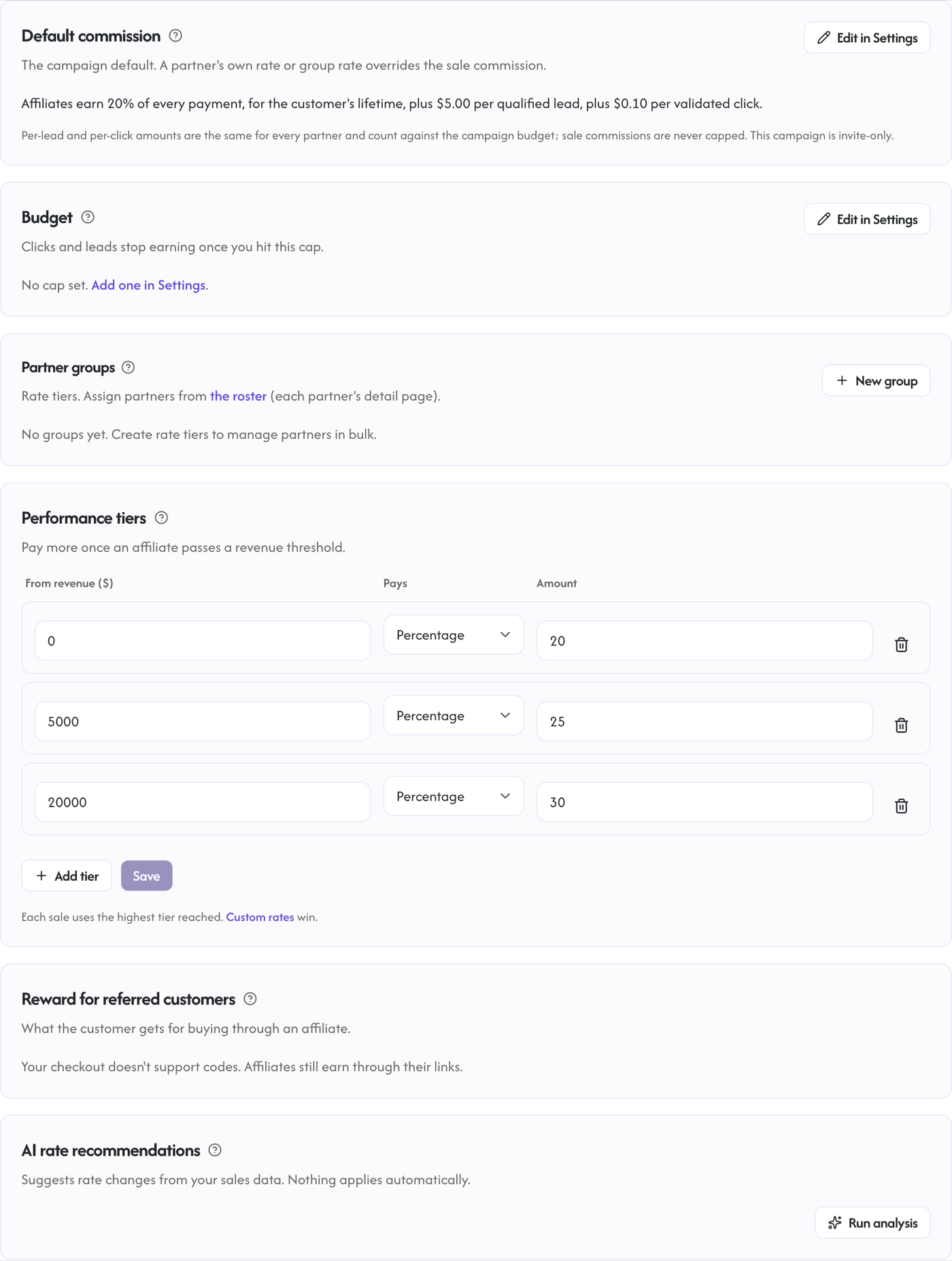
- Budget cap. Set an optional campaign budget (any campaign that pays per click or per lead). Once the campaign's click and lead rewards reach it, new clicks and leads stop earning. Live spent / remaining shows on the Commission tab. Sale commissions always pay outside this cap.
- Multiple destination links. Every campaign that pays per click or per sale supports extra product & page links (deep links) to specific products or pages on your own site, each tracked separately (a lead-only campaign shares one lead form instead). On campaigns that pay per click these route through the neutral
rekomi.link/{slug}domain, validated to your campaign's domain so the link can never be pointed at an arbitrary site; on sale campaigns they are direct links to the destination with the affiliate's own code.
Keeping click and lead payouts honest (CPC and CPL)
Because these models pay without a purchase behind them, Rekomi validates every click and lead up front, before it can ever become a payout, rather than clawing money back later. This is the layer most affiliate tools skip, and it is why paying per click or lead on Rekomi is safe:
- IP fraud scoring before payment. Every lead is scored against IP reputation at the moment of submission, and every click within about a minute of being recorded: proxy, VPN, Tor, and datacenter detection, known-bot signals, recent-abuse history, and a blended fraud score. Anything the score flags as high-risk is held out of payment.
- A real visitor IP that is hard to spoof. Rekomi reads the true client IP at the edge in a way an affiliate cannot practically forge, which is what makes the next two controls reliable.
- Per-IP and per-affiliate limits, plus de-duplication. A single device or IP cannot earn unlimited clicks; repeat clicks from the same visitor collapse to one, each IP is capped at 100 payable clicks per day, and each affiliate is capped at 500 payable clicks (and 500 paid leads) per day by default, so no one partner can run up the budget in a day.
- Invalid-traffic quarantine you can review. Flagged clicks and leads are recorded and quarantined, never silently deleted. If something was a false positive, validate it from the Conversions page (Leads or Clicks tab) and it becomes payable; if a Pending item looks wrong, you can invalidate it.
- Affiliate reputation. An affiliate whose traffic is consistently flagged as invalid is surfaced for review and can be auto-suspended, so a repeat offender is stopped, not just their individual clicks.
- Fail-closed by design. If a click's IP cannot be scored (for example the fraud service is briefly unreachable), it is held and retried for up to 3 days, then dropped, never paid. A lead that cannot be scored is rejected outright and not recorded. Money never moves on unverified traffic.
- Budgets, invite-only, and a payout hold. A campaign budget caps total spend, campaigns are invite-only, and click and lead earnings sit in the standard payout grace window before any money moves, giving you time to review.
Choose how strict the filtering is
Every campaign that pays per click or per lead has a Fraud filtering setting (campaign Settings, next to the budget) with three levels:
- Strict (the default): VPNs and proxies are blocked, and the tightest risk thresholds apply. Right for most campaigns.
- Standard: VPNs and proxies are still blocked, with a little more tolerance on the blended risk score before a click or lead is held.
- Relaxed: visitors on VPNs and privacy tools are allowed. Pick this when your audience legitimately uses them, for example privacy-focused or developer products.
Whatever level you choose, the floor never moves: bots, Tor, and known-abuse traffic are always blocked, unverifiable traffic is always held rather than paid, and the per-IP and per-affiliate limits stay on. The levels only tune how much benefit of the doubt borderline traffic gets.
See what was filtered
The Fraud section of each campaign's Performance tab opens with a Filtered, not billed summary: how many clicks were blocked (and why), how many are currently held for checks, how many leads were quarantined, and roughly what that traffic would have cost you at your campaign's rates. Held clicks finish their checks automatically; you do not need to do anything with them.
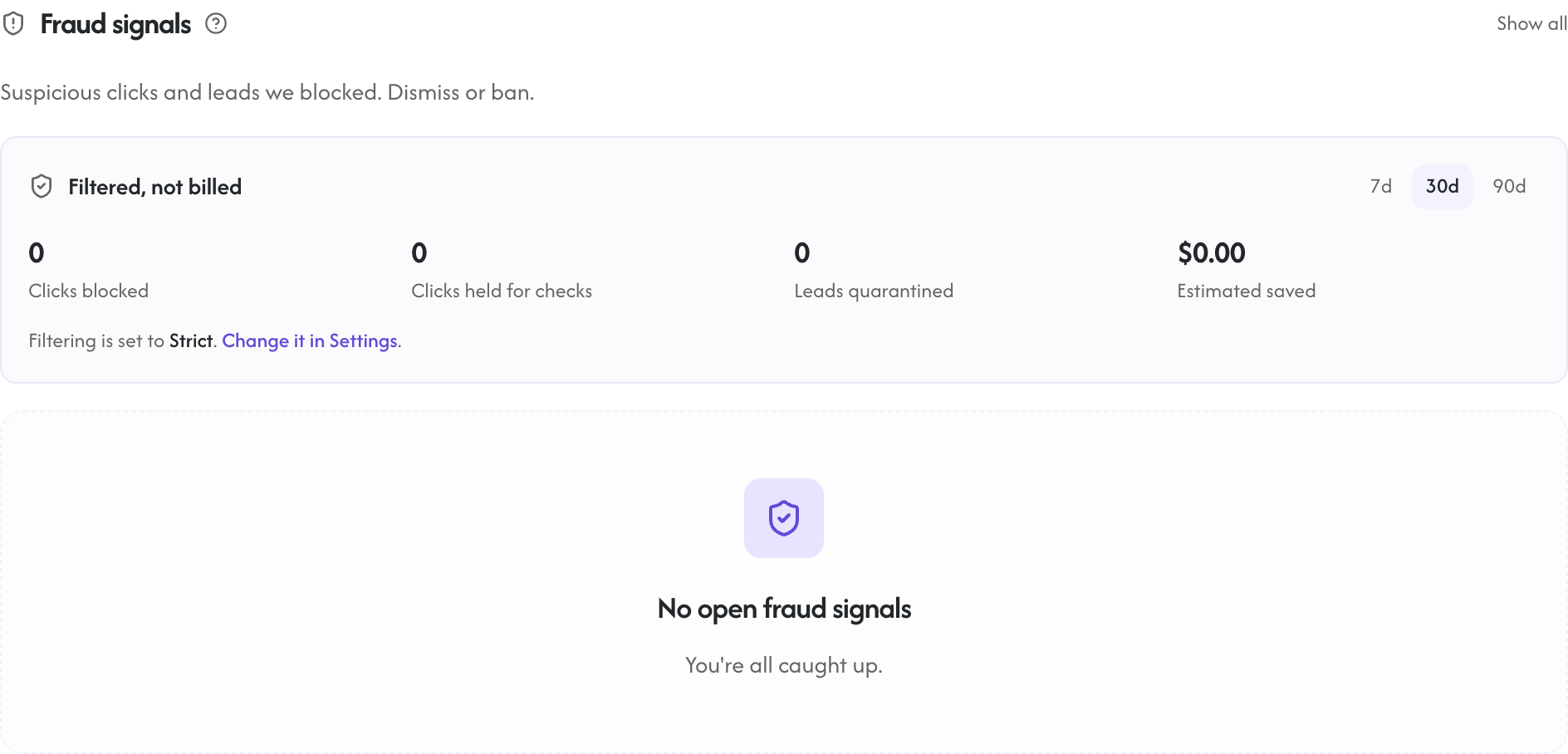
There are two places you review this. Each campaign's Performance tab has a Fraud section that lists the clicks and leads Rekomi flagged and did not pay (high-risk IPs, bots, self-leads, disposable emails, and abusive affiliates); from there you can dismiss a false positive, mark it resolved, or ban a partner, which stops their future clicks and leads from earning immediately. Separately, a click or lead that was quarantined as invalid traffic shows an Invalidated status on the Conversions page (Leads or Clicks tab), where you can validate it to release it for payment, or invalidate a Pending item you judge fraudulent. CPC and CPL commissions are not refundable the way sales are, which is exactly why the checks happen before payment, not after.