

Emails
The automated email catalog on each campaign, campaign-scoped switches, previews, and where broadcasts live.
Emails live on each campaign: open a campaign and pick the Emails tab for everything your affiliates hear from you. Two sections: Automated is the catalog of every lifecycle email Rekomi sends on your behalf, and Broadcasts is where you write one-off sends. (The old /dashboard/emails page redirects here.)
Automated emails
Every automated email gets one row: its name and a short description, when it sends, how many went out in the last 30 days (with an open rate once something has sent), and an on/off switch.
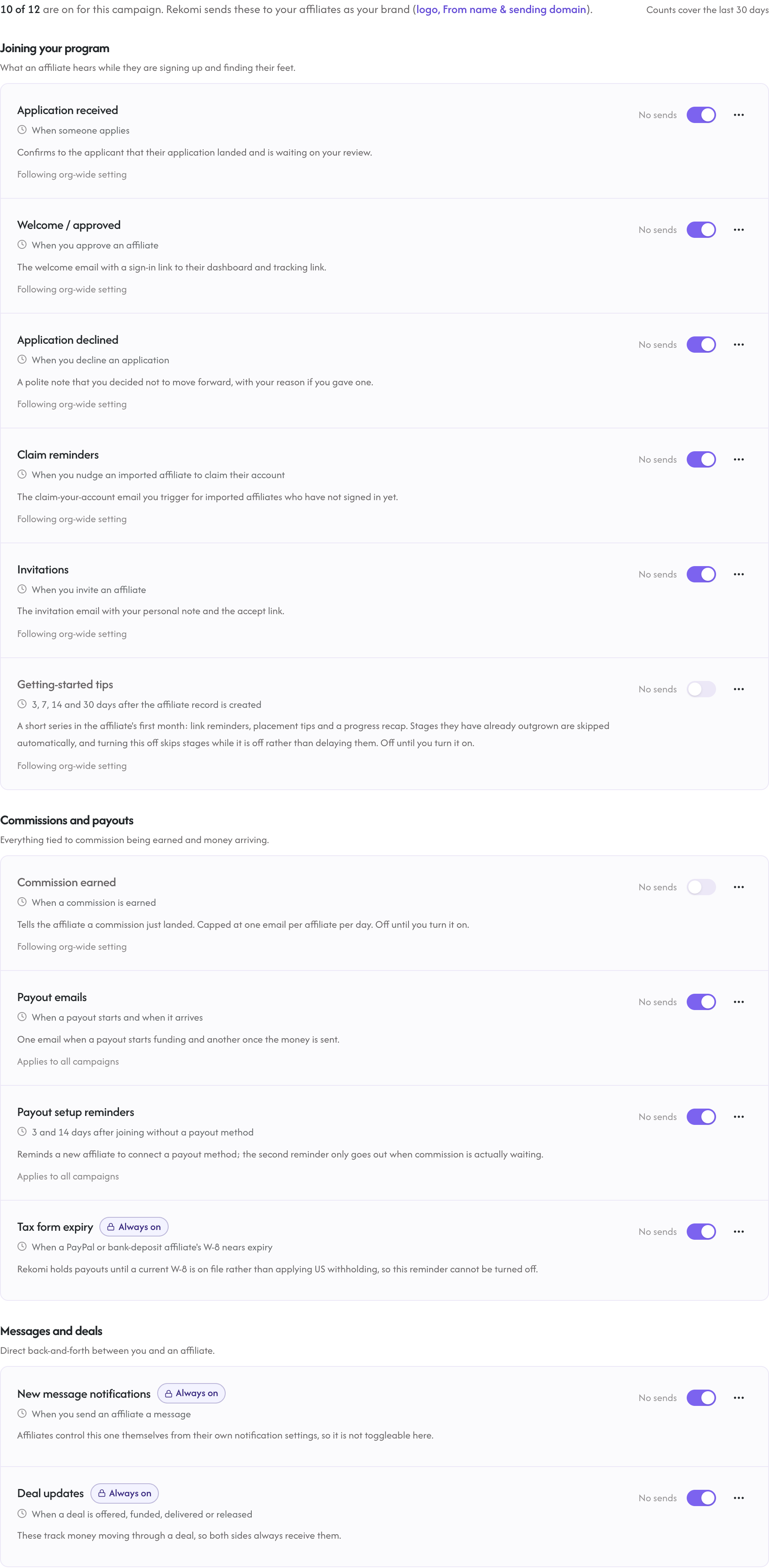
The catalog:
| When it sends | Default | |
|---|---|---|
| Application received | When someone applies | On |
| Welcome / approved | When you approve an affiliate | On |
| Application declined | When you decline an application | On |
| Commission earned | When a commission is earned (a sale, a paid lead or a paid click) | Off until you turn it on |
| Payout emails | When a payout starts and when it arrives | On |
| Payout setup reminders | 3 and 14 days after joining without a payout method | On |
| Claim reminders | When you nudge an imported affiliate to claim their account | On |
| Invitations | When you invite an affiliate | On |
| Getting-started tips | 3, 7, 14 and 30 days after the affiliate record is created | Off until you turn it on |
| Tax form expiry | When a PayPal or bank-deposit affiliate's W-8 nears expiry | Always on |
| New message notifications | When you send an affiliate a message | Always on |
| Deal updates | When a deal is offered, funded, delivered or released | Always on |
Always-on rows
A few rows show a lock instead of a switch. These keep money and accounts working, so they cannot be turned off:
- Tax form expiry: Rekomi holds payouts until a current W-8 is on file rather than applying US withholding, so the reminder always goes out.
- New message notifications and Deal updates: these carry conversations and deal money the affiliate is a party to.
Off by default
Commission earned and the Getting-started tips series start off. They are the chattiest rows in the catalog, so you opt in rather than opt out. Everything else is on from day one.
Language
Every automated affiliate email goes out in the affiliate's own language when they chose one, otherwise in your default affiliate language from Settings > Language. Broadcasts and invite messages stay exactly as you wrote them.
Campaign scope
The switches you see are that campaign's effective settings. A campaign follows your account-wide defaults until you flip a switch on its Emails tab; from then on that campaign keeps its own setting, and your other campaigns are unaffected. Rows that say Applies to all campaigns (payout and tax emails) are account-wide by nature, so flipping them changes every campaign.
Previews
Send me a preview in the row menu sends a sample of that email, with your real branding, to your own verified inbox. There is deliberately no recipient field, so a preview can never mail anyone else. A few rows have no generic sample because you write their content per send (claim reminders, invitations, deal updates); those tell you there's no preview.
The getting-started tips series
The Getting-started tips row is a short drip of four emails that helps a new affiliate get moving. How it behaves:
- It sends 3, 7, 14 and 30 days after the affiliate record is created.
- It skips stages the affiliate has outgrown: the early nudges don't send once the affiliate already has clicks (day 3) or a sale (day 7). The later check-ins send with the affiliate's real numbers.
- Turning the series off skips stages rather than delaying them. A stage that comes due while the switch is off is consumed; turning the series back on later never sends stale mail for stages that already passed.
- It only applies to affiliates created after the feature went live. Affiliates who existed before that never enter the series.
Broadcasts
The Broadcasts section holds the composer for one-off sends to all (or filtered) affiliates, with recipient counts, plan limits, and unsubscribe handling. The composer opens with the campaign you came from pre-selected. See Broadcasts for the full walkthrough.