

ConvertKit (Kit)
Connect Kit once and it does two jobs. Approved affiliates land in a Kit form with tags, and sales, including Kit Commerce purchases, are credited to the affiliate whose link brought the subscriber.

Rekomi's ConvertKit (now branded as Kit) connection does two jobs, and each has its own switch on the integration page. Sync affiliates into Kit subscribes every approved affiliate to a Kit form you pick (Kit's data model is form-centric rather than list-centric: a subscriber joins your account by being attached to a form, then automations and sequences fire off that form). Credit sales through Kit credits sales to the affiliate whose link brought the subscriber, using the arrival record Kit keeps on each subscriber. Both switches are on by default.
What this connection does and does not do. It syncs affiliates into Kit, it credits sales to affiliates, and for Kit Commerce it also brings the sales themselves into Rekomi, because Kit Commerce bills through a Stripe account Kit manages that cannot be connected to Rekomi. If you sell through your own Stripe instead, that Stripe account connected under Setup > Connect payment gateway is where the sale comes from and the Kit connection names the affiliate. It cannot credit a buyer who never signed up through a Kit form or landing page, because Kit only records the arrival on those signups (see the limits below).
Credit sales through Kit
How it works
- Every affiliate link Rekomi hands out for your campaign carries two extra parameters:
utm_source=rekomiandutm_campaignset to that affiliate's link slug. For example:https://newsletter.example.com?via=jane&utm_source=rekomi&utm_campaign=jane. - When a reader lands from that link and signs up through a Kit form or a Kit landing page (a Kit form embedded on your own site counts), Kit stores those values on the new subscriber. Kit writes them once, on that first signup.
- When that subscriber later buys, the sale reaches Rekomi one of two ways. A Kit Commerce purchase arrives through the purchase feed Rekomi registers with Kit when you connect. A purchase on your own connected Stripe arrives through Stripe. Either way, when nothing else names an affiliate (a coupon, checkout metadata, the customer's history, an email lead Rekomi recorded itself), Rekomi asks Kit for the subscriber by email, reads the stored tag, and credits the affiliate it names. A discount code named on a Kit Commerce purchase counts as that coupon: when it is a code Rekomi minted for one of your affiliates, that affiliate is credited even if the buyer never signed up through a form.
- Nothing runs in the buyer's browser for any of this. The per-landing-page script in the Kit install guide is optional and only adds click counts and early leads.
What you need
- The Kit connection on this page with Credit sales through Kit on. It is on from the moment you connect, and connecting registers the Kit Commerce purchase feed for you; there is nothing to build or relay.
- If you sell through your own Stripe rather than Kit Commerce, that Stripe account connected under Setup > Connect payment gateway.
The switch and the status line
Credit sales through Kit sits on the integration page next to Sync affiliates into Kit. Under it the page shows one plain sentence of status: whether Rekomi's last check of your account succeeded and when it ran, and how many sales have been credited through Kit so far. Rekomi runs that check when you connect. A subscriber is credited only when they joined within the window shown on the page (365 days by default, counted from the signup date Kit stores).
Turning the switch off stops the lookups, removes the two tags from your affiliates' links, and removes the purchase feed and signup alerts below, so Kit Commerce purchases stop reaching Rekomi while it is off. Affiliate sync keeps running.
Check a subscriber's email
Under the sales block, Check a subscriber's email takes one address and tells you what Kit has stored for it: whether the person is a subscriber, whether the arrival tag names one of your affiliates, and whether a sale from that email would be credited. Use it to test: open an affiliate link, sign up through your Kit form with a fresh address, then check that address here.
Signup alerts
When the switch is on, Rekomi registers signed Kit webhooks for new and activated subscribers, so a subscriber who arrived through an affiliate link shows up as a lead under that affiliate right away, before any sale. Subscribers that Rekomi itself added (your synced affiliates) are left out.
Limits, stated plainly
- Kit records the arrival only on form and landing-page signups. A subscriber created by import, by the API, through the Creator Network, or by a Kit Commerce order with no earlier form signup carries no tag, so a buyer who goes straight to checkout without signing up first is not credited by this connection.
- Kit writes the arrival once. A subscriber already on your list before they clicked an affiliate link is not credited by the lookup. The optional script from the install guide records a lead when such a reader types their email on a page where it runs, and that lead credits the sale by email match.
- Kit has no refund event. A refunded Kit Commerce purchase is not clawed back automatically, because Kit never tells Rekomi about the refund. When you refund a Kit order, invalidate the matching sale from the Conversions page and the commission reverses.
- Kit's rate limit is shared. Kit allows 120 requests per minute per key. Rekomi makes a read or two per sale, keeps a short per-email cache so the same buyer is not read twice in a burst, and tries a read again after two minutes if Kit answers 429. The affiliate sync honors
Retry-After, so a busy launch day slows the sync a little rather than dropping sales.
Sync affiliates into Kit
What syncs
When an affiliate is approved (or, optionally, when they apply), Rekomi runs Kit's v4 create-then-form sequence:
POST /v4/subscriberscreates or updates the subscriber by email withemail_address,first_name, andfields.last_name(Kit's v4 form endpoint only accepts subscribers that already exist, so this step always comes first).POST /v4/forms/{form_id}/subscribersadds the subscriber to your chosen form.- Each configured tag is applied by name (missing tags are auto-created in Kit).
The subscriber create is a documented upsert, re-subscribing the same email never duplicates the subscriber, it just refreshes their attributes. Being re-added to a form they are already on is also a no-op.
Finding your API key
In Kit:
- Open Settings → Developer.
- Click Generate API Key to create a v4 API key.
- Copy the key. Legacy v3 API secrets do not work; if you only have a v3 secret, generate a fresh v4 key.
Connecting ConvertKit in Rekomi
- Go to Integrations in the dashboard sidebar.
- Click the Kit card (Kit is ConvertKit's current brand name).
- Paste your v4 API key. Click Connect.
- Rekomi runs a test call against
GET /v4/accountto verify the key, then checks that it can look subscribers up, so the sales status line is filled in immediately. - Once connected, pick a default form from the Form dropdown. Click refresh after creating a new form in Kit.
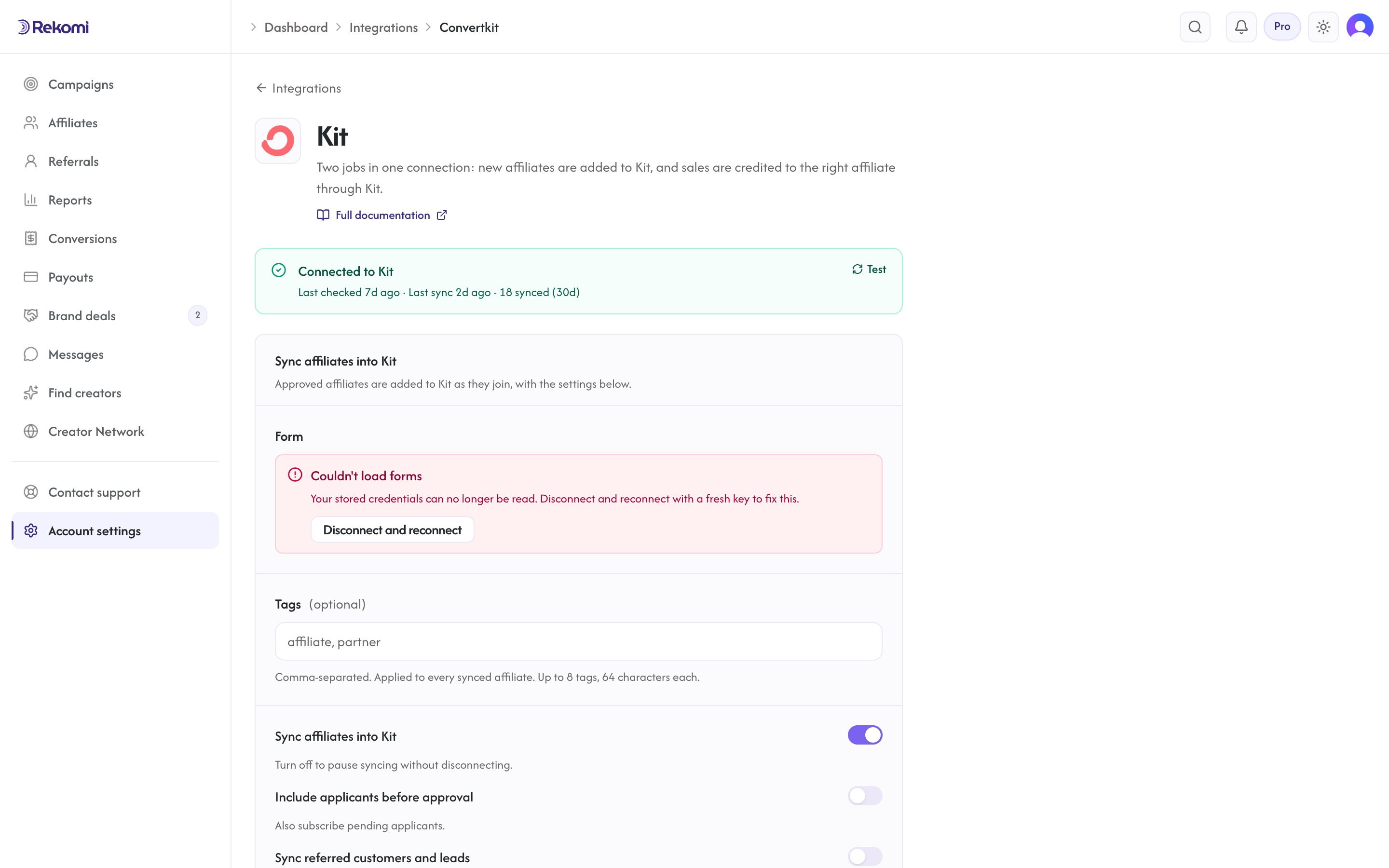
Tags
Optional. Comma-separated tag names. Rekomi resolves each name against your Kit account's tags and creates any that don't exist yet (Kit's tag creation is safe to repeat and case-insensitive), then attaches them to the subscriber.
The default Rekomi affiliate system tag is applied the same way, so every Rekomi-synced subscriber is identifiable in Kit out of the box. Tag failures are non-fatal: the subscriber is already on your form by the time tags are applied, so a tag hiccup never blocks the sync.
Referred customers and leads (optional)
Under Sync affiliates into Kit, turn on Sync referred customers and leads and every sale or lead Rekomi attributes to an affiliate is written to ConvertKit (Kit) as well, matched on email so existing contacts are updated, not duplicated. Sales credited through Kit by the lookup above are included. Each one carries:
- custom fields
Rekomi referral link,Rekomi campaign,Rekomi referring affiliate,Rekomi referring affiliate code,Rekomi last event,Rekomi last sale amount, created on first use - tags
Rekomi customerorRekomi lead - Affiliates synced by the section above also get
Rekomi referral link,Rekomi campaignandRekomi affiliate statusin the same fields, so you can merge a partner's link into your emails. The referral link written here carries the same two tags as the links Rekomi shows affiliates.
Refunded, denied and fraud-quarantined conversions are never pushed, and imported historical conversions are skipped. It is off by default. Referred customers are NOT added to your connect form (so they never receive the form's incentive or sequence); they get the tag and the fields only.
When sync fires
- Default: only
Approvedaffiliates sync. - Optional: enable "Include applicants before approval" on the provider's settings card to sync
Pendingaffiliates immediately on apply.
Per-campaign overrides
Each campaign can route to a different Kit form or skip Kit entirely. Open the campaign's Settings and find the CRM sync for this campaign section to set:
- A campaign-specific form (override the account default).
- Additional tags (added to whatever's set at the account level).
- A per-campaign disable toggle.
Per-affiliate sync visibility
The affiliate detail page has a CRM sync panel showing each connected CRM and the latest sync state for that affiliate. The Resync button clears prior job rows and re-fires the sync from scratch, useful after fixing a misconfigured tag ID or form selection.
Troubleshooting
- "Kit migrated to API v4...", Your connection was created with a legacy v3 API secret, which does not authenticate against v4. Disconnect, generate a v4 API key in Kit (Settings → Developer → Generate API Key), and reconnect.
- "Form not found", The form was deleted in Kit after Rekomi cached its ID. Refresh the form picker and choose a current one.
- Tags not applying, Tag application is non-fatal, so the subscriber still lands on the form. Check the affiliate's CRM sync panel for the tag error, then hit Resync.
- A Kit Commerce purchase shows as a purchase but not as a credited sale, Use Check a subscriber's email with the buyer's address. No subscriber means the buyer went straight to checkout without a form signup; a subscriber with no tag means they joined before the click or through an import, the API or the Creator Network.
- Sync fails with 401/403 after working before, Rekomi marks the integration "action needed" and emails you a reconnect prompt once per breakage. Reconnect with a fresh v4 key, then use Resync all on the Failed tile of the integration page.
A note on API versions
Rekomi uses Kit's v4 API with personal API keys (header-based auth). Kit retired active development on v3, and v3 API secrets are a separate credential pair from v4 keys, which is why existing v3 connections must reconnect with a v4 key; there is no automatic migration.
Disconnecting
Click Disconnect on the Kit connect page. The integration row + any per-campaign overrides are deleted, and the purchase feed and signup webhooks Rekomi registered are removed from your Kit account. Historical sync rows are preserved for audit.
See the convertkit integration overview on the marketing site for use-cases, persona fit, and unique automation patterns.
GoHighLevel
Connect GoHighLevel (HighLevel) once and it does two jobs. Affiliates, referred customers and leads land in your sub-account as contacts with the referring affiliate on the record, and sales are credited to the affiliate whose link brought the contact, with a workflow webhook for one-time order forms and non-Stripe gateways.
ActiveCampaign
Connect ActiveCampaign so approved affiliates land in your contact list and get tagged automatically.