

Coupon-code attribution
Use Stripe promotion codes as a tracking mechanism alongside referral links.
Coupon-code attribution lets your affiliates share a redeemable string, essentially a referral code, at checkout instead of a click-tracked URL. Useful when:
- Your affiliate posts in their podcast, video, or newsletter and viewers will type a code rather than click.
- The customer hits your site directly (search, brand awareness) but redeems a code at Stripe Checkout.
- You want a paper trail in Stripe that ties revenue back to a specific affiliate.
Rekomi creates the Stripe coupon for you, mints a unique promotion code per affiliate, and credits the right affiliate whenever a customer redeems one at checkout. Refunds clawback automatically.
Coupon attribution works on the Stripe, Shopify, Wix, BigCommerce and WooCommerce integrations (on a BigCommerce multi-storefront store, a code minted under a campaign limited to certain storefronts only works on those storefronts) (codes are real promotion codes or discount codes in that checkout, so customers actually get the discount). Stripe codes are authored from this dashboard; Shopify, Wix and BigCommerce codes are authored from the embedded Rekomi app inside the store admin and listed here; WooCommerce codes are authored here and created by the plugin. It is not available on other billing providers (Paddle, Lemon Squeezy, Chargebee, and the rest) or on server-to-server-only setups; on those, the campaign coupons area in your dashboard explains this instead of offering the feature, and affiliates keep earning through their links. Affiliate self-mint (affiliates creating their own vanity codes) works on every coupon rail.
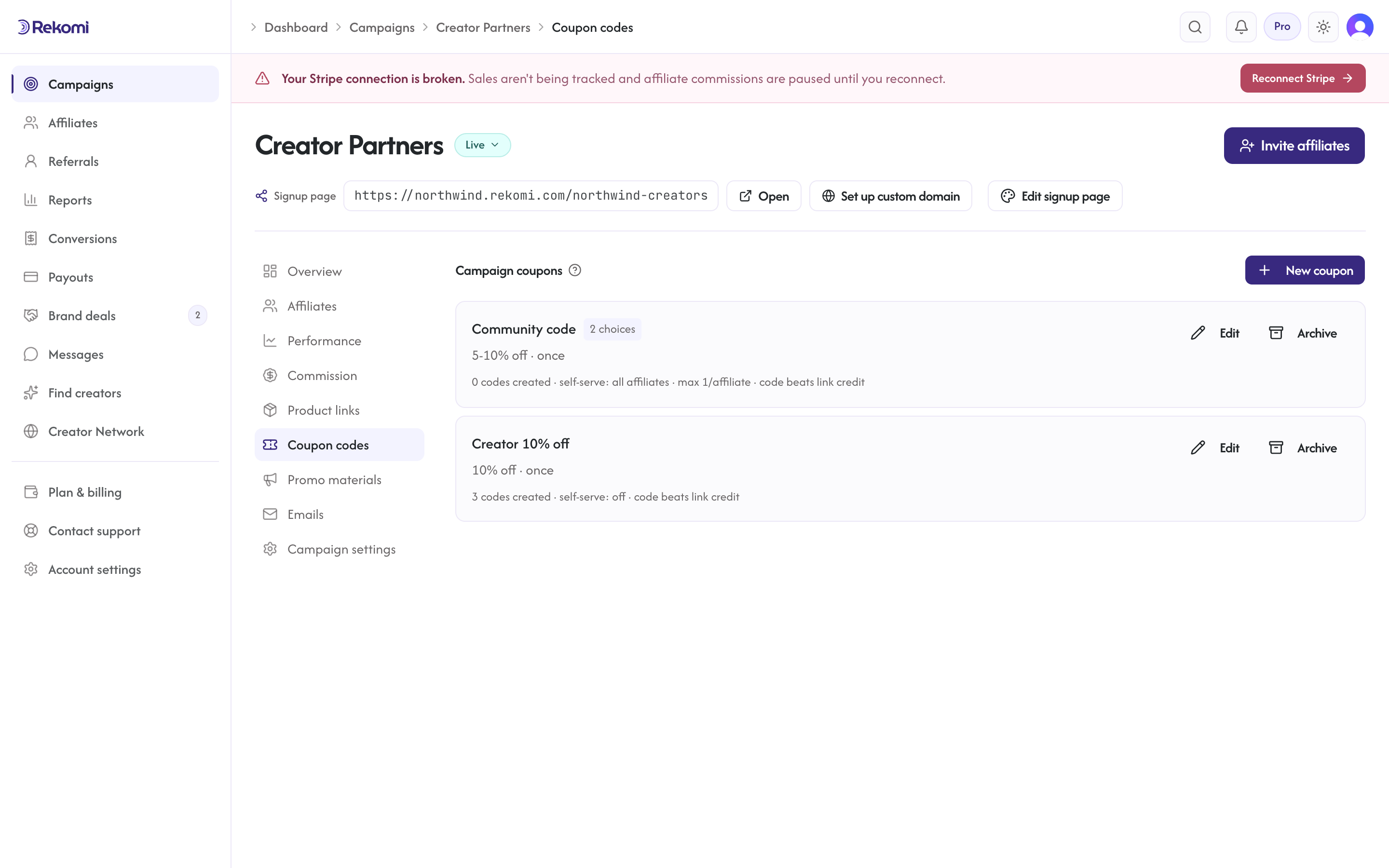
How it works
- Brand creates a campaign coupon. Pick a discount (% off or fixed $ off), a duration, optional max redemptions and expiry. Rekomi creates the matching Stripe
couponunder the hood and stores its id. - Brand mints a per-affiliate code. From an affiliate's detail page, click "Generate" in the Coupons tab. Rekomi creates a Stripe
promotion_codethat points at the campaign coupon and is tagged with the affiliate's id in metadata. - Affiliate shares the code. The code shows on
/a/campaigns/{id}for them to copy. Optionally, brands let affiliates mint their own vanity codes from /a: each campaign coupon has a self-service setting with three modes (no one, all approved affiliates, or a specific allow-list of affiliates you pick). - Customer redeems at checkout. Stripe fires
invoice.paidorcustomer.subscription.createdwith the promotion code embedded. Rekomi sees it, credits the owning affiliate, records a conversion withattribution_method = "coupon". - You see it like any other sale. The conversion lands in your dashboard automatically, tagged in the Source column as "Coupon" with the redeemed code (for example "Coupon · SARAH20"), right alongside link and server-to-server conversions. No setup needed: coupon conversions are never silent. The same
attribution_method(and the code) is in the REST API, the CSV export (attribution_method+coupon_codecolumns), and theconversion.createdwebhook if you sync conversions to your own systems. - Refunds clawback. A full refund decrements the affiliate's redemption count and marks the conversion refunded; partial refunds claw back commission proportionally and keep the redemption counted.
When coupon beats click attribution
Each campaign coupon has an Overrides click attribution toggle (default on). When on, a coupon redemption credits the coupon's affiliate even if the customer also clicked another affiliate's tracking link. Use this when:
- You want code-based affiliates (influencers, podcast hosts) to win over generic site traffic.
- You want a deterministic, observable attribution path with no cookie ambiguity.
- Your affiliates drive purchase intent through audio/video where clicks are rare.
Turn it off when:
- Click tracking is your primary channel and codes are secondary.
- You run multiple-affiliate-touch flows where the first click should win and the coupon is a "thank you for redeeming" mechanic.
Multiple codes per affiliate
You can mint as many codes as you like for one affiliate. They all roll up to the same affiliate's stats; each code has its own redemption counter. Useful for:
- Campaign-specific codes (
SARAH-BLACKFRIDAYvsSARAH-SPRING). - A/B testing copy ("Try
SARAH20" vs "TrySARAHSPRING"). - Letting the affiliate brand variants without losing attribution.
Limit a coupon to specific products
By default a campaign coupon discounts the whole order. You can scope it to specific products instead, so the discount (and the attribution) only applies to those line items.
On the Stripe rail, use "Limit to specific products" in the coupon create dialog: a picker lists your active Stripe products (name, image, and id) with search, so you choose rather than type. The picker shows your 100 most recent active products; for deeper catalogs, or if you prefer, "Paste product IDs instead" accepts comma-separated prod_... ids, and the API takes the same productRefs field (see Coupon code tracking). On a Shopify store, use "Limit to products" when creating a coupon offer in the Rekomi app inside your Shopify admin: pick the products with Shopify's own product picker, and every code minted under that offer inherits the scope.
Plan tier
Coupons are available to every brand from the dashboard. Managing coupons through the public API requires a paid plan (Starter or above). Trial users (14-day free trial on any tier) can use everything.
What gets created in Stripe
For every campaign coupon Rekomi creates:
- A Stripe
couponwith the discount you picked, optionalredeem_by(expiry), andmetadata.rekomi_campaign_coupon_idmatching the Rekomi row id.
For every per-affiliate coupon Rekomi creates:
- A Stripe
promotion_codeattached to the campaign coupon, with the code string you supplied (or one we generated), optionalmax_redemptionsinherited from the parent, andmetadata.rekomi_affiliate_coupon_idmatching the Rekomi row id.
If you delete a Rekomi row, Rekomi deactivates / deletes the Stripe object on a best-effort basis. The Rekomi row is the source of truth for attribution.
API access
Coupon endpoints are documented in the developer reference. Both /api/campaigns/{programId}/coupons and /api/affiliates/{affiliateId}/coupons are exposed under /api/v1/* for public-API callers with rk_live_* keys.
Affiliate self-service
Each campaign coupon has a self-service mode that controls who may mint their own codes:
- All approved affiliates (the default for new coupons created in the dashboard or the Shopify app): anyone approved on the campaign can mint vanity codes from
/a/campaigns/{id}. Self-serve is the point: you define the offer, affiliates handle their own codes. - No one: only you mint codes, from the affiliate detail page. (This stays the default for API callers that omit the field, so existing integrations keep their behavior.)
- Specific affiliates: an allow-list you pick, in the dashboard or the Shopify app; removing an affiliate from the list revokes the codes they minted.
Codes still need to satisfy ^[A-Z0-9_-]{3,32}$ and be unique within the brand. Self-service is useful for influencer programs where each creator controls their personal brand string, or hands-off flows where you'd rather not gate every mint behind brand-side approval. You can change the mode at any time; codes already minted keep working unless you revoke them.
Per-coupon commission rates
A campaign coupon can carry its own commission rate. When you set "Codes from this coupon earn" on a coupon, every sale made with one of its codes pays that rate instead of the campaign rate (and instead of any per-affiliate, group, tier, or per-product rate). Zero is a real setting: "codes earn nothing" is how you run a pure-discount code, for example a Black Friday code that should not pay commission.
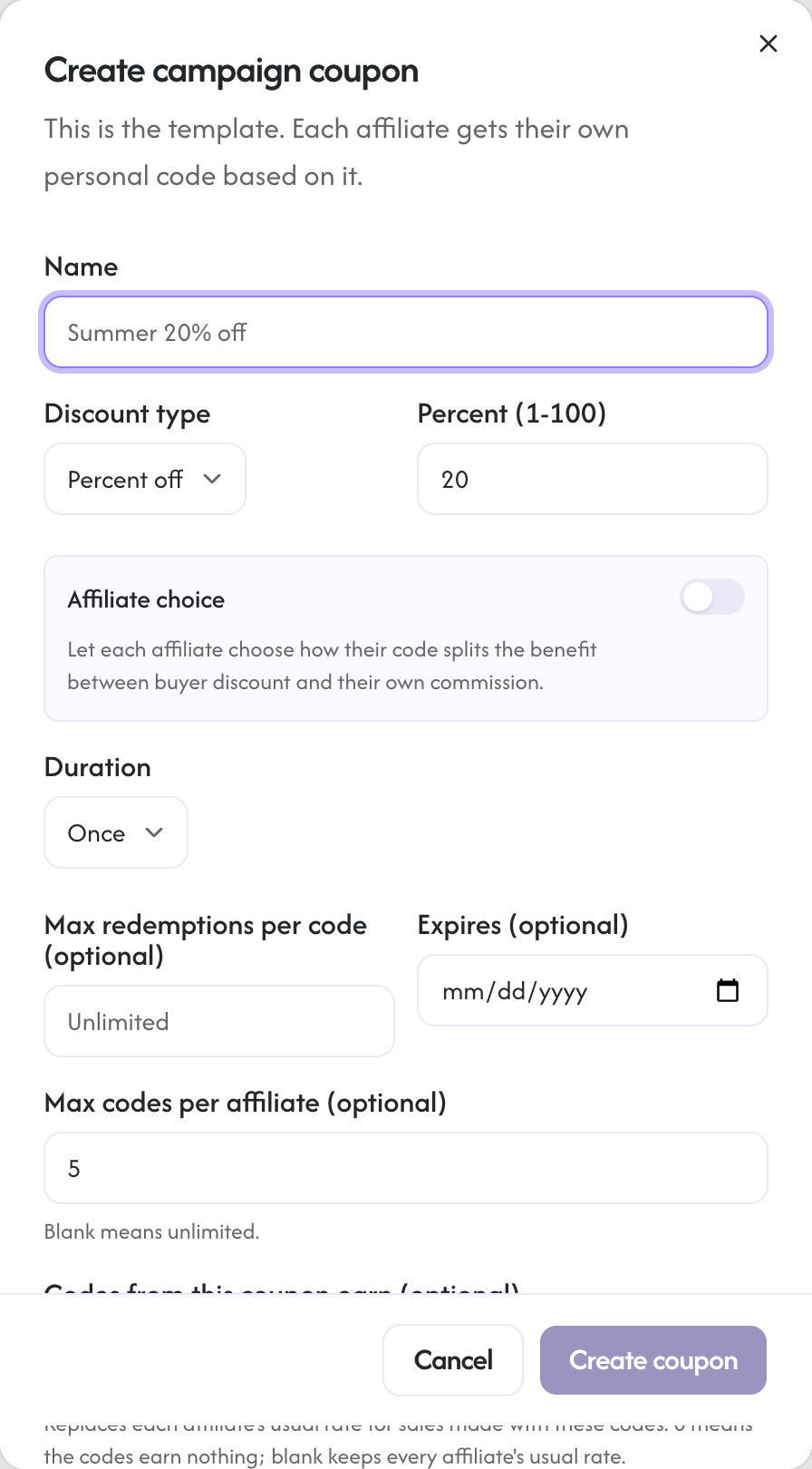
Two honest details:
- The rate applies to sales made with the code. If the same affiliate shares their tracking link instead, link sales pay the normal campaign ladder.
- On subscriptions, Stripe attaches the code to each invoice it discounts. A "once" coupon pays the coupon rate on the first invoice; renewals (which no longer carry the discount) revert to the campaign ladder. "Forever" and still-running "repeating" coupons keep paying the coupon rate on every discounted invoice.
Affiliate choice: let each affiliate pick their split
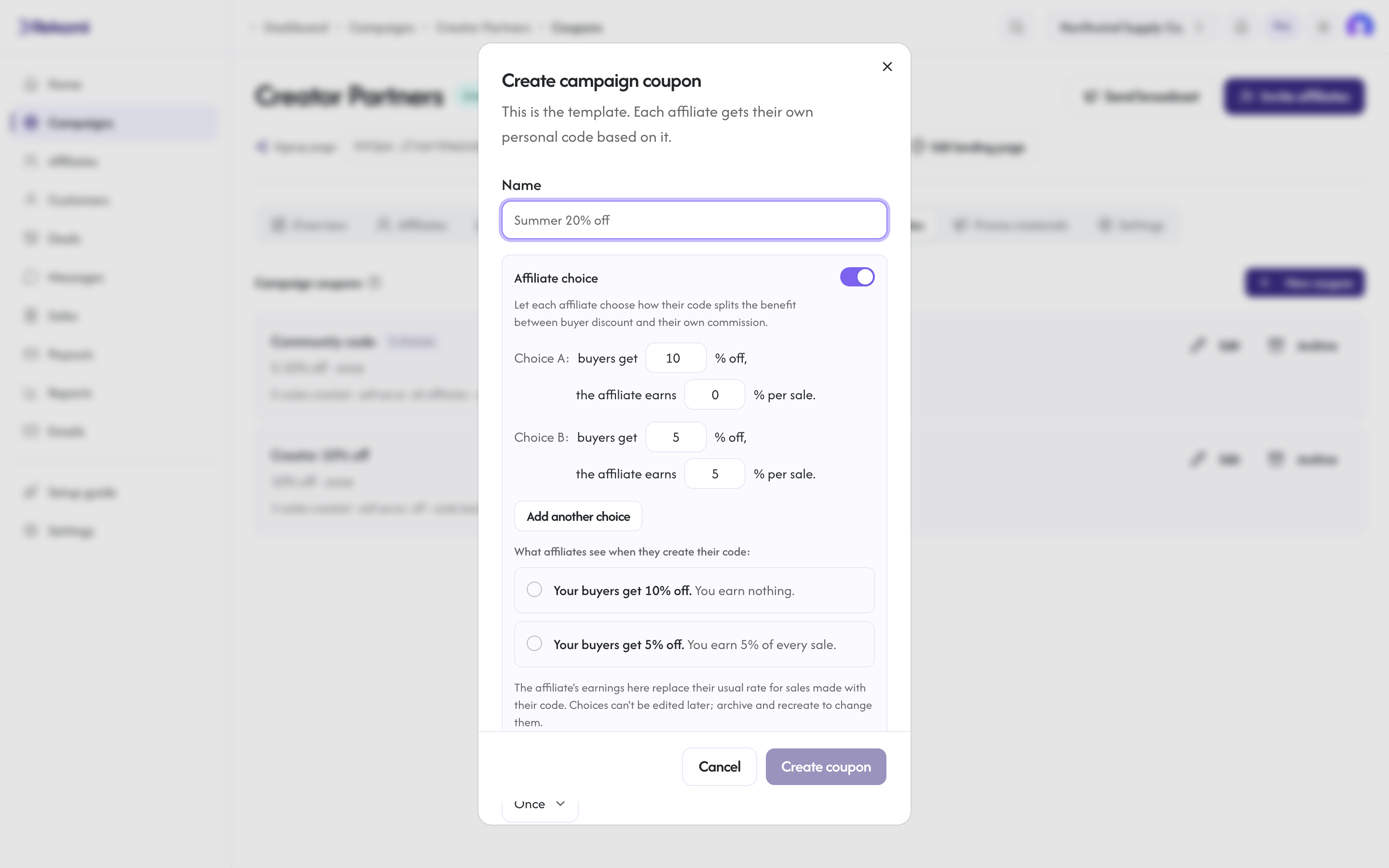
Some programs give ambassadors a fixed benefit and let each person decide how to use it: gift the whole discount to their audience, or share it and keep a commission. The Affiliate choice toggle in the coupon create dialog does exactly that. You define 2 to 4 choices, each a pair of buyer discount and affiliate commission, for example:
- Choice A: buyers get 10% off, the affiliate earns nothing (the gift option).
- Choice B: buyers get 5% off, the affiliate earns 5% per sale.
When an affiliate creates their code, they pick one choice; the pick decides both the discount their buyers get and what their code pays them, and each code shows its own economics ("5% off · earns you 5% per sale"). The dialog previews the exact options affiliates will see, generated from your numbers, so nobody has to write or proofread the copy.
When an affiliate creates their code, the same options render in their mint flow:
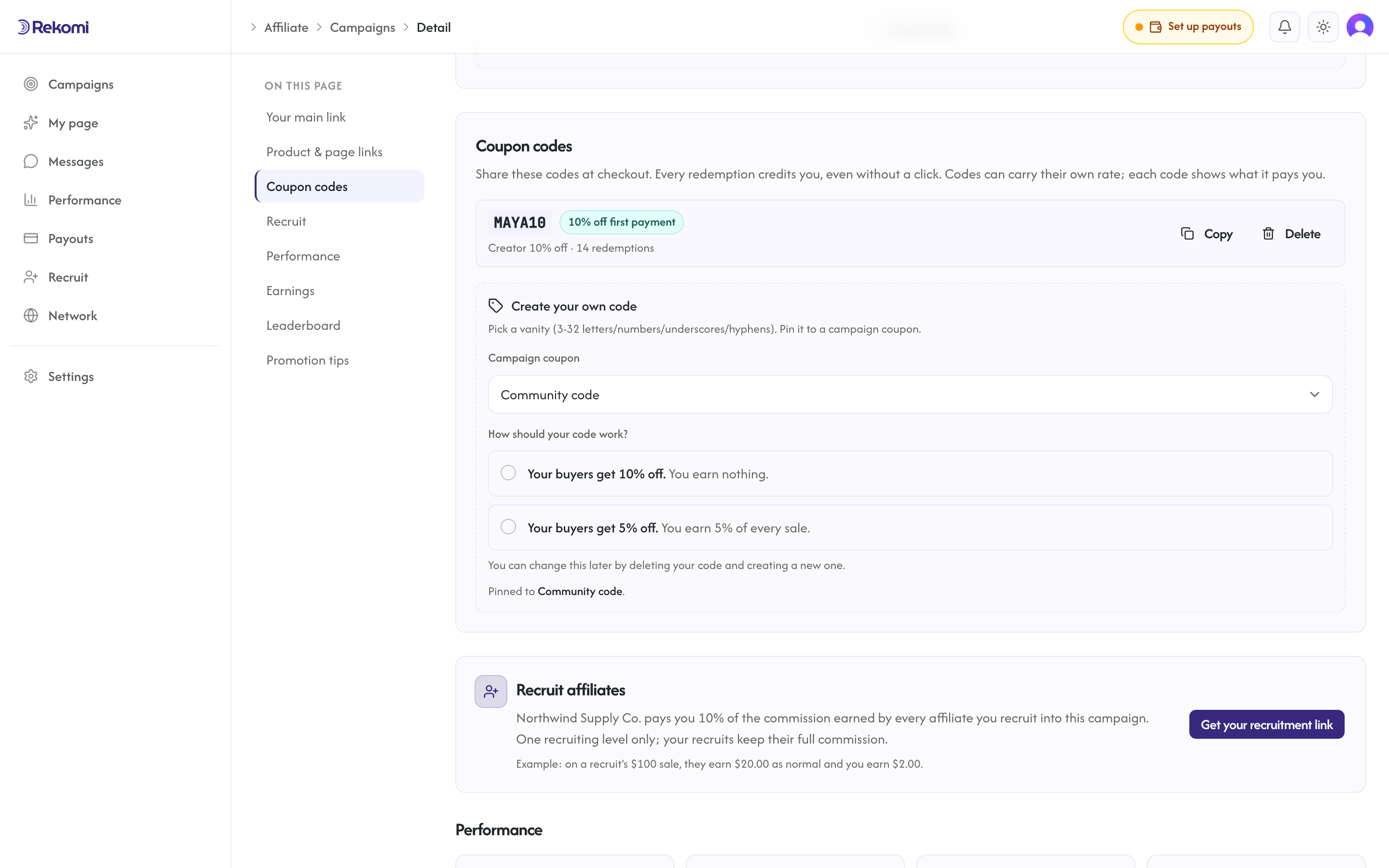
Rules worth knowing:
- Choice coupons default to 5 codes per affiliate (adjustable in the coupon's settings, including down to 1). Each code locks in the choice it was created with, and every sale pays by the code that was used; past sales keep the rate they were earned under.
- Choices are immutable after create, like the discount itself. Archive the coupon and create a new one to change them.
- On subscriptions, the same renewal rule as above applies: the chosen split pays on the invoices the code discounts. A "once" coupon pays it on the first invoice; renewals revert to the affiliate's usual rate.
- Both the per-coupon rate and choices work on every coupon rail. The in-Stripe app drawer doesn't offer choice coupons yet; mint those from the dashboard or let affiliates self-mint.
See also
- Sub-affiliate recruiting: the other affiliate-network feature, a 2-tier program with a bounded override on top of normal commission, one recruiting level only. Works alongside coupon attribution; override fires whether the parent sale was attributed via click or coupon.
- Per-product commission rates: set a different commission for specific products, on top of coupon attribution.
Pay per click or lead (CPC & CPL)
When to use cost-per-click and cost-per-lead, how to set each up, the affiliate experience, and how Rekomi keeps them fraud-resistant.
Products and per-product rates
Override the campaign rate for specific products, or assign a product to a partner who is paid on every sale of it, on rails that report line items.