

Stripe Connect (sales tracking)
Connect your Stripe account once and Rekomi tracks every sale and refund automatically. How the OAuth connect works, how attribution pairs with click tracking, and a technical overview of the webhook rail.
Stripe Connect is the default and simplest way to feed sales into Rekomi. You authorize Rekomi to read your Stripe account once, and from then on every paid checkout and every refund flows into Rekomi automatically. No thank-you-page snippet for the sale event, no per-sale reconciliation, no spreadsheet at month end.
This is what most brands use, because if your billing already runs through Stripe, the conversion backend is one click.
Manage it from inside Stripe. The Rekomi app for Stripe, approved for the Stripe App Marketplace and rolling out now, puts attribution, commission approvals, and payout status directly in your Stripe Dashboard. Same native tracking, different entry point.
The two halves of tracking
This is the one thing worth understanding up front, because it explains why connecting Stripe is not always the only step:
- The sale signal (Stripe Connect). Connecting your Stripe account tells Rekomi that a sale happened, its amount, currency, and whether it was later refunded. The amount Rekomi records is the pre-tax amount: when Stripe reports a tax line on the payment, that tax is left out, so commissions are never paid on tax you collect.
- Attribution (click tracking or coupons). Connecting Stripe does not, on its own, tell Rekomi which affiliate to credit. That identity rides along on the sale, and it gets there in one of two ways:
- the click cookie set by the tracking snippet, forwarded onto the subscription or invoice as
rekomi_affiliate_idmetadata (see Install on Stripe), or - a coupon code the affiliate shares, which Stripe records on the sale, or
- on beehiiv, Kit, MailerLite, Ontraport and GoHighLevel, the platform connection under Integrations, which reads the tag the platform stored on the customer at signup.
- the click cookie set by the tracking snippet, forwarded onto the subscription or invoice as
So Stripe Connect is the conversion backend, and the snippet or coupons are the attribution layer. That is why onboarding marks "Connect payment gateway" as done once Stripe is linked, but still walks you through installing the snippet: the snippet is what names the affiliate. A sale that arrives with no attribution metadata, no affiliate coupon, and no prior attribution history for that customer is recorded by Stripe but simply has no one to credit.
How to connect
In setup, the Connect payment gateway step (/dashboard/setup/connect-sales) has a "Connect Stripe" button: one click, no interstitial page in between. Connecting Stripe there completes the conversion-tracking backend; affiliate payouts are set up separately, from your payout settings. You can also reach it later from your settings.
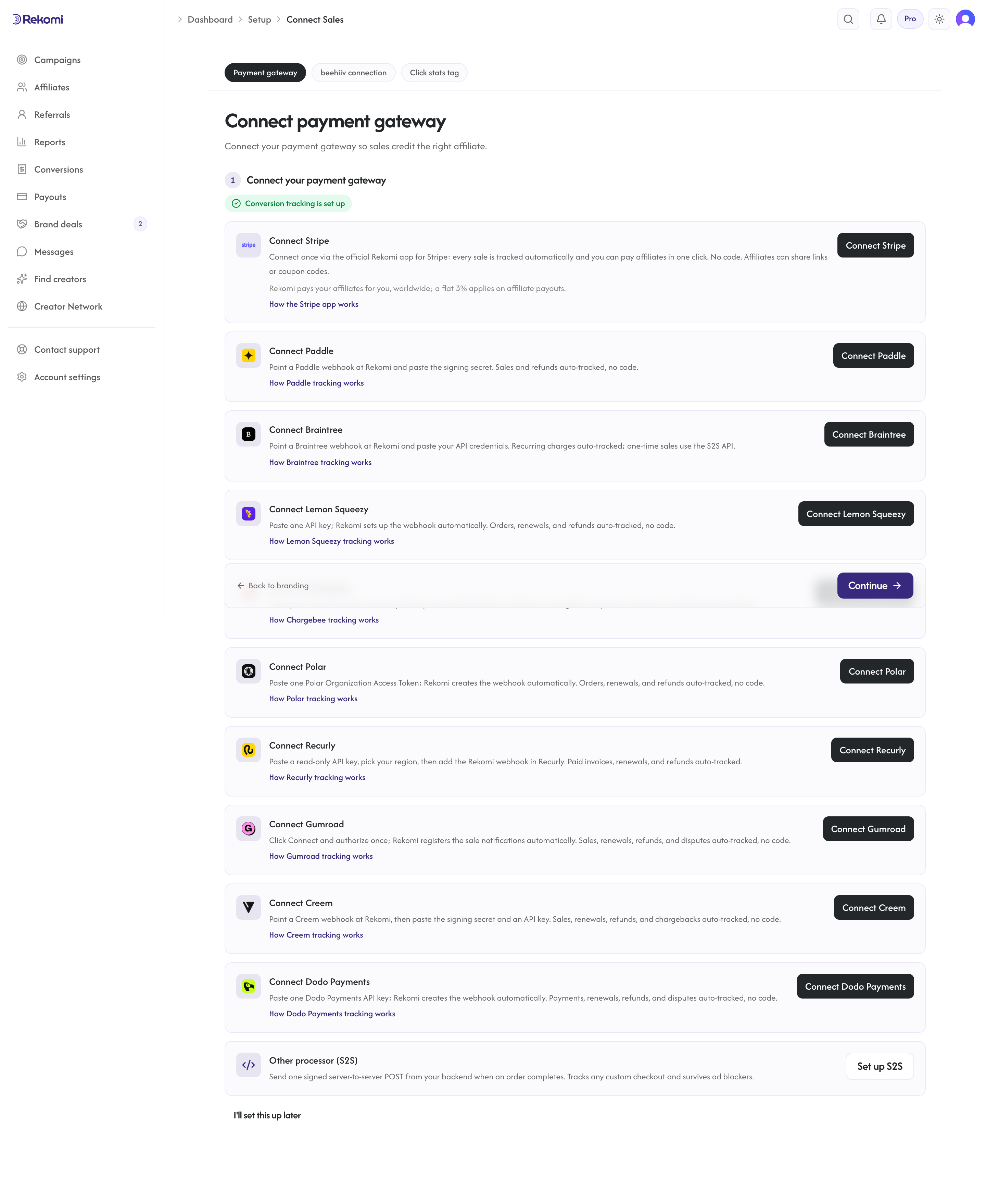
Click it and you are sent to Stripe's hosted consent for the Rekomi app, where you pick the Stripe account you already use to bill customers and approve the app's permissions. That single authorization is the connection: Stripe sends you back to the dashboard with the account linked, your sale and refund events start flowing, and the app's panels appear inside your Stripe Dashboard as a bonus. /dashboard/setup/payments is where the connection lands and where you manage it afterwards.
Status after connecting:
- Not connected: no Stripe account linked yet.
- Connected: Rekomi is receiving your sale and refund events. The dashboard shows the connected account id (
acct_...).
One Stripe account links to exactly one Rekomi organization. If you reconnect a different Stripe account later, Rekomi drops the old connection and stops receiving its events; uninstall the Rekomi app from the old account's Stripe Dashboard to remove the grant there too.
What Rekomi does with your events
Once connected, Stripe delivers your account's events to Rekomi through the Rekomi app's event stream. Rekomi reacts to:
- Sales (successful invoice payments): if the sale carries an affiliate (via metadata, a coupon, or the customer's attribution history), Rekomi records a conversion when the invoice is paid and the commission lands on that affiliate's ledger.
- Refunds (
charge.refunded): Rekomi reverses the commission proportionally and updates the affiliate's pending balance the same day. There is no "mark as refunded" button because Stripe is the source of truth. Subscription cancellations (customer.subscription.deleted) are recorded for reporting but do not claw anything back: commission already earned stays earned unless the underlying charge is refunded. See Tracking and attribution.
Duplicate event deliveries are no-ops: each Stripe event id is processed once.
What Rekomi can and cannot see
Connecting grants Rekomi read access to your account's billing activity (charges, invoices, subscriptions, refunds). Rekomi does not see your customers' card numbers, and the connection never moves money in or out of your Stripe account: affiliate payouts are funded from the payout method you save in Rekomi, not from your Stripe balance. You can revoke access at any time (see Disconnect below).
Disconnect and reconnect
To disconnect, uninstall the Rekomi app from your Stripe Dashboard (Settings, then Installed apps). Your Stripe account itself is untouched; Rekomi simply stops receiving new events. Sales already recorded stay on the affiliate ledgers, and re-installing the app restores the connection to the same workspace.
To switch to a different Stripe account, run the connect flow again and pick the new account in the consent screen.
When Stripe Connect is not the right backend
Stripe Connect is the best fit when your sales run through Stripe. If they do not, or you cannot connect, use one of the alternatives. They are mutually compatible; pick what matches where your sales originate:
- Server-to-server tracking: your backend posts each conversion to Rekomi directly. Best for mobile in-app purchases, custom checkout, or non-Stripe billing.
- Coupon codes: each affiliate gets a unique code; redemptions attribute automatically. Works with or without Stripe Connect, and needs no code on your site.
- Browser pixel: for non-Stripe checkouts where you cannot run server-side code (Webflow, Memberstack, Lemon Squeezy).
- Platform connection: on beehiiv, Kit, MailerLite, Ontraport and GoHighLevel, the CRM connection credits sales from the platform's own signup record, and for Kit Commerce and Ontraport it brings the sales in as well.
Technical overview
For developers and the technically curious, here is what happens under the hood.
Connect (authorization)
Workspaces authorize through the Stripe Apps OAuth flow: POST /api/integrations/stripe-app/authorize builds the marketplace consent URL for the Rekomi app and redirects the brand to it. Approving installs the app on the chosen account, and the callback binds that account (acct_...) to your organization with account-scoped OAuth tokens. The state parameter is an encrypted, signed token (ASP.NET Data Protection) bound to your organization and a single-use, 10-minute nonce, so the callback cannot be replayed or swapped across organizations.
A unique index guarantees one Stripe account maps to one organization; re-running the consent for the same account heals the existing binding (fresh tokens) instead of creating a duplicate.
Event ingestion (the webhook rail)
Rekomi exposes a single Stripe webhook endpoint that verifies each delivery against two platform-level signing secrets: one for Rekomi's own platform billing and one for the application webhook that carries events from every account with the Rekomi app installed. Because verification is against platform secrets, you do not configure a Stripe webhook of your own for Rekomi to receive sales. Installing the app is what enrolls your account into the event stream.
This is only about Rekomi receiving events from Stripe. If you want Rekomi to push conversions back out to your own systems (to mirror attribution, sync to a data warehouse, etc.), that is a separate, optional Rekomi feature: see outbound webhooks and Zapier. Every coupon, link, and S2S conversion is also visible in your dashboard with a "Source" tag regardless, so most brands need no integration at all.
For a connected-account event, Stripe sets the event's account field to your acct_.... Rekomi resolves your organization by matching that against the stored connected account id, then routes the event to conversion or refund handling. Signatures are checked with a 300-second replay tolerance, and processed event ids are deduplicated, so retries and replays are safe.
Attribution precedence
When a sale event arrives, Rekomi resolves the affiliate in this order:
- An affiliate coupon on the sale, when the campaign is set to let coupons win over click attribution.
rekomi_affiliate_idin the subscription or invoice metadata, stamped at checkout from the click cookie.- The customer's attribution history: renewals and repeat purchases credit the affiliate who originally referred that customer.
- An affiliate coupon on the sale when the campaign is not set that way (used only if nothing above resolved).
- An email match against a lead the affiliate previously recorded.
- The platform lookup: on beehiiv, Kit, MailerLite, Ontraport and GoHighLevel connections with Credit sales on, Rekomi reads the tag the platform stored on the customer at signup. Always last, never an override.
If none resolve, the sale has no attributable affiliate and no commission is created. This is why the click snippet (which stamps the attribution metadata) or coupons are required alongside Stripe Connect, not optional polish, except on those five platforms, where the connection carries the attribution and the snippet only adds click counts.
Related
- Install on Stripe: stamping attribution metadata onto your Checkout Sessions, and coupon-code attribution for Payment Links (the attribution half)
- Tracking and attribution: the full model across all sources
- Payouts: how affiliate payouts are funded and dispatched
- Coupon-code attribution
Integrations
Connect Stripe, Paddle, Braintree, Shopify, WooCommerce, Wix, Lemon Squeezy, Chargebee, Polar, Recurly, Gumroad, Creem, Dodo Payments, or Mollie for native sales tracking, run payouts through Stripe, and use Zapier for no-code automations across 8,000+ apps.
Organization settings
Profile, brand color, timezone, API keys, audit log, webhooks.