

Brevo
Connect Brevo (formerly Sendinblue) so approved affiliates land in a contact list automatically.

Rekomi's Brevo integration adds every approved affiliate to a Brevo contact list you pick.
What syncs
When an affiliate is approved (or, optionally, when they apply), Rekomi calls POST /v3/contacts with:
emailattributes.FIRSTNAME(first name)attributes.LASTNAME(last name)listIds: [your-chosen-list-id]updateEnabled: true(so re-syncing the same affiliate updates instead of returning 400)
The call is synchronous and the response is authoritative, 201 Created on new, 204 No Content on existing.
Finding your API key
In Brevo:
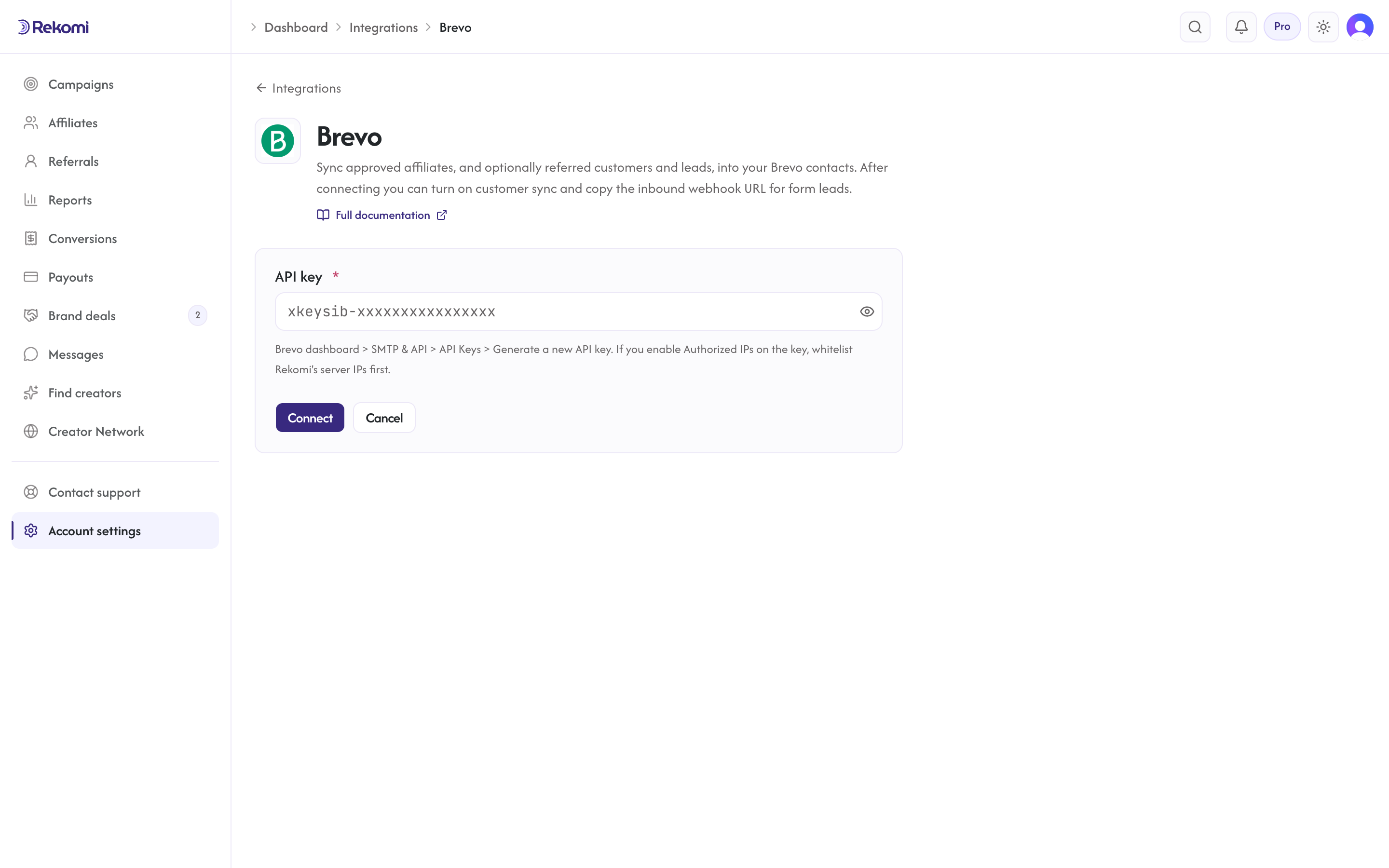
- Top-right profile menu, then SMTP & API.
- Open the API Keys tab.
- Click Generate a new API key, name it "Rekomi".
- Copy the key. It starts with
xkeysib-.
If you enable Authorized IPs on the key (optional security feature), you must whitelist Rekomi's server IPs first, otherwise the connection test returns 401.
Connecting Brevo in Rekomi
- Go to Integrations in the dashboard sidebar.
- Click the Brevo card.
- Paste your API key. Click Connect.
- Rekomi runs a test call against
GET /v3/account. - Once connected, pick a default list from the dropdown.
Tags
Brevo has no first-class tags concept on the contacts endpoint. Rekomi shows no tags input for Brevo and sends no tags (sending unknown attribute names returns HTTP 400; the safer behavior is not to send them). If you want tag-like segmentation, create a Brevo contact attribute manually (Contacts > Settings > Contact attributes) and use Brevo's segment builder.
The Rekomi affiliate system tag is therefore also not applied for Brevo.
Referred customers and leads (optional)
Turn on Sync referred customers and leads on the integration page and every sale or lead Rekomi attributes to an affiliate is written to Brevo as well, matched on email so existing contacts are updated, not duplicated. Each one carries:
- contact attributes
REKOMI_REFERRAL_LINK,REKOMI_CAMPAIGN,REKOMI_REFERRING_AFFILIATE,REKOMI_REFERRING_AFFILIATE_CODE,REKOMI_LAST_EVENT,REKOMI_LAST_SALE_AMOUNT, created on first use - no tags (Brevo has none); segment on
REKOMI_LAST_EVENT=leadorsale - Affiliates synced by the section above also get
Rekomi referral link,Rekomi campaignandRekomi affiliate statusin the same fields, so you can merge a partner's link into your emails.
Refunded, denied and fraud-quarantined conversions are never pushed, and imported historical conversions are skipped. It is off by default.
When sync fires
- Default: only
Approvedaffiliates sync. - Optional: turn on "Include applicants before approval" to also sync
Pendingaffiliates.
Per-campaign overrides
Each campaign can override the account-level configuration. From a campaign's detail page, open the Settings tab and scroll to the CRM sync for this campaign section.
Per-affiliate sync visibility
Open any affiliate's detail page. The CRM sync panel shows the per-CRM status. Resync clears prior jobs and re-fires the sync.
Troubleshooting
- HTTP 400 "duplicate_parameter", Means
updateEnabledwas missing or false on the request. Rekomi always sendsupdateEnabled: true; if you see this, contact support so we can check the request. - HTTP 400 unknown attribute, Brevo rejects unknown attribute names with 400 (opposite of ConvertKit which silently drops). Rekomi only sends FIRSTNAME / LASTNAME which auto-exist on every Brevo account.
- HTTP 403, Authorized IPs restriction. Whitelist Rekomi's server IPs on the key, or remove the restriction.
- HTTP 429, Brevo's contacts endpoint throttles around 10 req/sec. Rekomi's worker paces at 1/sec so this is rare; when hit, Rekomi honors Brevo's
x-sib-ratelimit-resetwindow (Brevo does not send a standardRetry-After). - Sync fails with 401/403 after working before, The key was revoked or an Authorized IPs restriction was added. Rekomi marks the integration "action needed" and emails you a reconnect prompt once per breakage. Fix the key, reconnect, then use Resync all on the Failed tile of the integration page.
Disconnecting
From the Brevo connect page, click Disconnect. The integration row and per-campaign overrides are deleted. Historical sync history rows are preserved for audit.
See the brevo integration overview on the marketing site for use-cases, persona fit, and unique automation patterns.