

Commission models
How Rekomi's commission tracking works, percentage vs flat fee. Per sale (one-time, set period, or lifetime recurring), per click, and per lead. Plus tiered commissions.
Rekomi gives you two commission types (how the math works) and a small set of commission models (when a commission triggers). They combine to cover every common affiliate payout pattern.
Commission types
| Type | Math | Example |
|---|---|---|
| Percentage | A percent of the invoice amount | 25% of every $99 invoice = $24.75 |
| Fixed | A set amount per sale, in the currency the sale arrives in | 50 per paid invoice ($50 on a USD invoice, 50 EUR on a EUR invoice) |
You set the type and value at the campaign level (defaultCommissionType, defaultCommissionValue). You can override the type and value per-affiliate (custom commission) and per-tier (performance tiers).
A Fixed rate is a number, not a dollar figure. It pays that many units of whatever currency the sale arrives in, so a rate of 50 pays $50 on a USD invoice and 50 EUR on a EUR invoice. If you sell in several currencies, choose Percentage so the payout stays proportional everywhere. Because a flat 50 is worth very different amounts in different currencies, a Fixed-rate sale that arrives in a currency other than your home currency is flagged to Rekomi's team (once a day per workspace) so an unintended magnitude is looked at the same day; the commission itself still pays as the rule says, nothing is withheld or re-priced automatically, so check the campaign's rate if you start selling in a new currency.
Commission models
Per sale is live for every brand today. Paying per click or per lead needs a Starter plan or above, and a campaign that pays per click, or pays nothing per sale, is invite-only. Every click and lead runs through the de-duplication, real-time IP fraud-scoring, and aggregation pipeline described below before it can be paid, with an optional per-campaign budget cap. You can also combine the three on one campaign; see Combine sales, leads and clicks.
The campaign form calls the three payout legs Sales, Leads and Clicks; the API's defaultCommissionModel field names the campaign's main one. Each leg triggers on its own event:
- Sales (pay per sale, also called CPS, cost per sale): pay when a referred customer makes a purchase. Choose a flat fee (paid in the currency the sale arrives in, as described above) or a percentage, then choose how long the affiliate keeps earning on that customer (see Recurring payouts): one time, a set period of months, or the customer's lifetime. This one model covers both one-off sales and subscription revenue share. (RevShare was the old name for a recurring per-sale percentage; existing RevShare campaigns now appear as Per sale, percentage, lifetime, with identical payouts.)
- Leads (pay per lead, also called CPL, cost per lead): pay a flat fee per qualified lead. The affiliate shares a Rekomi-hosted lead form (
/lead/{slug}); each submission passes an anti-bot challenge (Cloudflare Turnstile), email-format + disposable-domain validation, a self-lead guard, and per-affiliate de-duplication before it earns. Use for free-trial signups, demo requests, and waitlists. - Clicks (pay per click, also called CPC, cost per click): pay a flat fee per validated click. Campaigns that pay per click use a neutral Rekomi tracking link (
rekomi.link/{slug}) so the click is measured on Rekomi's side, not your server, the affiliate can't be under-counted. Clicks are de-duplicated per device, bot/anonymizer-filtered, and aggregated into commissions hourly. Rare in subscription contexts; useful for paid content or syndication deals. (Pairs with the fraud notes below.)
Most subscription products use Sales, percentage, set to lifetime recurring, with a 20-30% commission.
Legacy models. CPA (cost per action) and Hybrid were earlier model names, retained in the API for existing campaigns (they behave like Per sale). They are not offered when creating a new campaign; use Sales instead.
Combine sales, leads and clicks on one campaign
A campaign can pay for any combination of the three: sales only, sales plus leads, leads plus clicks, all three, and so on. In the campaign form, What do you pay affiliates for? is a multi-select: tick Sales, Leads and Clicks in any combination and set a rate for each. The same block lives in Campaign settings under Commission, and the form reads the whole deal back in one sentence ("Affiliates earn 20% of every payment, for the customer's lifetime, plus $5.00 per qualified lead, plus $0.10 per validated click").
How each leg pays:
- Sales pay the commission on an attributed purchase, with the commission length you choose (first payment only, a set number of months, or the customer's lifetime). Refunds claw the commission back the standard way.
- Leads pay a flat amount, in your home currency, for each qualified lead sent through the campaign's Rekomi-hosted lead form. Every submission passes the same anti-bot, disposable-email, self-lead and de-duplication checks as a lead-only campaign, and a high-risk lead is quarantined for your review instead of paid.
- Clicks pay a flat amount, in your home currency, for each validated click on the affiliate's Rekomi tracking link (
rekomi.link/{their-slug}). Clicks are fraud-scored, de-duplicated per device and day, and capped per IP and per affiliate before anything is paid. A visitor counted at the link and then counted again by your site's tracking script pays once.
The rules that come with combining them, so you know exactly what you are agreeing to pay:
- Paying per click makes the campaign invite-only. So does paying nothing per sale (a lead-only or click-only campaign). Public sign-up, auto-approve and the creator-network listing switch off, and you invite each partner and set their rate. A campaign that pays per sale, with or without a lead reward, can stay public.
- Per-click and per-lead pay need a Starter plan or above, whatever else the campaign pays.
- The campaign budget caps click and lead spend only. Once the campaign's click and lead rewards reach the cap, new clicks and leads stop earning. Sale commissions pay on real revenue and are never counted against the cap.
- Partner-specific rates apply to one leg. Invite rates, partner groups, performance tiers and coupon rates override the campaign's main rate: the sale commission on a campaign that pays per sale, the per-click amount on a click campaign, the per-lead amount on a lead campaign. The other legs pay the same flat amount to every partner, and the form tells you which leg is which.
- Click and lead rewards are never refunded. There is no invoice to reverse, which is why they are validated before payment rather than clawed back later.
Affiliates see every leg on their invite, on their campaign page and in their earnings ledger. A campaign that pays per click shares the Rekomi tracking link, which counts the click at Rekomi's edge and then sends the visitor on to your site with the affiliate's code, so sales through it still credit them. A campaign that pays per lead alongside sales or clicks also shows the affiliate a lead-form link.
For API and MCP callers, defaultCommissionModel names the campaign's main leg (Cps, Cpc or Cpl) and defaultCommissionType / defaultCommissionValue carry its rate. leadBountyCents adds a per-lead amount to a sale or click campaign, clickRewardCents adds a per-click amount to a sale or lead campaign, and saleCommissionType / saleCommissionValue add a sale commission to a click or lead campaign (its length follows recurringMonths). See the API reference.
Fraud and quality
Because paying per click and per lead (CPC and CPL) rewards an action with no purchase behind it, Rekomi filters those clicks and leads before any commission is minted:
- Neutral measurement. Paid clicks are counted at Rekomi's edge (
rekomi.link) before the visitor reaches your site, so the number you pay on isn't controlled by either party alone. - De-duplication. At most one payable click per device per day per affiliate; at most one paid lead per (campaign, email), including plus-aliases (keyed on the campaign, not the affiliate, so two affiliates cannot both be paid for the same person).
- Bot + anonymizer filtering. Cloudflare bot score and (when enabled) datacenter/VPN/proxy detection drop low-quality clicks. The lead form adds a Cloudflare Turnstile challenge, email-format + disposable-domain validation, and a self-lead guard.
Click and lead rewards (CPC and CPL) are not refundable the way sales are, there is no invoice to reverse, so quality is enforced up front rather than clawed back later. To stop a bad actor, reject or ban the affiliate from the Affiliates tab.
Paying per click or per lead requires a Starter plan or above, on any campaign shape.
Tiered commissions
You can override the default with performance tiers based on revenue brought in by each affiliate. Each tier has:
minRevenueCents: the threshold (cumulative referred revenue) where this tier kicks in, in minor units of your home currency (the tier editor shows it in that currency)commissionType: Percentage or FixedcommissionValue: the percent, or the set amount in the sale's currency
The highest-matching tier wins. Tiers are configured at /dashboard/campaigns/{id} in the Commission tab.
Example:
- Tier 0 (default): 20% recurring
- Tier 1 (after $10,000 referred): 25% recurring
- Tier 2 (after $50,000 referred): 30% recurring
An affiliate who has driven $12,000 in referred revenue would fall into Tier 1 (25%).
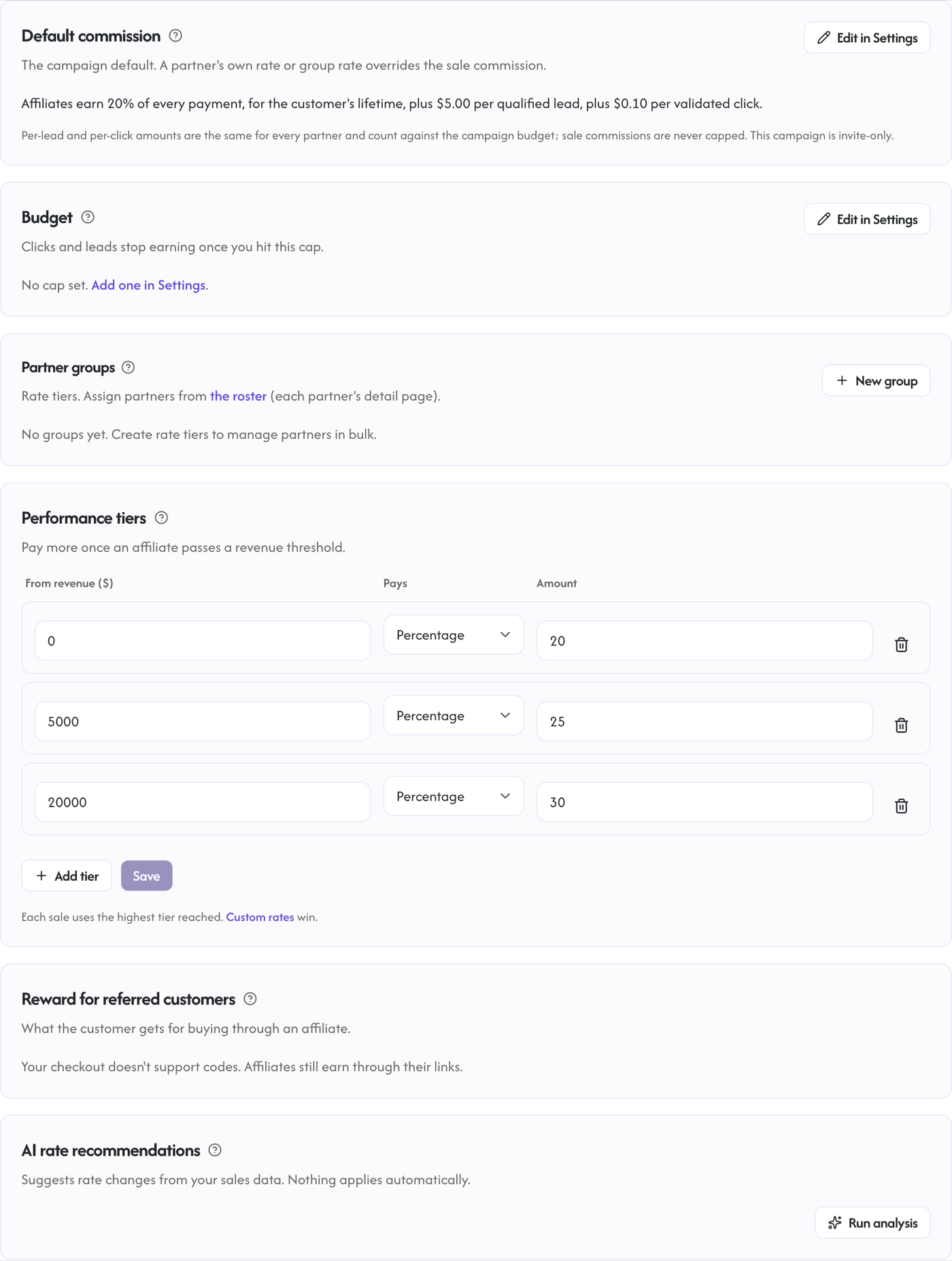
Tier rates apply automatically, on every live rail, including sales reported through the S2S API. At each sale, the affiliate's cumulative referred revenue in the campaign selects the highest tier they have crossed, and that rate is used for the sale (never retroactively re-pricing older sales). A per-affiliate override or partner group rate still wins over any tier.
When sales arrive in more than one currency, the ladder reads like this:
- Thresholds are typed in your home currency. A sale in your home currency is compared against the threshold as written.
- A sale in another currency is compared against the threshold converted into that currency at the reference rate for the day of the sale. A $1,000 threshold on a USD workspace is 147,000 JPY at 147 yen per dollar and C$1,360 at 1.36, so a JPY affiliate reaches Tier 1 once their JPY sales pass 147,000 JPY, not 1,000 JPY.
- If Rekomi holds no rate from the last 7 days for that currency, the sale pays the untiered rate (the affiliate's own override or group rate, or the campaign default) rather than a tier picked at the wrong number, and our team is alerted once a day per workspace so it is put right when rates resume.
- Ladders are per currency: an affiliate's revenue in one currency counts only toward their tier in that currency. Their EUR sales never qualify their USD sales, and the other way round.
Partner groups
Assign affiliates to a named rate group from their detail page to manage rates in bulk; groups live in the same Commission tab as the tier editor. A partner's own custom rate beats their group rate; a group rate beats any performance tier.
Per-affiliate overrides
You can override the commission for a specific affiliate without changing the campaign default or the tiers. From the Affiliates tab on a campaign, click an affiliate, and set their custom commission. Use this for partnerships you negotiate one-off (a marquee creator, an exclusive deal, an introductory offer).
Per-product rates
On rails that report what was bought (Shopify, Stripe, Gumroad, Lemon Squeezy, Polar, Creem, Dodo, Mollie when the payment carries order lines, and Braintree subscriptions), you can also set a commission rate for a specific product from the Products tab's Product commission rates card. This slots into the precedence chain within a sale: the affiliate's base rate resolves first (per-affiliate override, then group, then tier, then campaign default), and then, line by line, any line matching a product with its own rate uses that product rate instead, while the rest of the sale's lines still use the affiliate's base rate. See Per-product commissions.
The same Products tab also holds Assigned partners: a product assigned to a partner is paid to that partner on every sale, whatever link, coupon or click brought the buyer, and that sale is then priced by the ladder above (product rate first, else override, group, tier, or campaign default). Unassigned products in the same order attribute as usual. See Assigned partners.
One rate sits above all of these: a coupon's own commission rate. When a sale is attributed to a coupon code whose coupon (or the choice the affiliate picked) carries a commission rate, that rate wins outright, over per-affiliate, group, tier, campaign default, and per-product rates alike, and the per-product blend is skipped for that sale. It is the most specific statement of intent there is: you set what that exact code pays, and (for choice coupons) the affiliate actively picked it. Recurring caps and delay windows still apply on top; a coupon rate never revives a capped or delayed recurrence.
Give a free month instead of cash
For a refer-a-friend campaign whose referrers are your own customers, the Sales leg can reward with a free month on your product instead of a cash commission. When a referred friend pays their first invoice, Rekomi applies a credit on your own billing platform, sized from the referrer's plan (or a fixed amount you set), and it comes off their next invoice. Referrers never need a payout method or a tax form, and these campaigns pay for sales only, once per new paying friend. Works on Stripe (through the Rekomi app for Stripe), Chargebee, Recurly, Paddle, Braintree, Lemon Squeezy, Dodo Payments and Mollie, Starter plan and above. See Free month rewards.
What about refunds
Commissions are not paid on refunded invoices. A partial refund claws back only its proportional share of the commission (a 40% refund claws back 40% of the commission), and the sale only moves to Refunded status once cumulative refunds cover the full invoice; a full refund reverses the whole commission right away. If the commission had already been paid out, nothing is netted against the next payout run; your workspace admins are notified, and you reverse that commission, for the refunded share, from the payout's Detail page (see Reversing a paid payout).
See Tracking and attribution for refund timing details.
Recurring payouts
For Per sale campaigns, the Commission section of the campaign form has a "How long affiliates earn per customer" control with three choices:
- Lifetime: earn on every renewal, forever. The default.
- For a set period: earn on every payment in each customer's first N calendar months, counted from their first payment, then stop. Twelve months is twelve months whether the customer pays monthly or yearly.
- One time: one commission per new customer. Their first subscription payment earns; renewals do not, and a cancel and resubscribe does not earn again. One-off orders with no subscription (a store checkout) always earn.
How the set period is measured, in detail: the clock starts on the date Rekomi recorded the customer's first successful payment with you, whichever subscription or order it came through (the payment date, not the service period the payment covers), and every later payment by that customer dated inside the window earns commission (a skip-the-first-N-invoices setting, below, still applies on top of the window). The window closes three days before the N-month boundary, so a renewal your billing platform charges a little early for the next period is not paid by accident. With 12 months set, a monthly subscriber earns on their first 12 payments (the thirteenth, due at the anniversary, falls outside), and a yearly subscriber earns on the first annual payment only, because the anniversary renewal lands on the boundary. Plan changes on the same subscription (an upgrade, downgrade, or a prorated charge for the change) are further payments on that subscription: they earn commission on the pre-tax amount of that charge while the window is open, and they never restart the clock. The window follows the customer, not the subscription: if a referred customer cancels and later comes back under a new subscription, or a plan change replaces their subscription with a new one, they stay inside the same window, and once it has closed nothing further pays that affiliate for that customer. This applies to one-off orders too: a returning customer's repeat orders earn commission only inside their first N months. Rekomi recognises the returning customer by the customer id your billing platform sends with each subscription payment; a payment that carries no customer id falls back to the subscription id, and a one-off order that carries neither (a guest checkout, for example) is treated as that customer's first payment. If the customer later buys through a different affiliate's link or code, that affiliate's own window starts from the first payment attributed to them.
Two campaign fields back this control:
recurringMonths: not set (null) = lifetime (pays every renewal);0= one time (no renewals paid); N = each customer's first N calendar months. (The control appears whenever the campaign pays per sale, including a click or lead campaign with a Sales leg; it is hidden on campaigns that pay nothing per sale.)recurringDelayInvoices(default0): skip the first N invoices before paying renewal commission. Useful if your product has a high first-invoice refund rate or a discounted first month.
These settings live on the campaign, not on the commission tier.