

Getting paid
When the money lands, methods, and what to do if a payout fails.
/a/payouts is your payout history. Every batch a brand has run that included you shows up here, with the status, the method, and the amount.
What you see
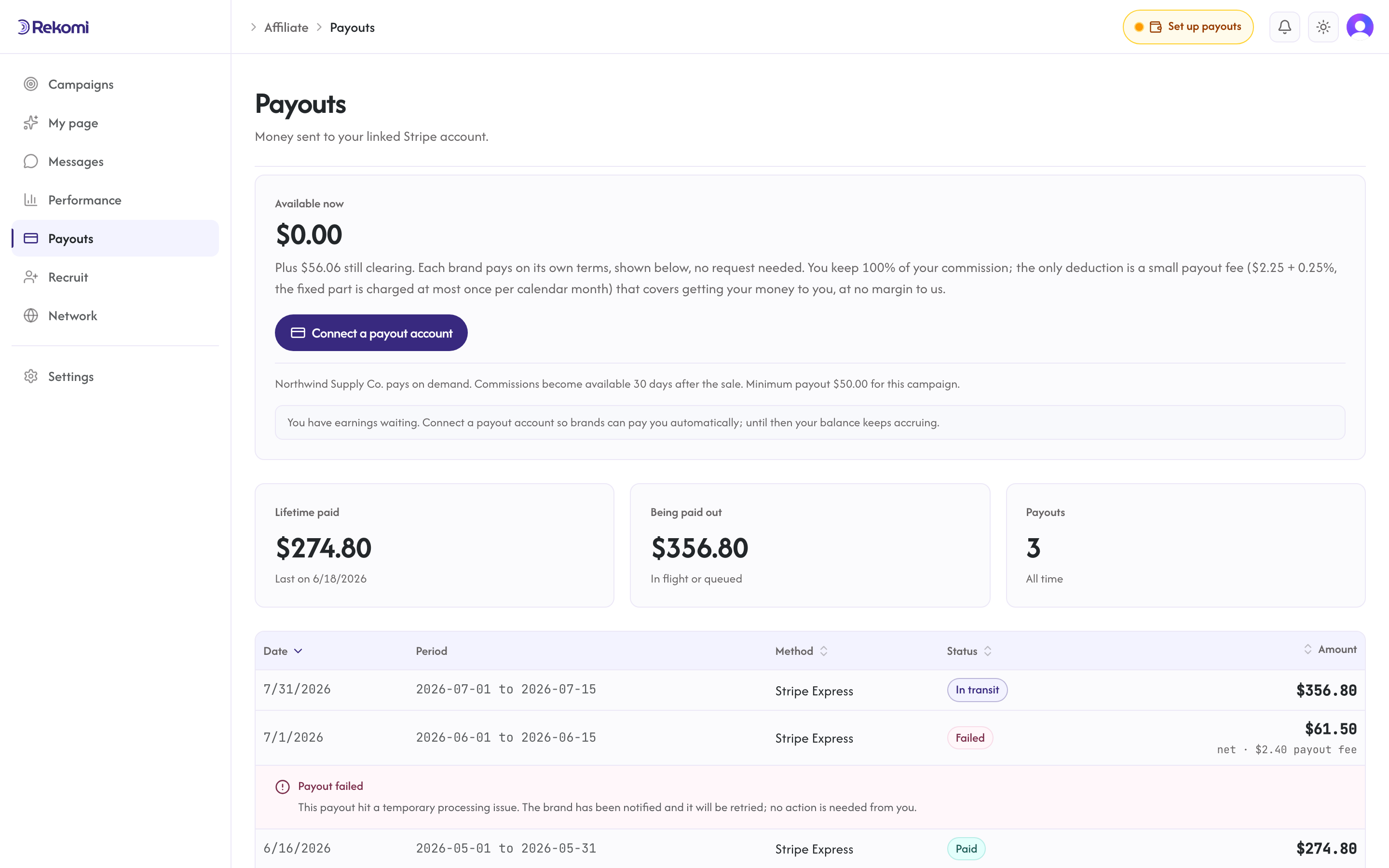
Commission payouts and deal releases both land here; a deal release is a normal payout row with the deal's name in it.
Columns in the payout table:
- Date: when the brand initiated the payout.
- Period: the date range of conversions included (e.g., "Apr 1 - Apr 30").
- Method: Stripe Express, bank deposit, or PayPal, determined by your payout country (see Payout countries).
- Status: In transit (created or on its way), Paid, or Failed.
- Amount: what lands in your account for this batch, shown net of the withdrawal fee (see below), in the currency the brand pays in.
Each row has a Breakdown link under the amount. It expands the payout's line items: what you earned on each commission in its native currency, the mid-market rate it converted at and the date of that rate (lines already in USD say "no conversion"), and any amount reversed after a refund. Payouts created before line items were recorded have no Breakdown link. A failed payout also shows its failure reason inline under the row.
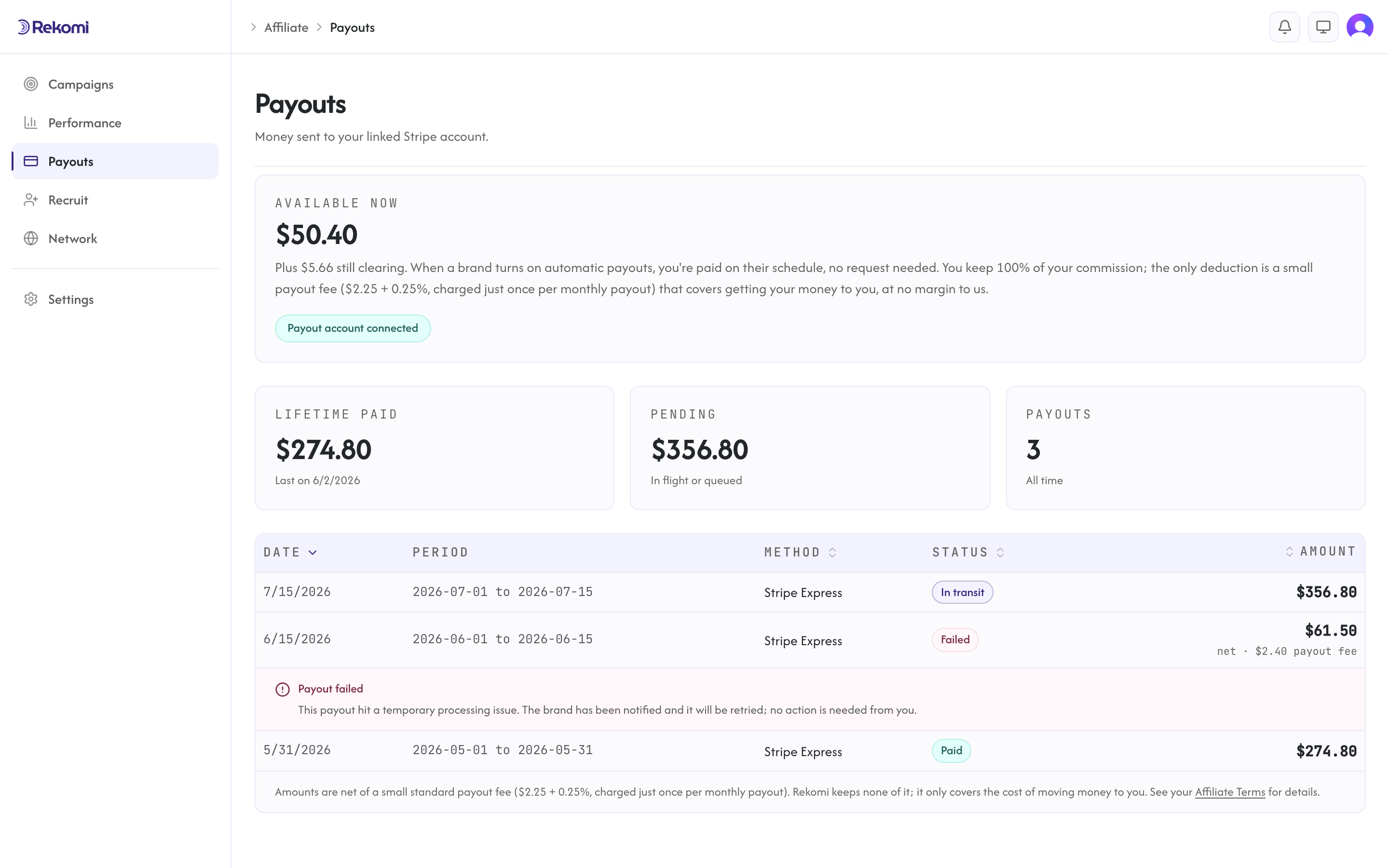
The table shows 25 rows per page and covers your 200 most recent payouts.
Withdrawal fee
You keep 100% of your commission. The one deduction Rekomi makes is a small standard withdrawal fee. For Stripe payouts, that fee is a flat $2.25 plus 0.25% of the payout. It covers the conventional cost of moving money to you (Stripe's per-account and per-payout charges) and handling the tax paperwork, and Rekomi takes no margin on it. So a $500 payout arrives as $500 minus ($2.25 + $1.25) = $496.50.
For bank-deposit payouts, the withdrawal fee is the exact cost of the international transfer: $1.50 plus a small percentage that depends on your country (for example about 2% to the Philippines, 1.75% to India or Türkiye), passed through with no Rekomi margin. So a $500 payout to the Philippines arrives as roughly $488.70 in your local currency, and your bank deducts nothing further.
For PayPal payouts, the withdrawal fee is 2% of the amount sent, capped at $20, charged by Rekomi (exactly PayPal's own sending cost). PayPal deducts nothing on arrival: the amount you see is the amount that lands in your PayPal balance.
The flat $2.25 is charged just once per calendar month, mirroring Stripe's once-a-month account charge. If you're paid more than once in the same month, every payout after the first carries only the 0.25% and no $2.25, so getting paid more often never costs you extra.
The fee is the affiliate's standard pass-through cost; it is separate from the platform fee the brand pays Rekomi (3% of the payout, 2.5% on Enterprise), which never comes out of your earnings beyond this withdrawal fee. Your dashboard shows pending and paid balances; the amount that reaches your account is always net of the withdrawal fee.
How payouts work
Brands run payouts from their dashboard, either on demand or on an automatic daily, weekly, or monthly schedule they configure. For an on-demand batch, the brand picks which conversions to include (typically every payable balance for affiliates they want to pay) and runs it; automatic runs pay every eligible balance on the schedule. Either way, payouts settle to your connected Stripe Express account, straight to your bank as a local-currency deposit, or to your PayPal account, depending on your payout method.
Some brands are new to Rekomi and not yet verified; their runs dispatch 7 days after their funding lands, and a small number of runs are checked by Rekomi before they go out. Your payout page shows the expected date either way, and you are never asked to do anything about it.
Each batch creates one payout record per affiliate, settled in USD (commissions earned in other currencies convert at the most recent published mid-market reference rate available when the payout runs, and the native amount, the applied rate, and the rate's date are recorded on the payout). Yours appears in /a/payouts immediately with the status In transit.
Payout reviews
Rekomi checks every affiliate account automatically before money moves, and a small number of payouts are looked at by a person at Rekomi before they are sent. The check only ever affects money movement: your links, tracking, and commissions keep working, and nothing is forfeited while a payout waits. A held commission stays yours and is paid once the review ends.
When a payout of yours is affected, your payout settings (/a/settings, under Payout method) say so in plain words. You will see exactly one of these:
- "Your first payout will be sent on or after {date}. There is nothing you need to do." A short waiting period on a first payout after you connect a payout method.
- "Your payout is being reviewed by Rekomi before it is sent and will be released by {date} unless we contact you. There is nothing you need to do." A review with a release date already set.
- "Your payout is being reviewed by Rekomi before it is sent. We will email you if we need anything from you." A person at Rekomi is looking.
- "Please confirm who you are with a quick ID check so we can send your payouts." This comes with a Confirm my identity button. The check runs on Stripe Identity with a photo of your government ID and a selfie; Stripe holds the images, and Rekomi keeps only the outcome and the name on the document.
- "Rekomi needs to review your account before a new payout method can be added. We have been notified and will look shortly." Shown when adding a new payout method is paused pending a review. Everything you already set up keeps working.
Under every one of these there is an Ask Rekomi to look button. It opens a short form where you can add a note, and a person at Rekomi then reviews your account and emails you. You can also write to support@rekomi.com. A reviewer can change every outcome of the automatic check; nothing in it closes an account or reverses a commission on its own.
Brands see none of the detail. On their side, a payout that is waiting on Rekomi simply reads "Payout under review by Rekomi", and the rest of their run goes out as normal.
Payout terms
Near the top of /a/payouts, each brand's payout terms are stated in one plain line: how often they pay (on demand, daily, weekly, or monthly and on which day), how long after a sale a commission becomes available (the brand's refund-hold window), and any minimum payout. When one brand runs campaigns with different terms, each campaign gets its own labeled line. The same terms also appear on each campaign's page, and they are the same terms the brand sees stated on their own payouts page, so both sides read the same rules.
Status flow
- In transit: the payout has been created or the transfer is on its way, waiting for settlement on the payment provider's side.
- Paid: settled. The money is in your account.
- Failed: error. Check the failure reason shown under the row.
For Stripe Express: settlement is typically 1-3 business days for U.S. domestic, 3-7 days for international.
For bank deposits: the money arrives in your local currency, typically within 1-7 business days depending on your country.
What if a payout fails
Common causes:
- Your Stripe Connect account got suspended (account-level issue).
- A dispute or KYC hold on your side.
- A bank-level reject (closed account, fraud flag).
When a payout fails, the brand is alerted by email, and the failure reason appears on your /a/payouts page under the failed row.
To resolve:
- Read the failure reason shown under the failed row. It usually tells you what to fix.
- Fix the underlying issue. Reactivate your Stripe Connect account, contact your bank, etc.
- Ask the brand to retry. They click Retry in their Failed tab. The payout goes back to In transit.
One payout method
You have one payout method per account, determined by your country and locked once you connect. That method is Stripe Express in the 42 countries Stripe supports (including the US), a direct bank deposit in 60 more (you add your bank details once on a secure Stripe-hosted form), and PayPal in 30 more. The method is selected automatically from your country; you do not choose it by hand. It applies to every campaign you join, so there is nothing to pick per brand and no default to set. If your country's payout method ever changes, contact support. See Payout countries for which method covers your country.
Across multiple brands
If you are an affiliate for multiple brands, each brand runs their own payout batches independently. You see one row per batch in /a/payouts; the rows do not name the brand today, so match them by date and amount. Every batch pays to your single account-level payout method.
Currency
Your earnings are recorded in the currency the brand's sales come in (usually USD), and you can see those native amounts on every commission. Payouts settle in USD: when a batch runs, any non-USD earnings convert at the most recent published mid-market reference rate available when the payout runs (never more than seven days old), with no Rekomi markup. The payout records the native amount, the rate, and the date that rate was published for every commission, and each row's Breakdown shows them. That published date is often the previous business day rather than the payout date itself, and the recorded date is the one that governs. What arrives on your side then depends on your payout method:
- Stripe Express: the payout arrives in USD. If your bank account is in another currency, Stripe converts it at Stripe's own exchange rate, which includes Stripe's currency-conversion charge; Rekomi adds nothing to it. Where your bank can receive USD, adding a USD bank account in your Express dashboard avoids the conversion.
- Bank deposit: Stripe converts at send, so the deposit arrives already in your local currency (LKR in Sri Lanka, PHP in the Philippines, INR in India, and so on). The conversion is part of the at-cost withdrawal fee above; there is no Rekomi margin on the rate, and your bank has nothing left to convert.
- PayPal: funds arrive in USD in your PayPal balance with no receiving fee. If you convert them to another currency, or your country's PayPal account holds only the local currency and converts automatically, PayPal applies its own exchange rate, which includes PayPal's conversion charge; Rekomi adds nothing to it.
Withdrawal
For Stripe Express: by default, Stripe handles auto-payout to your bank on a 2-day rolling schedule. You can change this to manual payout from your Stripe Express dashboard.
For bank deposits: there is nothing to withdraw; the money lands directly in your bank account in your local currency.
For PayPal: funds land in your PayPal balance, and you withdraw to your bank through whatever options PayPal offers in your country.
Tax reporting
A tax form is required before your first payout on every rail: a W-9 if you are a U.S. person, a W-8BEN or W-8BEN-E otherwise. Upload it once from your payout settings; until it is on file, brands see "Tax form missing" beside your name and your balance waits. Rekomi never deducts withholding from a payout.
For U.S. residents earning at or above the IRS reporting threshold in a calendar year ($2,000 for 2026 payments): Rekomi (Uplup Inc.) is the payer of record (the entity that reports and files your tax form) and issues your 1099-NEC, delivered through Stripe in January. See Tax forms.
For non-U.S. residents: your W-8BEN or W-8BEN-E is the relevant document and stays valid through the end of the third year after you sign it.
Export
There is no CSV export button on /a/payouts today. For end-of-year totals, your 1099-NEC (if you are owed one) reports payments made to you during the year, not commissions earned or accrued, and you can also ask the brand to pull payout data via their API.