

Apply to the curated network
How brands get vetted into the Rekomi Network for creator-driven recruitment.
The Rekomi Network is a vetted pool of creators on one side, and a vetted pool of subscription brands on the other. Network creators browse the approved campaigns in their dashboard and apply with a pitch.
Listing works today; creator discovery is launching soon. Submitting a campaign listing and the human review described here are live now. The creator-side browse surface, where approved campaigns appear to matching creators, is the part still rolling out. In the meantime you can run public application pages and recruit affiliates directly (see Recruit affiliates).
Whether a campaign is listed in the network is controlled per campaign, and every listing goes through review before it can surface to creators. Listing also needs two things in place on your account: an active paid plan (a trial does not count yet) and a funding source for paying affiliates, which is either a bank debit on file or bank-transfer funding enabled under Settings, Billing, Payout funding source. While your account is still unverified, bank-transfer funding is the option that counts. Until both are in place the network switch in a campaign's settings cannot be turned on and says why, and new campaigns start private, so you turn the switch on when you want a campaign listed. A campaign that is already listed stays listed and is paused instead (see Pause your network listing below). Affiliates who find you in the network need to know they will be paid.
Separate from campaign listings, you can already book individual creators today: browse vetted creators' public pages in /dashboard/creators and pay them through escrowed deals. See Booking creators with deals.
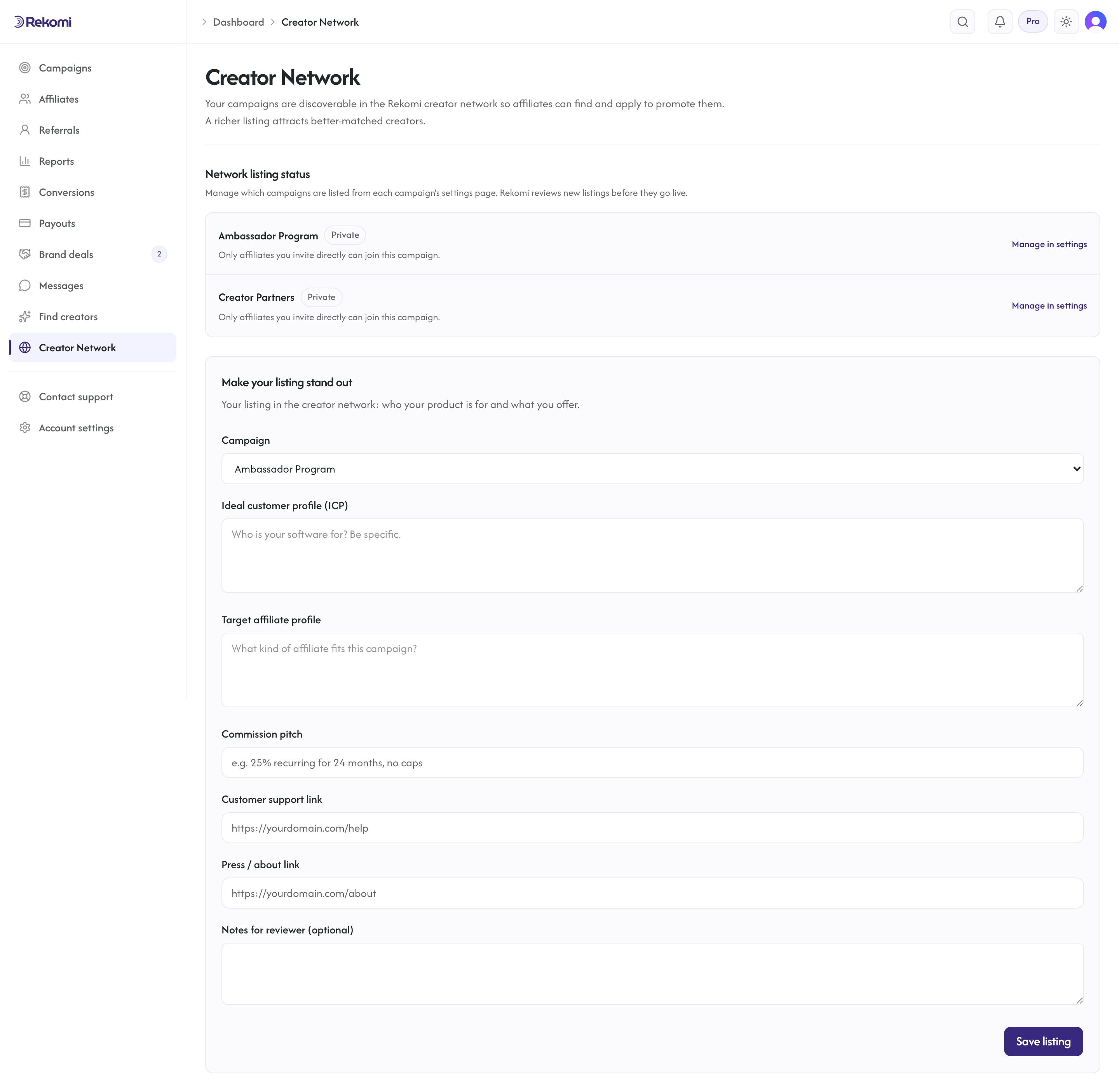
Apply
The listing itself is controlled per campaign: the network visibility setting lives in each campaign's settings. /dashboard/network is where you fill in the listing details and watch review status. The form appears once your account has an active paid plan and a funding source; until then the page says what is missing and where to set it up. Fill out:
- Campaign: pick which of your campaigns you are applying. Each campaign gets a separate network listing if you want.
- ICP description: who is your ideal customer? Concrete persona, not "everyone". Example: "Solo founders building B2B SaaS, $0-$50k MRR, mostly technical, marketing-curious".
- Target affiliate profile: who is the creator you want? Example: "Indie hackers with active Twitter or YouTube audiences in the early-stage SaaS space".
- Commission pitch: in a sentence or two, why is your commission attractive? Example: "30% recurring, no cap, 60-day cookie. Customers pay $99-$499/mo so creators earn $30-$150 MRR per referral".
- Support link: where creators get help (your support docs, your Slack invite, your email).
- Press link: your latest coverage. Useful for creator vetting. (Optional but recommended.)
- Notes: anything else (your internal numbers, unique positioning, restrictions).
Submit. Status flows through: Submitted -> Approved or Rejected. While submitted, the listing shows as Pending approval.
What the curator looks at
Rekomi curators are humans. They evaluate:
- Does the product match the network's positioning (subscription products with clear value)?
- Is the commission competitive?
- Is the company real (not a scam, not a one-week-old domain, etc.)?
- Are the terms fair (no clawback traps, no shadow throttling)?
- Is the support story credible?
Approvals typically land within 1-3 business days. Rejections come with a written reason; treat one as a request for changes, since revising and saving resubmits for a fresh review.
What happens after approval
Your campaign shows up in /a/network, the affiliate-side browse page, where creators filter by category and search. Your target-profile text helps the right creators self-select; it is not an automated matching filter. Network creators see:
- Your brand logo and campaign name, description, commission pitch
- Real commission terms: rate, whether it's recurring, and the cookie window
- Your support link, your press link
- An instant-approval badge, when your campaign auto-approves
- A trust line showing whether you have a verified payout method and a history of sent payouts
- A "Apply to this campaign" CTA
When they apply, the application lands in your normal affiliates queue at /dashboard/affiliates under the Pending tab. You approve or reject as you would any other application; the network just upstreams the introduction.
Rejection
If your campaign is rejected, you see the reason inline on /dashboard/network. Common reasons:
- Commission below the typical range for your category
- Terms with clawback traps that hurt creators
- Product too early-stage to support partner success
- Cannot verify your company is legitimate
To resubmit, update the listing details and save: saving a rejected listing resets it to Submitted for a fresh review.
Pause your network listing
There is no separate withdraw button. To pause a listing, set the campaign's network visibility to Private in that campaign's settings. New creator applications stop immediately. Existing approved affiliates continue earning under your campaign; only the network surfacing pauses.
A listing can also pause on its own. If your account loses its funding source or your plan stops being active, the Creator Network page at /dashboard/network marks the campaign Paused and says what to restore; the campaign's own network status card says the same once the creator network is open. The campaign stays listed and approved, and its network switch stays on. Creators stop seeing it in /a/network while funding or the plan is missing. Once both are back in place the listing shows again on its own, with no new review.
Network application status
/dashboard/network lists each submission with its status, and shows the rejection reason inline when a listing is rejected. Edit the listing form and save to resubmit. A listing shown as Withdrawn was taken out of review because the account had no funding source or active plan at the time; listing the campaign again once both are in place submits it for review again.