

Reports
The one analytics surface, KPIs, trends, breakdowns, and CSV exports, with four deep reports on its pill nav.
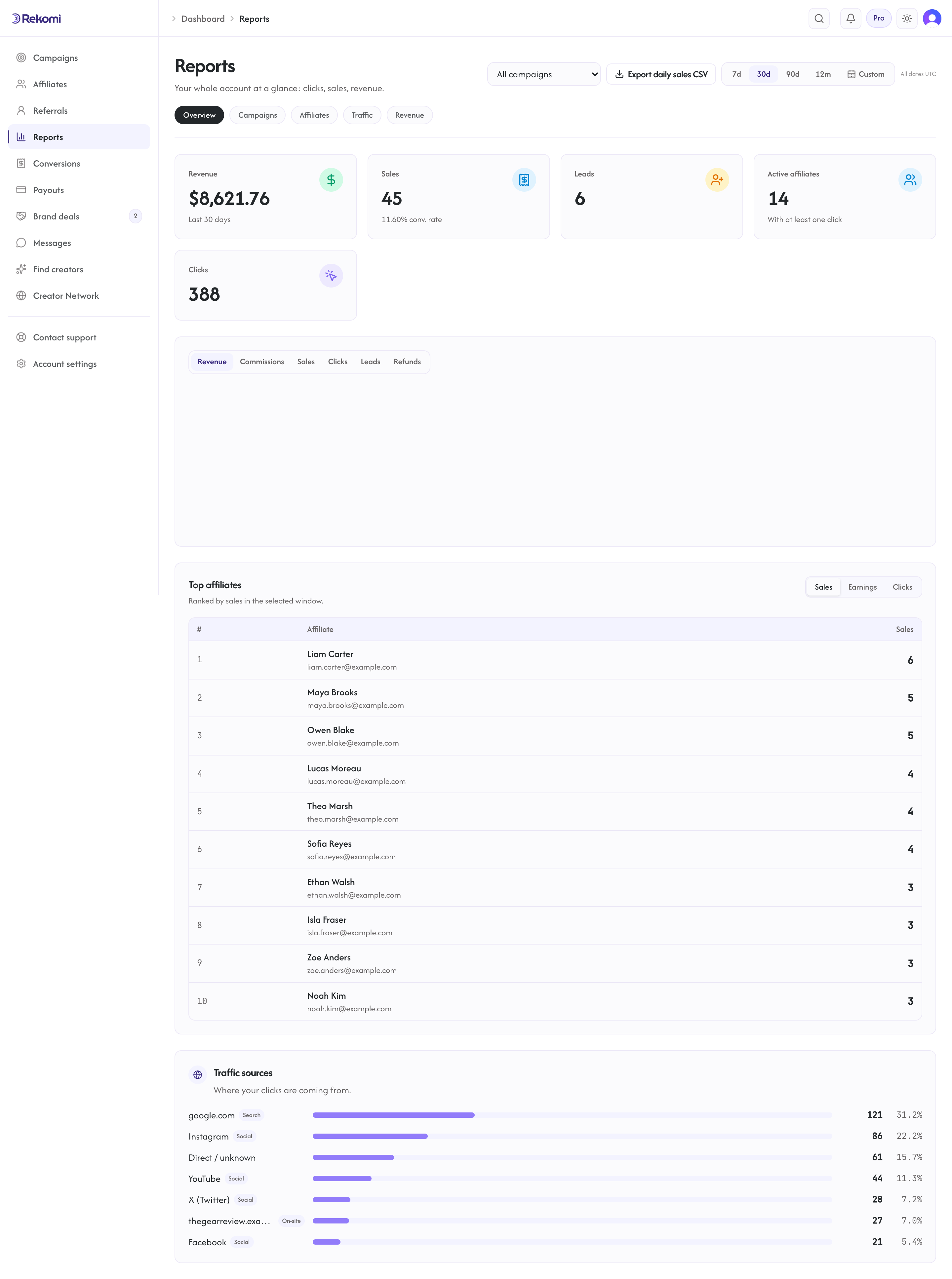
Reports at /dashboard/reports is your one analytics surface: performance KPIs, the trend chart, leaderboards, and breakdowns covering sale origin, geography, devices, funnels, and recurring revenue. The Conversions page is the raw event log; Reports is the rollup. A pill nav at the top hops between the overview and four deeper reports:
- Overview: the whole program at a glance: clicks, sales, revenue.
- Campaigns performance: every campaign side by side.
- Affiliates performance: who drives clicks, sales, and revenue.
- Traffic and sources: where clicks and sales come from.
- Sales and revenue: funnels, timing, repeat buying, and recurring revenue.
Date range and campaign filter
Every view shares the same header controls:
- Date range: 7d, 30d, 90d, or 12m presets, plus a Custom range where you pick from and to dates.
- Campaign filter: all campaigns, or one.
Both live in the URL (?range and ?campaign), so your selection survives switching between views, and a report link you share with a teammate opens with the same scope. The campaign filter applies to everything on the page, KPI cards and charts included; no section shows whole-account numbers while a campaign is selected. Two natural exceptions: Campaigns performance always lists every campaign side by side (that is its job; your selection is still kept for the other reports), and the columns in Affiliates performance are lifetime totals, which the page says itself; the date presets do not apply to that table.
Overview
Up to five KPI cards over the selected window:
- Revenue: gross referred revenue, converted to your home currency.
- Sales: how many referred sales landed, with the conversion rate. Denied and refunded sales are excluded, as are leads and click rewards.
- Leads (shown only when you capture leads): signups captured in the window.
- Active affiliates: affiliates with at least one click in the window.
- Clicks: tracked clicks in the window.
Below the cards: the tabbed trend chart (Revenue, Commissions, Sales, Clicks, plus Leads and Refunds; money tabs plot in your home currency), a Top affiliates leaderboard (each row links to the affiliate's detail page), a Traffic sources ranked bar list showing where clicks happened, grouped by channel (paid ads are named by network from their ad click IDs, and search, social, email, on-site navigation, and bot traffic are all told apart from plain referrer domains), and an uncredited-activity panel showing real sales that resolved to an affiliate who could not earn (it hides itself when there is nothing to show). The Export daily sales CSV button downloads the window's sales, honoring the campaign filter.
Campaigns performance
Every non-archived campaign side by side in a sortable table, so you can compare which campaigns actually drive clicks, sales, and revenue.
Affiliates performance
A stats table of your affiliates: who drives clicks, sales, and revenue. These columns are lifetime totals, not window-scoped.
Traffic and sources
Traffic sources (the same channel-grouped breakdown as the Overview card, with counts and percentages), plus four breakdowns: Sale origin (how sales were attributed: link, coupon, customer match, server, imported), Geography (clicks and sales by country), Devices (desktop, mobile, tablet), UTM performance (which utm_source and utm_medium values drive sales), and Sub-IDs (the channel tags affiliates add to their links, like ?sub=yt, with clicks and sales per tag; sales count on every billing provider because the tag is stored on the sale itself, see Sub-IDs).
Sales and revenue
The money-side breakdowns: earnings per click, average order value, and refund rate KPIs (plus lead-funnel KPIs when you capture leads), the click-to-sale Funnel, Time to convert (how long after the first click customers buy), Attribution (coupon against link), Top products (your best sellers by referred revenue, where your payment provider reports what sold), Customers (new against returning buyers), a day-of-week and hour-of-day activity heatmap, and Recurring revenue (renewal commissions and MRR for subscription campaigns).
Programmatic access
Everything on this page reads live queries; there is no overnight aggregation delay. The same numbers are available via the API: /api/metrics/summary, /api/metrics/timeseries, /api/metrics/leaderboard, /api/metrics/traffic-sources, and /api/metrics/export.csv, plus /api/metrics/insights/* for the breakdown sections, including top-products. For raw rows, use GET /api/conversions (see the developer reference).
Affiliates get their own mirror of the overview at /a/performance scoped to their own stats, so the numbers you discuss with a partner always agree.