

Booking creators with deals
Pay a creator upfront with escrow, optionally with a commission tail, end to end.
A deal books a creator for a flat amount (a dedicated video, a newsletter feature, anything on their page) with the money held in escrow by Rekomi until you confirm the work. Optionally, a commission tail keeps paying them a percentage of tracked sales afterward, so the creator stays invested after the flat fee.
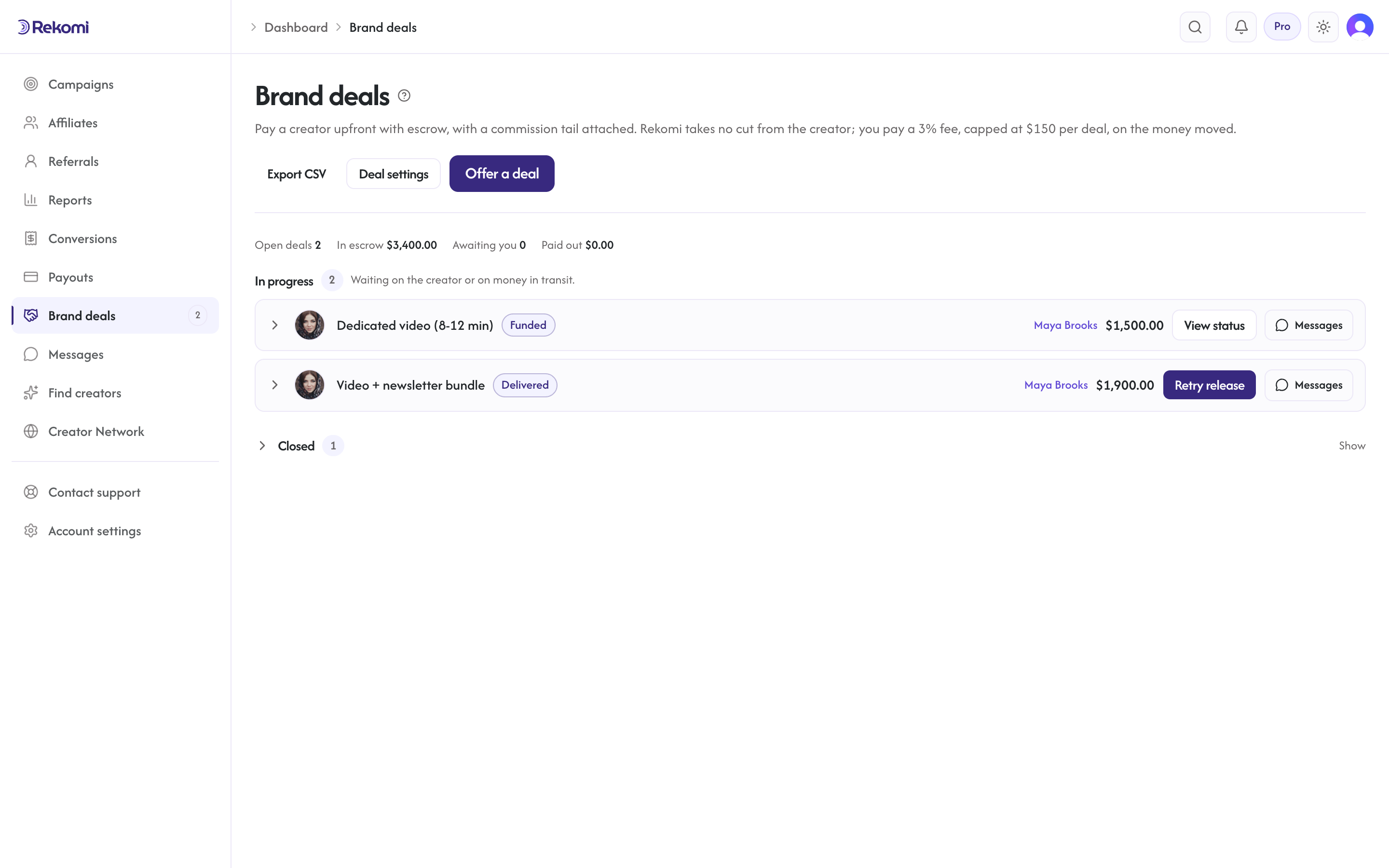
Deals live under Brand deals in the sidebar, at /dashboard/deals (the same name the creator side uses for this rail). Rekomi takes no cut from the creator; you pay a capped service fee on the money moved, itemized before you pay:
- Deals you source yourself (offering by email, accepting a creator's proposal link or email, their work-with-me form): your plan's rate (3%), minimum $5, capped at $150 per deal. A $20,000 deal costs you $150.
- Creators you discover in the Rekomi directory: your first funded deal with that creator carries a one-time 10% match fee, capped at $500. Every deal with them after that, forever, is the capped 3% above. The fee preview and invoice say which one applies before you pay.
The full schedule, with worked examples, is on the brand deals fee sheet.
Finding creators
/dashboard/creators is the directory of vetted creators with public pages: search by name, niche, or channel, view their page, and hit Offer a deal to start with their identity pre-filled. You can also offer a deal by email to any creator, on Rekomi or not: an address with no Rekomi account gets the deal terms by email with an invite to create a free creator account, and once they sign up with that address the deal is waiting for them to accept, decline, or message you (the deal card shows "Invited to Rekomi" until then). Or accept a proposal a creator sends you, as a link or an email. A proposal page shows the creator's pitch, their terms, and a printable invoice with its own number for your books; accepting takes you straight to funding the escrow, and the invoice link keeps working afterwards with its status updated as the deal is paid and released. When a creator sends a proposal to the email on your Rekomi account, it also rings your notification bell and appears under Invites for you at the top of /dashboard/deals, so you never have to dig it out of your inbox. The proposal page tells you which brand the deal will be added to; if you run several brands, switch to the right one in the dashboard before accepting. It also shows the Rekomi platform fee up front (standard 3% of the deal amount, capped at $150, added when you fund the escrow) and the escrow rule: your payment is held by Rekomi and released to the creator only after you mark the work complete.
Accepting a deal never requires a subscription. A brand that only wants to work with a creator gets deals-only access: create a free brand account, accept the proposal, fund the escrow, and manage the deal and its messages from /dashboard/deals, all without picking a plan or starting a trial. A plan is only needed to run your own affiliate program (campaigns, tracking, and payouts to your affiliates); the deals page links to the plan picker whenever you want to add that.
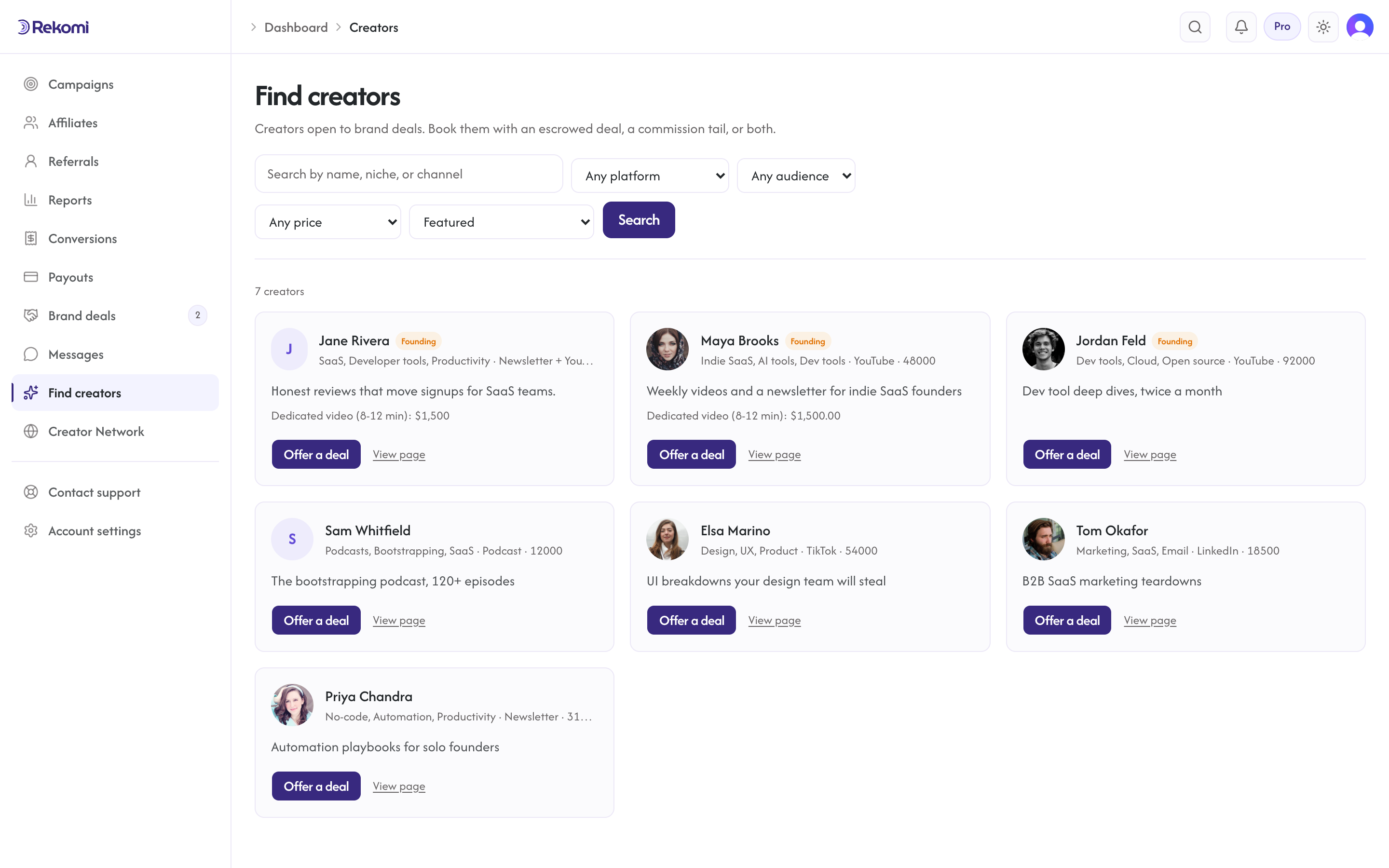
The flow
- Offer. Pick the campaign that will host the tracking, what you are booking, the flat amount ($50 to $50,000 USD equivalent, quotable in any of 135+ supported currencies), and the tail (a recurring percentage is the default; one-time or none also work). The creator gets 14 days to accept before the offer expires. Tick Split into milestones to pay in parts instead of one lump (see Milestones below).
- Fund. Once accepted, fund the escrow: amount plus the service fee. Your first deal, verified or not, is funded from your bank-transfer balance: send a transfer to the details under Settings, Billing, Funding (it lands in one to three business days), then press Fund and the escrow is secured at once. Until your account is verified every deal funds this way; verified brands can charge their linked US bank by ACH from the deal after their first funding, which settles in about four business days. Shopify-billed brands: the fee goes to your Shopify invoice instead, and the charge is the amount only. A deal quoted in another currency converts at the market rate when you fund; the exact USD total and the locked rate are itemized on the invoice. While a charge settles the deal shows "settling", and both sides are notified when the money is secured. Funding requires the org owner in an interactive session, same as payout runs.
- Delivery. The creator does the work and marks it delivered (you can also mark it yourself once the content is live). Marking delivered requires the escrow to be settled.
- Review and release. Look at the work. Happy? Release: the creator is paid the deal amount through their Stripe payout account (Express or bank payout), minus only standard payout processing fees. A creator set up for PayPal only is asked to add a Stripe payout account before the release goes out.
- Auto-release. If you take no action, the payment releases automatically at the end of the review window (7 days after delivery unless the deal terms set 3 to 14 days); we remind you by email at day 3 and tell you the exact date everywhere. Review on time.
Reviews, holding periods, and verification
Deals move real money to people, so new accounts get the same care as payout runs:
- Verification before funding. While the deals rail is new, funding a deal needs a verified account. You can create, negotiate and accept deals before that, and the fund step shows the verification card until a person at Rekomi has signed off. The two checks are described below under Get verified.
- A quick look before the first deal. The first time a new account funds a deal, verified or not, a person at Rekomi looks at the account first. Nothing is charged while that happens; the deal shows "Under review" and usually clears within one business day. You get an email either way, and if we need something from you it says what.
- A holding period after release. Until your account is verified, a released payment waits 7 days before it goes to the creator (both sides see the exact date on the deal). A creator whose payout account is under a week old waits the same 7 days, whoever the brand is. If anything looks wrong in that window, Rekomi can cancel the payment and refund your escrow. Verified brands release instantly.
- A cap until verified. Funded deals and payout runs share one limit: $2,500 per rolling 30 days until you are verified.
- Get verified. Open Settings, Billing, Funding. A deal-only account has two checks: who you are (verify your ID, or a bank account in your business's name) and how you pay (your first bank transfer landing counts); a website is optional. Submit, and a person signs off, usually within one business day. Verified brands can link a bank debit (used from the deal after their first funding), release instantly, and have no cap.
- The creator's side. A release only goes through once the creator's tax form (W-9 or W-8) is on file and their payout account is finished. Deals pay out through Stripe (Express or bank payout); a creator set up for PayPal only is asked to add a Stripe payout account first. If anything is missing, the deal thread says so and the money waits; nothing is lost.
Using Rekomi for deals only
You do not need a plan to work with creators. A brand account that starts from a creator's proposal link (or only ever uses Brand deals) can run as many deals as it likes: accept or counter proposals, fund escrow, review and release milestones, message creators, invite teammates, and export deals for finance (Admins and Owners). The platform fee is collected on each deal. Your dashboard lands on Brand deals, and the affiliate-program pages sit behind one "Start an affiliate program" link.
When you do want creators and affiliates earning commissions on tracked sales, start a plan from that link; it is the same account, so every deal, creator relationship, teammate, and invoice carries over, and the affiliate program pages simply unfold in the navigation. A brand that already runs an affiliate program sees Brand deals in the same navigation, with a count of deals waiting on you.
Negotiating before acceptance
Nothing is locked until one side accepts, so an offer can change shape without starting over:
- Edit your offer. While a deal is Offered, Edit offer on its card lets you change the title, brief, amount, milestone schedule (for example split one payment into one per video), commission tail, and terms. The creator is notified and sees the new version (a creator who has not joined Rekomi yet gets the updated terms by email for the first three revisions).
- Counter-proposals. The creator can answer your offer with different terms instead of a plain yes or no. The card then says the creator proposed different terms, and the deal thread shows what changed; Accept their terms locks the deal, Revise sends your version back, or cancel it. The same applies to a proposal a creator sent you: Propose changes on the proposal (in Invites for you, or from the deal page) turns it into an offer with your terms that the creator accepts, counters, or declines. That uses up the proposal link.
- Each version is a numbered revision; if the terms change while you are looking at an older version, the accept button asks you to review the latest one first. Up to 20 revisions per deal; after that, settle the details in the thread.
Cancelling the whole deal is only possible before funding (while Offered or Accepted). Once any milestone is funded, Cancel closes only the milestones nobody has funded yet; for the money already in escrow, the path forward is delivery and release, or a dispute.
Milestones
A deal can be paid in milestones: a deposit that reserves the slot, the rest on delivery, or one payment per video in a series. Either side sets the schedule up front (you on the offer form, or the creator on a proposal with its own milestone rows), and every milestone has a title, an amount, an optional description and target date.
- Each milestone is its own escrow. Fund milestone 1 to start; fund the next when you are ready, or Fund all remaining in one click (that is still one bank charge per milestone, so each one can be released, or disputed, on its own).
- Each milestone is released on its own. The creator submits a milestone when its work is delivered; you approve and release it, or ask for changes. The auto-release at the end of the review window and the day-3 reminder run per milestone, from the day it was submitted.
- Request changes pauses the auto-release clock until the creator resubmits, so a milestone you are still reviewing can never release on its own. Up to five rounds per milestone; after that, release it or bring us in.
- One fee for the whole deal. The platform fee is still 3% capped at $150 per deal (10% capped at $500 on a first directory deal); each milestone's charge carries its share until the cap is reached, so a $6,000 deal split three ways costs $60, $60, then $30.
- Cancelling after a milestone is funded closes only the milestones nobody has funded yet; funded ones continue as agreed.
- Invoices. On deals that started from a creator's proposal, each milestone has its own invoice under the proposal number (the number with -1, -2, ... appended; links are on the proposal page), and the bare invoice link is the deal statement with every milestone listed.
A classic one-amount deal is simply a deal with one milestone, and works exactly as before.
Terms, review window, and bookkeeping
Every offer (and every creator proposal) can carry terms: a statement of work, usage rights and licence period, exclusivity, and the review window, the number of days you have to review each submitted milestone before it releases automatically (3 to 14 days, default 7). Accepting the deal records both sides' agreement with a timestamp, and the terms show on the deal card and the invoice. On the deal card you can also add a PO number and cost center; both appear on invoices and in the CSV export.
A deal can also carry a structured brief: a one-liner, the full description of what you want made, the call to action, your promo link, up to 10 asset links, and the accounts you want tagged or mentioned. Both sides see the same brief on the deal page, and its links go through the same safety scan as everything else on Rekomi. You can edit it while the deal is Offered or Accepted with nothing funded; the moment the first milestone is funded it freezes, so what was agreed is what stays agreed (use the deal thread for notes after that).
Proof of delivery
When a creator submits a milestone they attach links to the delivered content and a short note, and confirm the sponsorship disclosure is in place. Everything shows on the milestone row so you can review without leaving the page. Under Deal settings an Owner can make the disclosure confirmation mandatory for every submission.
Submitted milestones can also carry results. When a proof link is a video on the creator's own verified YouTube channel, Rekomi pulls the video's public views, likes, and comments automatically and refreshes them daily for 30 days; those numbers show as "verified via YouTube". Anything the creator types by hand is always labeled "creator-reported, unverified", so you can tell at a glance which numbers were actually checked.
If the work is not right
Say so in the deal's message thread first; most issues resolve as a revision, and on a milestone you can click Request changes to say what is missing while the clock is paused. If that does not settle it, open a dispute on the milestone:
- Pick a reason (not delivered, quality, scope, late, payment, other), describe the problem, add evidence links, and propose an outcome: release the full amount to the creator, split it (part to the creator, the rest refunded to you), or refund it all.
- The payment stays in escrow while the dispute is open: no manual or automatic release can touch that milestone.
- The creator has 7 days to accept your proposal (applied immediately) or disagree. Disagreement, or silence past the deadline, escalates it to Rekomi, who reviews both sides and applies a decision. You can withdraw a dispute you opened while it is still waiting on the creator; once it has escalated, Rekomi resolves it.
- Refunds go back to the funding bank charge; a partial split pays the creator their share through the normal payout rail. The platform fee collected at funding is not refunded (it covers escrow and the dispute process).
Creators can open disputes too (for example when a brand goes quiet after delivery); you get the same response window.
Changing the schedule
Either side can propose a change: amend an unfunded milestone's title, amount, or date, or add a milestone. Nothing changes until the other side accepts; funded milestones can never be amended because their money has already moved. Up to five proposals can be open at once.
Team controls, bulk offers, and exports
- Deal settings (Owners only, top of the deals page): an approval threshold so deals at or above a total must be funded by an Owner (Admins can offer and review but see "approval required" at funding); the mandatory disclosure confirmation; and a deal budget per campaign, a hard cap on escrow funded through that campaign across all its deals.
- Send to several creators on the offer form turns one brief into separate offers for up to 20 creator emails, each with the same amount, milestones, tail, and terms.
- Export CSV downloads one row per milestone (amounts, fees, refunds, released amounts, timestamps, charge and payout ids, PO and cost center) for your finance system.
- Webhooks:
deal.funded,milestone.submitted,milestone.released, anddispute.openedare available under Webhooks; the MCP server exposeslist_deals,get_deal,approve_milestone, andrequest_milestone_changes(funding and releasing stay in the dashboard on purpose).
Messages
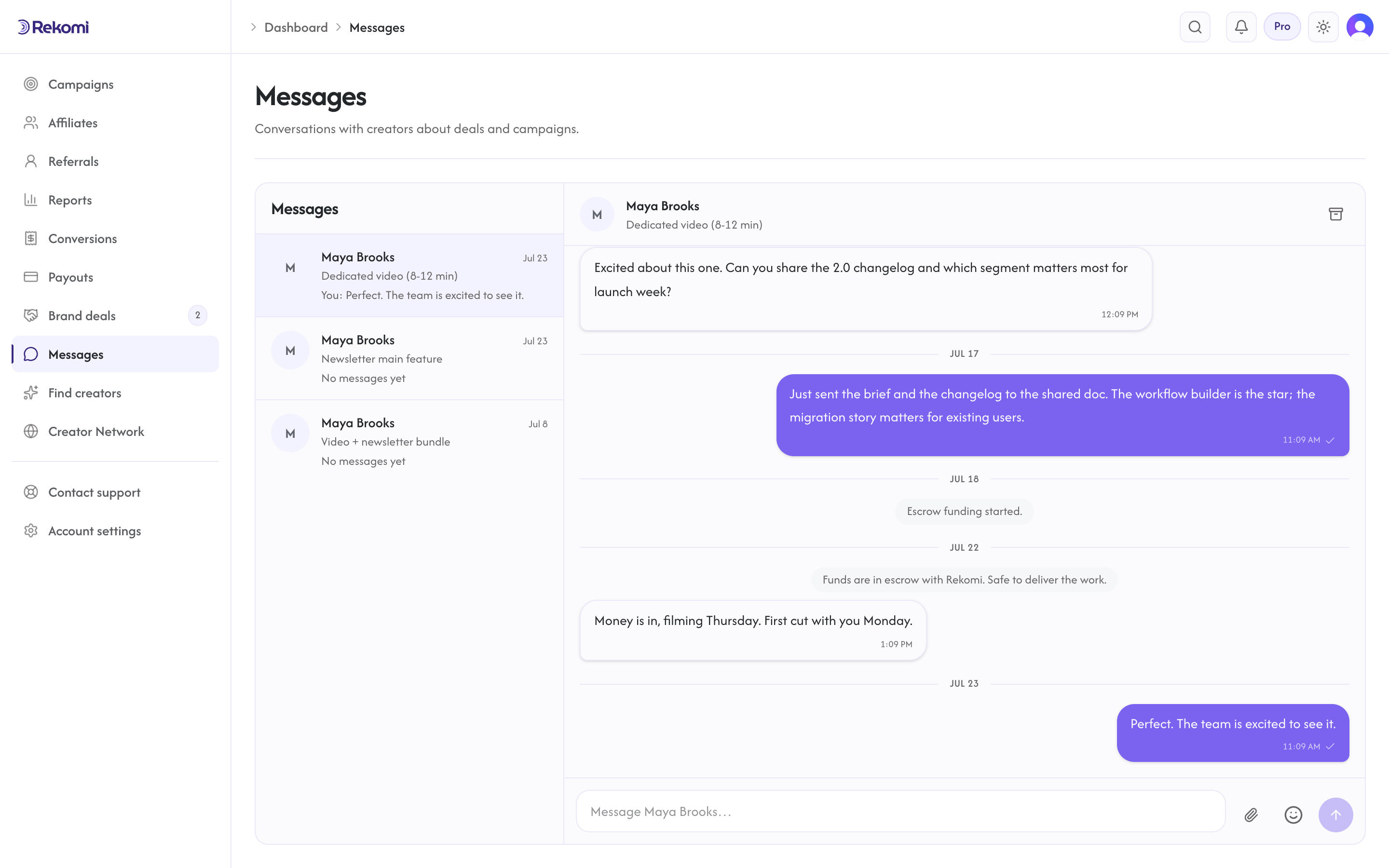
Every deal has a conversation thread at /dashboard/messages (or the Messages button on the deal card): live chat with typing indicators, unread counts, and the deal's history inline ("Funds are in escrow", "Payment released"). You can attach images and PDFs straight in the thread (up to 5 per message, 10MB each). Notification emails deep-link to the exact thread and stay quiet while you are actively viewing it.
Money details
- The service fee snapshot is taken when you fund, so a plan change never reprices a live deal.
- The one-time match fee applies only when the deal started from the directory and you have never funded a deal with that creator before; declined or expired offers never consume it. Once any deal with a creator is funded, every future deal together is the capped base fee, whichever side starts it.
- Escrow is held by Rekomi and the release draws from your specific funding charge; your money is never pooled into someone else's payout.
- A failed ACH charge steps the deal back to Accepted with an email to you; fund again to retry.
- A failed release (creator payout account issue) keeps the money in escrow; retry once they fix their payout setup.
- The commission tail lives in the campaign you picked: accepting the deal creates the creator's tracking link there, and tail commissions flow through the normal payouts.