

Referrals
People your affiliates referred, leads and paying customers, grouped per person.
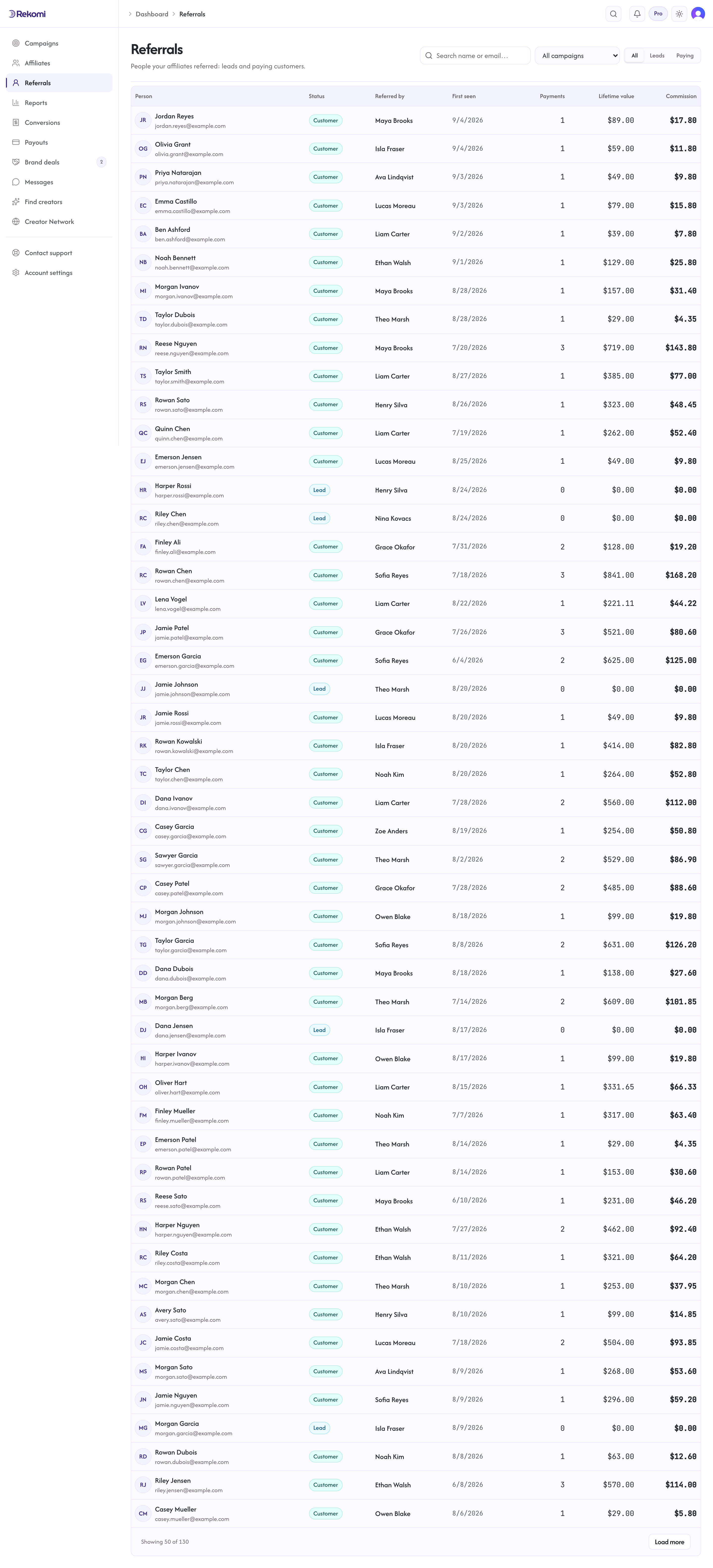
The Referrals page at /dashboard/customers shows everyone your affiliates referred: leads who haven't paid yet and paying customers alike. Where the Conversions page is a log of events, Referrals is a list of people: each row is one person, with everything they've done rolled up.
What you see
One row per person, with these columns:
- Person: name and email as captured from your payment processor or lead tracking, with an avatar (their Gravatar when they have one, initials otherwise).
- Status: Lead (referred but never paid) or Customer (at least one payment).
- Referred by: the affiliate credited with the person's first conversion, linking to their profile.
- First seen: when their first referred activity was recorded.
- Payments: how many payments they've made. Refunded and denied sales don't count.
- Lifetime value: what the person actually paid, net of refunds.
- Commission: what their referrals earned the affiliate, including per-lead fees on campaigns that pay per lead (CPL).
Click a row to open the person's detail page with their full ledger. All amounts are converted to your home currency.
Finding people
- All / Leads / Paying tabs split the list by status.
- Search matches the start of a name or email.
- The campaign filter narrows the list to people referred through one campaign.
How people are grouped
Rekomi builds this list from your referred sales and leads, deduplicating per person: rows sharing the same payment-processor customer id (for Stripe, the Stripe customer id) are one person, and rows without one group by their captured email. Two honest caveats:
- If the same person shows up once under a processor customer id and separately under only an email, they appear as two rows; there is no cross-key merge.
- Referred activity that captured neither a customer id nor an email can't be tied to a person, so it doesn't appear here (it still appears on the Conversions page).
Synthetic test sales from the Test Affiliate never appear on this page.
Commission rate for one customer
Some accounts are special: a customer on preferential pricing, a reseller you split differently, a legacy plan whose margin is thinner. Open the person's detail page from a campaign (/dashboard/campaigns/{id}/customers/{ref}) and set a Commission rate for this customer. Every sale by that customer on that campaign, the first payment and every renewal, then pays that rate, whoever referred them and however the sale was attributed (link, coupon code, or customer history). It wins over the affiliate's own rate, their partner group, performance tiers, the campaign default and any coupon rate, and per-product rates are skipped for that customer. A rate of 0 means the account earns nothing for the affiliate. Remove the rate to return the customer to the normal ladder; sales already recorded keep the rate they were priced at.
The rate is tied to the same identity this page groups people by: the payment processor's customer id when Rekomi has it (the Chargebee or Stripe customer), otherwise the captured email. A customer who paid once with an id and once with only an email is two rows here, and a rate set on one does not reach the other. Rates are per campaign; a customer referred into two campaigns can carry a different rate in each. Through the API, rates live under /api/customers/{key}/commission-override?programId= (GET, PUT, DELETE), where key is the row's key from the list.
A note on privacy
This page shows your referred customers' names and emails to everyone on your team. That's the point (it answers "who did this affiliate actually bring us"), but it means customer contact details are visible to every teammate with dashboard access. Keep that in mind when granting team access, and cover this data in your own privacy policy.