

Webhooks
Subscribe to events, verify signatures, and handle retries.
Rekomi posts events to your webhook endpoints as they happen. Conversions, payouts, affiliate lifecycle: anything you might want to react to from your own systems.
Plan tier required: Starter or higher to create / rotate / update / test webhook endpoints. Existing endpoints continue to fire if your subscription lapses (we don't strand your integration mid-cycle), but you need an active Starter or higher plan to add new ones or change configuration. Trial users (14-day free trial on any paid tier) can configure webhooks freely. The Zapier integration uses this same surface under the hood, which is why webhooks are available on every paid plan.
Create a webhook subscription
The instructions below describe direct webhook subscriptions you manage yourself. If you want the same events to fan out to Slack, Gmail, HubSpot, Notion, Google Sheets, or any of the 8,000+ apps Zapier supports, without writing code or hosting an endpoint, use the Zapier integration instead. Zapier consumes this same webhook surface as a REST-hook subscriber: turning a Zap on registers a subscription against your org, and turning it off cleanly unregisters it, all transparently to you.
Create an endpoint from the dashboard: go to /dashboard/settings/webhooks and click "Add endpoint".
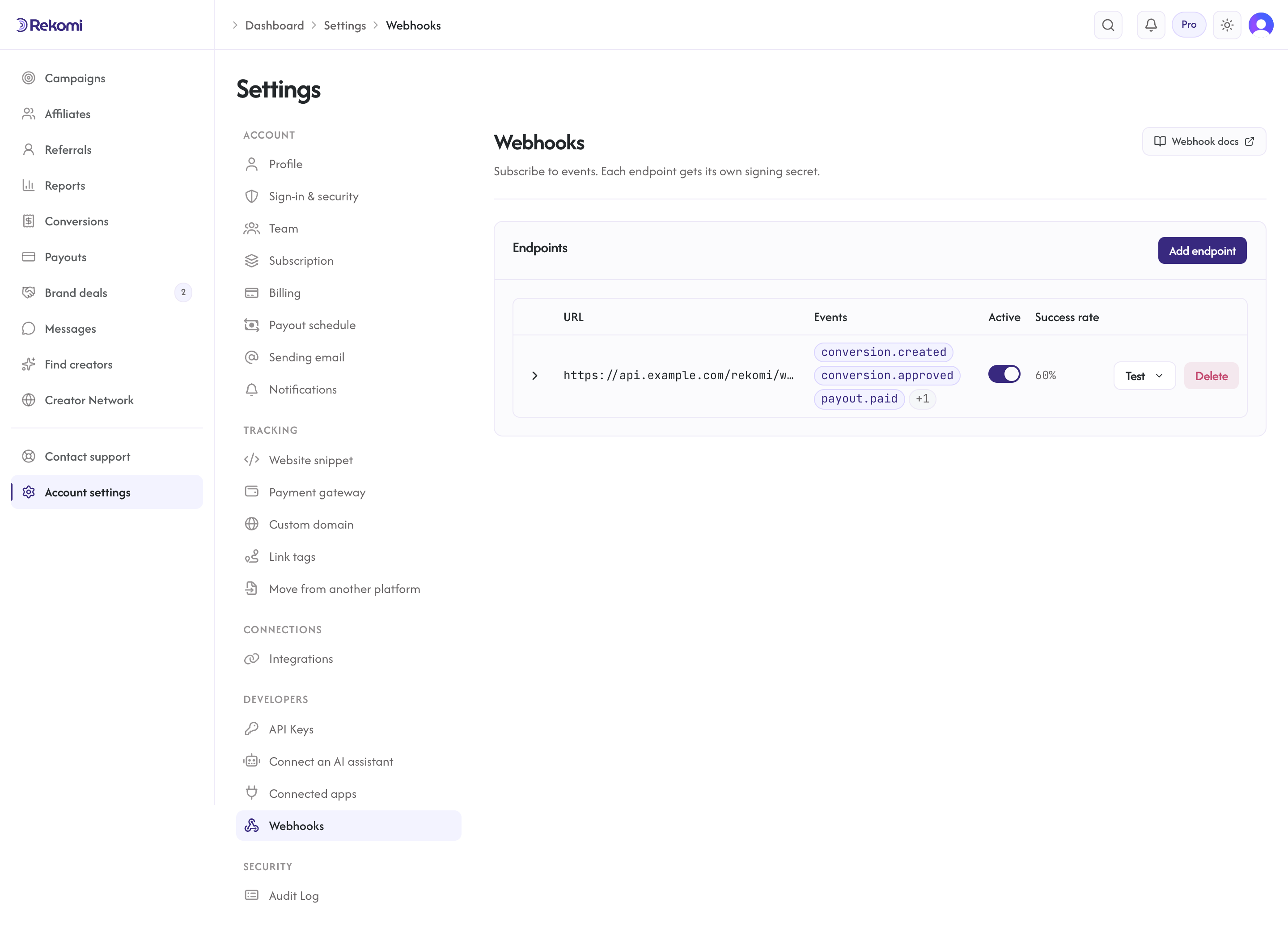
Required:
- URL: an HTTPS endpoint you control.
- Events: the dashboard picker offers the most common events (
*,conversion.created,conversion.approved,payout.created,payout.paid,affiliate.created,affiliate.approved); subscribe to the full list below via the API, or pick*for everything.
Click Create. A signing secret is shown EXACTLY ONCE. Save it; it cannot be recovered.
The same signing secret will sign every payload sent to this endpoint. If you rotate the secret, the old one stops being used immediately.
Event types
Currently supported:
*(all events)conversion.created(new conversion attributed; includes paid clicks and paid leads on campaigns that pay per click or per lead)conversion.approved(a Pending conversion was explicitly approved)conversion.refunded(commission clawed back)conversion.denied(conversion denied)conversion.validated(a fraud-quarantined conversion was released back to payable)conversion.invalidated(a conversion was fraud-quarantined or manually invalidated; not payable)conversion.adjusted(conversion amount/commission adjusted)payout.created(payout batch created with this affiliate as a recipient)payout.paid(payout settled)payout.failed(payout transfer failed)affiliate.created(new affiliate application or approved network match)affiliate.approved(affiliate status moved to Approved)affiliate.application_completed(an applicant finished step 2 of a two-step application form; carries the full answers map)deal.funded(a creator-deal milestone's escrow charge was created; payload carries dealId, milestoneId, seq, title, amountCents, takeCents, totalBrandCharge, fundingChargeId, dealStatus)milestone.submitted(the creator submitted a milestone for review; carries submissionUrls and autoReleaseAt)milestone.released(a milestone's payout was released; carries grossCents, netCents, payoutId, dealStatus)dispute.opened(either side opened a dispute on a milestone; carries openedBy, reason, proposedResolution)campaign_coupon.created(brand created a parent campaign coupon, owns the Stripecoupon)campaign_coupon.updated(campaign coupon settings changed, name + toggles)campaign_coupon.deactivated(campaign coupon archived; child per-affiliate codes also revoked)campaign_coupon.deleted(campaign coupon hard-deleted; only possible when no per-affiliate codes existed)affiliate_coupon.created(per-affiliate redeemable code minted; brand-side OR affiliate self-mint)affiliate_coupon.deactivated(per-affiliate redeemable code revoked by the brand)affiliate_coupon.revoked(an affiliate deleted their own code;source: "self_deleted")
You can subscribe to a subset on each endpoint. Different endpoints can subscribe to different events. See event payload shapes below for the exact data field for each type.
Nine of these events also surface as ready-made Zapier triggers: conversion.created, conversion.refunded, affiliate.created, affiliate.approved, payout.created, payout.paid, payout.failed, campaign_coupon.created, and affiliate_coupon.created. If your downstream consumer is a Zapier-supported app, you do not need to host or sign a webhook endpoint at all, Zapier handles the subscription, the HTTPS endpoint, and the signature verification on your behalf.
Payload envelope
Every delivery is a JSON object with the same outer envelope. The data field changes per event type (full shapes documented below).
{
  "id": "evt_9f8e7d6c5b4a39281706f5e4d3c2b1a0",
  "type": "conversion.created",
  "createdAt": "2026-05-11T03:14:25.000Z",
  "organizationId": "01234567-89ab-cdef-0123-456789abcdef",
  "data": { /* see per-event tables below */ }
}
id is evt_ followed by 32 hex characters.
id: unique event identifier. Use for de-dup on your side (Rekomi also setsX-Rekomi-Delivery-Idfor retry de-dup; see the headers section).type: the event type from the list above.createdAt: ISO-8601 UTC timestamp.organizationId: your org id. Always your own org; you never receive events for other orgs (defense-in-depth filter at the dispatcher).data: event-specific payload. Fields whose value is null are omitted from the serialized payload entirely, so read optional fields defensively rather than expecting an explicitnull.
Event-specific data shapes
The shapes below are verified against the live event emitter code; these are the exact field names you'll receive.
conversion.created
{
  "conversionId": "c0nv0001-...",
  "affiliateId": "01234567-...",
  "programId": "0789abcd-...",
  "amountCents": 9900,
  "currency": "USD",
  "commissionCents": 1980,
  "status": "Pending",
  "externalEventId": "in_1XYZ...",
  "type": "Recurring",
  "attributionMethod": "coupon"
}
status enum: Pending | Approved | Paid | Denied | Refunded | Invalidated (fraud-quarantined, not payable). type enum: OneTime | Recurring | Bonus | ClickReward (a paid click on a campaign that pays per click, CPC) | LeadReward (a paid lead on a campaign that pays per lead, CPL).
attributionMethod tells you how the sale was attributed, so you can mirror a coupon redemption the same way you mirror a link click. It is the raw value; the Rekomi dashboard groups these into a "Source" tag. The complete set:
attributionMethod (raw) | Dashboard "Source" | Meaning |
|---|---|---|
coupon, coupon_with_metadata, shopify_discount_code, wix_coupon_code, bigcommerce_coupon_code, wordpress_coupon, gumroad_coupon_code, creem_coupon_code, mollie_coupon_code | Coupon | Attributed by a redeemed affiliate coupon code (on Mollie, the metadata.rekomi_coupon stamp) |
metadata_or_customer, paddle_custom_data, braintree_custom_field, rekomi_self_referral, lemonsqueezy_custom_data, chargebee_referral, recurly_referral, polar_metadata, polar_reference_id, gumroad_url_param, creem_metadata, creem_request_id, dodo_metadata, mollie_metadata, shopify_pixel_journey, shopify_landing_site, shopify_customer_journey | Link | Attributed by referral metadata, a tracked click, or a gateway URL/reference param. The three Shopify values are link attribution resolved from, respectively: the store's web pixel click, the order's recorded landing page, or Shopify's own customer-journey data |
paddle_customer_history, braintree_customer_history, shopify_customer_history, wix_customer_history, bigcommerce_customer_history, wordpress_customer_history, lemonsqueezy_customer_history, chargebee_customer_history, recurly_customer_history, polar_customer_history, gumroad_customer_history, creem_customer_history, dodo_customer_history, mollie_customer_history, mollie_subscription_history, email_lead_match | Customer match | Attributed by matching a returning customer or a prior lead |
crm_lookup:<platform> (crm_lookup:beehiiv, crm_lookup:convertkit, crm_lookup:mailerlite, crm_lookup:ontraport, crm_lookup:gohighlevel) | Platform match | Credited from the connected platform's own signup record: nothing else named an affiliate, so Rekomi looked the buyer's email up on the platform and the arrival tag stored there named the affiliate |
manual_stripe_app | Link | Attributed manually by the brand from the in-Stripe manage surface |
cpc_aggregation | Click | Pay-per-click reward rollup |
lead_signup | Lead | A zero-commission signup capture (free identified signup) |
lead_form | Lead | A qualified lead-form submission on a campaign that pays per lead (CPL); earns the campaign's per-lead amount |
sub_affiliate_override | Override | Recruiter override row (see below) |
historical_import:<source> | Imported | Migrated from another platform |
null (absent) | Server | Server-to-server postback (S2S sets no method) |
The same attributionMethod field is available on the REST GET /api/v1/conversions list + detail and the CSV export (attribution_method column), so you do not need a webhook to read it. Every conversion.created payload also carries subId, the channel tag the customer's visit carried (?sub=yt on the affiliate's link), omitted when there is none; see Sub-IDs.
Sub-affiliate override rows
If the campaign has sub-affiliate recruiting enabled, every parent sale produces a second conversion.created event for the recruiter's override row. Override events look identical in shape but carry attributionMethod = "sub_affiliate_override", amountCents = 0, commissionCents > 0, and a parentAffiliateConversionId pointing at the parent sale's conversionId.
{
  "conversionId": "c0nv0override-...",
  "affiliateId": "01234567-A-...",
  "programId": "0789abcd-...",
  "amountCents": 0,
  "currency": "USD",
  "commissionCents": 200,
  "status": "Pending",
  "attributionMethod": "sub_affiliate_override",
  "parentAffiliateConversionId": "c0nv0parent-...",
  "type": "OneTime"
}
Warning: if your handler filters conversion.created events by amountCents > 0 to drop zero-revenue events, you will silently lose all override events. Filter on commissionCents > 0 instead, or on status. Full payload details: Sub-affiliate API.
conversion.refunded
{
  "conversionId": "c0nv0001-...",
  "affiliateId": "01234567-...",
  "programId": "0789abcd-...",
  "refundedAmountCents": 9900,
  "commissionReversedCents": 1980,
  "cumulativeRefundedAmountCents": 9900,
  "isFullRefund": true,
  "currency": "USD",
  "refundedAt": "2026-05-12T14:00:00Z",
  "attributionMethod": "coupon"
}
attributionMethod carries the original sale's attribution (same values as conversion.created) so you can reconcile refunds by source. cumulativeRefundedAmountCents is the running total refunded against the conversion (partial refunds accumulate), and isFullRefund is true once the full sale amount has been refunded. When the refunded sale had a sub-affiliate override, the override's refund event also carries parentAffiliateConversionId.
conversion.approved
Fires when a Pending conversion is explicitly approved. Today that action is available from the in-Stripe manage surface. The payload is minimal:
{ "conversionId": "c0nv0001-..." }Pending conversions that are picked up in a payout run emit payout.created rather than a separate approval event, so if you want an "approved OR paid out" signal, subscribe to both and de-dup on conversionId.
affiliate.created
{
  "affiliateId": "01234567-...",
  "programId": "0789abcd-...",
  "email": "newaffiliate@example.com",
  "fullName": "New Affiliate",
  "status": "Pending",
  "slug": "newaffiliate",
  "applicationAnswers": {
    "website": "https://example.com",
    "how_will_promote": "Newsletter and YouTube reviews",
    "custom_promo_code": "SPRING20"
  }
}
status enum: Pending | Approved | Rejected | Paused | Banned. slug is the auto-generated default tracking link slug. Applications submitted through the public storefront form also carry a source field set to "public_apply".
applicationAnswers is every answer from your campaign's application form, keyed by the field key you set in the signup page editor (built-in fields use their system keys: website, audience, why_interested; custom fields use the key you chose). This is how a custom field such as a promo code or a social handle reaches your automation (Make, Zapier, n8n, your CRM) without repurposing the Full name field. The key is omitted when the affiliate was created without a form (an admin add or a bulk import). Fraud-screening signals shown on the brand's review page are never included.
affiliate.approved
{
  "affiliateId": "01234567-...",
  "programId": "0789abcd-...",
  "email": "newaffiliate@example.com",
  "fullName": "New Affiliate",
  "approvedAt": "2026-05-12T11:30:00Z",
  "applicationAnswers": {
    "website": "https://example.com",
    "how_will_promote": "Newsletter and YouTube reviews"
  }
}
When an application is auto-approved on arrival (the campaign has auto-approve on), the payload also carries "autoApproved": true. applicationAnswers has the same shape as on affiliate.created and reflects the answers on file at approval time, so a manual approval after a two-step application includes the step-2 answers.
affiliate.application_completed
{
  "affiliateId": "01234567-...",
  "programId": "0789abcd-...",
  "email": "newaffiliate@example.com",
  "fullName": "New Affiliate",
  "status": "Approved",
  "applicationAnswers": {
    "website": "https://example.com",
    "how_will_promote": "Newsletter and YouTube reviews",
    "audience": "10k newsletter subscribers"
  }
}
Fires when an applicant submits step 2 of a two-step application form. affiliate.created (and, on auto-approve campaigns, affiliate.approved) fired at step 1 before those answers existed, so if your automation keys on a step-2 field, subscribe to this event. It repeats if the applicant resubmits step 2; the answers map is always the full current set.
campaign_coupon.created
Fires when a brand creates a parent campaign coupon. The corresponding Stripe coupon is created at the same time (Rekomi runs them in a single transaction).
{
  "campaignCouponId": "c0upon01-...",
  "programId": "0789abcd-...",
  "name": "Summer 20% off",
  "discountType": "PercentOff",
  "discountValue": 20,
  "duration": "Once",
  "selfMintMode": "Disabled",
  "grantedAffiliateCount": 0,
  "createdAt": "2026-05-17T20:00:00Z"
}
selfMintMode is who may self-mint a code from this coupon (Disabled, AllAffiliates, or SpecificAffiliates); grantedAffiliateCount is how many affiliates are on the allow-list when the mode is SpecificAffiliates. discountCurrency appears only on AmountOff coupons (null fields are omitted).
campaign_coupon.updated
Fires when a brand updates a campaign coupon's editable fields (name, self-mint toggle, click-override toggle). Discount semantics are immutable per Stripe's rules and never appear in an .updated payload.
{
  "campaignCouponId": "c0upon01-...",
  "programId": "0789abcd-...",
  "name": "Summer 20% off (updated)",
  "allowAffiliateSelfMint": true,
  "overridesClickAttribution": true,
  "selfMintMode": "AllAffiliates",
  "grantedAffiliateCount": 0,
  "updatedAt": "2026-05-17T20:30:00Z"
}
campaign_coupon.deactivated
Fires when a brand archives a campaign coupon. All child per-affiliate codes are also deactivated in Stripe and locally; deactivatedChildCount reports how many.
{
  "campaignCouponId": "c0upon01-...",
  "programId": "0789abcd-...",
  "archivedAt": "2026-05-17T21:00:00Z",
  "deactivatedChildCount": 12
}
campaign_coupon.deleted
Fires when a brand hard-deletes a campaign coupon. Hard-delete is only possible when no per-affiliate codes were ever minted; otherwise the API returns 422 has_affiliate_coupons and forces an archive instead.
{
  "campaignCouponId": "c0upon01-...",
  "programId": "0789abcd-..."
}
affiliate_coupon.created
Fires when a per-affiliate redeemable code is minted (brand-side OR affiliate self-mint).
{
  "affiliateCouponId": "ac0upon0-...",
  "campaignCouponId": "c0upon01-...",
  "affiliateId": "01234567-...",
  "programId": "0789abcd-...",
  "code": "SARAH20",
  "createdAt": "2026-05-17T20:05:00Z",
  "source": "self_minted"
}
source is only present when the affiliate self-minted from /a. Brand-side mints omit the field.
affiliate_coupon.deactivated
Fires when a brand revokes a single per-affiliate redeemable code. The Stripe promotion_code is deactivated and the Rekomi row is marked inactive.
{
  "affiliateCouponId": "ac0upon0-...",
  "campaignCouponId": "c0upon01-...",
  "affiliateId": "01234567-...",
  "programId": "0789abcd-...",
  "code": "SARAH20",
  "revokedAt": "2026-05-17T21:05:00Z"
}
Currency on payout events
payout.created, payout.paid, and payout.failed all carry a currency field. The value is always present and is the ISO 4217 code of the payout itself. Payouts settle in USD: a run consolidates each affiliate's earnings across currencies into one USD payout (each non-USD commission converts at the published mid-market rate on the run date, recorded per line), so currency is "USD" on these events and an affiliate earning in two currencies still produces one payout per run. Payouts created through the legacy single-currency API contract carry that run's own currency instead. The per-line native amount, the rate applied and the rate date are not on the events themselves: read them from GET /api/v1/payouts/{id} under lineItems[] (nativeAmountCents, nativeCurrency, fxRate, fxRateDate; null on legacy rows). That is how a consumer that stored a conversion.created in JPY reconciles it against the USD payout.created that later pays it. See Multi-currency for the payout model and Conversion currency for the supported allowlist.
payout.created (fires once per recipient per run)
{
  "payoutId": "payout-uuid",
  "affiliateId": "01234567-...",
  "amountCents": 9800,
  "currency": "USD",
  "method": "StripeConnect",
  "status": "Pending",
  "lineItemConversionIds": ["c0nv0001-...", "c0nv0002-..."],
  "periodStart": "2026-04-01",
  "periodEnd": "2026-04-30"
}
method enum: StripeConnect (Stripe Express) | PayPal | GlobalPayouts (bank deposit via Stripe); legacy payouts may also show Manual. The same values appear on payout.paid and payout.failed, so do not treat the set as closed to the first two. currency is the ISO 4217 code of this specific payout: "USD" on consolidated runs, where an affiliate earning in multiple currencies still receives ONE payout.created per run (their non-USD commissions convert per line at the run-date mid-market rate). Only payouts created through the legacy single-currency API contract carry another currency.
payout.paid
New payouts settle on the Stripe Express, PayPal, or bank-deposit (Stripe Global Payouts) rail, and the payout.paid payload carries one rail-specific reference next to method: Stripe Express payouts carry method StripeConnect with stripeTransferId; PayPal payouts carry method PayPal with paypalBatchId and paypalTransactionId; bank-deposit payouts carry method GlobalPayouts with gpOutboundPaymentId. There is no status field on payout.paid or payout.failed (the event type is the status), and neither carries lineItemConversionIds or the period fields. The legacy Manual method and externalTransactionId shown below only appear on historical payouts recorded before mark-as-paid was removed.
{
  "payoutId": "payout-uuid",
  "affiliateId": "01234567-...",
  "amountCents": 9800,
  "currency": "USD",
  "method": "Manual",
  "externalTransactionId": "wire-2026-04-30-abc123",
  "paidAt": "2026-05-01T09:00:05Z"
}
payout.paid (Stripe Connect method; legacy single-currency run shown)
{
  "payoutId": "payout-uuid",
  "affiliateId": "01234567-...",
  "amountCents": 1200000,
  "currency": "JPY",
  "method": "StripeConnect",
  "stripeTransferId": "tr_1ABC...",
  "paidAt": "2026-05-01T09:00:05Z"
}
This example shows a legacy single-currency run, which is the only way a non-USD payout currency still occurs. Note JPY has no minor unit; amountCents of 1200000 represents 1,200,000 JPY (not 12,000.00 JPY). Treat the integer as the smallest indivisible unit the currency supports.
payout.paid (bank deposit via Stripe Global Payouts)
{
  "payoutId": "payout-uuid",
  "affiliateId": "01234567-...",
  "amountCents": 9800,
  "currency": "USD",
  "method": "GlobalPayouts",
  "gpOutboundPaymentId": "obp_1ABC...",
  "paidAt": "2026-05-01T09:00:05Z"
}
Bank-deposit affiliates are paid in USD from Rekomi's Stripe balance and receive local currency at Stripe's conversion; gpOutboundPaymentId is the Stripe outbound payment reference.
payout.failed
{
  "payoutId": "payout-uuid",
  "affiliateId": "01234567-...",
  "amountCents": 9800,
  "currency": "USD",
  "method": "StripeConnect",
  "failureReason": "Affiliate has no Stripe Connect account",
  "failedAt": "2026-05-01T09:00:05Z"
}
failureReason is a short human-readable message: either a Rekomi-generated string such as "Affiliate has no Stripe Connect account" or the payment provider's error message passed through. Do not switch on exact values. method carries the same values as payout.paid (StripeConnect, PayPal, GlobalPayouts, legacy Manual), and failedAt is present on every payout.failed event.
Signature header
Every POST includes:
X-Rekomi-Signature: t=1715366423,v1=8f4e2c5b...
X-Rekomi-Timestamp: 1715366423
X-Rekomi-Event: conversion.created
X-Rekomi-Delivery-Id: 8f14e45f-ceea-467a-bb2c-d8b8c0afc8d8X-Rekomi-Signature: HMAC-SHA256 int=<unix-seconds>,v1=<hex>format (Stripe-compatible). Note: the S2S tracking endpoint uses a similar header but tags the signaturesig=instead ofv1=; outbound webhooks and inbound S2S have separate verifier code paths.X-Rekomi-Timestamp: the Unix-seconds timestamp the signature is computed over (same value as thet=field).X-Rekomi-Event: the event type. Convenient for routing without parsing the body.X-Rekomi-Delivery-Id: the delivery id (a plain UUID). Use for de-dup; retries reuse the same delivery id.
Verify the signature
import crypto from "node:crypto";

const SECRET = process.env.REKOMI_WEBHOOK_SECRET!;

function verify(rawBody: string, headerValue: string): boolean {
  const parts = Object.fromEntries(
    headerValue.split(",").map((p) => p.split("="))
  );
  const t = parts.t;
  const v1 = parts.v1;
  if (!t || !v1) return false;
  const ageSec = Math.abs(Date.now() / 1000 - Number(t));
  if (ageSec > 300) return false; // 5-minute replay window

  const expected = crypto
    .createHmac("sha256", SECRET)
    .update(`${t}.${rawBody}`)
    .digest("hex");
  const a = Buffer.from(v1);
  const b = Buffer.from(expected);
  // timingSafeEqual throws on length mismatch, so guard first.
  if (a.length !== b.length) return false;
  return crypto.timingSafeEqual(a, b);
}
Use crypto.timingSafeEqual (or your language equivalent) to prevent timing attacks. Compare the lengths first and return false on a mismatch, since timingSafeEqual throws when the buffers differ in length. Reject the request if the comparison fails.
Retry semantics
If your endpoint returns a non-2xx status (or times out after 10 seconds), Rekomi retries with doubling backoff. Attempts are made about 30 seconds after the event, then roughly 1, 2, 4, and 8 minutes after the event (backoff doubles each attempt), for 5 attempts total:
| Attempt | Roughly, after the event |
|---|---|
| 1 | 30 seconds |
| 2 | 1 minute |
| 3 | 2 minutes |
| 4 | 4 minutes |
| 5 | 8 minutes |
If your endpoint returns 429 or 503 with a Retry-After header, we honor it, clamped between 30 seconds and 1 hour. After attempt 5 the delivery is marked Failed and is not retried. Use the Test button (below) to send a fresh sample while you debug.
A 2xx response stops retries. The body content does not matter; only the status code.
Idempotency on your side
Retries reuse the same X-Rekomi-Delivery-Id. Use it to de-dup so a retried delivery does not double-process on your side. Pseudocode:
const deliveryId = req.headers["x-rekomi-delivery-id"];
if (await alreadyProcessed(deliveryId)) {
  return res.status(200).send("already processed");
}
await processEvent(payload);
await markProcessed(deliveryId);
res.status(200).send("ok");
Test deliveries
From /dashboard/settings/webhooks, click "Test" next to any endpoint. Rekomi sends a synthetic event with type = "test", or a realistic sample of any of the nine trigger event types (conversion.created, conversion.refunded, affiliate.created, affiliate.approved, payout.created, payout.paid, payout.failed, campaign_coupon.created, affiliate_coupon.created); other subscribed types only support the generic test payload, and the endpoint rejects a test for an event type it is not subscribed to. Use this to verify your handler is wired correctly before relying on real events.
Delivery history
Each endpoint has a delivery history view. Expand any endpoint to page through deliveries (50 per page) with:
- Event type
- Delivery id
- Response status code
- Response body excerpt (first 500 characters)
- Attempt count
- Settled timestamp
Useful for debugging "why didn't I get notified".
Rotating the signing secret
Rotating swaps an endpoint's signing secret without changing its URL or subscribed events. Click "Rotate" on any endpoint. A new secret is shown EXACTLY ONCE. The old secret stops working immediately. There is no overlap window, so rotate during a maintenance window.
Security checklist
- Always verify the HMAC signature. Never trust an unsigned request.
- Always validate the timestamp is within 5 minutes.
- Always use
crypto.timingSafeEqualfor the comparison. - Always require HTTPS for your webhook URL (the dashboard enforces this).
- Always handle retries idempotently using the delivery id.
- Store the signing secret in a secrets manager. Never log it.