

Build your creator profile
The profile that reviewers see when evaluating your applications.
Your creator profile is the pitch you make with every application. A complete profile gets you approved into campaigns you would otherwise miss.
Where to edit
Everything is edited in one place: the page builder at /a/page/design (Profile tab). Your name, bio, topics, verified socials, and services live there once, and they front both your campaign applications and your public page. /a/network and /a/settings both link you straight to it.
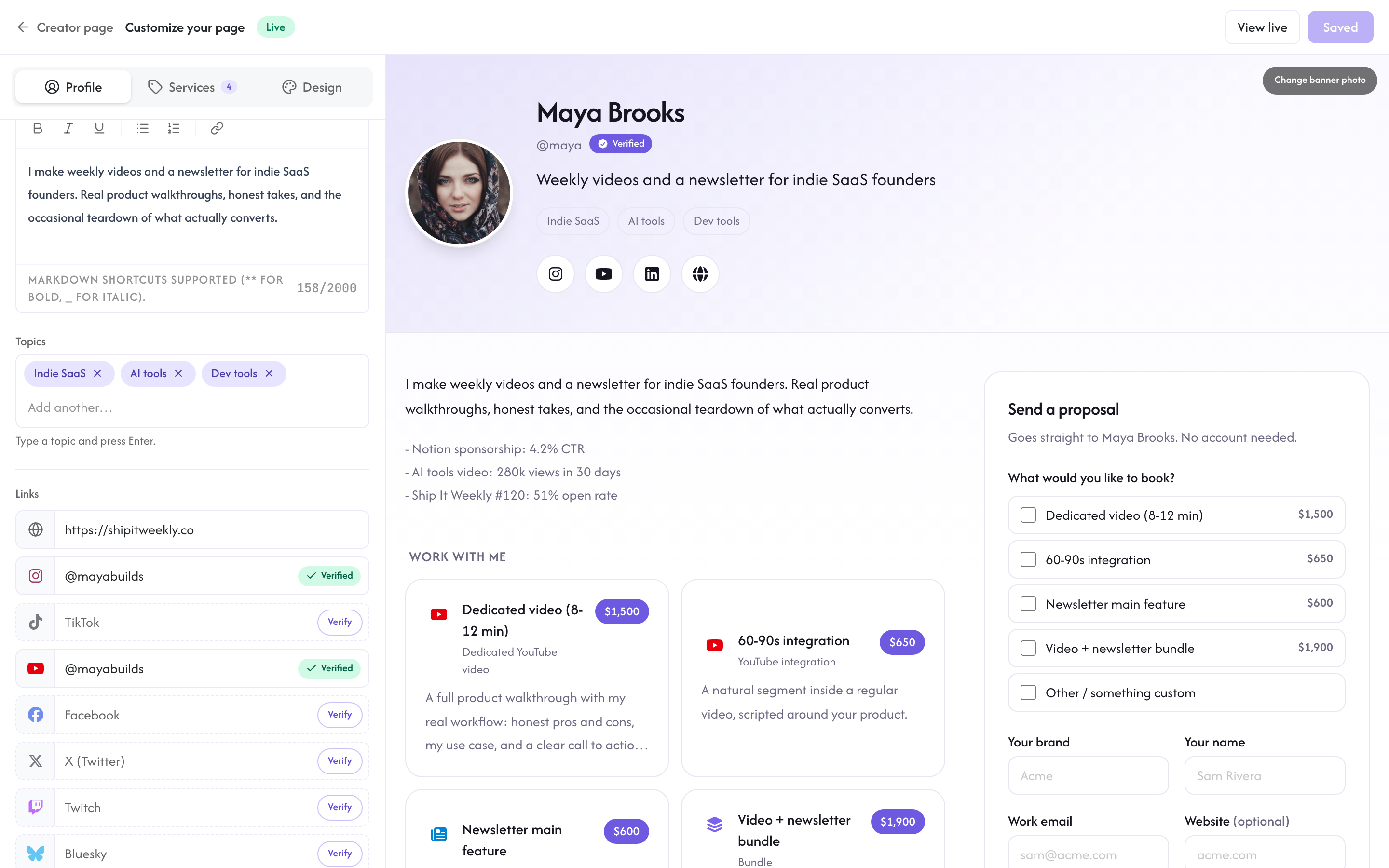
Fields
Your bio, niche, and payout country are required to complete setup; the rest is optional, but every extra field improves your approval odds.
Bio (required)
Two or three sentences about what you do and who you reach. Concrete and specific beats generic.
Bad: "I create content about technology."
Good: "Indie hacker building B2B SaaS. I publish twice-weekly to 12,000 Twitter followers and 4,000 newsletter subscribers, mostly early-stage founders."
Niche (required)
Describe the topic area you cover in your own words; during setup you can also pick from quick suggestions like Indie SaaS, AI tools, Dev tools, No-code, Marketing, Design, Productivity, Newsletters, Courses, Creator economy, E-commerce, or Fintech. Reviewers use your niche to judge fit with the brand's audience, so picking accurately matters.
Verified socials (your audience proof)
There is no "audience size" box to type a number into. Instead, connect your social accounts from your Creator page and your profile shows live, verified follower counts. A verified 10,000-subscriber newsletter or channel carries far more weight with reviewers than any self-reported number, and brands can see the checkmark that proves it.
Recent results (recommended)
A short bullet list of recent wins. Examples:
- "Newsletter sponsored by Notion: 4.2% CTR"
- "YouTube video on AI tools: 280k views in 30 days"
- "Twitter thread on solopreneur SaaS: 1.4M impressions"
Real numbers and recent dates work. Vague hype hurts.
Name, website, and social links
You can also add your name and your website; your website doubles as the portfolio link brands click. Social accounts are connected, not typed: hit Verify on a platform row and the account appears with a checkmark once you approve the connection.
What reviewers see
When you apply to a campaign, reviewers see your profile (every field above plus your application pitch). They prioritize:
- Niche alignment with the brand's target audience
- Verified audience in the right range for the offer
- Channel relevance (a video product wants a YouTuber, not a newsletter)
- Portfolio quality
- Recent activity (someone who posted last week vs. last year)
A clean, honest profile beats an inflated one. Keep your numbers honest; misrepresentation can get your network account suspended.
Updating your profile
Click Save and your changes apply immediately. Reviewers see your current profile, so updates you make while an application is pending are visible immediately; only your pitch is fixed at submission time.
Privacy
Your applications, pitches, and account details are private: they are reviewed by the Rekomi network team and shared with brands only as part of your applications.
The profile fields themselves (bio, topics, socials, audience) are private too, until you publish a public page. A published page puts those fields on rekomi.com/@you, which is public and indexed by search engines; that is the point of the page. If you never publish a page, nothing about you is public.