

Install on Polar
Connect Polar natively with one Organization Access Token. Rekomi creates the webhook endpoint in your Polar organization for you, then tracks orders, subscription renewals, and refunds automatically. Polar checkout links and embeds are credited to the right affiliate automatically once the Rekomi script is installed; server-created (API) checkouts stamp rekomi_ref.

Polar is a Merchant of Record: your customer pays Polar and Polar remits to you, so there is no merchant Stripe account to connect. Rekomi supports it natively with a one-paste setup: you paste a single Organization Access Token into Rekomi, and Rekomi does the rest. It validates the token, resolves your organization, and creates the webhook endpoint in your Polar organization itself; there is no manual webhook configuration and nothing to paste on Polar's side. From that point on, orders, subscription renewals, and refunds flow into Rekomi with no relay code to write or maintain. Still evaluating? See Why Rekomi for Polar →.
What you need
One Organization Access Token. In Polar, open your Organization Settings, find the Developers section, and create a token with just these two scopes:
organizations:readwebhooks:write
Set the expiration to "No expiration" so the connection never lapses on a timer. The token starts with polar_oat_. Rekomi uses it to create and health-check the webhook endpoint; commissions and money flow are never touched through it.
Connect in Rekomi
Step 1. Go to /dashboard/setup/polar and paste the token.
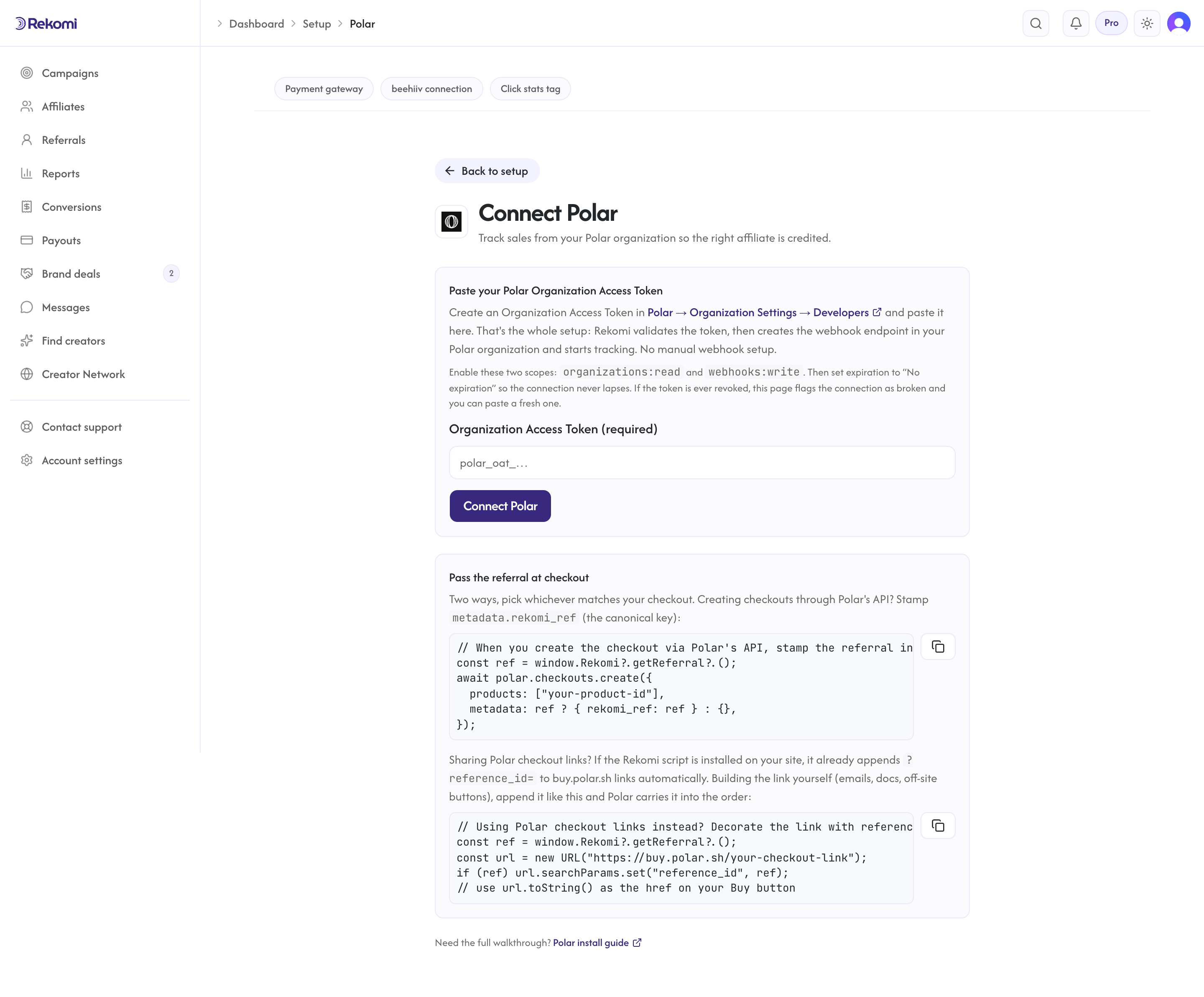
Rekomi validates it live, resolves your Polar organization, and creates the webhook endpoint automatically, subscribed to exactly the events Rekomi needs:
order.paidsubscription.createdsubscription.canceledsubscription.revokedsubscription.uncanceledrefund.createdrefund.updated
Polar generates the webhook signing secret when the endpoint is created; Rekomi stores it encrypted and verifies the signature on every delivery. The setup page shows the endpoint's URL and event list for reference only.
Step 2. That's it for the connection. The remaining work is attribution: carrying the affiliate referral into checkout, below.
Attribution: carry the referral into checkout
Polar hosts checkout on its own domain, so the affiliate referral has to travel from the visitor's browser into the order. Rekomi handles this automatically for Polar checkout links and embeds; only server-created (API) checkouts need one small addition.
First, make sure the Rekomi head script is installed on your marketing site so the affiliate click is captured when a visitor lands on an affiliate link:
<script async src="https://api.rekomi.com/api/v1/r/loader.js" data-program-id="YOUR_PROGRAM_ID" data-rkmi-email-capture="auto"></script>The program ID is in the Rekomi dashboard under Settings, Tracking, Website snippet (the install hub). Rekomi records an email a referred visitor types into any email or text field on the pages where the tag runs (signup, login, checkout and other forms) so the sale can be credited even when your checkout passes no referral. Nothing is recorded without a referral. Remove the data-rkmi-email-capture attribute to turn this off; explicit Rekomi.convert() calls still work.
Checkout links and embeds (automatic, nothing to add). If you sell through Polar checkout links or embed buttons (buy.polar.sh / polar.sh/checkout), the Rekomi script above does the rest: it appends the affiliate's reference_id to those links for you, both on page load and just-in-time at click (so dynamically added and single-page-app links work too). Polar copies reference_id into the order's metadata.reference_id, which Rekomi reads for attribution. If a link already carries a reference_id, Rekomi leaves your value alone rather than overwrite it.
Server-created checkouts via Polar's API (one small addition). When your backend creates the checkout, the client script can't reach it, so stamp metadata.rekomi_ref (the canonical key) yourself. Read the referral on your frontend with window.Rekomi.getReferral() and send it with the checkout request:
const ref = window.Rekomi && window.Rekomi.getReferral();
await polar.checkouts.create({
  products: ["your-product-id"],
  metadata: ref ? { rekomi_ref: ref } : {},
});
Rekomi reads metadata.rekomi_ref first, then metadata.reference_id. If you already use reference_id for your own bookkeeping, keep using it; a value that matches no affiliate is simply ignored, and the rekomi_ref key stays free for attribution.
Lead email match (fallback). When an order reaches Rekomi with neither rekomi_ref nor a reference_id that matches an affiliate, and the order carries the customer's email, Rekomi also checks that email against the leads the Rekomi script captured on your own site in the last 90 days (turn on email capture on your signup form with data-rkmi-email-capture="auto" on the loader tag; see lead tracking) and credits the affiliate who brought that lead. A referral in the metadata always wins when it is present, as does the customer's earlier history, and an affiliate buying with their own email is not credited.
What gets recorded
- Orders are recorded when
order.paidfires: a first purchase is a one-time conversion, and subscription renewals are recurring conversions, so recurring revenue-share commissions keep accruing automatically. The referral stamped at checkout stays on the subscription, so renewals credit the same affiliate; Rekomi also falls back to the customer's conversion history. - Commission basis is the net order amount: after discounts and excluding tax (Polar, as Merchant of Record, collects the tax; it is never commissioned), and net of any customer-balance credit Polar applied. Trials produce a $0 order at trial start; it never earns commission. When the referral is attributed, Rekomi records it as a $0 lead (visible in your funnel and leads views), and the commission comes from the first real charge.
- Subscription lifecycle events (created, canceled, revoked, uncanceled) are recorded on the subscription's history, so you can see cancellations and reactivations alongside the conversions; commissions are only reversed when a refund occurs.
- Refunds, full or partial, claw back the commission automatically and proportionally, in the same audit trail as the original conversion. The refunded amount is pre-tax, symmetric with the commission basis.
Refunds and chargebacks
Refunds you issue in Polar arrive as refund events and reverse commission proportionally: a 40% refund claws back 40% of the commission. Pending refunds are not clawed back until they succeed. One caveat: Polar sends no webhook for disputes or chargebacks, and a lost dispute does not surface as a refund event, so it never reaches Rekomi on its own. If a chargeback lands, invalidate the conversion manually and the commission reverses in the same audit trail.
Security
- Every webhook delivery is verified against the Polar-generated signing secret (standard-webhooks HMAC signatures with a 5-minute replay window) before anything is processed; deliveries that fail verification are rejected.
- Your Organization Access Token and the webhook signing secret are stored encrypted at rest and never returned by the API. Disconnecting wipes both, deletes the webhook endpoint Rekomi created in your Polar organization, and retires the per-workspace URL.
- The token's two scopes cover only reading your organization and managing its webhook endpoint; Rekomi never modifies products, prices, or payouts in your Polar account.
Quirks worth knowing
- One conversion source per workspace. Polar Connect is mutually exclusive with Stripe (via the Rekomi app for Stripe), Paddle, Braintree, Shopify, Lemon Squeezy, Chargebee, Recurly, Gumroad, Creem, Dodo Payments, Mollie, and the S2S API, so the same sale is never counted twice. Disconnect one before connecting another.
- Tokens need not expire. Pick "No expiration" when creating the token. If the token is ever revoked, the health check flags the connection as broken, shows a reconnect banner, and emails you; pasting a fresh token restores the connection with history intact.
- Polar auto-disables failing endpoints. After repeated failed deliveries Polar disables a webhook endpoint. Rekomi's health check detects this state specifically: re-enable the endpoint in Polar's webhook settings, or simply reconnect in Rekomi (which recreates the endpoint fresh).
- Reconnecting rotates the secret. A reconnect deletes the old endpoint and creates a new one, which mints a fresh Polar-generated signing secret; nothing to copy manually.
- Sandbox is a separate universe. Polar's sandbox (
sandbox.polar.sh) has its own accounts and tokens. Production Rekomi accepts production tokens; a sandbox token pasted in production fails validation and is rejected.
Troubleshooting
"Your Polar connection is broken." banner or reconnect email. Either the stored token stopped validating (revoked or expired in Polar) or the webhook endpoint was deleted or disabled. Reconnect on /dashboard/setup/polar with a fresh Organization Access Token; your tracking history is preserved.
Polar disabled the webhook endpoint. Polar switches an endpoint off after repeated delivery failures. Re-enable it in Polar's Organization Settings > Webhooks, or reconnect in Rekomi to recreate it. The connection check on the setup page tells you when this is the reason.
"Required events missing" on the health check. Someone edited the webhook's event list in the Polar dashboard, so the endpoint no longer subscribes to everything Rekomi needs. Click Reconnect on the setup page; it recreates the endpoint with the full event set.
Orders arrive but no affiliate is credited. The order reached Rekomi without a referral in its metadata. Verify the Rekomi head script is installed and ran before the buyer clicked through (so window.Rekomi.getReferral() has a value), and that any server-created (API) checkouts set metadata.rekomi_ref. Polar checkout links and embeds are tagged automatically by the script, so the usual cause there is the head script simply not being present on the page that links to checkout.
Token rejected at connect. Check the token was copied in full (it starts with polar_oat_), has the organizations:read and webhooks:write scopes, and has not expired or been revoked.
Related
Install on Chargebee
Connect Chargebee natively: paste your site name and a Read-Only API key into Rekomi, add the Rekomi webhook in Chargebee, and payments, subscription renewals, and refunds are tracked automatically. Carry rekomi_ref on the subscription so each sale credits the right affiliate.
Install on Recurly
Connect Recurly natively: pick your US or EU region and paste a read-only API key into Rekomi, add the Rekomi webhook in Recurly, and paid invoices, subscription renewals, and refunds are tracked automatically. Carry rekomi_ref on the subscription so each sale credits the right affiliate.