

Install on Chargebee
Connect Chargebee natively: paste your site name and a Read-Only API key into Rekomi, add the Rekomi webhook in Chargebee, and payments, subscription renewals, and refunds are tracked automatically. Carry rekomi_ref on the subscription so each sale credits the right affiliate.

Chargebee is subscription billing on top of your own payment gateway, and Rekomi supports it natively. You paste your site name and a Read-Only API key into Rekomi, then add one webhook in Chargebee pointed at your per-workspace Rekomi URL. From that point on, payments, subscription renewals, and refunds flow into Rekomi with no relay code to write or maintain. Still evaluating? See Why Rekomi for Chargebee →.
One thing to know up front: Chargebee webhooks are unsigned (Chargebee does not support webhook signing), so Rekomi authenticates every delivery with Basic Authentication credentials that Rekomi generates for you. The password is shown exactly once; you paste it into Chargebee's webhook settings alongside the URL.
What you need
- Your site name. The subdomain of your Chargebee URL:
acmefromacme.chargebee.com. Test sites end in-test(for exampleacme-test) and have their own keys and webhooks. - A Read-Only API key. In Chargebee, open Settings > Configure Chargebee > API Keys and Webhooks > API Keys and click + Add API Key, choosing the Read-Only type with access to all resources (a restricted read-only key also works as long as it can read customers). Rekomi uses it to validate the connection and run periodic health checks; it is never used to change anything in your site.
Connect in Rekomi
Step 1. Go to /dashboard/setup/chargebee. The page shows your per-workspace webhook URL and the Basic Authentication credentials (username rekomi plus a generated password).
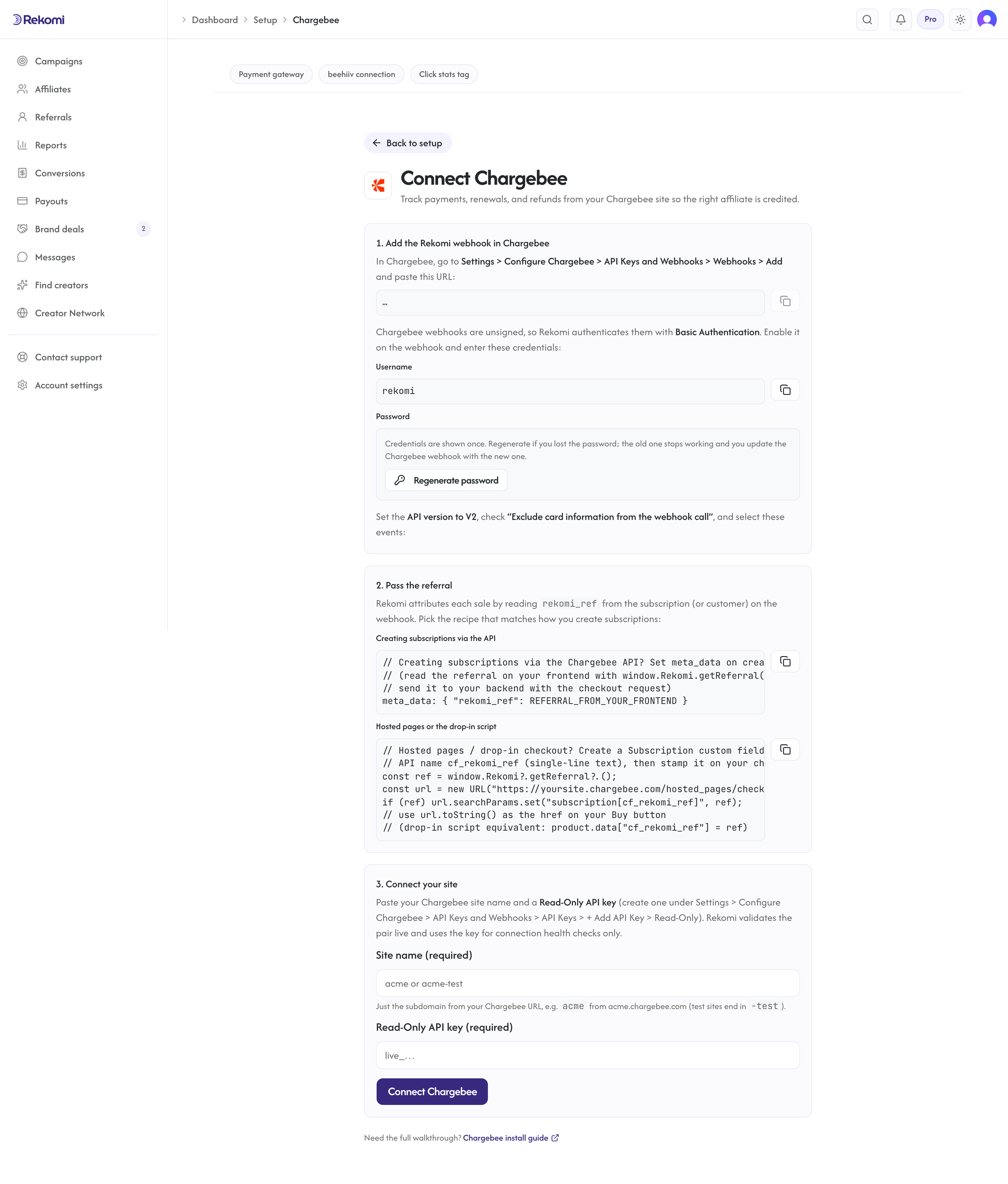
Step 2. Copy the webhook URL, the username, and the password. The password is shown once. It is stored encrypted and cannot be displayed again; if you lose it, the setup page has an explicit Regenerate button that mints a new one (the old one stops working immediately, so you would update the Chargebee webhook with the new value).
Step 3. Add the webhook in Chargebee with those values (the next section walks through the exact settings).
Step 4. Back in Rekomi, enter your site name and the Read-Only API key and click Connect Chargebee. Rekomi validates the pair live against your site before accepting it.
Add the webhook in Chargebee
In Chargebee, open Settings > Configure Chargebee > API Keys and Webhooks > Webhooks and click Add Webhook:
- Paste the webhook URL from the Rekomi setup page.
- Turn on "Protect webhook URL with basic authentication" and enter the username and password from the setup page.
- Set the API version to V2. Rekomi processes V2 payloads only; V1 deliveries are rejected so Chargebee retries them after you fix the version.
- Check "Exclude card information from the webhook call". Rekomi never needs card data.
- Select these events:
payment_succeededpayment_refundedpayment_failedsubscription_createdsubscription_activatedsubscription_cancelledsubscription_reactivatedsubscription_changedsubscription_deletedcredit_note_created
An "All Events" configuration also works (Rekomi acknowledges and ignores event types it does not use), but the explicit list keeps the traffic lean.
Attribution: carry rekomi_ref on the subscription (required)
Chargebee hosts the checkout on its own domain, so the affiliate referral has to travel from the visitor's browser into the subscription record. This step is required: without it, payments arrive with no referral and no commission is credited, unless the buyer's email matches a lead captured on your site (the fallback at the end of this section).
First, make sure the Rekomi head script is installed on your marketing site so the affiliate cookie is set when a visitor lands on an affiliate link:
<script async src="https://api.rekomi.com/api/v1/r/loader.js" data-program-id="YOUR_PROGRAM_ID" data-rkmi-email-capture="auto"></script>The program ID is in the Rekomi dashboard under Settings, Tracking, Website snippet (the install hub). Rekomi records an email a referred visitor types into any email or text field on the pages where the tag runs (signup, login, checkout and other forms) so the sale can be credited even when your checkout passes no referral. Nothing is recorded without a referral. Remove the data-rkmi-email-capture attribute to turn this off; explicit Rekomi.convert() calls still work.
Then pick the recipe that matches how you create subscriptions. Rekomi reads the referral from the subscription first, then the customer, in both the meta_data and custom-field renderings.
Creating subscriptions via the API. Set meta_data on subscription create. Read the referral on your frontend with window.Rekomi.getReferral() and send it to your backend with the checkout request:
{
  "meta_data": { "rekomi_ref": "REFERRAL_FROM_YOUR_FRONTEND" }
}
Hosted pages or the drop-in script. Create a Subscription custom field in Chargebee (Settings > Configure Chargebee > Custom Fields) with the API name cf_rekomi_ref, single-line text. Then stamp it onto your checkout URLs:
<script>
  document.addEventListener('DOMContentLoaded', function () {
    var ref = window.Rekomi && window.Rekomi.getReferral();
    if (!ref) return;
    document
      .querySelectorAll('a[href*=".chargebee.com/hosted_pages"]')
      .forEach(function (a) {
        var url = new URL(a.href);
        url.searchParams.set('subscription[cf_rekomi_ref]', ref);
        a.href = url.toString();
      });
  });
</script>
Using Chargebee's drop-in script instead of hosted-page links? Pass the same field on the product object before opening checkout:
var ref = window.Rekomi && window.Rekomi.getReferral();
if (ref) product.data["cf_rekomi_ref"] = ref;
Custom fields created on a test site are published to the live site from the Chargebee custom-fields settings, so create the field once and publish it.
Lead email match (fallback). When a payment reaches Rekomi without rekomi_ref on the subscription or the customer, and the event carries the customer's email, Rekomi also checks that email against the leads the Rekomi script captured on your own site in the last 90 days (turn on email capture on your signup form with data-rkmi-email-capture="auto" on the loader tag; see lead tracking) and credits the affiliate who brought that lead. The referral on the subscription always wins when it is present, as does the customer's earlier history, and an affiliate buying with their own email is not credited.
What gets recorded
- Payments are recorded when
payment_succeededfires: the first successful payment of a subscription is the first conversion, and one-time charges without a subscription are one-time conversions. - Subscription renewals are recorded as recurring conversions on every successful renewal payment, so recurring revenue-share commissions keep accruing automatically. The referral set at signup stays on the subscription, and Rekomi also falls back to the customer's conversion history, so renewals credit the same affiliate.
- Signups (
subscription_created) are recorded as zero-value events so the customer is tied to the affiliate before the first payment. - Refunds, full or partial, claw back the commission automatically and proportionally when
payment_refundedfires, in the same audit trail as the original conversion.
Refunds and chargebacks
Refunds you issue in Chargebee (refundable credit notes) arrive as payment_refunded and reverse commission proportionally: a 40% refund claws back 40% of the commission. Chargebacks handled through Chargebee's Chargeback Management feature reach Rekomi the same way, as refunds and credit notes, and claw back too. Disputes resolved outside that feature (directly at your payment gateway) do not generate Chargebee events and are invisible to Rekomi; adjust those manually if they matter for a payout.
Adjustment credit notes that reduce an invoice without moving cash are observed but never recorded as money.
Security
- Every webhook delivery is authenticated with the Basic Authentication credential before anything is processed; deliveries that fail the check are rejected.
- Keep the webhook URL and the credentials private: treat them like a password. Everything travels over HTTPS end to end.
- Chargebee does not support webhook signing, which is why Rekomi mints the credential instead of the more common signing-secret flow you may know from Stripe or Paddle. The credential plus your unguessable per-workspace URL are the authentication.
- Your Read-Only API key and the webhook password are stored encrypted at rest; the password is returned only once, at the moment it is generated, and can never be retrieved again. Disconnecting wipes both and retires the webhook URL.
Quirks worth knowing
- One conversion source per workspace. Chargebee Connect is mutually exclusive with Stripe (via the Rekomi app for Stripe), Paddle, Braintree, Shopify, Lemon Squeezy, Polar, Recurly, Gumroad, Creem, Dodo Payments, Mollie, and the S2S API, so the same sale is never counted twice. Disconnect one before connecting another.
- Chargebee API keys do not expire. If the health check flags the connection as broken, the key was deleted or disabled, the site was renamed, or the webhook credentials were changed; it is never a routine expiry.
- Late deliveries are fine. Chargebee retries failed webhooks for up to two days. Rekomi de-duplicates by event id, so retries and replays never double-count.
- Test sites are separate sites.
acme-testhas its own API keys and webhooks. Connect the test site to a sandbox workspace to rehearse; connect the live site for production. - Delete the webhook if you disconnect. If you disconnect Rekomi, also delete the Rekomi webhook in Chargebee (Settings > Configure Chargebee > API Keys and Webhooks > Webhooks); Chargebee keeps posting to the retired URL until you remove it there.
Rehearse on your test site
- In your Chargebee test site, enable the Chargebee Test Gateway and create a Read-Only API key.
- Create the
cf_rekomi_refSubscription custom field (or plan to usemeta_datavia the API). - Connect the test site in Rekomi and add the webhook in Chargebee with the Basic Authentication credentials, API version V2, and the event list above.
- Open a hosted checkout with
subscription[cf_rekomi_ref]set to an approved affiliate's link slug and pay with a test card. The conversion should appear on the campaign's Performance tab within a minute. - Use Chargebee's Time Machine to advance a billing term and confirm the renewal payment credits the same affiliate.
- Refund the invoice (partially, then fully) and confirm the commission claws back proportionally.
Troubleshooting
"Your Chargebee connection is broken." banner or reconnect email. The stored API key stopped validating: it was deleted or disabled in Chargebee, or the site name changed. Create a fresh Read-Only key and reconnect on /dashboard/setup/chargebee; your tracking history is preserved.
Events stop arriving but the connection shows healthy. The health check probes the API key, not the webhook. Check the webhook still exists in Chargebee, points at the right URL, uses API version V2, and has Basic Authentication set to the current credentials (a regenerated password must be updated in Chargebee too). Chargebee's webhook dashboard shows the delivery attempts and their responses.
Deliveries rejected as unauthorized. The Basic Authentication credentials in Chargebee do not match. Regenerate the password on the setup page and paste the new value into the Chargebee webhook settings.
Payments arrive but no affiliate is credited. The event reached Rekomi without rekomi_ref on the subscription or customer. Verify the stamping snippet runs on every page that links to checkout, that the head script ran before the buyer clicked through (so window.Rekomi.getReferral() has a value), that the custom field's API name is exactly cf_rekomi_ref (case-sensitive), and that API-created subscriptions set meta_data.rekomi_ref.
V1 events rejected. Rekomi processes API version V2 only. Edit the webhook in Chargebee to V2; Chargebee redelivers the failed events and Rekomi records them.
Related
Install on Lemon Squeezy
Connect Lemon Squeezy natively with one API key. Rekomi creates and verifies the webhook for you, then tracks orders, subscription renewals, and refunds automatically. Stamp rekomi_ref on your checkout links so each sale credits the right affiliate.
Install on Polar
Connect Polar natively with one Organization Access Token. Rekomi creates the webhook endpoint in your Polar organization for you, then tracks orders, subscription renewals, and refunds automatically. Polar checkout links and embeds are credited to the right affiliate automatically once the Rekomi script is installed; server-created (API) checkouts stamp rekomi_ref.