

Install on Creem
Connect Creem natively: add one webhook in Creem's dashboard with all events selected, paste the signing secret and an API key into Rekomi, and sales, subscription renewals, refunds, and chargebacks are tracked automatically. Carry rekomi_ref in checkout metadata so each sale credits the right affiliate.

Creem is a Merchant of Record for SaaS and digital products, and Rekomi supports it natively. You add one webhook in Creem's dashboard pointed at your per-workspace Rekomi URL, then paste the webhook signing secret plus an API key into Rekomi. From that point on, sales, subscription renewals, refunds, and chargebacks flow into Rekomi with no relay code to write or maintain. Still evaluating? See Why Rekomi for Creem →.
One thing to know up front: the API key you paste is used only to validate the connection and run a periodic read-only health check. It never reads your sales; those arrive through the signed webhook. A minimal key with Products read access is all Rekomi needs, so you never hand over a key that could touch your money.
What you need
- A Creem store in production mode. The webhook and the API key both come from your production dashboard (not Test Mode; Creem's test environment is a separate universe with its own
creem_test_keys, and Rekomi rejects test credentials on a production connection with a specific error before anything is stored). - An API key with Products read access. In Creem, open Developers > API Keys and create a key. Products read is enough: Rekomi's validation and health probe is one cheap read-only call. Note that Creem answers with the same 403 for an invalid or revoked key as for a key missing the permission, so if the connect error mentions Products read and your key looks scoped correctly, create a fresh key and try again.
- Five minutes. There is no OAuth dance and no code; the whole flow is two pastes.
Connect in Rekomi
Step 1. Go to /dashboard/setup/creem. The page shows your per-workspace webhook URL.
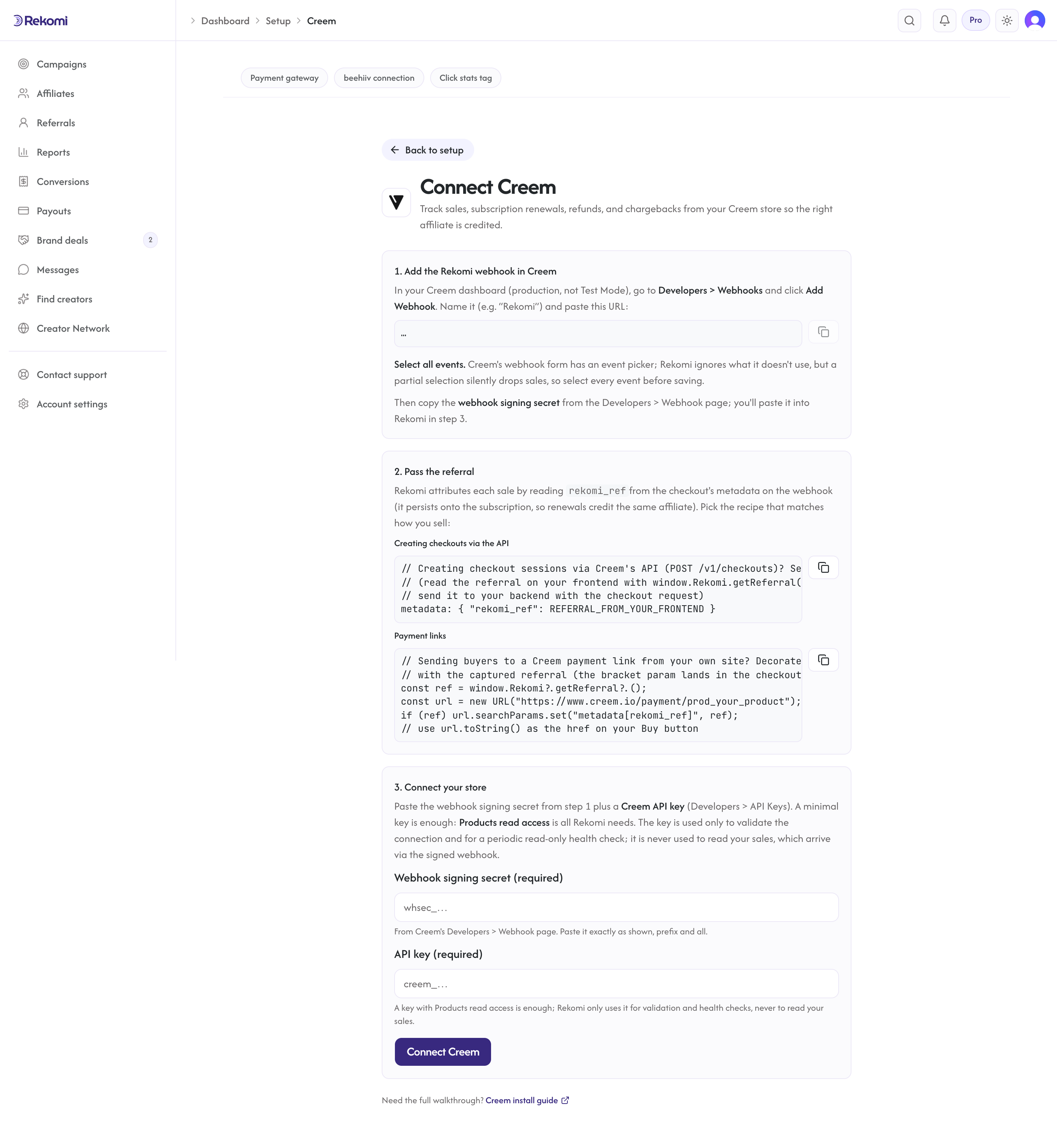
Step 2. In your Creem dashboard, open Developers > Webhooks and click Add Webhook. Name it (e.g. "Rekomi"), paste the URL from step 1, and select all events. This matters: Creem's webhook form has an event picker, and Rekomi acknowledges and ignores event types it does not use, but a partial selection silently drops sales with no error anywhere; the only symptom would be events going stale. Select everything.
Step 3. Copy the webhook signing secret from Creem's Developers > Webhook page and paste it into Rekomi exactly as shown, prefix and all.
Step 4. Paste your API key and click Connect Creem. Rekomi validates the key live against Creem before accepting it; a Test Mode key gets its own specific error, while an invalid, revoked, or under-scoped key gets one combined message naming all three causes, because Creem answers the same 403 for each.
Attribution: carry rekomi_ref in checkout metadata (required)
Creem hosts its checkout on its own domain, so the affiliate referral has to travel from the visitor's browser into the checkout record. This step is required for link-based new-customer attribution: without it, a linked sale arrives with no referral and no commission is credited (two things still credit on their own: a redeemed affiliate coupon code, see the quirks below, and a buyer email that matches a lead captured on your site, see the fallback at the end of this section).
First, make sure the Rekomi tracking script is installed on your marketing site so the affiliate click is captured and window.Rekomi.getReferral() returns a value when a visitor lands on an affiliate link. That script is the same one every Rekomi install uses; your site platform's recipe in the install hub covers it. There is no Creem-specific script to add: the native connection you set up above is what records the sale. Then pick the recipe that matches how you sell:
Creating checkout sessions via Creem's API. Read the referral on your frontend with window.Rekomi.getReferral(), send it to your backend with the checkout request, and set it in metadata when creating the checkout session:
{
  "product_id": "prod_your_product",
  "metadata": { "rekomi_ref": "REFERRAL_FROM_YOUR_FRONTEND" }
}
Payment links. Decorate the link with the bracket metadata param; Creem copies link metadata onto the checkout:
const ref = window.Rekomi?.getReferral?.();
const url = new URL("https://www.creem.io/payment/prod_your_product");
if (ref) url.searchParams.set("metadata[rekomi_ref]", ref);
// use url.toString() as the href on your Buy button
Note: the field is rekomi_ref, not creem_ref (Creem reserves creem_ref for its own affiliate feature).
Lead email match (fallback). When a checkout reaches Rekomi without rekomi_ref in its metadata and without an affiliate coupon code, and the event carries the customer's email, Rekomi also checks that email against the leads the Rekomi script captured on your own site in the last 90 days (the tag Rekomi hands out carries data-rkmi-email-capture="auto", which records the email typed on your signup form as a lead; see lead tracking) and credits the affiliate who brought that lead. A coupon code or a referral in the metadata always wins when it is present, as does the customer's earlier history, and an affiliate buying with their own email is not credited.
How sales and renewals track
- One-time sales record when Creem reports the completed checkout, at the order amount.
- Subscriptions record the first charge as a one-time-style initial conversion and every renewal as a recurring conversion, at the charged transaction amount. Checkout metadata persists onto the subscription, so renewals credit the same affiliate with no extra work; if a renewal ever arrives without it, Rekomi falls back to the customer's attribution history.
- Trials start with a subscription lifecycle event and no money; no commission exists until the first real charge. Cancellations flow through as churn signals for churn-aware commission rules.
- Commissions are calculated on the pre-tax sale amount, in both of Creem's tax modes. Creem is a Merchant of Record, so it collects the tax; your affiliates earn on the sale, not on the tax. This works whichever way your products are priced: with tax-exclusive pricing the tax is added on top of your price, and with tax-inclusive pricing your listed price already contains the tax. Rekomi derives the net from what the customer actually paid minus the tax line, so an inclusive-priced product does not pay commission on its VAT.
- Everything is de-duplicated by the underlying order, transaction, refund, and dispute ids, so Creem's redeliveries and manual resends never double count.
Refunds and chargebacks
Refunds reverse commission automatically and proportionally on the pre-tax share: a 50% refund claws back 50% of the commission, and multiple partials keep clawing back until the original commission is exhausted, never past it. This includes pro-rata downgrade refunds: when a customer downgrades mid-cycle and Creem refunds the unused portion, the commission claws back pro-rata too, which is the intended behavior (the affiliate earns on what the customer actually paid).
Disputes (chargebacks) always claw back the disputed money. Creem typically processes a full refund on your behalf when a chargeback lands, which can produce both a refund event and a dispute event for the same money; Rekomi's clawback is capped at the original commission, so the double signal never double-claws.
Currencies
Creem currently prices in USD and EUR (their currency list is Creem's to grow, not a Rekomi limit). Rekomi records conversions in the currency Creem reports; with 135+ currencies supported, anything Creem adds is almost certainly covered already. In the rare event an amount arrives in a currency outside the allowlist, that event is skipped and flagged rather than guessed at, so a commission is never computed on a mangled amount.
Security
- Every webhook delivery is signature-verified before anything is processed. Creem signs deliveries two ways, a legacy HMAC header and the standard-webhooks scheme, and Rekomi verifies whichever the delivery carries, failing closed on anything malformed.
- Honesty note: the legacy scheme carries no timestamp, so replay resistance on that path rests on Rekomi's event de-duplication (a replayed delivery is recognized and ignored) rather than a freshness window. The standard-webhooks scheme adds a 300-second freshness window on top.
- The signing secret and the API key are stored encrypted at rest and never returned by the API. Disconnecting wipes both and retires the webhook URL.
- Test Mode and production are isolated: events whose mode does not match your connection are skipped, never recorded as money.
Quirks worth knowing
- One conversion source per workspace. Creem Connect is mutually exclusive with Stripe (via the Rekomi app for Stripe), Paddle, Braintree, Shopify, Lemon Squeezy, Chargebee, Polar, Recurly, Gumroad, Dodo Payments, Mollie, and the S2S API, so the same sale is never counted twice. Disconnect one before connecting another.
- Creem API keys do not expire. If the health check flags the connection as broken, the key was deleted or regenerated in Creem, or it lost its Products read permission in a scope edit; it is never a routine expiry. Reconnect with a current key.
- The health check verifies the key, not the webhook. Creem has no webhook management API, so a deleted Rekomi endpoint is not detectable by the health check; the only symptom is that events stop arriving. The setup page reads the last-event time for you: it stays amber with "no event has arrived yet" until a signed delivery lands, and warns again if events go quiet for more than a week. Either state points at the same fix: re-add the URL under Developers > Webhooks with all events selected.
- Rotating credentials does not need a disconnect. If you delete and re-create the webhook in Creem you get a new signing secret, and until you paste it in, every delivery fails signature checks while the connection still looks healthy (the API key is unaffected). Use Update credentials on the setup page. Your webhook URL is preserved, so nothing changes on the Creem side. Disconnecting instead would rotate the URL and force a full re-setup.
- The retry ladder covers several hours. Creem retries a failed delivery at 30 seconds, 5 minutes, 30 minutes, and 6 hours after the initial attempt (five deliveries over roughly 6.5 hours; schedule confirmed by Creem support), then stops. Rekomi answers with an error on purpose when it briefly cannot process a money event so Creem redelivers; for anything that outlives the ladder, Creem's dashboard has a manual resend under the Developers section, and Rekomi safely records resends without double-counting.
- Coupon-code attribution is live. Creem's webhooks carry the discount code the buyer redeemed, and a code that matches an affiliate's coupon code in Rekomi credits that affiliate even without a tracked click. The redeemed code outranks link signals (typing a code at checkout is the buyer's most explicit statement of who sent them), and an unknown or revoked code falls through to normal
rekomi_reflink attribution with no harm done.
Rehearse in Test Mode
Creem's Test Mode is a separate environment, and production Rekomi connections deliberately reject test credentials, so a full rehearsal runs on a staging setup. What you can verify on production without spending money:
- Connect, then click Check connection on the setup page: it live-probes your API key.
- Add the webhook with all events selected, then send a test delivery from Creem's webhook page if offered; a signature-valid delivery updates "last event" on the setup page.
- Place one real purchase through an affiliate link with
?via=set to an approved affiliate's link slug, confirm the conversion on the campaign's Performance tab within a minute, then refund it and confirm the commission claws back.
Troubleshooting
"Your Creem connection is broken." banner or reconnect email. The stored API key stopped validating: it was deleted or regenerated in Creem, or lost its Products read permission. Create a fresh key (Products read is enough) and reconnect on /dashboard/setup/creem; your tracking history is preserved.
"That is a creem_test_ key..." You pasted a Test Mode key on a production connection (or the reverse). Keys are not interchangeable between Creem's environments; paste a live creem_ key from your production dashboard.
The error says the key is "invalid, revoked, or missing the Products read permission". Creem answers the same 403 for all three causes, so Rekomi cannot tell them apart. Rekomi only needs Products read access; if your key looks scoped correctly, create a fresh key with that permission and connect again.
Events stop arriving but the connection shows healthy. The health check probes the API key, not the webhook. Check the endpoint still exists in Creem under Developers > Webhooks, points at the right URL, and has all events selected (a partial selection is the classic silent failure). Creem's dashboard shows delivery attempts and lets you resend. If you re-created the webhook at any point, the signing secret changed: paste the current one via Update credentials.
Sales arrive but no affiliate is credited. The checkout reached Rekomi but carried no rekomi_ref. Verify your checkout-create call sets metadata.rekomi_ref (or your payment links carry ?metadata[rekomi_ref]=), and that the tracking script ran before the buyer clicked through (so window.Rekomi.getReferral() had a value).
A conversion is missing after an outage. Creem's retry ladder ends after roughly 6.5 hours. Open the delivery in Creem's dashboard under the Developers section and resend it; Rekomi records it safely, without double-counting.
Related
- Rekomi in Creem's official docs, their own guide to this integration
- S2S tracking API reference
- No-code and non-Stripe checkout tracking
- Refund handling
Install on Gumroad
Connect Gumroad natively: click Connect, approve once on Gumroad's consent screen, and Rekomi registers the sale, refund, dispute, and membership notifications for you. Sales, renewals, refunds, and disputes are tracked automatically; ?rekomi_ref on the product link carries the referral.
Install on Dodo Payments
Connect Dodo Payments natively: paste one API key with write access enabled and Rekomi creates the webhook endpoint at Dodo itself, so payments, subscription renewals, refunds, and disputes are tracked automatically with nothing to paste back. Carry rekomi_ref in checkout metadata so each sale credits the right affiliate.