

Install on Squarespace
Code Injection Header field on the Core plan or higher. Squarespace Commerce runs on your own Stripe so attribution works automatically once the head script is in place.
Squarespace's install is one of the simplest among the no-code platforms: paste a script in the Code Injection header field and publish. The only friction is that Code Injection requires the Core plan or higher (the entry Basic plan does not expose it; legacy Business and Commerce plans also include it). If you're on Basic, upgrade first or the field will not appear in Settings.
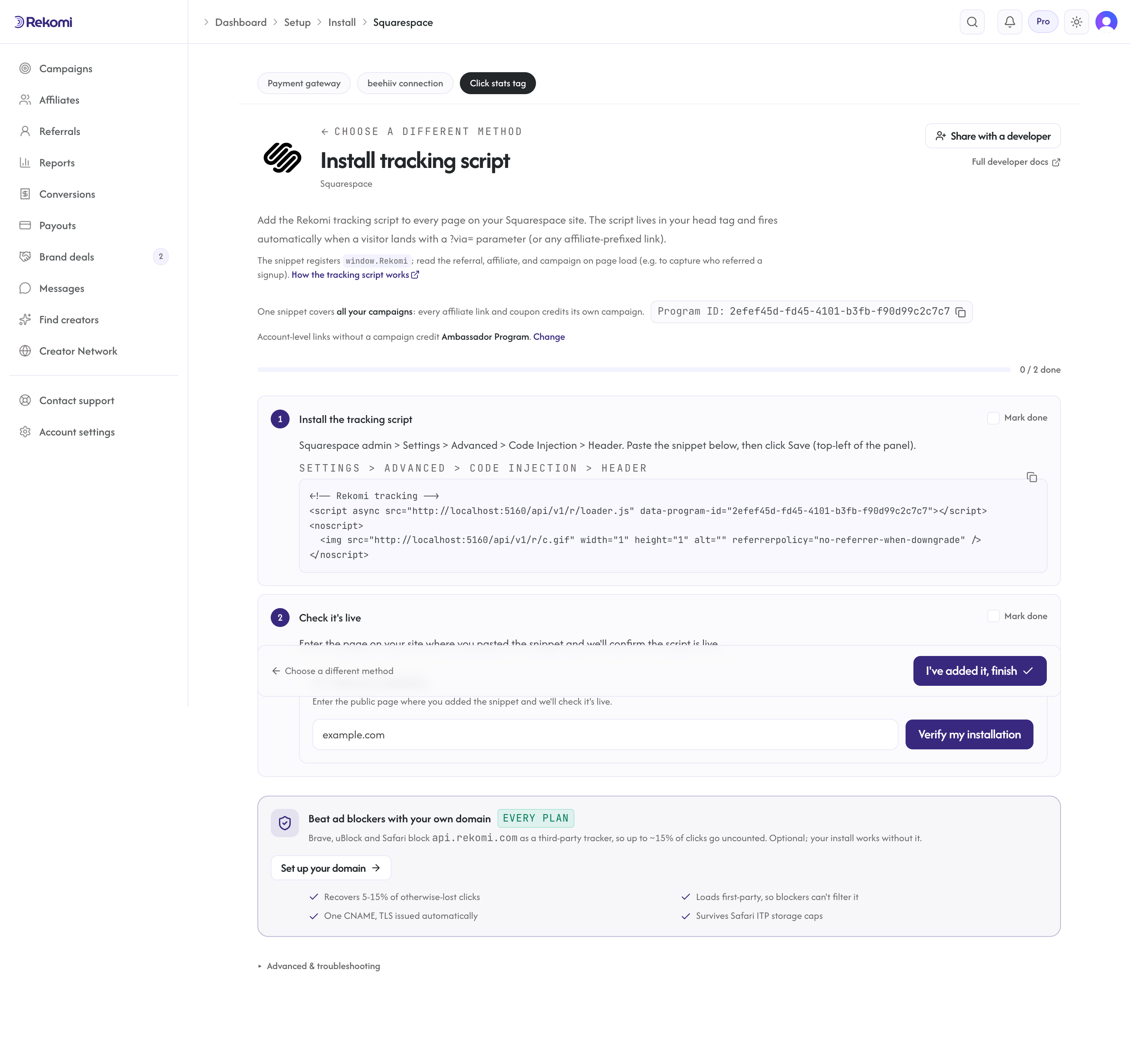
Install the head script
Squarespace admin > Settings > Advanced > Code Injection > Header.
Paste:
<!-- Rekomi tracking -->
<script async src="https://api.rekomi.com/api/v1/r/loader.js" data-program-id="YOUR_PROGRAM_ID" data-rkmi-email-capture="auto"></script>
<noscript>
  <img src="https://api.rekomi.com/api/v1/r/c.gif" width="1" height="1" alt="" referrerpolicy="no-referrer-when-downgrade" />
</noscript>
Click Save (top-left of the Code Injection panel). The script now loads on every public Squarespace page.
Copy the snippet with your program ID already filled in from Setup > Install in Rekomi. Rekomi records an email a referred visitor types into any email or text field on the pages where the tag runs (signup, login, checkout and other forms) so the sale can be credited even when your checkout passes no referral. Nothing is recorded without a referral. Remove the data-rkmi-email-capture attribute to turn this off; explicit Rekomi.convert() calls still work.
Squarespace 7.0 vs 7.1
The path above is for Squarespace 7.1 (the current default for new sites). Legacy 7.0 sites have different admin chrome, but the same Settings > Advanced > Code Injection > Header path leads to the same field. The install is identical.
Squarespace Commerce: know the limits
If your Squarespace site has the built-in Commerce module enabled, payments process through the account you picked under Squarespace admin > Commerce > Payments (Stripe or PayPal). Either way, those charges are bare card payments with no Stripe invoices, so they do not reach Rekomi's Stripe rail on their own, and Squarespace's discount codes are native to Squarespace, so they never reach Rekomi either.
That leaves two workable shapes for Commerce stores:
- A backend relay. If you run a small backend, subscribe to order webhooks through Squarespace's developer API and relay each paid order to the S2S endpoint. The relay must name the affiliate, and Squarespace checkout offers no clean referral pass-through, so this fits stores that capture the referral themselves before checkout (for example, a custom form step that stores
window.Rekomi.getReferral()against the buyer). - Commission leads instead of sales. If a relay is not realistic, run a lead-based campaign: capture signups with
window.Rekomi.convert({ email })and pay per lead. See Lead tracking.
If your Squarespace site is really a marketing surface in front of Stripe Payment Links, use the coupon path below instead; it needs no backend and attributes cleanly.
External Stripe Payment Links
If you're using Squarespace as a marketing site and embedding a Stripe Payment Link as a button (rather than using Squarespace Commerce), attribute those sales with per-affiliate coupon codes. Stripe hosts the Payment Link checkout page, so a script on your Squarespace site cannot pass the referral through it; the code the buyer redeems is what credits the affiliate, and no code on your site is needed:
- In Stripe, edit the Payment Link and turn on Allow promotion codes.
- In Rekomi, open your campaign's Coupons tab and create the coupon (the discount buyers get). Each affiliate then gets their own unique code: generate one from the affiliate's detail page, or let affiliates claim their own from the campaign page in their portal.
- Affiliates share your Payment Link with their code pre-filled, so buyers land on checkout with the discount already applied:
https://buy.stripe.com/your-link?prefilled_promo_code=THEIRCODE
When the buyer pays, Stripe delivers the sale to Rekomi over your Stripe connection and the redeemed code names the affiliate. The full walkthrough lives in Install on Stripe.
Quirks worth knowing
Core plan required. Basic-plan sites cannot install custom code. The Code Injection menu item simply isn't there. Upgrade to Core or higher (legacy Business and Commerce plans also include it) or use a different platform.
Code Injection runs on every page. Header code injects into the global template, so it loads on every page Squarespace serves. No per-page configuration needed.
Sitewide Header vs per-page Code Injection. Squarespace also exposes a per-page Code Injection field on individual pages (Page settings > Advanced). Don't install Rekomi there; that would only run on that one page. Always use the Settings > Advanced > Code Injection > Header path for sitewide install.
Squarespace Stripe is real Stripe. Don't worry that Squarespace abstracts the integration: when a buyer pays, your Stripe account receives the charge and fires the webhook to Rekomi normally. The standard Stripe attribution rail works.
Custom Forms (non-Commerce) submissions. If you collect leads via Squarespace's native Form Block (not the Commerce checkout), the lead doesn't go through Stripe and doesn't fire a Stripe webhook. Lead-based commissions are a separate feature: see lead tracking for how window.Rekomi.convert({ email }) records a referred lead (not a sale). For actual purchases, use Squarespace Commerce with Stripe or per-affiliate coupon codes as above.
Troubleshooting
Code Injection menu item is missing. You're on a plan without Code Injection (the entry Basic plan). Upgrade to Core or higher.
Script appears in Code Injection but not in View Source on the live site. Hard-refresh the page (Cmd+Shift+R). Squarespace serves CDN-cached HTML by default; the script may take a few minutes to appear after Save.
Squarespace Commerce orders don't attribute. Confirm your Stripe account is connected at Commerce > Payments, and that Stripe is connected in Rekomi under Setup > Connect payment gateway so its webhook events reach Rekomi.
Payment Link sale completed but did not attribute. Either promotion codes aren't enabled on the Payment Link, or the buyer checked out without entering an affiliate code. Turn on Allow promotion codes in Stripe, confirm the affiliate shared the ?prefilled_promo_code= version of the link, and check that the code redeemed is one Rekomi created for that affiliate.
Related
- No-code and non-Stripe checkout tracking
- Install on Stripe: the Stripe Commerce and Payment Links attribution patterns
- Squarespace docs: Code Injection
Install on Framer
Site Settings Custom Code tab, "Start of head tag" field. Publish is explicit. Custom code needs a paid site plan, and the sale itself always completes off-Framer via Stripe.
Install on Bubble
Settings SEO/metatags Header field for the install. Sales record through your own Stripe account via Stripe Connect, coupon codes, or a server-to-server relay from your Stripe webhook.