

Install on Gumroad
Connect Gumroad natively: click Connect, approve once on Gumroad's consent screen, and Rekomi registers the sale, refund, dispute, and membership notifications for you. Sales, renewals, refunds, and disputes are tracked automatically; ?rekomi_ref on the product link carries the referral.

Gumroad is a Merchant of Record for digital products and memberships, and Rekomi supports it natively with the simplest connect flow of any rail: one click. You press Connect Gumroad, approve Rekomi once on Gumroad's consent screen (read-only sales access), and Rekomi registers the sale, refund, dispute, and membership lifecycle notifications in your Gumroad account itself. There is no Ping URL to configure, no webhook to paste, and no relay code to write or maintain. Still evaluating? See Why Rekomi for Gumroad →.
Connect in Rekomi
Step 1. Click Connect Gumroad, either on the Connect payment gateway step of setup or on /dashboard/setup/gumroad. The button starts the OAuth authorization directly: one click, no interstitial page, and you are on Gumroad's consent screen, which asks only for read-only sales access (view_sales).
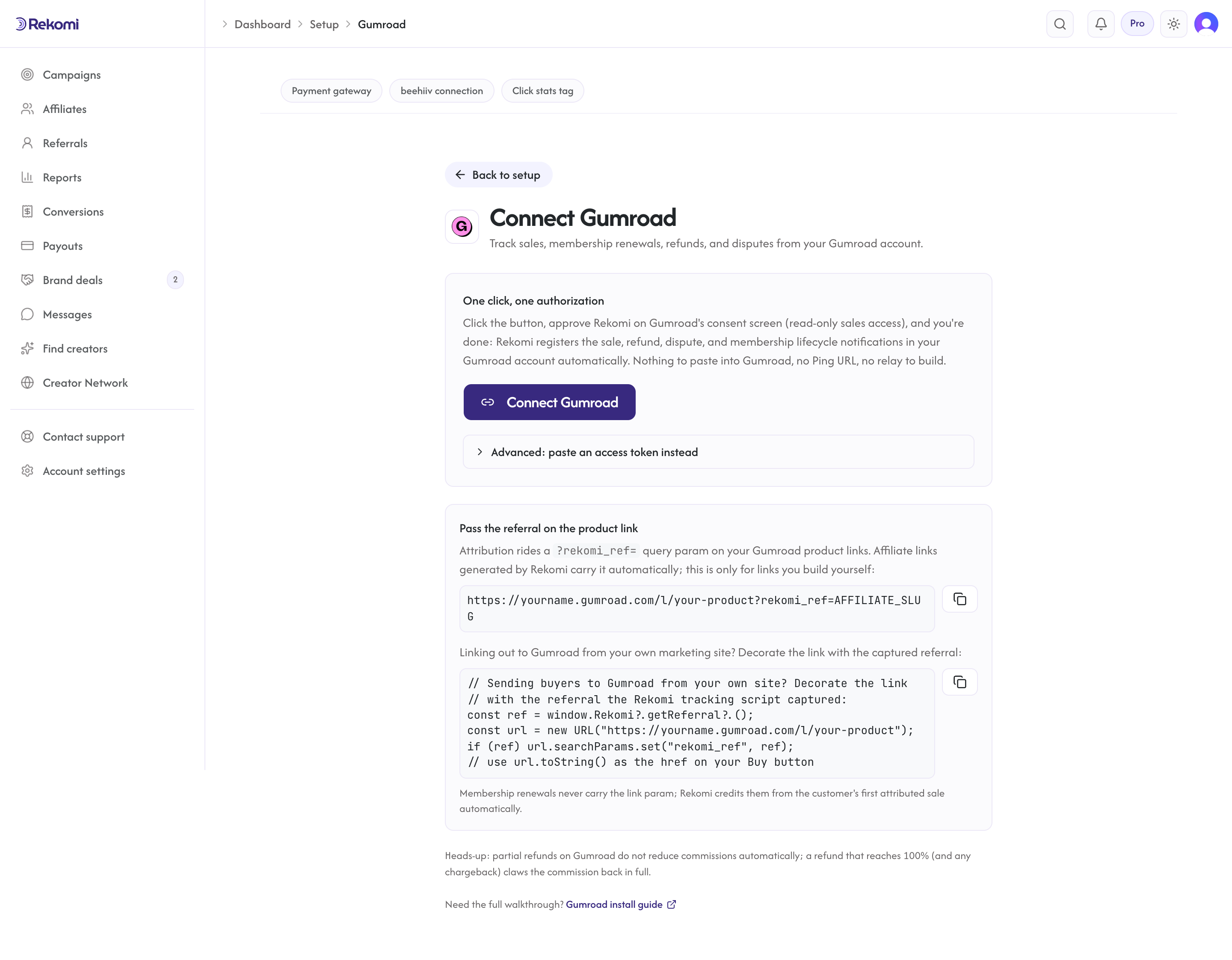
Step 2. Approve. You land back on /dashboard/setup/gumroad already connected (that page is also where you manage the connection later): Rekomi resolves your seller identity and registers six resource subscriptions in your Gumroad account (sale, refund, dispute, cancellation, subscription_ended, subscription_restarted). The setup page lists them as chips so you can see all six are live.
Advanced fallback: paste an access token. If the button flow is unavailable to you, the setup page has a collapsed "Advanced" section that accepts an access token from an application you create in Gumroad (Settings > Advanced > Applications). Know the trade-off: a token created that way grants access to your entire Gumroad account, not just sales, which is why the Connect button (scoped to view_sales only) is the recommended path. Either way the token is stored encrypted and never shown again.
Connecting is Owner-only in Rekomi, and reconnecting at any time is safe: Rekomi cleans up its old registrations and rotates your webhook credentials automatically.
Attribution: the rekomi_ref link param
Gumroad hosts its checkout on its own domain, so the affiliate referral travels as a query parameter on the product link: ?rekomi_ref=AFFILIATE_SLUG or ?via=AFFILIATE_SLUG (Rekomi reads either). Gumroad preserves the landing URL's query parameters onto the sale notification, which is how Rekomi knows which affiliate drove the sale.
- Affiliate links generated by Rekomi carry the referral automatically. Rekomi-generated links append the referral as
?via=by default, and Rekomi reads bothviaandrekomi_reffrom the sale's URL params, so campaign links that point straight at your Gumroad product pages attribute with nothing extra to do. - Sending buyers to Gumroad from your own marketing site? Install the Rekomi tracking script there (your site platform's recipe in the install hub covers it) and decorate your Buy links:
// Decorate Gumroad product links with the captured referral
const ref = window.Rekomi?.getReferral?.();
const url = new URL("https://yourname.gumroad.com/l/your-product");
if (ref) url.searchParams.set("rekomi_ref", ref);
// use url.toString() as the href on your Buy button
Renewals never carry the link parameter. Gumroad's recurring membership charges arrive without url_params, so Rekomi credits them from the customer's first attributed sale automatically (the customer-history match every native connection uses for renewals).
Lead email match (fallback). When a sale reaches Rekomi without rekomi_ref or via on the product link, Rekomi also checks the buyer's email from the sale against the leads the Rekomi script captured on your own site in the last 90 days (the tag Rekomi hands out carries data-rkmi-email-capture="auto", which records the email typed on your signup form as a lead; see lead tracking) and credits the affiliate who brought that lead. An affiliate coupon redeemed as a Gumroad offer code always wins when it is present, then the link parameter, then the customer's first attributed sale on renewals; the lead match runs only when all three miss, and it skips an affiliate buying with their own email.
What gets tracked
- Sales. One-time purchases and first membership charges record as one-time conversions; recurring membership charges record as recurring conversions for the same affiliate. Gumroad settles every charge in US dollars, so amounts are always USD.
- Refunds. A full refund claws the commission back in full, automatically. Partial refunds do not reduce commissions automatically: Rekomi records that the partial refund happened but leaves the commission intact for you to adjust if it matters. A series of partial refunds that reaches 100% claws back once, in full.
- Disputes. A chargeback claws the commission back like a full refund.
- Membership lifecycle. Cancellations, ended subscriptions, and restarts are tracked as subscription events, so churn-aware reporting and recurring commissions stay correct (a restarted membership resumes crediting the original affiliate).
- Test purchases. Gumroad flags a seller's own test purchases, and Rekomi deliberately records them as connection checks, not commissions: a test purchase updates "last event" on the setup page so you can verify the pipe end to end without creating money. Free-trial starts ($0 sales) create no conversion either; the first real charge does.
How Rekomi authenticates Gumroad's notifications
Stated plainly: Gumroad does not sign its webhook notifications. There is no signature to verify, so Rekomi authenticates deliveries with layered checks instead:
- Your notifications arrive on a per-workspace secret URL that Rekomi registered at Gumroad. Treat it like a password: the dashboard shows it to workspace Owners only, and it rotates on every reconnect.
- Sale, refund, and dispute deliveries are bound to your seller identity and rejected for any other seller; membership lifecycle notifications carry no seller field, so they are accepted only when they match a subscription Rekomi already tracks for you.
- For every money event (sale, refund, dispute), Rekomi reads the sale back from Gumroad's API with your token and records amounts from that authoritative read, never from the raw notification, cross-checking the identifiers along the way. A notification that fails the readback is rejected.
The readback means money is only ever recorded after Gumroad's own API confirms the sale exists and matches. It also means the connection's access token is load-bearing for tracking: if it is revoked, tracking stops (see connection health below).
Delivery is lossy: gaps and backfill
Gumroad retries a failed delivery only a handful of times inside roughly 14 minutes, and only when your endpoint answers with specific server errors; a delivery that times out or fails to connect is dropped without retry. Rekomi's handler is built to answer well inside Gumroad's delivery window, but if Rekomi or Gumroad's API is unreachable for longer than the retry ladder, a sale in that window can be missed.
The partial fix is the sales-history importer as a backfill lane: open Settings > Migrate, pick Gumroad, and run the Step 2 sales pull with From set to the gap's start date. Your connected account's token is used automatically, and re-running is safe (already-recorded sales are skipped as duplicates). Two caveats. First, the importer can backfill sales made through Gumroad's own built-in affiliates feature, but a missed sale that was attributed by the referral link parameter cannot be reconstructed from Gumroad's API (Gumroad's sales API does not expose URL params); record those conversions manually from Gumroad's sale records. Second, sales refunded or charged back inside the gap window are skipped by the importer (that money was clawed at Gumroad), so review those manually if any commissions from the gap need reversing.
Import your existing Gumroad affiliates and history
Migrating an existing Gumroad affiliate program? The importer is two steps:
- Roster CSV. Gumroad's dashboard exports your affiliates list (exports over 500 affiliates arrive by email). Upload it under Settings > Migrate. Gumroad
/a/affiliate links cannot carry over (their opaque ids only route inside Gumroad), so imported affiliates get fresh Rekomi links; each affiliate's fee percentage and product scope land in the per-row import notes. - Sales history via API. After the roster completes, pull each affiliate's past sales directly from Gumroad's API. History imports as settled records (Gumroad paid its affiliates biweekly), so stats and recurring attribution carry over but nothing becomes payable and balances are never retro-credited.
The full guide is Migrating from Gumroad.
Quirks worth knowing
- One conversion source per workspace. Gumroad Connect is mutually exclusive with Stripe (via the Rekomi app for Stripe), Paddle, Braintree, Shopify, Lemon Squeezy, Chargebee, Polar, Recurly, Creem, Dodo Payments, Mollie, and the S2S API, so the same sale is never counted twice. Disconnect one before connecting another.
- Gumroad's own marketplace affiliates keep working. Gumroad ships a built-in affiliates feature; connecting Rekomi does not touch it. Run both side by side, or wind the built-in one down; Rekomi adds cross-platform affiliate accounts, approval and anti-fraud controls, and a real payout system on top.
- Access tokens do not expire, but revocation is silent. Revoking the Rekomi app in Gumroad kills the token AND silently stops the notifications. Rekomi's health check probes the connection periodically and flags it broken (with a reconnect email) when that happens; the dashboard also shows a persistent reconnect banner.
- Disconnect cleans up remotely. Disconnecting deletes the six resource subscriptions in your Gumroad account and wipes the stored token. Reconnecting mints fresh credentials; the old webhook address stops working.
Test the install
Make a test purchase of one of your products with ?rekomi_ref=test on the link (or use Gumroad's test purchase flow as the seller). The delivery shows up as "last event" on /dashboard/setup/gumroad within a minute; seller test purchases verify the pipe without creating a commission. Then have a real purchase ride an approved affiliate's link and confirm the conversion on the campaign's Performance tab.
Troubleshooting
"Your Gumroad connection is broken." banner or reconnect email. The Rekomi app's access was revoked in Gumroad (which also silently stops notifications), or the sale notification registration disappeared. Click Connect Gumroad again; reconnecting re-registers all six feeds and rotates credentials. Tracking history is preserved.
Sales arrive but no affiliate is credited. The sale reached Rekomi but carried no referral. Check the link the buyer used actually had ?rekomi_ref=SLUG or ?via=SLUG on the Gumroad product URL, the slug belongs to an approved affiliate, and (for links from your own site) the tracking script ran before the buyer clicked through. Renewals are credited from the customer's first attributed sale, so an unattributed first sale means unattributed renewals too.
A sale is missing entirely. Check the Gumroad connection is healthy on the setup page, then run the backfill pull (Settings > Migrate > Gumroad > Step 2) for the affected date range; Gumroad drops timed-out deliveries without retrying, so extended downtime windows need the backfill. The pull recovers sales made through Gumroad's built-in affiliates feature only; a missed link-attributed sale has to be recorded manually from Gumroad's sale records.
Legacy: Ping URL relay (S2S)
Before the native connection, Gumroad tracking ran through a self-hosted relay: Gumroad's Ping URL POSTs each sale to a handler you run, and your handler forwards it to Rekomi's S2S endpoint with an HMAC signature. The recipe remains here for sellers who have not connected Gumroad natively; if you can use the Connect button, prefer it (no infrastructure, plus refunds, disputes, and membership lifecycle included).
In Gumroad, open Settings > Advanced > Ping URL and point it at a handler on your backend. Gumroad does not sign pings, so protect the inbound leg with a shared secret in the URL (and/or IP-allowlisting); the API key and HMAC below protect your relay's call to Rekomi, not Gumroad's call to you. This legacy relay reads the ?via= parameter; the native connection reads both via and rekomi_ref.
// Node example with express
const express = require('express');
const crypto = require('crypto');

// Every call to Rekomi carries your API key (rk_live_...) as a Bearer token plus a
// timestamped HMAC signature: X-Rekomi-Signature: t=<unix>,sig=<hex>, where <hex> is
// HMAC-SHA256 of `${ts}.${rawBody}` with your signing secret. Full contract:
// /docs/developers/s2s-tracking
function rekomiHeaders(body) {
  const ts = Math.floor(Date.now() / 1000);
  const sig = crypto.createHmac('sha256', process.env.REKOMI_SIGNING_SECRET)
    .update(`${ts}.${body}`).digest('hex');
  return {
    'Content-Type': 'application/json',
    'Authorization': `Bearer ${process.env.REKOMI_API_KEY}`,
    'X-Rekomi-Signature': `t=${ts},sig=${sig}`,
  };
}

app.post('/webhooks/gumroad', express.urlencoded({ extended: true }), async (req, res) => {
  // 1. Verify shared secret (or IP allowlist at the edge).
  if (req.query.secret !== process.env.GUMROAD_SHARED_SECRET) {
    return res.sendStatus(401);
  }

  const sale = req.body;

  // 2. Pull the affiliate slug from url_params[via]. Gumroad nests the original URL query
  //    under url_params; extended: true makes urlencoded parse the nested keys.
  const referral = sale.url_params?.via || sale.url_params?.rekomi_ref || sale.url_params?.ref;
  if (!referral) return res.sendStatus(200); // No affiliate involved.

  // 3. Refunds: the ping fires again with refunded=true. Reverse instead of recording.
  if (sale.refunded === 'true' || sale.refunded === true) {
    const refundBody = JSON.stringify({
      externalEventId: sale.sale_id, // Same id as the original sale
    });
    await fetch('https://api.rekomi.com/api/tracking/refund', {
      method: 'POST',
      headers: rekomiHeaders(refundBody),
      body: refundBody,
    });
    return res.sendStatus(200);
  }

  // 4. Relay the sale to Rekomi. Gumroad already sends price in cents (integer),
  //    so do NOT multiply by 100.
  const body = JSON.stringify({
    externalEventId: sale.sale_id,
    affiliateSlug: referral,
    amountCents: parseInt(sale.price, 10),
    currency: 'USD', // Gumroad settles every charge in USD
    customerEmail: sale.email,
  });

  await fetch('https://api.rekomi.com/api/tracking/s2s', {
    method: 'POST',
    headers: rekomiHeaders(body),
    body,
  });
  res.sendStatus(200);
});
Relay quirks, corrected against Gumroad's current behavior:
- Gumroad sends
pricein cents already (integer). Multiplying by 100 gives a 100x commission, the single most common bug on this install. Thecurrencyfield on the ping is the product's display-pricing label, not the settlement currency; money is always USD cents. - Form-encoded body with nested keys. Gumroad POSTs
application/x-www-form-urlencoded, not JSON. Use a parser that supports nested keys sourl_params[via]resolves. - Retries are few and narrow. Gumroad redelivers up to 3 times (4 total attempts) inside roughly 14 minutes, and only when your handler answers 499, 500, 502, 503, or 504. Anything else that goes wrong, including a handler timeout or a connection failure, is dropped without retry. Make the relay safe to retry (
externalEventIdde-dupes on Rekomi's side), keep it fast, and run it on infrastructure with strong uptime; queue-and-retry on your side is the robust pattern. - The Ping URL fires on every sale, including ones with no affiliate. Return 200 early for those so the delivery is considered handled.
- Affiliate links must carry the parameter explicitly. Gumroad has no cookie layer Rekomi controls; the slug has to be in the URL the buyer lands on.
Related
Install on Recurly
Connect Recurly natively: pick your US or EU region and paste a read-only API key into Rekomi, add the Rekomi webhook in Recurly, and paid invoices, subscription renewals, and refunds are tracked automatically. Carry rekomi_ref on the subscription so each sale credits the right affiliate.
Install on Creem
Connect Creem natively: add one webhook in Creem's dashboard with all events selected, paste the signing secret and an API key into Rekomi, and sales, subscription renewals, refunds, and chargebacks are tracked automatically. Carry rekomi_ref in checkout metadata so each sale credits the right affiliate.