

Install on Paddle
Connect your Paddle Billing account to Rekomi natively, point a Paddle notification destination at Rekomi and paste the signing secret, so sales and refunds are tracked automatically with no backend code.

Paddle is a Merchant of Record: your customer pays Paddle and Paddle remits to you. Rekomi integrates with Paddle Billing natively. You point a Paddle notification destination (webhook) directly at Rekomi and paste its signing secret into your dashboard. Rekomi verifies every event and records the conversion, so there is no backend relay to build or maintain. Still evaluating? See Why Rekomi for Paddle →.
Attribution has two halves: the Rekomi script captures the affiliate click on your marketing pages, and you carry that referral into Paddle Checkout via customData. When Paddle sends the order to Rekomi, the referral on the event is matched to the affiliate.
Looking for a custom checkout or another platform? Use the server-to-server API instead, that path relays conversions from your own backend.
1. Install the head script
Paste the Rekomi head script in your marketing site's <head>, on every page that can lead to a purchase, so the click is captured before the buyer opens Paddle Checkout.
<script async src="https://api.rekomi.com/api/v1/r/loader.js" data-program-id="YOUR_PROGRAM_ID" data-rkmi-email-capture="auto"></script>On a no-code builder (Webflow, Framer, Squarespace, etc.), use the platform's custom head-code field. Your program ID is in the dashboard under Settings, Tracking, Website snippet (the install hub).
Rekomi records an email a referred visitor types into any email or text field on the pages where the tag runs (signup, login, checkout and other forms) so the sale can be credited even when your checkout passes no referral. Nothing is recorded without a referral. Remove the data-rkmi-email-capture attribute to turn this off; explicit Rekomi.convert() calls still work.
2. Pass the referral to Paddle Checkout
When you open Paddle Checkout, attach the referral from window.Rekomi.getReferral() to customData under the key rekomi_ref. Paddle stores it on the transaction and includes it on every webhook for that order.
const referral = window.Rekomi && window.Rekomi.getReferral();
Paddle.Checkout.open({
  items: [{ priceId: 'pri_xxx', quantity: 1 }],
  customData: {
    rekomi_ref: referral || null,
  },
  settings: {
    successUrl: 'https://yourdomain.com/thanks',
  },
});
The customData key must be exactly rekomi_ref. That value is your affiliate's link slug, which is what Rekomi matches the sale against.
Lead email match (fallback). When a completed transaction reaches Rekomi without rekomi_ref, Rekomi also checks the buyer's email against the leads the Rekomi script captured on your own site in the last 90 days (turn on email capture on your signup form with data-rkmi-email-capture="auto" on the loader tag; see lead tracking) and credits the affiliate who brought that lead. One thing to know: Paddle's default notifications may not include the customer object, only the customer id, so the event itself may carry no email. When it carries none, Rekomi reads the customer through the read-only Paddle API key from step 5, provided you have one saved and lead capture is in use. So the fallback needs one of the two: the customer entity included in the notification, or the API key saved in Rekomi. The referral in customData always wins when it is present, as does the customer's earlier history, and an affiliate buying with their own email is not credited.
3. Get your Rekomi webhook URL
In Rekomi, open Setup, choose Connect payment gateway, and click Connect Paddle. Rekomi shows a webhook URL unique to your workspace, for example:
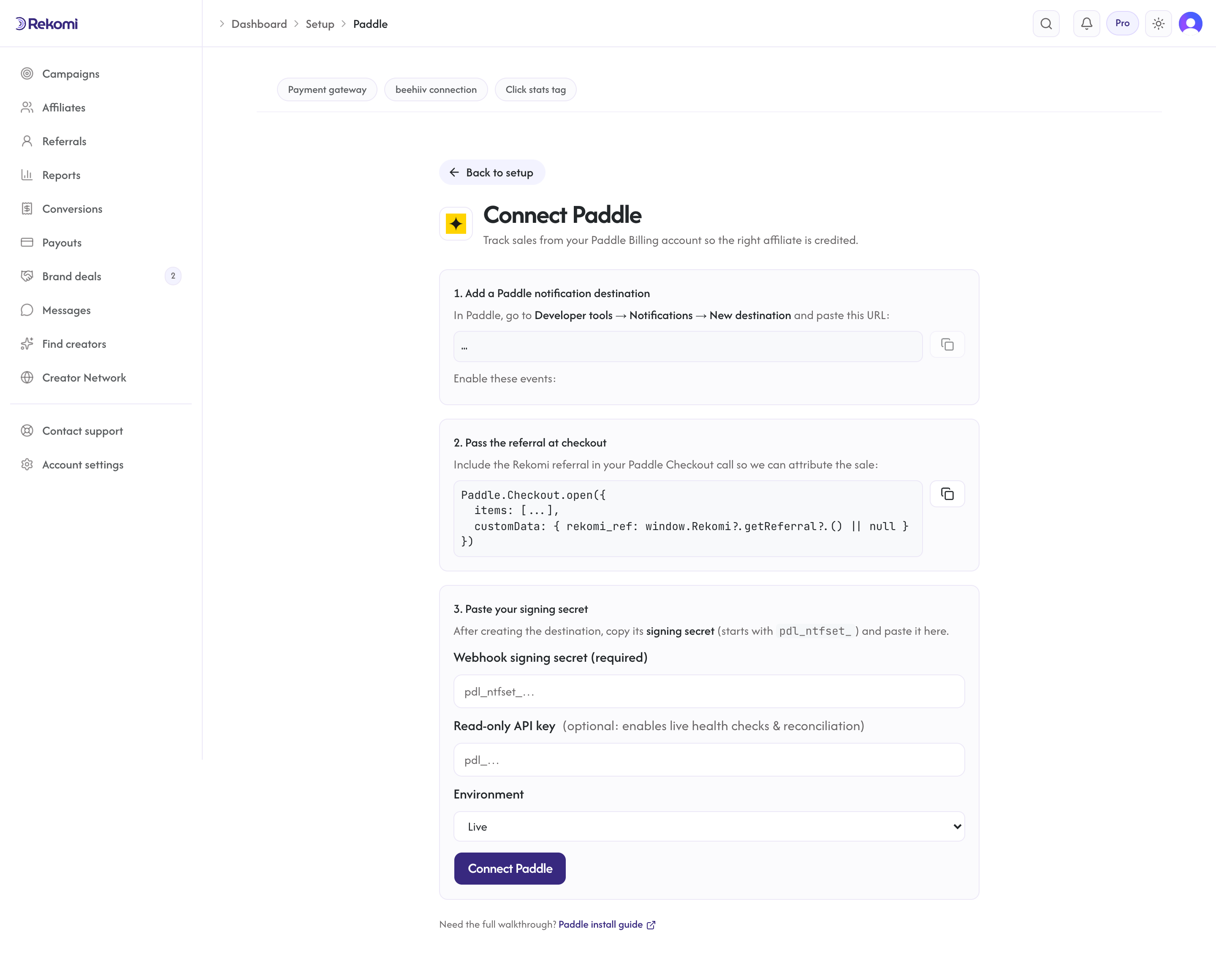
https://api.rekomi.com/api/webhooks/paddle/<your-token>Copy it. This URL is unique to you and is how Rekomi knows which workspace an event belongs to. Keep it private.
4. Create the Paddle notification destination
In Paddle, go to Developer tools → Notifications → New destination and paste the Rekomi webhook URL. Enable these events:
transaction.completedsubscription.createdsubscription.updatedsubscription.canceledadjustment.createdadjustment.updated
Save the destination, then open it again and copy its signing secret (it starts with pdl_ntfset_).
5. Paste the signing secret into Rekomi
Back in Connect Paddle, paste the signing secret, choose your environment (Live or Sandbox), and click Connect Paddle. That signing secret is what lets Rekomi verify every incoming event is genuinely from your Paddle account; it is stored encrypted and never shown again.
Optionally, paste a read-only Paddle API key (Developer tools → Authentication). It is not required for tracking a sale that carries rekomi_ref; Rekomi uses it to validate the connection when you connect, for periodic health probes that confirm the connection is healthy, and to read the buyer's email from the customer when a notification does not include it and the sale is still unattributed (the lead email match in step 2), never to recover missed events. Tracking works with the signing secret alone.
That's it. From now on, every completed Paddle sale carrying a rekomi_ref is credited to the right affiliate automatically.
Refunds
Refunds and chargebacks are handled automatically, no extra setup. When Paddle approves a refund or chargeback adjustment (delivered via the adjustment.created / adjustment.updated events), Rekomi reverses the commission proportionally and updates the affiliate's pending balance.
Quirks worth knowing
Capture the click before the overlay opens. The Paddle Checkout overlay runs in an iframe Rekomi cannot touch, so the referral must already be captured (the head script must have run and window.Rekomi.getReferral() must return a value) before the buyer opens Checkout. On cold visits where a "Buy" button opens the overlay instantly, the async loader is usually fast enough; if you see misses, defer the overlay open by ~200ms after load.
Amounts need no conversion. Paddle sends totals as integer minor-unit strings (for example "4900" = $49.00) and Rekomi reads them as-is. Do not multiply by 100.
Commissions are calculated on the pre-tax amount. Paddle is a Merchant of Record: it collects sales tax and VAT itself, so that money is never your revenue. Rekomi commissions the transaction total minus its tax, net of any customer-balance credit Paddle applied, and refund clawbacks subtract the refund's own pre-tax amount, so they stay exactly symmetric with what was credited. Your affiliates earn on the sale itself, never on the tax a buyer's country happened to add.
One conversion source per workspace. Paddle Connect is mutually exclusive with Stripe (via the Rekomi app for Stripe), Braintree, Shopify, Lemon Squeezy, Chargebee, Polar, Recurly, Gumroad, Creem, Dodo Payments, Mollie, and the S2S API, so the same sale is never counted twice. Disconnect one before connecting another.
Troubleshooting
A Paddle sale didn't show up in Rekomi. Check three things: the head script is on the page that opens Checkout, the transaction's customData contains rekomi_ref with the affiliate slug, and the affiliate is Approved. Paddle's notification log shows the delivery + Rekomi's response code for each event.
Paddle shows a 401 from the webhook. The signing secret in Rekomi is missing or does not match the destination. Re-copy the secret from the Paddle destination and reconnect. A rotated secret in Paddle must be re-pasted in Rekomi. (A 404 instead means the webhook URL's token is stale, reconnect to get the current URL.)
The connection shows as broken in Rekomi. The destination was removed or its secret rotated. Re-create or re-copy in Paddle, then reconnect on the Connect Paddle page.
Related
- Server-to-server API reference
- Track leads and signups: with Paddle, subscription and trial signups are captured as leads automatically, no extra code; a free signup that never creates a Paddle subscription still needs the lead API
- Multi-currency reporting
The Rekomi app for Stripe
The Rekomi app for the Stripe Dashboard, the same authorization the dashboard's Connect Stripe button uses. A different entry point to the same native Stripe tracking, not a separate processor.
Install on Braintree
Connect your Braintree account to Rekomi natively, point a Braintree webhook at Rekomi and paste your API credentials, so recurring sales and chargebacks are tracked automatically with no backend relay.