

Install on Mollie
Connect Mollie natively: paste one advanced access token and Rekomi creates a signed webhook in your Mollie organization, so payments, subscription renewals, refunds, and chargebacks are tracked automatically, with a 30-minute check as backup. Carry rekomi_ref in payment and subscription metadata so each sale credits the right affiliate.

Mollie is a payment service provider for businesses in the EEA, Switzerland, and the UK, and Rekomi supports it natively. The setup is one paste: you give Rekomi an advanced access token with seven permissions (six read permissions plus webhooks.write), and Rekomi validates it live, creates one signed webhook in your Mollie organization, and stores the webhook's signing secret for you. There is nothing to paste back into Mollie and no webhook form to fill in. From that point on, payments, subscription renewals, refunds, and chargebacks flow into Rekomi with no relay code to write or maintain. Still evaluating? See Why Rekomi for Mollie →.
One thing to know up front: the credential is an advanced access token, not a standard API key. A standard API key (live_... or test_...) can create payments and refunds but cannot manage webhooks, so Rekomi refuses it with an error naming exactly that. The advanced access token holds only read permissions plus webhook management, so Rekomi never holds a credential that can move your money. After connect, the token is used to manage the webhook, run a periodic health check, and look for new payments, refunds, and chargebacks every 30 minutes; your sales arrive through the signed webhook first, and the 30-minute check is the backup.
What you need
- A Mollie organization in live mode. Mollie's test mode is EUR only and fully isolated from live. Rekomi's production connection is live mode only; test mode is available on a staging setup.
- An advanced access token with seven permissions. In the Mollie dashboard, open Developers > API keys and create an advanced access token (name it "Rekomi") with these permissions ticked:
webhooks.read,webhooks.write,payments.read,refunds.read,profiles.read,organizations.read, andcustomers.read.customers.readis what lets Rekomi read the buyer's email from the Mollie customer a payment belongs to when the payment itself carries none, so a lead captured on your site can still match. A token created beforecustomers.readwas added to this list does not carry it, so if you connected Mollie earlier, create a fresh advanced access token with all seven permissions and reconnect on /dashboard/setup/mollie (your history is preserved); until then, passbillingAddress.emailon the payments you create yourself. Only a user with the Admin role can create one. Create the token for all website profiles in your organization and for live mode. Mollie does not document this, but a token limited to a single website profile is answered with a 403 on the calls Rekomi makes to connect, so the connect fails. Rekomi still tracks one website profile per workspace; when the token sees several, Rekomi asks you which one to bind after you paste it. - Two minutes. There is no OAuth dance, no webhook form, and no secret to copy; the whole flow is one paste.
Connect in Rekomi
Step 1. Go to /dashboard/setup/mollie.
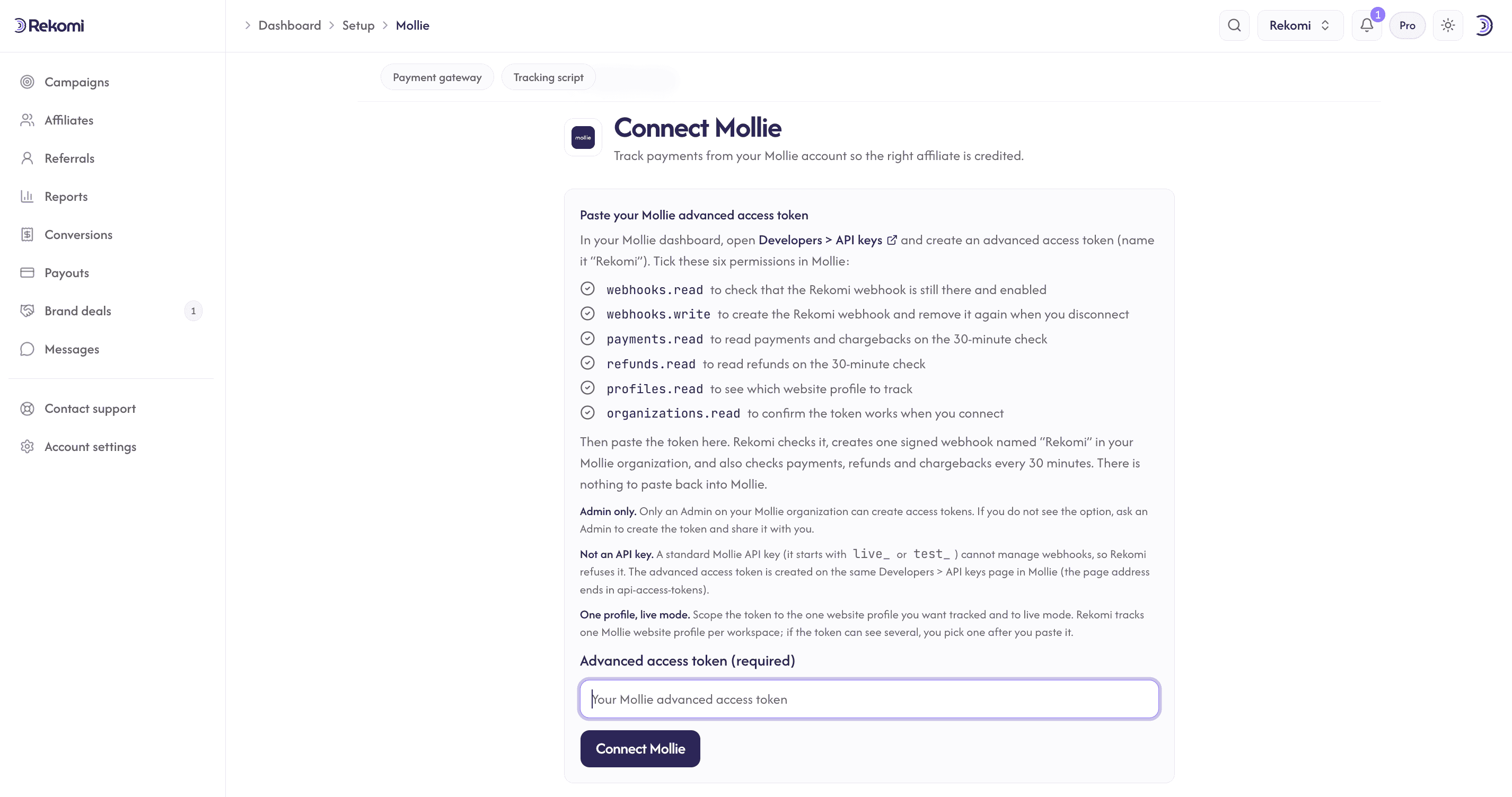
Step 2. Paste your advanced access token and click Connect Mollie. Rekomi validates the token live against Mollie (it reads your organization, your website profiles, and your existing webhooks), asks you to pick a website profile if the token sees more than one, then creates one webhook pointed at your per-workspace URL with the events it needs. The webhook is named "Rekomi" followed by a short id for your workspace, because Mollie needs webhook names to be unique inside an organization and two workspaces can share one organization. Mollie returns the webhook's signing secret once, in the create response, and Rekomi stores it encrypted. If the webhook cannot be created, nothing is stored and the error says why.
That's it. The setup page shows the webhook URL and the granted events for reference only; Rekomi manages the webhook end to end.
Attribution: carry rekomi_ref in metadata (required)
Mollie hosts its checkout on its own domain and runs no scripts there, so the affiliate referral has to travel from the visitor's browser into the payment record. This step is required for new-customer attribution unless you use the lead email match described below: without one of the two, sales arrive with no referral and no commission is credited.
First, make sure the Rekomi tracking script is installed on your own site so the affiliate click is captured and window.Rekomi.getReferral() returns a value when a visitor lands on an affiliate link. That script is the same one every Rekomi install uses; your site platform's recipe in the install hub covers it. There is no Mollie-specific script to add: the native connection you set up above is what records the sale. Then stamp the referral where you create the payment or the subscription:
One-time payments. Read the referral on your frontend with window.Rekomi.getReferral(), send it to your backend with the checkout request, and set it in metadata on POST /v2/payments:
{
  "amount": { "currency": "EUR", "value": "49.00" },
  "description": "Pro plan",
  "redirectUrl": "https://example.com/thanks",
  "metadata": { "rekomi_ref": "REFERRAL_FROM_YOUR_FRONTEND" }
}
Subscriptions. Set the same key in metadata on POST /v2/customers/{customerId}/subscriptions. Mollie forwards subscription metadata to every payment the subscription generates, so each renewal arrives already stamped:
{
  "amount": { "currency": "EUR", "value": "49.00" },
  "interval": "1 month",
  "description": "Pro plan",
  "metadata": { "rekomi_ref": "REFERRAL_FROM_YOUR_FRONTEND" }
}
Stamp the first payment too (the one with sequenceType: "first" that sets up the mandate), since Mollie creates it separately from the subscription.
Coupon codes. Mollie has no coupon or discount-code object of its own, so if your checkout accepts a per-affiliate code, pass it as metadata.rekomi_coupon on the same call. A coupon stamp outranks the referral stamp when both are present. Rekomi reads the coupon on one-time and first payments only; renewals credit the same affiliate through customer and subscription history, so a coupon's commission override applies to the first charge, not to every cycle.
Signup-first SaaS (the lead email match). If your customer signs up first and the first charge is created from your backend days later (a no-card trial, for example), there may be no browser to read the referral from at charge time. In that case capture the lead on your signup form with the tracking script's email capture (data-rkmi-email-capture="auto" on the loader tag, or Rekomi.convert(); see lead tracking), and pass the buyer's email as billingAddress.email when you create the payment. Rekomi then matches the payment to a lead recorded within the last 90 days. A Mollie payment carries an email only when you send one (card and iDEAL payments carry none by default). When the payment carries none but belongs to a Mollie customer, which every subscription payment does, Rekomi reads the email from that customer record instead (that is what customers.read is for). So with email capture on your signup form, subscription sales attribute even without the metadata stamp; the stamp stays the precise path, so keep it wherever your backend can set it. A token created before customers.read was added to the list does not carry it, so if you connected Mollie earlier, create a fresh advanced access token with all seven permissions and reconnect on /dashboard/setup/mollie (your history is preserved); until then, pass billingAddress.email on the payments you create yourself, and renewals follow the first charge through customer history. A one-time payment created without a customer still needs billingAddress.email. An affiliate buying with their own email is never credited through this match.
Renewals without a stamp fall back to the customer's and the subscription's attribution history, so a customer credited once keeps crediting the same affiliate. The rekomi_ref value is matched against the affiliate's slug without regard to case, so a code you store as SERKAN credits the affiliate whose slug is serkan.
How sales and renewals track
payment.paidis the money event. One-time payments, the first subscription charge, and every renewal record from Mollie'spayment.paidevent, once per payment id, at the amount the customer paid (or the captured amount, whenever Mollie reports one). A payment that is only authorized, pending, failed, canceled, or expired never creates a conversion.- First vs renewal comes from the payment itself. Mollie labels every payment with a
sequenceType(oneoff,first, orrecurring), so Rekomi never has to guess which charge is the renewal. Recurring commission rules (delays, caps, churn windows) key off that label. - Renewals carry the forwarded subscription metadata. Mollie copies the subscription's metadata onto every payment it generates, so a renewal arrives with the same
rekomi_refyou stamped once. A renewal without a stamp falls back to attribution history. Mollie sends no subscription lifecycle events (there is no "subscription canceled" webhook), so churn is inferred when a subscription stops producing paid payments. - Failed renewal retries cost nothing. Mollie retries a failed subscription charge up to five times, once a day, each as a new payment; only the one that ends
paidrecords. - A first payment below one unit of its currency is never a sale. Mollie's mandate-verification charge (0.00 or 0.01 EUR, the
sequenceType: "first"payment that only sets up the mandate) is skipped, and it never starts the recurring window; the first real charge, at one unit or more (1.00 EUR, 1 JPY), is the sale that does. Every other paid payment records. - Payments made before you connected are never backfilled. Rekomi starts from the moment of connect; a refund of an earlier payment is acknowledged and logged, with nothing to claw back.
- Everything is de-duplicated by the underlying payment, refund, and chargeback ids, so Mollie's redeliveries (up to ten attempts over 26 hours) and the 30-minute check never double count.
Refunds and chargebacks
Refunds reverse commission automatically: each refund claws back its own amount once it reaches Mollie's refunded status (the moment the money actually goes back to the customer), so a partial refund claws back the refunded share, and multiple partials keep clawing back until the original commission is exhausted, never past it. A refund that is still queued, pending, or processing changes nothing yet; one that fails or is canceled never claws back.
Chargebacks claw back the charged-back amount when Mollie receives the chargeback. If the chargeback is later reversed, the commission is not restored automatically in this version; the reversal is logged so you can adjust manually if you choose.
On some Mollie accounts, refund and chargeback events are still in beta. Mollie makes payment.paid available to every account but offers refund and chargeback events as a beta you request from Mollie support. Rekomi asks for them at connect and uses them where granted; where they are not, nothing is lost: Rekomi checks your refunds and chargebacks (and payments) every 30 minutes and claws back the same way, so the only difference is up to 30 minutes of delay instead of a few seconds. The same check also covers deliveries that Mollie's retry ladder could not get through.
Currencies
Mollie takes payments in 28 currencies, and Rekomi's 135+ currency allowlist covers all of them, including the zero-decimal ISK and JPY, which record at the right unit. Rekomi always records the amount the customer paid in the currency they paid in, never Mollie's settlement conversion. Mollie's test mode is EUR only.
Commission basis
Mollie is a payment service provider, not a merchant of record, so a payment carries what the customer paid, VAT included, and no separate tax field. When you send order lines on the payment with VAT amounts (lines[] with vatAmount), Rekomi computes commission on the pre-tax total of those lines, so your affiliates earn on the sale, not on the VAT. When a payment carries no lines, commission is computed on the charge amount. Refunds and chargebacks are scaled onto the same basis, and every clawback is bounded by what was credited.
Security
- Every webhook delivery is signature-verified before anything is processed: Mollie signs the raw body with the webhook's secret (HMAC-SHA256, sent in the
X-Mollie-Signatureheader), and Rekomi fails closed on a missing, malformed, or mismatched signature. Mollie's older unsigned webhook style (a form post carrying only a payment id) is refused; Rekomi only ever creates the signed kind. - The access token and the webhook signing secret are stored encrypted at rest and never returned by the API. You never see or handle the signing secret; Mollie returns it once when Rekomi creates the webhook, and Rekomi stores it directly.
- The token carries no permission to create payments or refunds, so Rekomi cannot move money in your Mollie account.
- Rekomi creates exactly one webhook, named "Rekomi" followed by a short id for your workspace. Every payment is checked against the connected website profile and mode before it records, and a refund or chargeback only ever applies to a payment this workspace recorded, so a test refund can never touch a live commission.
- Disconnecting deletes the webhook at Mollie and wipes the stored token and secret.
Quirks worth knowing
- One conversion source per workspace. Mollie Connect is mutually exclusive with Stripe (via the Rekomi app for Stripe), Paddle, Braintree, the Shopify, Wix, and BigCommerce apps, the WooCommerce plugin, Lemon Squeezy, Chargebee, Polar, Recurly, Gumroad, Creem, Dodo Payments, and the S2S API, so the same sale is never counted twice. Disconnect one before connecting another.
- Mollie allows three live webhooks per organization. Rekomi needs one of them. If all three slots are already in use, the connect still succeeds, but without a webhook: Rekomi records payments, refunds, and chargebacks from its 30-minute check instead, so sales appear within about half an hour rather than within seconds. To get webhook delivery, free a slot in Mollie under Developers > Webhooks and reconnect.
- One website profile per workspace. A Mollie organization can run several website profiles; Rekomi binds one. If your token sees more than one, the connect asks you to choose, and payments from the other profiles are skipped with a log entry. To track a second profile, use a second Rekomi workspace. The token is still created for all profiles (Mollie refuses a single-profile token with a 403), and each workspace gets its own webhook name, so two workspaces can share one Mollie organization. If you bound the wrong profile, the setup page tells you and offers a switch; see Payments on another profile.
- The hosted checkout runs no scripts. Mollie's checkout page allows branding only, so the Rekomi tracking script goes on your own site (pricing, signup, and thank-you pages), the click cookie survives the round trip on your domain, and the sale itself is credited from the webhook. Mollie's redirect back to your site carries nothing about the payment, so do not try to record the sale in the browser.
- Payment links carry no metadata. A payment made through a Mollie payment link cannot be stamped with
rekomi_ref, so it attributes only through the customer's attribution history or, when the payment carries the buyer's email, the lead email match. - Point-of-sale payments record only when they carry a stamp. A payment taken on a Mollie terminal has no click path, so Rekomi skips it with a log entry unless your point-of-sale integration stamps
metadata.rekomi_reformetadata.rekomi_couponon it, in which case it records like any other payment. - Mollie has no coupon codes. There is no discount-code object anywhere in Mollie, so per-affiliate coupon attribution on this rail works only through
metadata.rekomi_coupon, stamped by your checkout. If you sell through WooCommerce, Shopify, or Wix with Mollie underneath, the shop keeps the coupons and orders, so connect the shop's own Rekomi integration (the WooCommerce plugin, the Shopify app, or the Wix app) rather than this rail. On Shopware, Magento, or PrestaShop, the shop's Mollie plugin creates the payment for you, so there is no place to stamp the referral; track those stores with the Rekomi script on your pages and the S2S API from your backend instead. - Reconnect instead of rolling the secret. Mollie's dashboard offers a "Roll secret" action on webhooks. Rolling it invalidates the secret Rekomi stored within a day, after which deliveries fail signature verification until you reconnect (the 30-minute check keeps recording payments in the meantime). If you think the secret is compromised, reconnect in Rekomi: that deletes the old webhook and creates a fresh one with a fresh secret.
- Don't edit the webhook's event list in Mollie's dashboard. Rekomi registers the webhook with the events it was granted; removing any of them silently stops those deliveries. The health check compares the webhook's event list against what was granted at connect and flags the connection as broken if events were removed; reconnecting restores them.
- A webhook that keeps failing gets blocked. If Mollie cannot reach Rekomi for about 24 hours, it marks the webhook as blocked, stops delivering, and emails you. Re-enable it in Mollie under Developers > Webhooks or reconnect in Rekomi; the 30-minute check records what was missed in between. Mollie's retry ladder is ten attempts over 26 hours.
- Standard API keys are refused. They cannot manage webhooks, so the connect stops before anything is stored and asks for an advanced access token.
Payments on another profile
Mollie sends every event in your organization to every webhook in it, so the Rekomi webhook also hears payments made on the other website profiles in your organization. Rekomi checks each payment against the profile you connected and skips the ones that belong to another profile, with a log entry and nothing recorded.
When the connected profile has recorded no payments in the last 30 days while another profile in the same organization has, Rekomi shows a notice on /dashboard/setup/mollie titled "Payments are landing on a different Mollie profile", and the same idea appears as a suggestion on your dashboard. The notice names both profiles and the number of payments seen on the other one. It usually means the connect bound the wrong profile, for example a legacy profile that no longer takes payments.
The notice has two actions. Switch rebinds this workspace to the other profile, and Rekomi tracks that profile's payments from that moment on; the token, the webhook and your history stay as they are. Payments made on the other profile before the switch were skipped at the time and stay untracked. Dismiss hides the notice for everyone on the workspace and keeps the current profile. Switching needs the Admin role in Rekomi.
If you run two Rekomi workspaces on one Mollie organization on purpose, one per profile, that is fine and no notice appears: a profile that another workspace has connected never counts as a wrong profile.
Test the flow
Mollie's test mode is EUR only and isolated from live, and Rekomi's production connection is live mode only, so a full rehearsal with test payments runs on a staging setup. In test mode the hosted checkout becomes a status picker (paid, failed, canceled, expired), a paid test payment exposes a changePaymentState page that can also create refunds and chargebacks for it, and webhooks fire exactly as they do in live. What you can verify on production without spending money:
- Connect, then click Check connection on the setup page: it reads the webhook Rekomi created (token validity, the webhook's status, and its event list, in one check). On a healthy check Rekomi also asks Mollie to send a test event, and the page shows "Test event delivered" when it lands. If your connection runs on the 30-minute check (no free webhook slot at Mollie), there is no webhook to read, so the check verifies the token against your Mollie account instead.
- Confirm the webhook appears in your Mollie dashboard under Developers > Webhooks, named "Rekomi" followed by a short id for your workspace and pointed at your per-workspace URL.
- Place one real purchase through an affiliate link with
?via=set to an approved affiliate's link slug, withmetadata.rekomi_refstamped on the payment, confirm the conversion on the campaign's Performance tab within a minute, then refund it and confirm the commission claws back (within a minute where refund events are granted, otherwise within 30 minutes).
Troubleshooting
The connect says the token is the wrong kind, or is missing a permission. You pasted a standard API key, or an advanced access token without one of the seven permissions. Create an advanced access token under Developers > API keys with webhooks.read, webhooks.write, payments.read, refunds.read, profiles.read, organizations.read, and customers.read ticked, and connect with that. Only an Admin can create one.
The connect asks you to pick a website profile. Your token can see more than one profile. Pick the one whose checkout you want tracked; the others are skipped. Do not narrow the token to that one profile to skip the question: Mollie answers a single-profile token with a 403 on the connect calls. Keep the token created for all profiles and pick the profile here.
The connect fails and the message says Mollie answered 403. The access token was created for a single website profile. Mollie does not document it, but a token limited to one profile is refused with a 403 on the calls Rekomi makes to connect, even with all seven permissions ticked. Create a fresh advanced access token for all profiles in the organization, with the same seven permissions and in live mode, and connect with that; you pick the profile to track in Rekomi after pasting.
The connect fails with "A webhook with that name already exists". Mollie needs webhook names to be unique inside an organization. Rekomi names its webhook "Rekomi" followed by a short id for your workspace, so two workspaces on one organization each get their own name. If you still see this, a webhook with that name is left over from an earlier connect (Rekomi deletes its previous webhook before creating a new one, but cannot when Mollie is unreachable or the old token no longer works). Delete the leftover Rekomi webhook in Mollie under Developers > Webhooks and connect again.
The setup page says Rekomi is recording from the 30-minute check instead of a webhook. Mollie allows three live webhooks per organization and all three were in use when you connected. Sales still record, with up to 30 minutes of delay, and Check connection verifies the token against your Mollie account rather than a webhook. To get webhook delivery, delete an unused webhook in Mollie under Developers > Webhooks and reconnect.
"Your Mollie connection is broken." banner or reconnect email. Either the stored token stopped validating (revoked or edited in Mollie), the webhook was blocked, disabled, or deleted at Mollie, or its event list was edited so it no longer subscribes to everything Rekomi was granted. The message says which. For a blocked or disabled webhook, re-enable it in Mollie under Developers > Webhooks or reconnect; for everything else, create a fresh advanced access token and reconnect on /dashboard/setup/mollie; your tracking history is preserved.
Sales arrive but no affiliate is credited. The payment reached Rekomi but carried no rekomi_ref, no rekomi_coupon, and no email that matched a lead. Verify your create-payment or create-subscription call sets metadata.rekomi_ref, that the tracking script ran before the buyer clicked through (so window.Rekomi.getReferral() had a value), and, for signup-first flows, that the lead was captured on your site and, for a one-time payment created without a Mollie customer, that billingAddress.email is passed. If you connected Mollie before customers.read was on the token list, your token cannot read the customer's email for subscription payments, so create a fresh advanced access token with all seven permissions and reconnect, and pass billingAddress.email on the payments you create yourself until then.
A refund or chargeback did not claw back within a minute. Your Mollie account most likely does not have refund and chargeback events enabled yet (they are in beta on some accounts). The 30-minute check claws it back; if it is still missing after an hour, tell us in the in-app messenger with the refund id (re_...) or chargeback id (chb_...).
A payment from another website profile did not record. Rekomi tracks one website profile per workspace. Payments from other profiles in the same organization are skipped by design; connect a second workspace for a second profile. If all of your payments are on that other profile, the setup page shows a notice and offers to switch the tracked profile; see Payments on another profile.
A conversion is missing after an outage. Mollie retries each delivery up to ten times over 26 hours, and the 30-minute check picks up anything the retries missed, so a payment normally appears within half an hour of Rekomi being reachable again. If it is still missing after that, tell us in the in-app messenger with the payment id (tr_...).
Related
Install on Dodo Payments
Connect Dodo Payments natively: paste one API key with write access enabled and Rekomi creates the webhook endpoint at Dodo itself, so payments, subscription renewals, refunds, and disputes are tracked automatically with nothing to paste back. Carry rekomi_ref in checkout metadata so each sale credits the right affiliate.
S2S API (any gateway)
Next Page