

Install on Wix
Install the Rekomi app from the Wix App Market and setup is done. Tracking, coupons, and refund handling are automatic. A manual custom-code path remains only for brands on a separately connected gateway.
The Rekomi Affiliate Marketing app is live in the Wix App Market, and installing it is the whole setup. The app injects the tracking script for you, records paid store orders automatically, creates affiliate coupon codes as real Wix coupons, and reverses commission when an order is refunded. Nothing to paste, no relay to build. Open the App Market listing to install.
You need a Wix site with Wix Stores for order tracking. The app path does not require a paid Wix plan; only the manual fallback below does.
Install the app
- Open the Rekomi Affiliate Marketing listing, or search "Rekomi" in the Wix App Market.
- Click Add to Site.
- Approve the permissions the app requests.
- Open Rekomi from your site dashboard's sidebar.
- Pick a plan on Subscription. Every plan starts with a 14-day free trial, billed through Wix, so the charge lands on your Wix invoice when the trial ends. The trial is available once per Wix account, and switching plans ends the trial immediately (Wix billing policy).
- Create your first campaign.
That is the whole install. The tracking script is injected automatically; there is nothing to paste into Custom Code.
What the app tracks
- Link clicks. Affiliate links track out of the box across your site.
- Coupon codes. Each affiliate can claim a personal coupon code, created as a real Wix coupon on your store (cart-wide, up to 20 characters). A redeemed code credits the affiliate even without a tracked click.
- Paid store orders. Commissions mint from paid Wix store orders on the pre-tax amount. Card gateways mark orders paid automatically; manual and offline payment orders (Cash on delivery style) count once you mark them paid in Wix.
- Refunds. Refunded orders adjust the commission automatically; nothing to do on your side.
Affiliates also get product links straight from your live store catalog, so they can deep-link to the exact products they promote.
Reinstalling after an uninstall
Tracking stops the moment the app is uninstalled: no clicks, no orders, no coupons. Reinstalling from the App Market re-arms everything; your existing Rekomi account, campaigns, and affiliates reconnect as they were.
One important Wix rule: uninstalling the app does not cancel your Rekomi subscription. Wix keeps app subscriptions alive independently of the install. Cancel from the Wix subscriptions page in your Wix account; uninstalling alone keeps billing you.
Manual install (fallback)
Never do both: the app already injects this script, and a second paste double-loads it. The manual path exists only for brands whose payments run through a separately connected gateway (Stripe, Paddle, and so on) and whose site happens to be on Wix. If you installed the app, skip this whole section.
The manual path needs a paid Wix plan (Light or above); Wix Free strips custom code from published sites. Custom code lives in the Dashboard, not the Editor: Settings in the left sidebar (under Development & integrations) > Custom Code > + Add Custom Code. In the dialog:
- Paste the head script into the Code box:
<!-- Rekomi tracking -->
<script async src="https://api.rekomi.com/api/v1/r/loader.js" data-program-id="YOUR_PROGRAM_ID" data-rkmi-email-capture="auto"></script>
<noscript>
  <img src="https://api.rekomi.com/api/v1/r/c.gif" width="1" height="1" alt="" referrerpolicy="no-referrer-when-downgrade" />
</noscript>- Name:
Rekomi - Place Code in: Head (critical: must be Head, not Body)
- Apply to: All pages
- Load code on each new page: keep on (default)
Click Save > Publish the site. Copy the snippet with your program ID already filled in from Setup > Install in Rekomi.
Rekomi records an email a referred visitor types into any email or text field on the pages where the tag runs (signup, login, checkout and other forms) so the sale can be credited even when your checkout passes no referral. Nothing is recorded without a referral. Remove the data-rkmi-email-capture attribute to turn this off; explicit Rekomi.convert() calls still work.
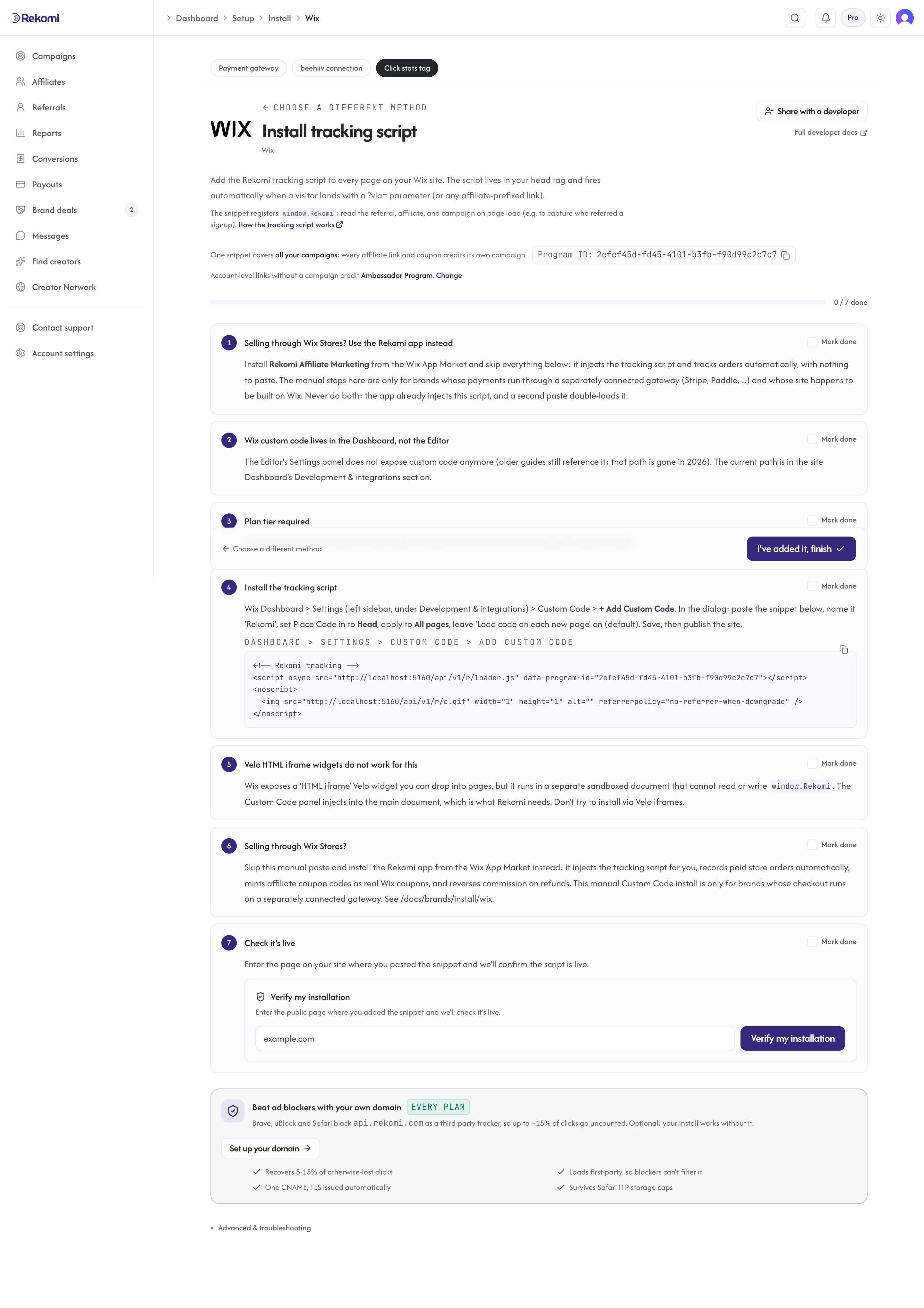
Do not install via a Velo HTML iframe widget. Velo iframes run in a sandboxed document that cannot read or write window.Rekomi on the main page, and the cookie set inside the iframe never reaches the pages your CTAs live on. The Custom Code panel injects into the main document; that is the only correct manual path.
Conversions on the manual path come from your connected gateway, not from Wix. If Wix Stores or Bookings routes payments through your own Stripe account (Wix Dashboard > Settings > Accept Payments shows your Stripe account), your Stripe webhook records the sale and the head script covers clicks. If payments run through Wix itself, use the app instead: that is exactly what it is for.
Quirks worth knowing
Uninstalling does not cancel billing. Wix platform rule, applies to every App Market app. Cancel your subscription from the Wix subscriptions page; removing the app only stops tracking.
Coupon codes are cart-wide and capped at 20 characters. They are real Wix coupons, so they follow Wix's coupon rules: they apply to the whole cart and codes longer than 20 characters are rejected.
Manual and offline orders wait for you. A Cash on delivery style order does not mint a commission until you mark it paid in Wix. Card gateway orders are marked paid automatically.
The trial runs once per Wix account. A second install, or an install on another site under the same Wix account, starts on a paid plan directly. Switching plans mid-trial ends the trial immediately.
Dashboard, not Editor (manual path). The Custom Code panel moved from the Editor to the Dashboard. Older guides referencing "Site Settings > Tracking & Analytics" in the Editor are outdated.
Paid plan required (manual path only). Wix Free strips all custom code from published sites. The app path has no such requirement.
Refunds
On the app path, refunds are automatic: when a tracked order is refunded in Wix, the commission adjusts on its own, proportionally for partial refunds. A refund that lands after the affiliate was already paid is recovered from their next payout automatically (see Refunds after a payout). On the manual Stripe-direct path, refunds fire charge.refunded to Rekomi's Stripe webhook listener and clawback is automatic there too.
Store credit instead of cash
A campaign can reward affiliates with store credit instead of a cash commission. Wix has no customer credit balance, so Rekomi issues a Wix gift card for the amount (the commission rate you set, or a fixed amount per sale) and Wix emails it to the affiliate; a refund disables the card. The site needs the Wix Gift Card app installed. See Store credit rewards.
Troubleshooting
A broken-connection banner in the Rekomi web dashboard. The app was uninstalled from your Wix site, so tracking has stopped. Reinstall from the App Market listing; your account, campaigns, and affiliates re-arm as they were.
An order shows in Wix but no commission in Rekomi. Check the order's payment status first: manual and offline payment orders count only once marked paid. Also confirm the order is a Wix Stores order; the app tracks store orders.
A coupon code will not create. Wix caps coupon codes at 20 characters. Shorten the code and retry.
Still being billed after uninstalling. Expected: uninstalling does not cancel the subscription. Cancel from the Wix subscriptions page.
Custom Code menu item missing in Dashboard (manual path). You are on Wix Free. Upgrade to a paid plan, or use the app, which has no plan requirement.
Script saves but does not appear on the live site (manual path). Wix CDN caches aggressively. Hard-refresh (Cmd+Shift+R) and check View Source. If still missing, confirm you clicked Publish (not just Save) after adding the Custom Code.
Related
- Integrations: Wix
- No-code and non-Stripe checkout tracking
- Install on Stripe: the manual fallback's gateway path
- Wix docs: Custom Code
Install on Shopify
The store owner's install guide. Install the Rekomi Affiliate Marketing app from the Shopify App Store and run the whole program from your Shopify admin; a developer fallback (Custom Pixel plus order webhook) sits at the end for stores that prefer not to install an app.
Install on BigCommerce
Install the Rekomi app from the BigCommerce App Marketplace and setup is done. Tracking, coupon codes, and refund handling are automatic, and everything runs inside your control panel.