

Install on Recurly
Connect Recurly natively: pick your US or EU region and paste a read-only API key into Rekomi, add the Rekomi webhook in Recurly, and paid invoices, subscription renewals, and refunds are tracked automatically. Carry rekomi_ref on the subscription so each sale credits the right affiliate.

Recurly is subscription billing on top of your own payment gateway, and Rekomi supports it natively. You pick your data region (US or EU), paste a read-only private API key into Rekomi, then add one webhook endpoint in Recurly pointed at your per-workspace Rekomi URL. From that point on, paid invoices, subscription renewals, and refunds flow into Rekomi with no relay code to write or maintain. Still evaluating? See Why Rekomi for Recurly →.
One thing to know up front: Recurly XML webhooks are unsigned (Recurly's signature verification applies to JSON payloads only), so Rekomi authenticates every delivery with Basic Authentication credentials that Rekomi generates for you. The password is shown exactly once; you paste it into Recurly's webhook endpoint settings alongside the URL.
What you need
- Your data region. Recurly runs two regions: US (
v3.recurly.com) and EU (v3.eu.recurly.com). Pick the one your site is hosted in. Not sure? Pick US: if the key belongs to the other region, Rekomi detects it during connect and suggests the switch. - A read-only private API key. In Recurly, open Integrations > API Credentials and click Add Private API Key, check Read-only, and name it Rekomi. Rekomi uses it to validate the connection, run periodic health checks, and read the
rekomi_refcustom field on each subscription's first payment; it is never used to change anything in your site. No API version setup is needed on your side: webhooks are configured entirely in the Recurly admin UI. - A Recurly plan with custom fields. New-customer attribution rides a custom field, and custom fields need Recurly Pro (up to 5) or Elite (up to 10). The Recurly Starter plan does not support custom fields, so link attribution for new customers is not available on Starter (the lead email match in the attribution section is the exception); renewals of customers Rekomi already attributed still track on any plan.
Connect in Rekomi
Step 1. Go to /dashboard/setup/recurly. The page shows your per-workspace webhook URL and the Basic Authentication credentials (username rekomi plus a generated password).
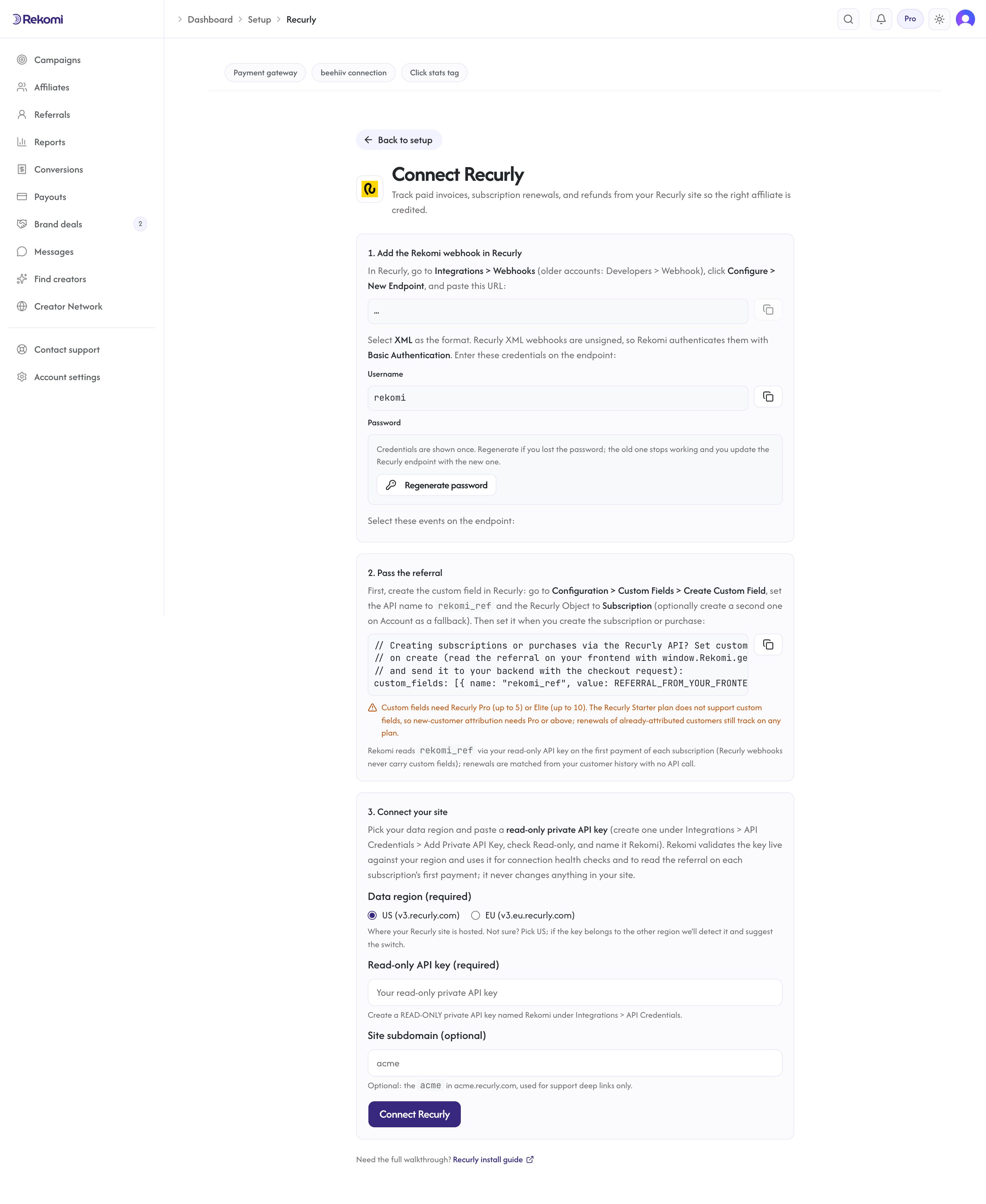
Step 2. Copy the webhook URL, the username, and the password. The password is shown once. It is stored encrypted and cannot be displayed again; if you lose it, the setup page has an explicit Regenerate button that mints a new one (the old one stops working immediately, so you would update the Recurly endpoint with the new value).
Step 3. Pick your region, paste the read-only API key (and optionally your site subdomain, the acme in acme.recurly.com, used for support links only), and click Connect Recurly. Rekomi validates the key live against your region before accepting it. If the key conclusively fails your selected region but works against the other one, Rekomi answers with a region suggestion instead of connecting; switch the selection and connect again.
Add the webhook in Recurly
In Recurly, open Integrations > Webhooks (older accounts: Developers > Webhook), click Configure, then New Endpoint:
- Paste the webhook URL from the Rekomi setup page.
- Select XML as the format. Rekomi processes XML payloads; the authentication model below depends on it.
- Enter the Basic Authentication username and password from the setup page in the endpoint's HTTP auth fields.
- Select these notifications:
paid_charge_invoice_notificationnew_charge_invoice_notificationfailed_charge_invoice_notificationsuccessful_refund_notificationvoid_payment_notificationsuccessful_payment_notificationfailed_payment_notificationnew_subscription_notificationupdated_subscription_notificationrenewed_subscription_notificationcanceled_subscription_notificationexpired_subscription_notificationreactivated_account_notification
A "select all" configuration also works (Rekomi acknowledges and ignores notification types it does not use), but the explicit list keeps the traffic lean.
Attribution: carry rekomi_ref on the subscription (required)
Recurly hosts its checkout pages on its own domain, so the affiliate referral has to travel from the visitor's browser into the subscription record. This step is required for new-customer attribution: without it, paid invoices arrive with no referral and no commission is credited, unless the buyer's email matches a lead captured on your site (the fallback at the end of this section).
First, make sure the Rekomi tracking script is installed on your marketing site so the affiliate click is captured and window.Rekomi.getReferral() returns a value when a visitor lands on an affiliate link. That script is the same one every Rekomi install uses; your site platform's recipe in the install hub covers it. There is no Recurly-specific script to add: the native connection you set up above is what records the sale.
Then create the custom field in Recurly: go to Configuration > Custom Fields > Create Custom Field, set the API name to rekomi_ref and the Recurly Object to Subscription. Optionally create a second rekomi_ref field on the Account object as a fallback (Rekomi checks the subscription first, then the account).
Finally, set the field when you create the subscription or purchase via the Recurly API. Read the referral on your frontend with window.Rekomi.getReferral() and send it to your backend with the checkout request:
{
  "custom_fields": [
    { "name": "rekomi_ref", "value": "REFERRAL_FROM_YOUR_FRONTEND" }
  ]
}
The same custom_fields array works on subscription create, purchase create, and account create/update calls. Field names are case-insensitive on Recurly's side; keep the exact rekomi_ref spelling anyway.
Plan gating, stated plainly: custom fields need Recurly Pro or Elite. On the Starter plan there is no custom field to set, so Rekomi cannot attribute new customers from a link; renewals of already-attributed customers still track from your customer history.
Lead email match (fallback). When a paid invoice reaches Rekomi without rekomi_ref on the subscription or the account, and the notification carries the account's email, Rekomi also checks that email against the leads the Rekomi script captured on your own site in the last 90 days (the tag Rekomi hands out carries data-rkmi-email-capture="auto", which records the email typed on your signup form as a lead; see lead tracking) and credits the affiliate who brought that lead. This is also the one way a Starter site, which has no custom fields, can credit a new customer. The custom field always wins when it is present, as does the customer's earlier history, and an affiliate buying with their own email is not credited.
How first payments and renewals work
Recurly webhooks never carry custom fields on subscription, account, payment, or invoice notifications (item notifications are the exception, and they are irrelevant here). So on the first payment of each subscription, Rekomi makes one bounded read-only API call with your key to read rekomi_ref from the subscription (falling back to the account), then records the conversion. Once a subscription's first payment has been recorded, its renewals never trigger an API call: they are matched from your customer history. If the first paid invoice Rekomi ever sees for a subscription happens to be a renewal, that one event still does the single lookup.
If Recurly's API is briefly unavailable at that moment, Rekomi answers the webhook with an error on purpose so Recurly retries the delivery: Recurly redelivers on an exponential ladder of up to 10 attempts over roughly three days, and the conversion records on whichever attempt finds the API healthy. For anything older, every notification has a manual Retry button in your Recurly console (15-day retention), so an extended outage is recoverable by replaying from Recurly.
Refunds and voids
Refunds you issue in Recurly arrive as successful_refund_notification, per refund transaction, and reverse commission proportionally: a 40% refund claws back 40% of the commission, and multiple partial refunds keep clawing back until the original amount is exhausted. A voided payment (void_payment_notification) reverses the full transaction amount. Credit notes that adjust an invoice without moving cash are observed but never recorded as money.
Chargebacks
Recurly has no dispute webhooks. Card chargebacks reach Rekomi only if your site uses Recurly's early-access Chargeback Management feature, where they arrive as refund-shaped events and claw back like refunds. SEPA direct-debit late failures with Recurly's default handling also flow through as refunds. Everything else (disputes resolved directly at your gateway) is invisible to Rekomi; adjust those manually if they matter for a payout.
Security
- Every webhook delivery is authenticated with the Basic Authentication credential before anything is processed; deliveries that fail the check are rejected.
- Recurly does not sign XML webhooks, which is why Rekomi mints the credential instead of the signing-secret flow you may know from Stripe or Paddle. The credential plus your unguessable per-workspace URL are the authentication, and everything travels over HTTPS end to end.
- Keep the webhook URL and the credentials private: treat them like a password.
- Your read-only API key and the webhook password are stored encrypted at rest and never returned by the API. Disconnecting wipes both and retires the webhook URL.
Quirks worth knowing
- One conversion source per workspace. Recurly Connect is mutually exclusive with Stripe (via the Rekomi app for Stripe), Paddle, Braintree, Shopify, Lemon Squeezy, Chargebee, Polar, Gumroad, Creem, Dodo Payments, Mollie, and the S2S API, so the same sale is never counted twice. Disconnect one before connecting another.
- Recurly API keys do not expire. If the health check flags the connection as broken, the key was deleted or revoked (removing a Recurly user also deletes the API keys that user created), the webhook endpoint or its credentials changed, or the region is misconfigured; it is never a routine expiry.
- Late deliveries are fine. Recurly retries failed webhooks for roughly three days. Rekomi de-duplicates deliveries, so retries and console replays never double-count.
- Sandbox sites deliver slowly. Recurly sandbox webhook deliveries can lag up to 48 hours, and Recurly can also auto-pause any endpoint, production included, after multiple consecutive days of failed deliveries; the console's Retry All button recovers paused endpoints and redelivers what was missed.
- Very old sites. Recurly sites created before May 2018 that never enabled the Credit Invoices feature use a legacy invoice notification family that Rekomi does not support.
Rehearse in a sandbox site
- Create a Recurly sandbox site (US region), enable the Recurly Test Gateway, and create a read-only private API key.
- Create the
rekomi_refcustom fields on Subscription (and optionally Account). - Connect the sandbox site in Rekomi (region US) and add the XML webhook endpoint in Recurly with the Basic Authentication credentials and the notification list above.
- Create a subscription via the API with
custom_fieldsset to an approved affiliate's link slug and pay with a test card. The conversion should appear on the campaign's Performance tab within a minute of the webhook delivery. - Use a plan with a daily billing cycle to observe a renewal (Recurly has no time-travel tool) and confirm the renewal credits the same affiliate.
- Refund the invoice (partially, then fully) and void a payment, confirming the commission claws back proportionally and then fully.
- Use the console's per-notification Retry button on an already-delivered event and confirm nothing double-counts.
Troubleshooting
"Your Recurly connection is broken." banner or reconnect email. The stored API key stopped validating: it was deleted or revoked in Recurly (including via a removed user), or the region no longer matches. Create a fresh read-only key and reconnect on /dashboard/setup/recurly; your tracking history is preserved.
"That key works against the other region." Your site lives in the other Recurly region. The connect form switches the region selection for you; review it and connect again. No state changed on the failed attempt.
Events stop arriving but the connection shows healthy. The health check probes the API key, not the webhook. Check the endpoint still exists in Recurly, points at the right URL, uses the XML format, and has Basic Authentication set to the current credentials (a regenerated password must be updated in Recurly too). Recurly's webhook console shows the delivery attempts and their responses.
Deliveries rejected as unauthorized. The Basic Authentication credentials on the Recurly endpoint do not match. Regenerate the password on the setup page and paste the new value into the endpoint settings in Recurly.
Payments arrive but no affiliate is credited. The first payment reached Rekomi but the subscription (and account) carried no rekomi_ref. Verify the custom field exists with that exact API name and the Subscription object, that your API sets custom_fields on create, and that the tracking script ran before the buyer clicked through (so window.Rekomi.getReferral() had a value). Also check your Recurly plan: Starter has no custom fields, so new-customer attribution needs Pro or above.
A conversion is missing after a Recurly API outage. Rekomi deliberately fails the webhook so Recurly retries (10 attempts over roughly three days). If the outage outlasted the ladder, open the notification in your Recurly console and click Retry (15-day retention); Rekomi records it safely, without double-counting.
Related
Install on Polar
Connect Polar natively with one Organization Access Token. Rekomi creates the webhook endpoint in your Polar organization for you, then tracks orders, subscription renewals, and refunds automatically. Polar checkout links and embeds are credited to the right affiliate automatically once the Rekomi script is installed; server-created (API) checkouts stamp rekomi_ref.
Install on Gumroad
Connect Gumroad natively: click Connect, approve once on Gumroad's consent screen, and Rekomi registers the sale, refund, dispute, and membership notifications for you. Sales, renewals, refunds, and disputes are tracked automatically; ?rekomi_ref on the product link carries the referral.