

Install on Lemon Squeezy
Connect Lemon Squeezy natively with one API key. Rekomi creates and verifies the webhook for you, then tracks orders, subscription renewals, and refunds automatically. Stamp rekomi_ref on your checkout links so each sale credits the right affiliate.

Lemon Squeezy is a Merchant of Record, and Rekomi supports it natively. You paste one API key; Rekomi validates it, creates the webhook on your store, and confirms it registered. From that point on, one-time orders, initial subscription orders, subscription renewals, and refunds flow into Rekomi with no relay code to write or maintain. Still evaluating? See Why Rekomi for Lemon Squeezy →.
One thing to know up front: Lemon Squeezy API keys expire after one year. Rekomi monitors the connection and emails you to reconnect when the key stops working, so plan on a 30-second re-paste once a year.
Connect your store
Step 1. In Lemon Squeezy, open Settings > API and click the + button to create a new API key. Copy it; Lemon Squeezy shows it only once.
Step 2. In Rekomi, go to /dashboard/setup/lemonsqueezy and paste the key. Rekomi validates the key, detects whether it is a test-mode or live-mode key, and, if your account has more than one store, asks which one to connect.
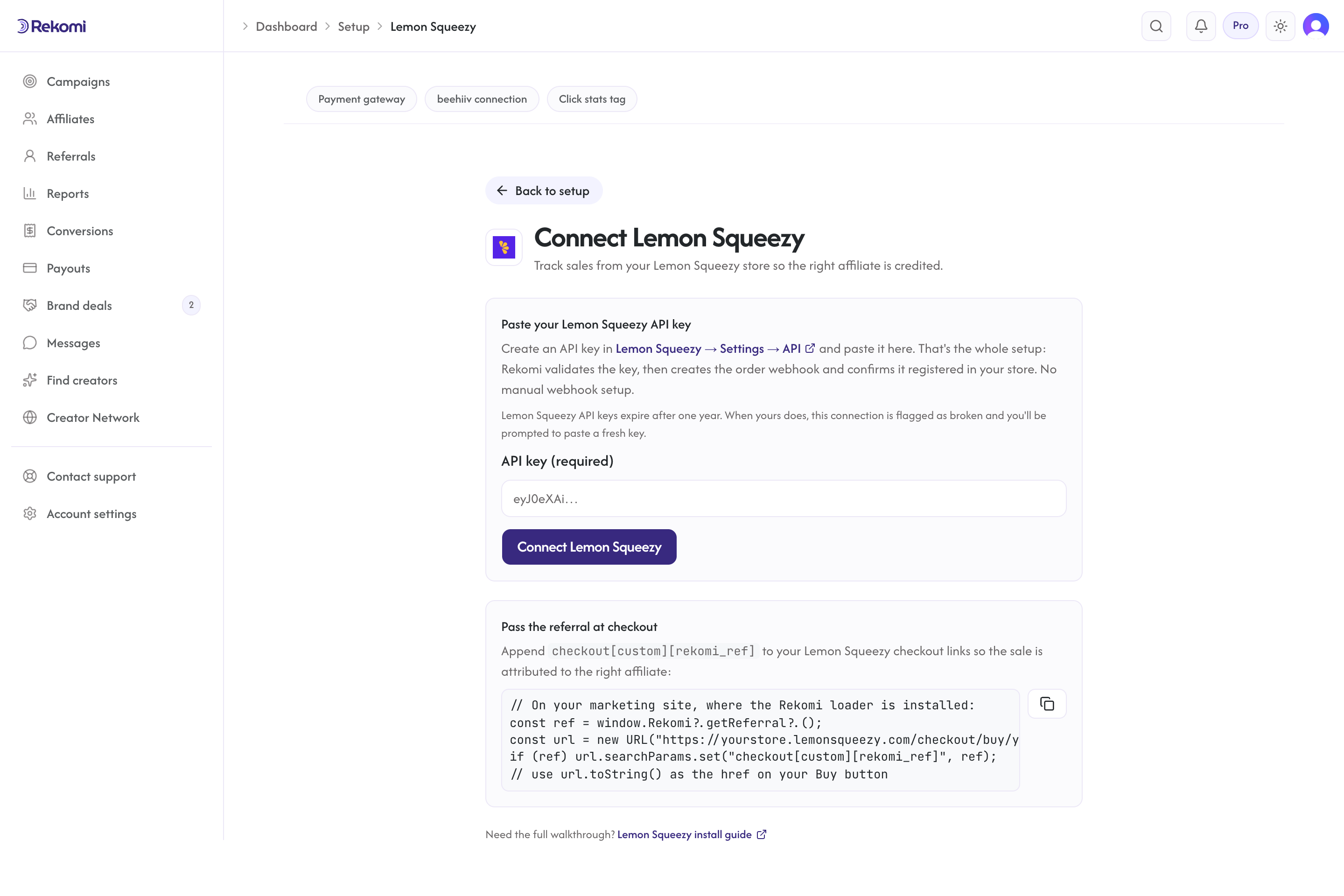
Step 3. If your account has more than one store, pick the store you want to track. Rekomi generates a signing secret and creates the webhook on that store for you, subscribed to exactly the order, subscription, and refund events it needs. There is nothing to configure in the Lemon Squeezy webhook UI, and disconnecting from Rekomi deletes the webhook again.
Attribution: stamp rekomi_ref on your checkouts (required)
Lemon Squeezy hosts the checkout on its own domain, so the affiliate referral has to travel from the visitor's browser into the order record. This step is required: without it, orders arrive with no referral and no commission is credited, unless the buyer's email matches a lead captured on your site (the fallback at the end of this section).
First, make sure the Rekomi tracking script is installed on your marketing site so window.Rekomi.getReferral() returns a value when a visitor arrives on an affiliate link. That script is the same one every Rekomi install uses; your site platform's recipe in the install hub covers it. There is no Lemon Squeezy-specific script to add: the native connection you set up above is what records the sale.
Then stamp the referral onto every checkout link (Buy buttons, pricing-page links, and the Lemon.js overlay all use the same URLs) as checkout[custom][rekomi_ref]:
<script>
  document.addEventListener('DOMContentLoaded', function () {
    var ref = window.Rekomi && window.Rekomi.getReferral();
    if (!ref) return;
    document
      .querySelectorAll('a[href*="lemonsqueezy.com/buy/"], a[href*="lemonsqueezy.com/checkout"]')
      .forEach(function (a) {
        var url = new URL(a.href);
        url.searchParams.set('checkout[custom][rekomi_ref]', ref);
        a.href = url.toString();
      });
  });
</script>
window.Rekomi.getReferral() returns the referral from the first-party cookie the head script set. Lemon Squeezy carries checkout[custom][...] values into the order's custom data, which is where Rekomi's webhook handler reads rekomi_ref from.
Server-generated checkouts. If you create checkouts server-side with the Checkouts API, pass the referral in checkout_data.custom instead:
{
  "data": {
    "type": "checkouts",
    "attributes": {
      "checkout_data": {
        "custom": { "rekomi_ref": "REFERRAL_FROM_YOUR_FRONTEND" }
      }
    }
  }
}
Read the referral on your frontend with window.Rekomi.getReferral() and send it to your backend along with the checkout request.
Lead email match (fallback). When an order reaches Rekomi without rekomi_ref in its custom data and the order carries the buyer's email, Rekomi also checks that email against the leads the Rekomi script captured on your own site in the last 90 days (the tag Rekomi hands out carries data-rkmi-email-capture="auto", which records the email typed on your signup form as a lead; see lead tracking) and credits the affiliate who brought that lead. The referral in the custom data always wins when it is present, as does the customer's earlier history on renewals, and an affiliate buying with their own email is not credited.
What gets recorded
- One-time orders are recorded as one-time conversions when the order is created.
- Initial subscription orders are recorded once, as the first conversion of the subscription (Rekomi de-duplicates the order event and the first payment event, so nothing is double counted).
- Subscription renewals are recorded as recurring conversions on every successful renewal payment, so recurring revenue-share commissions keep accruing automatically.
- Refunds, full or partial, claw back the commission automatically and proportionally, in the same audit trail as the original conversion.
- Commissions are pre-tax. Lemon Squeezy is a Merchant of Record: it collects sales tax and VAT itself, so Rekomi commissions the order total minus its tax, and refund clawbacks are measured on the same pre-tax scale. Affiliates earn on the sale, never on the tax.
Fallback: server-to-server relay
If you prefer to own the pipeline yourself (for example, you already run a webhook consumer for Lemon Squeezy events), you can skip the native connection and relay events to Rekomi's HMAC-signed S2S endpoint instead: subscribe to order_created (plus subscription_payment_success for renewals and the refund events), verify Lemon Squeezy's X-Signature, and POST the sale to Rekomi with the affiliate referral from the order's custom data. Amounts in Lemon Squeezy webhook payloads are already in cents, so do not multiply by 100 (converted-currency payloads can contain fractional values; round to integer cents). The full endpoint reference, payload shape, and refund endpoint are in the S2S tracking API docs.
Rekomi tracks one billing source per workspace, so Lemon Squeezy Connect is mutually exclusive with Stripe (via the Rekomi app for Stripe), Paddle, Braintree, Shopify, Chargebee, Polar, Recurly, Gumroad, Creem, Dodo Payments, Mollie, and the S2S API (native and S2S included). Pick one source of truth for Lemon Squeezy sales so conversions are never recorded twice, and disconnect one before connecting another.
Troubleshooting
"Your Lemon Squeezy connection is broken." banner or reconnect email. Lemon Squeezy API keys expire after one year, and deleting the key in Lemon Squeezy has the same effect immediately. Create a fresh key in Settings > API and paste it on /dashboard/setup/lemonsqueezy; your tracking history is preserved and the webhook is recreated automatically.
Webhook missing or edited. If someone deletes or edits the Rekomi webhook inside Lemon Squeezy, events stop arriving (the health check monitors the API key, not the webhook itself). Disconnect and then connect again from the setup page with a current API key; connecting again recreates the webhook automatically.
Orders arrive but no affiliate is credited. The order reached Rekomi without rekomi_ref in its custom data. Verify the stamping snippet runs on every page that links to checkout, that the tracking script ran before the buyer clicked through (so window.Rekomi.getReferral() has a value), and that server-generated checkouts pass checkout_data.custom.rekomi_ref.
Test orders do not appear. Test-mode and live-mode are properties of the API key, not separate hosts. If you connected a live key, test-mode orders are not delivered to the webhook Rekomi created. Connect a test-mode key to a sandbox workspace to rehearse end to end.
Related
Install on Braintree
Connect your Braintree account to Rekomi natively, point a Braintree webhook at Rekomi and paste your API credentials, so recurring sales and chargebacks are tracked automatically with no backend relay.
Install on Chargebee
Connect Chargebee natively: paste your site name and a Read-Only API key into Rekomi, add the Rekomi webhook in Chargebee, and payments, subscription renewals, and refunds are tracked automatically. Carry rekomi_ref on the subscription so each sale credits the right affiliate.