

Migrating from Gumroad
Move your Gumroad affiliate program onto Rekomi. The roster comes from Gumroad's affiliates CSV export; sales history and per-affiliate attribution come from Gumroad's API. History imports as settled records and never retro-credits balances.

This guide is for sellers running Gumroad's built-in affiliates feature who are switching to Rekomi. The migration is two surfaces, because Gumroad exposes each half differently: the affiliate roster only exists as a dashboard CSV export (there is no public affiliates API), while sales history only exists in the API (there is no conversions export).
Migration is on Starter or higher; auto-notify is on Growth or higher.
Step 1: the roster CSV
In Gumroad, open the Affiliates page of your dashboard and click Export. Exports of more than 500 affiliates arrive by email instead of downloading directly; save the attached file either way. Then open /dashboard/settings/migrate in Rekomi, pick Gumroad, choose the destination campaign, and upload the file.
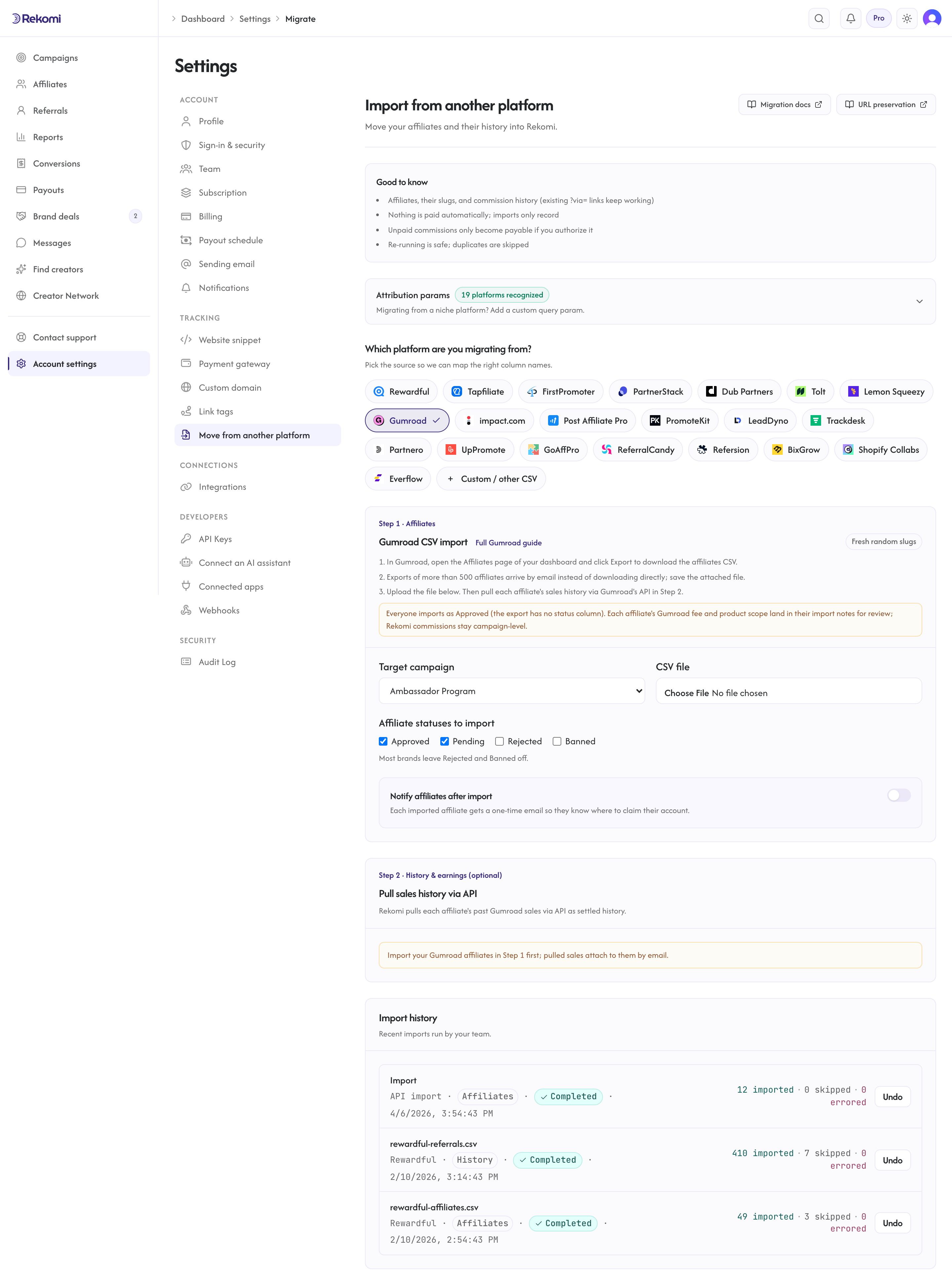
What the importer reads from the export:
| Field | Source column | Notes |
|---|---|---|
Email | Required. Primary dedup key; the trailing Totals row has no email and is dropped. | |
| Full name | Name | Optional. |
| Status | (none) | Gumroad's export has no status column, so every row imports as Approved. Reclassify after import if needed. |
| Fee + products | Fee, Products | Recorded into each row's import notes for your review; Rekomi commissions stay campaign-level, so set your campaign's commission to match (use per-affiliate overrides for special deals). |
| Tracking slug | (none) | Always fresh. Gumroad /a/{id} links use opaque ids that only route inside Gumroad, so they cannot re-attribute to Rekomi; every imported affiliate gets a new Rekomi link. |
| Clicks | (none) | The export's Sales ($) column is a dollar aggregate, not clicks, so no click history imports. |
Step 2: sales history via the API
Once the roster import completes, the same page unlocks Pull Gumroad sales history via API. Rekomi reads your sales from Gumroad's API and imports the ones a Gumroad affiliate earned on, matching each sale to your imported roster by the affiliate's email.
- If your Gumroad account is connected (Gumroad Connect), its access token is used automatically; nothing to paste.
- Otherwise, paste a Gumroad access token (created under Settings > Advanced > Applications in Gumroad). It is used once, server-side, and never stored, logged, or echoed back. Note that a token created this way carries full account scope.
- Optional From / To dates bound the pull. Large accounts fetch up to 5,000 sales per pull; the result tells you if the cap cut anything off, and narrowing the date range and re-running brings in the rest (re-runs are safe; duplicates are skipped).
What the pull imports, honestly:
- Only affiliate-attributed sales; direct sales are skipped (they are not migration-relevant history).
- Sale amounts are USD cents (Gumroad settles every charge in USD); each sale's commission comes from Gumroad's own affiliate cut for that sale.
- Recurring membership charges import as recurring conversions with their subscription id, so existing memberships keep crediting the affiliate on Rekomi once the native connection takes over renewals.
- Refunded and charged-back sales are skipped: that commission was already clawed back at Gumroad, and importing it would inflate history.
- Partially refunded sales import at their full original value. The result counts them so you can review; the import pipeline has no per-row adjustment for partials.
- Everything imports as settled history (Gumroad paid its affiliates biweekly). Stats and recurring attribution carry over, but nothing becomes payable and no balance is ever retro-credited. Settle any final unpaid earnings inside Gumroad before you wind its program down.
What CANNOT be imported
| Data | Why | Workaround |
|---|---|---|
Existing /a/ affiliate links | Gumroad affiliate links use opaque ids that only resolve inside Gumroad; no export or API reveals a reusable slug. | Affiliates get fresh Rekomi links; the optional auto-notify email tells each one where to claim their account and grab the new link. |
| Lifetime click counts | Not in the export (its Sales ($) column is money, not clicks) and not in the API. | None; click stats start fresh. |
| Leads | Gumroad has no lead concept. | Not applicable. |
| Live membership enrollment details | The v1 importer reads charge history only. | Renewals arriving after you connect Gumroad natively keep crediting the affiliate via the imported history match. |
Undo
Both jobs land in Import History with their own Undo: the roster undo removes the affiliates it added (keeping any who already claimed their account or have activity), and the history undo removes the conversions it added so you can re-import. Re-running either import is safe; duplicates are skipped.
After the import
- Connect Gumroad natively so new sales, renewals, refunds, and disputes track automatically (one click).
- Point your campaign's commission at what you actually paid on Gumroad (each import row's notes carry the old fee).
- Turn on auto-notify (Growth or higher) or announce the move yourself so affiliates claim their Rekomi accounts and swap their links.
Migrating from Lemon Squeezy
Move your Lemon Squeezy affiliate roster onto Rekomi. Lemon Squeezy has no affiliate CSV export, so Rekomi pulls your roster (names, emails, statuses) via their API, with an optional paste-in mapping that keeps existing ?aff= links working.
Migrating from impact.com
Move your impact.com partner roster onto Rekomi. Rekomi pulls partners, up to 3 years of conversion history, and lifetime click totals via the impact.com Advertiser API; nothing to export.