

Migrating from Lemon Squeezy
Move your Lemon Squeezy affiliate roster onto Rekomi. Lemon Squeezy has no affiliate CSV export, so Rekomi pulls your roster (names, emails, statuses) via their API, with an optional paste-in mapping that keeps existing ?aff= links working.

This guide is for brands running the built-in Lemon Squeezy affiliate hub who are switching to Rekomi. Lemon Squeezy is different from every other source Rekomi imports from in one important way: there is no affiliate CSV export anywhere in their product. The only bulk path to your roster is their read-only affiliates API, so instead of uploading a file, Rekomi pulls your affiliates directly from Lemon Squeezy for you.
Migration is on Starter or higher; auto-notify is on Growth or higher.
What the importer brings across
The pull reads Lemon Squeezy's GET /v1/affiliates endpoint and imports:
| Field | Source attribute | Notes |
|---|---|---|
user_email | Required. Lowercased + trimmed. Primary dedup key. Rows without an email are skipped (missing_email). | |
| Full name | user_name | Optional; some pending affiliates never complete a profile and arrive without one. |
| Status | status | See mapping table below. |
| Tracking slug | your optional email,aff_code paste | The API does not expose the ?aff= code, so slugs are fresh and random unless you paste a mapping (see below). |
Large programs are paged automatically (100 per page, up to 5,000 affiliates per pull; contact support if you have more).
What CANNOT be imported from Lemon Squeezy
Be aware of these before you plan the cutover. None of them are Rekomi limitations; the data simply is not exportable from Lemon Squeezy by any means (no API endpoint, no export button, and orders carry no affiliate reference):
| Data | Why | Workaround |
|---|---|---|
| Referral / conversion / payout history | Not exposed anywhere. | None. Step 2 (history import) is disabled for Lemon Squeezy; your affiliates start with fresh stats. Settle any final unpaid earnings inside Lemon Squeezy before you switch off their program. |
| Per-affiliate commission rates | Not exposed in bulk. | Configure your Rekomi commission model per campaign; use per-affiliate overrides for special deals. |
The ?aff= referral codes, in bulk | Each code is only visible on that affiliate's individual profile page in the Lemon Squeezy dashboard. | The optional Preserve existing ?aff= links paste: one email,aff_code line per affiliate whose link you want to keep working. Skipping it gives everyone a fresh Rekomi link. |
| Payout emails (PayPal) | Not exposed. | Affiliates connect their own payout account when they claim their Rekomi dashboard. |
Status mapping
Lemon Squeezy affiliates have exactly three statuses, which map to Rekomi's enum:
Lemon Squeezy status | Rekomi |
|---|---|
active | Approved |
pending | Pending |
disabled | Banned |
| anything unexpected | Pending (so you review it rather than auto-approving) |
Approved imports get an ApprovedAt timestamp set to the import time so payout eligibility math works correctly. As with every importer, the status checkboxes on the import screen let you skip statuses entirely (most brands leave Banned off).
Step-by-step
Open /dashboard/settings/migrate and pick Lemon Squeezy as the source. There are two ways to run the pull, depending on whether your store is already connected:
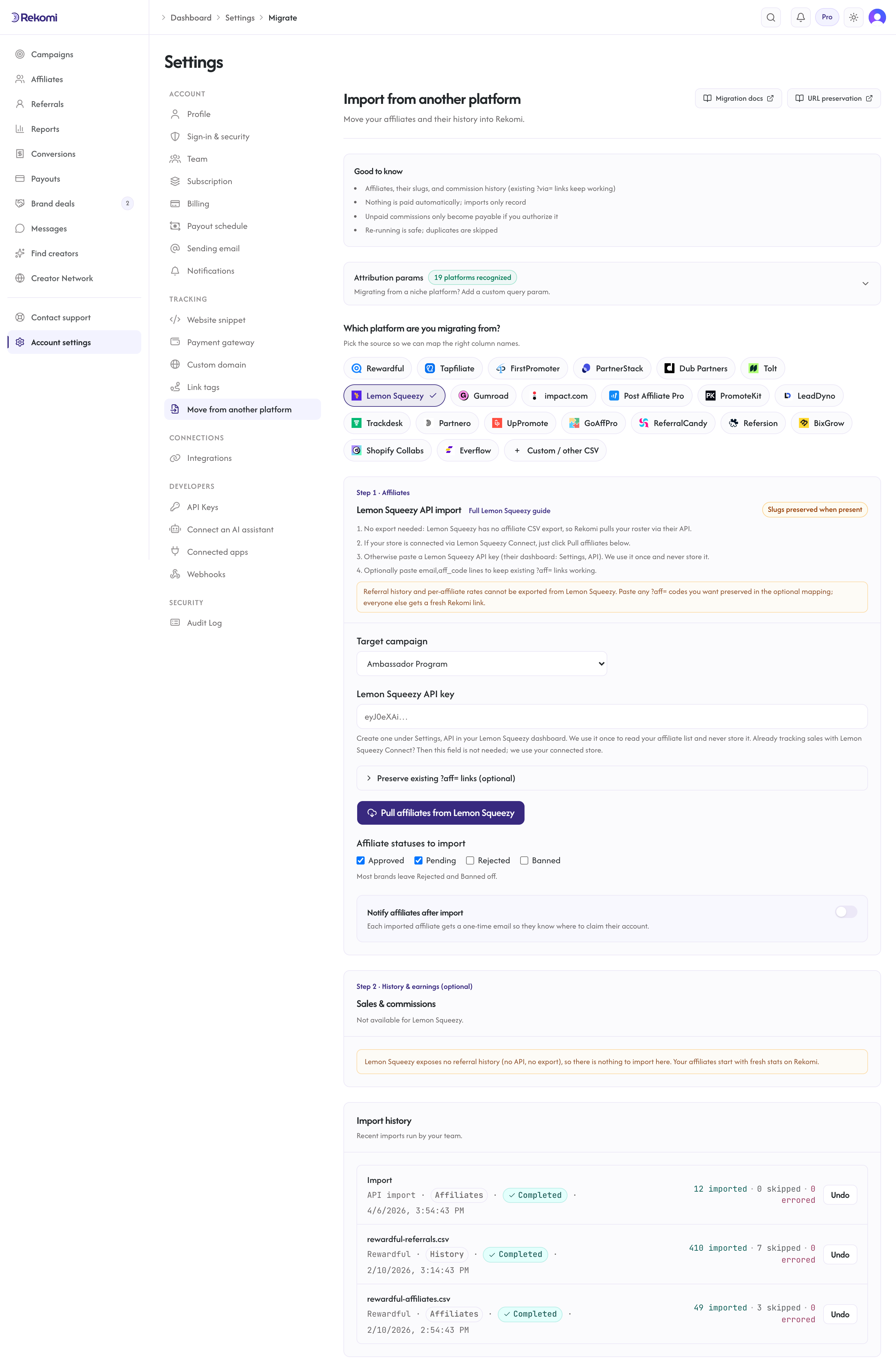
Path A: your store is connected via Lemon Squeezy Connect
If you already track conversions through Lemon Squeezy Connect, there is nothing to paste. Select your destination campaign and click Pull affiliates from Lemon Squeezy; Rekomi uses your connected store's API key and store id. No export needed.
Path B: paste an API key
If you have not connected Lemon Squeezy (for example, you are moving billing off Lemon Squeezy at the same time):
- In your Lemon Squeezy dashboard, open Settings, API and create an API key.
- Paste it into the key field on the import screen. The key is validated live, used once to read your affiliate list, and never stored, logged, or echoed back.
- If the key can see more than one store, Rekomi asks which store to pull from; pick one and re-run.
Preserving existing ?aff= links (optional, both paths)
Rekomi natively recognizes aff as one of its default attribution params, so a link like your-site.com/?aff=alex can keep attributing after migration IF the affiliate's slug survives. Since Lemon Squeezy's API does not expose the codes in bulk, the importer cannot preserve them automatically. To keep specific links working:
- In Lemon Squeezy, open the affiliate's profile; their code is shown there.
- On the import screen, expand Preserve existing ?aff= links and paste one
email,aff_codeline per affiliate (a header row is optional). - Run the pull. Each pasted code goes through the standard slug checks (3-64 chars, alphanumeric plus hyphen, globally unique); valid unique codes become that affiliate's Rekomi slug, invalid or taken ones fall back to a fresh random slug, and mapping lines whose email matches no fetched affiliate are reported per-row as
mapping_unmatchedin the job detail (never an error).
Two honest caveats. First, this only helps for links that land on your site, where the Rekomi snippet runs; links that point straight at your *.lemonsqueezy.com storefront cannot be carried over by any migration tool. Second, most brands with more than a handful of affiliates skip this step and let everyone get a fresh Rekomi link, then use auto-notify to hand out the new links.
Statuses, notify, and everything else
The status checkboxes, the notify-after-import option (Growth+), the personal note, and the send-sample preview all work exactly like the CSV importers; see the migrations overview for the shared behavior.
Undo
A Lemon Squeezy pull produces the same revertible import job as every other source. Undo in import history removes the affiliates the job created (freeing any preserved slugs) so you can re-run cleanly; affiliates who already signed in or have conversions are kept and reported. Re-running without undoing is also safe: existing emails are skipped as duplicates.
Verifying the import landed clean
- Open
/dashboard/affiliatesand spot-check a few rows against the Lemon Squeezy affiliates screen: name, email, status. - If you pasted a link mapping, open one of those affiliates and confirm the tracking link ends in their original code, then check the job detail for any
mapping_unmatchedrows (typos in the pasted emails).affis one of Rekomi's built-in attribution params, so preserved codes work with no extra configuration. - Click a test link with the Rekomi snippet installed and confirm a click row appears.
Where to go next
- Lemon Squeezy Connect: keep selling through Lemon Squeezy while Rekomi tracks conversions and runs your affiliate program.
- Tracking and attribution: the
affparam, cookie window, and stickiness. - Migrating from other platforms: the broader URL-preservation matrix.
- Plans and trials: what each tier includes and how the 14-day free trial behaves.
Migrating from Tolt
Move your Tolt program onto Rekomi with one API pull. Tolt has no dashboard export, so Rekomi imports your partners (with link slugs and click counts), your leads, and your commission history directly from Tolt's API.
Migrating from Gumroad
Move your Gumroad affiliate program onto Rekomi. The roster comes from Gumroad's affiliates CSV export; sales history and per-affiliate attribution come from Gumroad's API. History imports as settled records and never retro-credits balances.