

Migrating from LeadDyno
Move your LeadDyno program onto Rekomi with one API pull. Rekomi imports your affiliates (with ?afmc= codes, PayPal emails, and lifetime visitor counts), your Registered leads, and your commission history directly from LeadDyno's API.

This guide is for brands switching from LeadDyno to Rekomi. LeadDyno is a long-running affiliate tracker for e-commerce and SaaS. The primary path is a one-key API pull: paste your LeadDyno private API key and Rekomi imports your affiliate roster (with each affiliate's ?afmc= code, PayPal email, and lifetime visitor count), your Registered leads, and your commission history in one run.
Most teams complete the cutover in a single afternoon. Migration is on Starter or higher; auto-notify is on Growth or higher.
Import via API (recommended)
LeadDyno's dashboard exports are decent, but they are range-scoped and split across four surfaces; the API is the complete surface and also brings lifetime aggregates the exports lack.
- In LeadDyno, open Account → Profile and copy your API private key.
- Open
/dashboard/settings/migrate, pick LeadDyno, choose your target Rekomi campaign, and paste the key. It is used once, in memory, and never stored, logged, or shown again. - Leave the Import leads and Import commission history toggles on (or switch either off) and click Pull from LeadDyno.
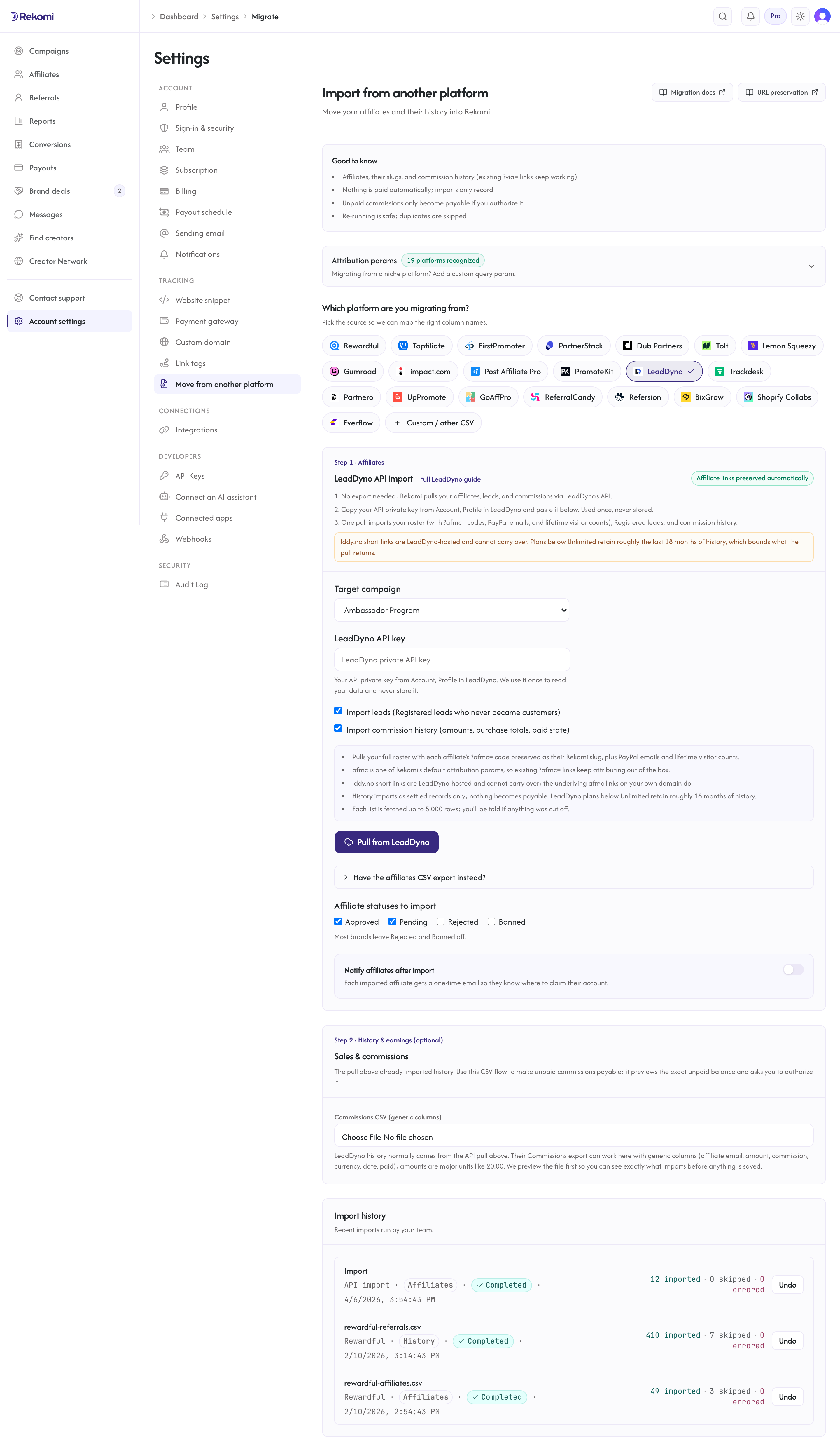
What the pull imports:
- Affiliates: email, first and last name, PayPal email, and status (archived affiliates import as Paused; see the mapping below).
- Referral codes: each affiliate's
?afmc=code (their custom affiliate code when set, else the code parsed from their affiliate URL) is preserved as their Rekomi slug when it passes the standard slug checks.afmcis one of Rekomi's built-in attribution params, so existing?afmc=links keep attributing out of the box. - Visitor counts: each affiliate's lifetime
total_visitorsaggregate carries over into their Rekomi click counter. - Leads: LeadDyno leads in the explicit
Registeredstate (gave an email, never purchased) import as zero-money lead records attributed to their affiliate.Customerrows are excluded here because their purchases arrive through the commission history instead. - Commission history: commissions with the commission amount, the underlying purchase total, per-row currency, the customer's email (from the purchase's lead), and the paid flag. LeadDyno reports money as decimal strings in major units ("20.0" means $20.00); Rekomi converts with the currency's real minor-unit scale. Cancelled commissions are skipped. Everything imports as settled, locked history: nothing becomes payable from the API pull.
What the pull cannot import: payable balances (use the Step 2 CSV flow with its preview), visitor-level click logs (only the lifetime aggregate is portable), and lddy.no short links (they are LeadDyno-hosted redirects; the underlying ?afmc= links on your own domain carry over instead). One plan caveat: LeadDyno plans below Unlimited retain roughly the last 18 months of historic data, which bounds what their API returns. Each list is fetched up to 5,000 rows; the result tells you if a fetch was cut off.
Re-running the pull is safe: affiliates dedupe by email and history rows dedupe on LeadDyno's own ids.
The CSV fallback
LeadDyno has a documented roster export: Affiliates → Manage → Export to CSV (direct download). It carries the affiliate link (with the ?afmc= code), affiliate code, PayPal email, and status, so it works well as a roster fallback. The CSV fallback covers the roster only; leads come from the API pull, and commission history from the API pull or the Step 2 generic-columns CSV flow.
What the CSV importer brings across
| Field | Source column | Notes |
|---|---|---|
Email / Email address | Required. Lowercased + trimmed. Primary dedup key. | |
| Full name | First name + Last name | Joined with a space. |
| Status | Status | See mapping table below. |
| PayPal email | Paypal email | Optional. Preserved as the payout destination when present. |
| Tracking slug | Affiliate code, or ?afmc= extracted from the Affiliate link column | The code column wins when both exist. |
| Click count | total_visitors / visitors | API-derived files only; the dashboard export's activity metrics are range-scoped, so they are not imported as lifetime counts. |
Status mapping
| LeadDyno | Rekomi |
|---|---|
approved, active, accepted | Approved |
pending | Pending |
rejected, declined, denied | Rejected |
archived | Paused |
| blank or missing | Approved |
| anything else | Pending |
Blank maps to Approved because LeadDyno auto-approves affiliates by default, so a roster with no status column is a working roster. Archiving is reversible in LeadDyno, so archived affiliates import as Paused, keeping their history importable.
How slug preservation works
LeadDyno's tracking links use the ?afmc= query parameter, for example brand.com/?afmc=alex, and the code is merchant-editable. afmc is one of Rekomi's built-in attribution params, so existing ?afmc= links keep attributing on Rekomi the moment you swap the tracking snippet.
The importer preserves the slug itself when the code passes the standard checks (3-64 characters, alphanumeric plus hyphen, globally unclaimed). Default LeadDyno codes are long hexadecimal hashes, which pass those checks and are preserved verbatim; custom codes like alex are preserved too. lddy.no short links cannot carry over (the redirector is LeadDyno's domain).
Step-by-step cutover
1. Run the API pull
Copy your private key from Account → Profile in LeadDyno and run the pull under /dashboard/settings/migrate. Export early if you are on a lower LeadDyno plan: their 18-month retention window keeps sliding.
2. Attribution params: nothing to configure for afmc
afmc is one of Rekomi's built-in attribution params and is always recognized, so existing LeadDyno links resolve to the right affiliate on Rekomi with zero configuration.
3. Check the import result
The import runs synchronously and shows a row-by-row result. Every job is listed under Import history with a per-row detail panel and an Undo button.
4. Opt into auto-notify (Growth+ only)
Check Notify affiliates after import, compose a short personal note, and send a sample to yourself before the throttled bulk send.
5. Swap the tracking snippet
Install Rekomi's tracking snippet, then remove LeadDyno's script. Existing ?afmc= links on your domain attribute to Rekomi immediately. Keep LeadDyno active for a 24-48 hour shadow period if you like; then cancel.
What is NOT imported
| Data | Status | Workaround |
|---|---|---|
| Visitor-level click logs | Not portable | The lifetime total_visitors aggregate imports instead. |
lddy.no short links | Not portable | LeadDyno-hosted redirects; the underlying ?afmc= links carry over. |
| History older than your LeadDyno retention window | Not exposed by LeadDyno | Plans below Unlimited retain roughly 18 months; export before downgrading or cancelling. |
| Sub-affiliate (referring affiliate) tree | Not imported in v1 | The roster export's Referring Affiliate column is ignored; configure Rekomi's sub-affiliate program fresh. |
| Custom commission rules | Not imported | Configure Rekomi's commission models directly. |
Common gotchas
The affiliate code doubles as a coupon code. Some LeadDyno setups use the affiliate code as a discount code at checkout. The code carries over as the tracking slug; mint matching Rekomi coupon codes if you also need coupon attribution.
Commission-only rows. LeadDyno commissions without an attached purchase (manual bonuses) import with a zero sale amount and the commission value intact.
Zero-decimal currencies. Amounts convert with the currency's real scale, so a 500 JPY commission imports as 500 minor units, never 50,000.
Verifying the import landed clean
- Open
/dashboard/affiliatesand spot-check 3-5 rows against the LeadDyno source. - Open one affiliate's detail page and confirm the preserved
afmcslug. - Click an affiliate's existing
?afmc=link with the new snippet installed; confirm a click row appears within a few seconds. - Send a sample notification to yourself before firing the bulk send.
Importing history and earnings
The API pull already imports your commission history (and leads) as locked, settled records; LeadDyno's paid flag decides which rows carry a paid date. Use the Step 2 CSV flow when you want open balances made payable on Rekomi: only the CSV flow previews the exact unpaid balance and asks you to authorize it. A Step 2 file for LeadDyno uses the generic columns (affiliate email, amount, commission, currency, date, paid); LeadDyno amounts are major units like 20.00. See the migrations overview for the full reference.
Where to go next
- Tracking and attribution: the
afmcparam, cookie window, and stickiness. - Migrating from other platforms: the broader URL-preservation matrix.
- Plans and trials: what each tier includes and how the 14-day free trial behaves.
Migrating from PromoteKit
Move your PromoteKit program onto Rekomi with one API pull. Rekomi imports your affiliates (with ?via= referral codes, payout emails, and click counts), your signed-up leads, and your commission history directly from PromoteKit's API.
Migrating from Trackdesk
Move your Trackdesk program onto Rekomi with one API pull. Rekomi imports your affiliates (with their public Affiliate IDs preserved as slugs), up to 3 years of conversion history, and matching click totals directly from Trackdesk's API.