

Migrating from Trackdesk
Move your Trackdesk program onto Rekomi with one API pull. Rekomi imports your affiliates (with their public Affiliate IDs preserved as slugs), up to 3 years of conversion history, and matching click totals directly from Trackdesk's API.

This guide is for brands switching from Trackdesk to Rekomi. Trackdesk is a performance-tracking affiliate platform. The primary path is a two-credential API pull: paste your Trackdesk tenant ID and a personal access token, and Rekomi imports your affiliate roster (with each affiliate's public Affiliate ID preserved as their Rekomi slug), up to 3 years of conversion history, and per-affiliate click totals covering the same 3-year window in one run.
Most teams complete the cutover in a single afternoon. Migration is on Starter or higher; auto-notify is on Growth or higher.
Import via API (recommended)
Trackdesk's API access requires their Business plan or higher (per Trackdesk's help center); grandfathered Starter or free tenants can use the CSV fallback instead.
- In Trackdesk, open Settings → Integrations → Personal access tokens and generate a token. Your tenant ID is your program's subdomain: for
https://acme.trackdesk.comthe tenant ID isacme(it is also shown in Settings under Your Trackdesk identifiers). - Open
/dashboard/settings/migrate, pick Trackdesk, choose your target Rekomi campaign, and paste both values. They are used once, in memory, and never stored, logged, or shown again. - Leave the Import conversion history toggle on (or switch it off) and click Pull from Trackdesk.
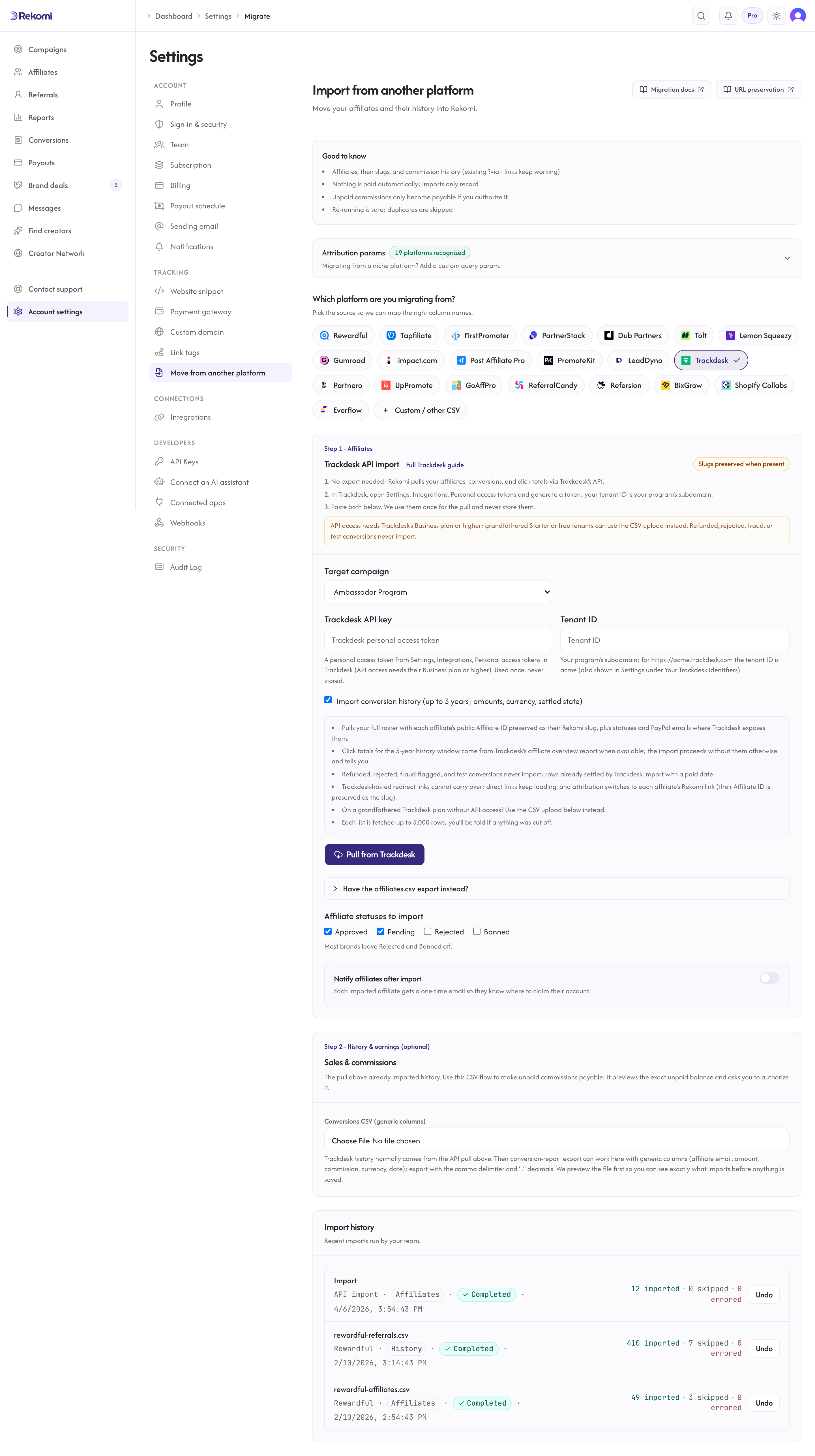
What the pull imports:
- Affiliates: email, name, and status (Trackdesk's
ENABLEDimports as Approved,PENDINGas Pending, andDISABLEDas Paused, since disabling is reversible in Trackdesk), plus the PayPal email when Trackdesk's inline payment methods expose one. - Affiliate IDs as slugs: each affiliate's public Affiliate ID (Trackdesk's 2-50 character url-friendly identifier) is preserved as their Rekomi slug when it passes the standard slug checks (globally unclaimed, valid charset).
- Click totals: per-affiliate click counts from Trackdesk's affiliate overview report, covering the same 3-year window as the conversion history, best-effort. When the report yields nothing, the import proceeds with zero historical clicks and the result tells you.
- Conversion history: up to 3 years of conversions with the order amount, the affiliate payout as the commission, per-row currency, and date. Trackdesk reports money as decimal strings in major units; Rekomi converts with the currency's real minor-unit scale.
FRAUD,NOT_ALLOWED,BLOCKED,REFUNDED,REJECTED, andTESTconversions never import. Rows already included in a Trackdesk settlement import with a paid date; everything imports as settled, locked history: nothing becomes payable from the API pull.
What the pull cannot import: payable balances (use the Step 2 CSV flow with its preview), customer emails (Trackdesk exposes only an opaque customer id on conversions), coupon-to-affiliate assignments (mint fresh Rekomi coupon codes), and lead rosters (Trackdesk has no standalone lead resource; lead-type conversions import as zero-amount conversions with their payout). Each list is fetched up to 5,000 rows; the result tells you if a fetch was cut off.
Re-running the pull is safe: affiliates dedupe by email and history rows dedupe on Trackdesk's conversion ids.
The CSV fallback
Trackdesk's Affiliate list → Export produces affiliates.csv (direct download) with the Referral ID, login email, full name, tier, status, and country. Export with the comma delimiter and "." decimals (the export dialog offers ";" and "," variants the importer does not consume). The CSV fallback covers the roster only; conversion history comes from the API pull or the Step 2 generic-columns CSV flow, and click totals from the API pull.
What the CSV importer brings across
| Field | Source column | Notes |
|---|---|---|
Login email / email | Required. Lowercased + trimmed. Primary dedup key. | |
| Full name | Full name / name | Imported as-is. |
| Status | Status | See mapping table below; the ACCOUNT_STATUS_ prefix is tolerated. |
| Tracking slug | Referral ID | Trackdesk's public Affiliate ID, preserved when valid. |
The export has no payout or billing columns (those are API-only in Trackdesk), so the CSV path imports affiliates without payout emails; they re-onboard payouts on Rekomi.
Status mapping
| Trackdesk | Rekomi |
|---|---|
ENABLED | Approved |
PENDING | Pending |
DISABLED | Paused |
| anything else, blank, or missing | Pending |
The mapper also accepts ACTIVE and APPROVED as Approved aliases. DISABLED is reversible in Trackdesk (re-enable exists), so it maps to Paused rather than Banned, keeping the affiliate's history importable. Reclassify any row with the bulk-status action in /dashboard/affiliates after import.
How slug preservation works
Trackdesk's human-readable Affiliate ID (2-50 characters, lowercase and hyphenated) is the identifier that rides in tracking links and reporting. The importer preserves it as the Rekomi slug when it passes the standard checks (3-64 characters, alphanumeric plus hyphen, globally unclaimed).
Link continuity is partial for Trackdesk, and honesty matters here:
- Direct links point at your own landing pages with Trackdesk parameters attached. After cutover those parameters become inert query strings on your own domain; the pages keep loading, but attribution needs the affiliate's new Rekomi link (or their preserved Affiliate ID slug in a Rekomi-format link).
- Redirect links through
{tenant}.trackdesk.comare Trackdesk-hosted and stop working when your account closes. A custom redirect domain (likego.yourbrand.com) is yours: re-point it once Rekomi is live. - Coupon codes assigned to affiliates in Trackdesk do not carry over; mint fresh Rekomi coupon codes per affiliate.
Plan the cutover as a link swap: import the roster (slugs preserved), then have the auto-notify email hand each affiliate their Rekomi link.
Step-by-step cutover
1. Run the API pull
Generate a personal access token under Settings → Integrations in Trackdesk, note your tenant ID, and run the pull under /dashboard/settings/migrate.
2. Check the import result
The import runs synchronously and shows a row-by-row result. Every job is listed under Import history with a per-row detail panel and an Undo button.
3. Opt into auto-notify (Growth+ only)
For Trackdesk migrations the notify email matters more than usual, since affiliates need their Rekomi link. Compose a short personal note and send a sample to yourself before the throttled bulk send.
4. Install the snippet and re-point custom domains
Install Rekomi's tracking snippet on your marketing site. If you ran a custom Trackdesk redirect domain, re-point it. Keep Trackdesk active for a 24-48 hour shadow period; then cancel.
What is NOT imported
| Data | Status | Workaround |
|---|---|---|
| Customer identities on conversions | Not exposed by Trackdesk | Conversions import with amounts and dates but no customer email. |
| Click-level logs | Not imported | Per-affiliate totals for the 3-year window import from the overview report instead. |
| Coupon assignments | Not imported | Mint fresh Rekomi coupon codes. |
| Trackdesk-hosted redirect links | Not portable | Custom redirect domains can be re-pointed; affiliates otherwise switch to their Rekomi link. |
| Offers / tiers / MLM structure | Not imported | All conversions import into the chosen Rekomi campaign; configure commission models and the sub-affiliate program fresh. |
Common gotchas
Multiple offers. A Trackdesk tenant can run several offers; the roster is tenant-wide and the history pull imports conversions across offers into the one Rekomi campaign you picked. Multi-offer brands wanting separation run separate Rekomi campaigns and use the Step 2 CSV flow per offer.
No API on my plan. Grandfathered Starter and free Trackdesk tenants have no API access; use the affiliates.csv fallback for the roster and the conversion report export through the Step 2 generic CSV path for history.
Semicolon CSVs. Trackdesk's export dialog offers a ";" delimiter and "," decimals for European locales; the importer needs the comma delimiter with "." decimals.
Verifying the import landed clean
- Open
/dashboard/affiliatesand spot-check 3-5 rows against the Trackdesk source (statuses included). - Open one affiliate's detail page and confirm their Affiliate ID carried over as the slug.
- Confirm click counts look plausible against Trackdesk's overview report for the last 3 years.
- Send a sample notification to yourself before firing the bulk send.
Importing history and earnings
The API pull already imports up to 3 years of conversions as locked, settled records (settlement-backed rows carry a paid date). Use the Step 2 CSV flow when you want open balances made payable on Rekomi: only the CSV flow previews the exact unpaid balance and asks you to authorize it. A Step 2 file for Trackdesk uses the generic columns (affiliate email, amount, commission, currency, date); export the conversion report with comma delimiter and "." decimals. See the migrations overview for the full reference.
Where to go next
- Tracking and attribution: cookie window, attribution params, and stickiness.
- Migrating from other platforms: the broader URL-preservation matrix.
- Plans and trials: what each tier includes and how the 14-day free trial behaves.
Migrating from LeadDyno
Move your LeadDyno program onto Rekomi with one API pull. Rekomi imports your affiliates (with ?afmc= codes, PayPal emails, and lifetime visitor counts), your Registered leads, and your commission history directly from LeadDyno's API.
Migrating from Partnero
Move a Partnero program onto Rekomi with one API pull per program. Rekomi imports the program's partners (with ?aff= referral codes and click counts), never-purchased signups as leads, and transaction history directly from Partnero's API.