

Migrating from FirstPromoter
Move your FirstPromoter program onto Rekomi with one API pull. Rekomi imports your promoters (with referral tokens and click counts), your leads, and your commission history directly from FirstPromoter's API; a CSV upload remains as a fallback.

This guide is for brands switching from FirstPromoter to Rekomi. The primary path is a pull-based API import: paste your FirstPromoter API key and Account ID and Rekomi imports your promoter roster (with each promoter's referral token and lifetime click count), your leads, and your commission history in one run. A CSV upload remains as a secondary path for Promoters exports you already have.
Existing brand.com/?fpr=alex links are preserved automatically. Migration is on Starter or higher; auto-notify is on Growth or higher.
Import via API (recommended)
FirstPromoter's Promoters CSV export has undocumented columns, and its Referrals list (your leads) has no export at all, so the API pull is both the easiest and the most complete path.
- In FirstPromoter, open Settings → Integrations and copy your API key and Account ID (both are shown there).
- Open
/dashboard/settings/migrate, pick FirstPromoter, choose your target Rekomi campaign, and paste both values. They are used once, in memory, and never stored, logged, or shown again. - Leave the Import leads and Import commission history toggles on (or switch either off) and click Pull from FirstPromoter.
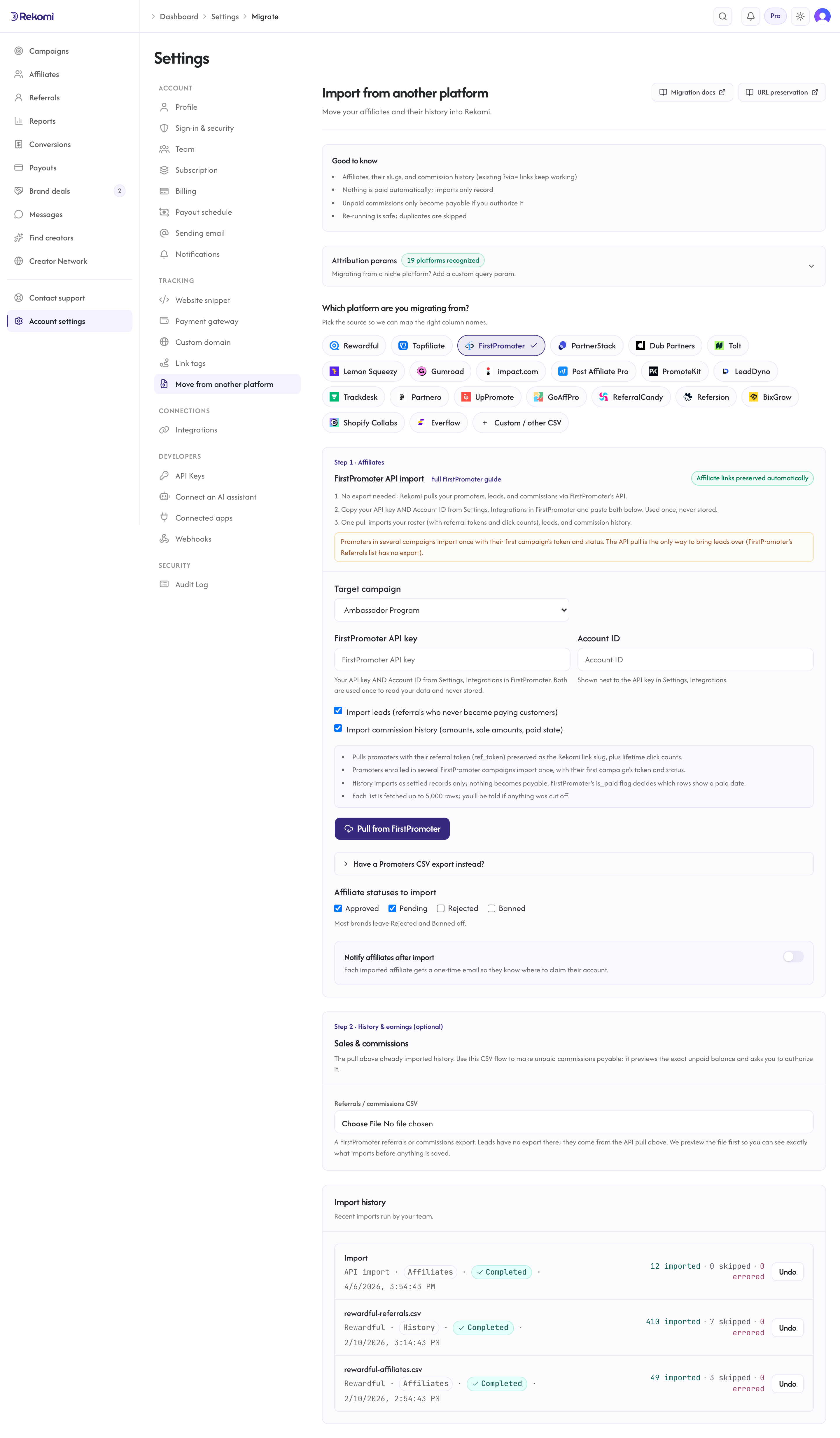
What the pull imports:
- Promoters: email, name, per-campaign status (API mapping:
acceptedimports as Approved,pending/not_setas Pending,rejectedandblockedas Banned,inactiveas Paused), PayPal email when exposed, and the referral token (ref_token) preserved as the Rekomi link slug. Promoters enrolled in several FirstPromoter campaigns import once, with their first campaign's token and status; the import summary reports how many that affected. - Click counts: each promoter's lifetime unique-click aggregate (
clicks_count) carries over into their Rekomi click counter, so leaderboards and EPC math don't reset to zero. - Leads: referrals who never became paying customers import as zero-money lead records attributed to their promoter, so your funnel and lead counts are populated from day one.
- Commission history: each commission's amount and sale amount (FirstPromoter reports integer cents; they import 1:1), date, and paid state (
is_paid). Paid commissions import as settled history; unpaid ones import as locked records. Nothing becomes payable from the API pull. Denied commissions are skipped. Zero-decimal currency amounts (for example JPY, which has no cents) import exactly as FirstPromoter reports them, with no rescaling. If you run a JPY (or other zero-decimal) program, spot-check a few imported amounts against FirstPromoter before relying on the totals. Commissions in ISK, UGX or MGA are skipped and counted asUnsupportedRepresentationRowson the pull result until FirstPromoter confirms how it represents those three currencies.
What the pull cannot import: payable balances (use the Step 2 CSV flow with its preview if you want unpaid commissions made payable), promo codes, campaign structure, custom fields, and click-level logs (FirstPromoter only exposes aggregates). Each list is fetched up to 5,000 rows; the result tells you if a fetch was cut off.
Re-running the pull is safe: affiliates dedupe by email and history rows dedupe on FirstPromoter's own ids.
The CSV fallback
If you prefer a file, the CSV importer still works with the Promoters-tab export. Leads and history cannot come from that file (only from the API pull or the Step 2 referrals CSV).
What the CSV importer brings across
| Field | Source column | Notes |
|---|---|---|
email | Required. Lowercased + trimmed. Primary dedup key. | |
| First name | first_name | Joined with last_name. |
| Last name | last_name | Joined with first_name. |
| Status | status (v1) OR state (v2) | Whichever column is present; mapping below. |
| PayPal email | paypal_email | Optional. Preserved as the affiliate's payout destination. |
| Tracking slug | default_ref_id (v1) or ref_token / ref_id (v2) | Direct slug column; a cust_ref value is used only as a last resort because it is your own customer reference, not the referral code. |
The importer fuzzy-matches header names case-insensitively and accepts either v1 or v2 columns interchangeably. Columns like id, promo_code, created_at, and country are ignored; a clicks_count or clicks column imports as the affiliate's lifetime click count.
Status mapping
FirstPromoter's v2 rollout renamed several states. The importer unifies both vocabularies:
FirstPromoter (v1 status / v2 state) | Rekomi |
|---|---|
approved / accepted | Approved |
pending / not_set | Pending |
denied / rejected | Rejected |
blocked / inactive | Banned |
| anything else, blank, or missing | Pending |
This table applies to the CSV fallback. The API pull maps the v2 per-campaign states slightly differently: rejected and blocked both import as Banned, and inactive imports as Paused.
The match is case-insensitive. If your CSV has both columns (transitional accounts during the v2 rollout), the first one the parser sees wins.
How slug preservation works
FirstPromoter's tracking URL is brand.com/?fpr={ref_id}. Rekomi recognizes fpr as one of the 21 default attribution params, so no additional config is required - every existing FirstPromoter link works on Rekomi out of the box once you swap the snippet.
The importer reads default_ref_id (v1) or ref_token / ref_id (v2, with Referral ID accepted) from every row and tries to register that exact value as the affiliate's new Rekomi slug. Preservation succeeds when:
- The value is a valid alias: 3-64 characters, alphanumeric plus hyphen, no leading or trailing hyphen.
- The slug is not already taken globally.
FirstPromoter's slugs are usually short, lowercase, and well-formed, so collision rates are low. The job detail panel lists any rows that fell back to fresh random slugs.
Step-by-step cutover
1. Run the API pull
Copy your API key + Account ID from Settings → Integrations in FirstPromoter and run the pull under /dashboard/settings/migrate (see Import via API above). One run brings your roster, leads, and history.
If you use the CSV fallback instead: export from the Promoters tab (NOT Reports; the Reports export excludes promoters who haven't yet made a referral) and upload the file. The importer detects v1 vs v2 automatically based on which columns are present.
2. Opt into auto-notify (Growth+ only)
Check Notify affiliates after import and compose a personal note. Click Send a sample to myself to fire a preview, then let the bulk dispatch run at 1 email/sec.
3. Swap the tracking snippet
Install Rekomi's tracking snippet, remove FirstPromoter's snippet. fpr is already in Rekomi's default attribution params, so every existing brand.com/?fpr=alex link starts attributing to Rekomi from the moment the swap is live.
4. Cancel FirstPromoter
Keep FirstPromoter active for a 24-48 hour shadow period if you want to compare numbers, then cancel.
v1 vs v2: which one am I on?
FirstPromoter was acquired by SpringWater Capital in September 2025. The v2 UI redesign started rolling out late 2025 and continued through early 2026. You can tell which export format you have by opening the CSV:
- v1 format has a
statuscolumn (approved/pending/denied/blocked) and adefault_ref_idcolumn. - v2 format has a
statecolumn (accepted/not_set/rejected/inactive) and aref_idcolumn.
You don't need to do anything different in the Rekomi importer - it auto-detects. The reason this matters is for verifying the import landed correctly after the fact: if your CSV is v2, expect rejected affiliates to show "rejected" in the source column and not "denied".
What is NOT imported
| Data | Status | Workaround |
|---|---|---|
| Historical click counts | API pull (or a CSV with a clicks column) | Lifetime aggregates import via the API pull; the Promoters CSV carries them only when it happens to include a clicks_count/clicks column (their export columns are undocumented). Click-level logs are not portable. |
| Leads | API pull only | FirstPromoter has no leads export; the API pull brings them as zero-money lead records. |
| Historical sales and commissions | API pull or Step 2 CSV | The API pull imports them as locked history; the Step 2 CSV flow additionally lets you make unpaid balances payable after a preview. |
| Historical commission rules | Not imported | Configure commission models directly; Rekomi's are more expressive. |
| Multi-program structure | Not imported | Set up Rekomi campaigns first; map at upload time. |
| Promoter custom fields | Silently ignored | Contact support if you need specific fields preserved. |
| Promo codes | Not imported | Use Rekomi's coupons feature; codes auto-attribute to affiliates. |
Common gotchas
My export from Reports has fewer rows than I expected. You exported from Reports instead of Promoters. The Reports tab excludes promoters without referrals. Re-export from Promoters → Export.
Some rows have status and others have state. This happens during the v2 rollout if FirstPromoter migrated only part of your account. The importer handles it - both columns get parsed correctly.
Promo codes in promo_code aren't carrying over. Correct - the importer doesn't currently bring across promo codes. Recreate them in Rekomi's coupons UI; Rekomi auto-attributes coupon redemptions to the affiliate they were minted for.
My PayPal emails are different from the affiliate emails. That's fine. paypal_email is preserved separately from email. Payouts use the PayPal address; the account login uses the regular email.
Verifying the import landed clean
After the job completes:
- Open
/dashboard/affiliatesand spot-check 3-5 rows. - Confirm one affiliate's tracking link is
brand.com/?fpr={ref_id}matching the referral id in the source. - Send a sample notification to yourself.
- Click your own test link with the new snippet live; confirm a click row appears.
Then fire the bulk auto-notify and cancel FirstPromoter.
Importing history and earnings
The API pull already imports your commission history (and leads) as locked, settled records. Use the Step 2 CSV flow instead when you have a referrals/commissions export file, or when you want unpaid commissions made payable on Rekomi: only the CSV flow previews the exact unpaid balance and asks you to authorize it.
- Past conversions and commissions are matched to the affiliate by email (or preserved slug) and recorded with the amount and date from your export.
- Commissions FirstPromoter already paid import as locked history (shown in lifetime totals, never paid again). Commissions still owed are queued for a Rekomi payout only if you authorize it on the preview screen.
- If your export includes a customer's Stripe customer/subscription id and your Stripe is connected, existing subscriptions keep paying the same affiliate on renewals.
- A dry-run preview shows what will import (and exactly how much, if anything, Rekomi would pay) before you commit. Re-running is safe. Denied and refunded rows are skipped.
See the migrations overview for the full reference.
Where to go next
- Tracking and attribution:
fprand the other 18 default params. - Coupons: recreate FirstPromoter promo codes with per-affiliate Stripe coupon minting.
- Migrating from other platforms: URL-preservation matrix.
- vs FirstPromoter: side-by-side comparison if you are still evaluating.
Migrating from Tapfiliate
Move your Tapfiliate affiliate roster onto Rekomi. CSV import preserves every existing referral code so ?ref= links keep working, with the gotcha that Tapfiliate emails the export rather than offering a direct download.
Migrating from PartnerStack
Move your PartnerStack affiliate roster onto Rekomi. The importer handles PartnerStack's loosely-documented CSV format via header fuzzy-matching. Tracking links use path-based URLs that need a redirect rule for full preservation; the importer handles roster, status defaults, and notifications.