

Migrating from Affonso
Move your Affonso program onto Rekomi with one API pull. Rekomi imports your affiliates (tracking ids preserved, PayPal emails, sign-up dates, groups, overrides and lifetime clicks), your leads and trials, and your commission history directly from Affonso's API; the file you originally imported into Affonso remains as a CSV fallback.

This guide is for brands switching from Affonso to Rekomi. The primary path is a one-key API pull: paste an Affonso API key and Rekomi imports your affiliate roster (with every existing tracking id preserved as the Rekomi link code), your leads and trials, and your commission history in one run, plus the program facts you need to mirror your campaign. A CSV upload remains as a secondary path for the file you originally imported into Affonso or a support-provided export.
Most teams complete the cutover in a single afternoon. Migration is on Starter or higher; auto-notify is on Growth or higher.
Import via API (recommended)
Affonso has no do-it-yourself CSV export for affiliates, referrals or commissions (their help center points you at support for a "comprehensive export"), so the API pull is both the easiest and the most complete path. The API is included on every Affonso plan.
- In Affonso, open Connect, API (
affonso.io/app/affiliate-program/connect/api), click Create Key, give it read permissions for affiliates, referrals, commissions and payouts (program settings too, if your role allows), and copy it. It is shown once. Since September 2026 your team role also gates what a key may read, so create it as an admin. - Open
/dashboard/settings/migrate, pick Affonso, choose your target Rekomi campaign, and paste the key. It is used once, in memory, and never stored, logged, or shown again. - Leave the Import leads and trials and Import commission history toggles on (or switch either off) and click Pull from Affonso.
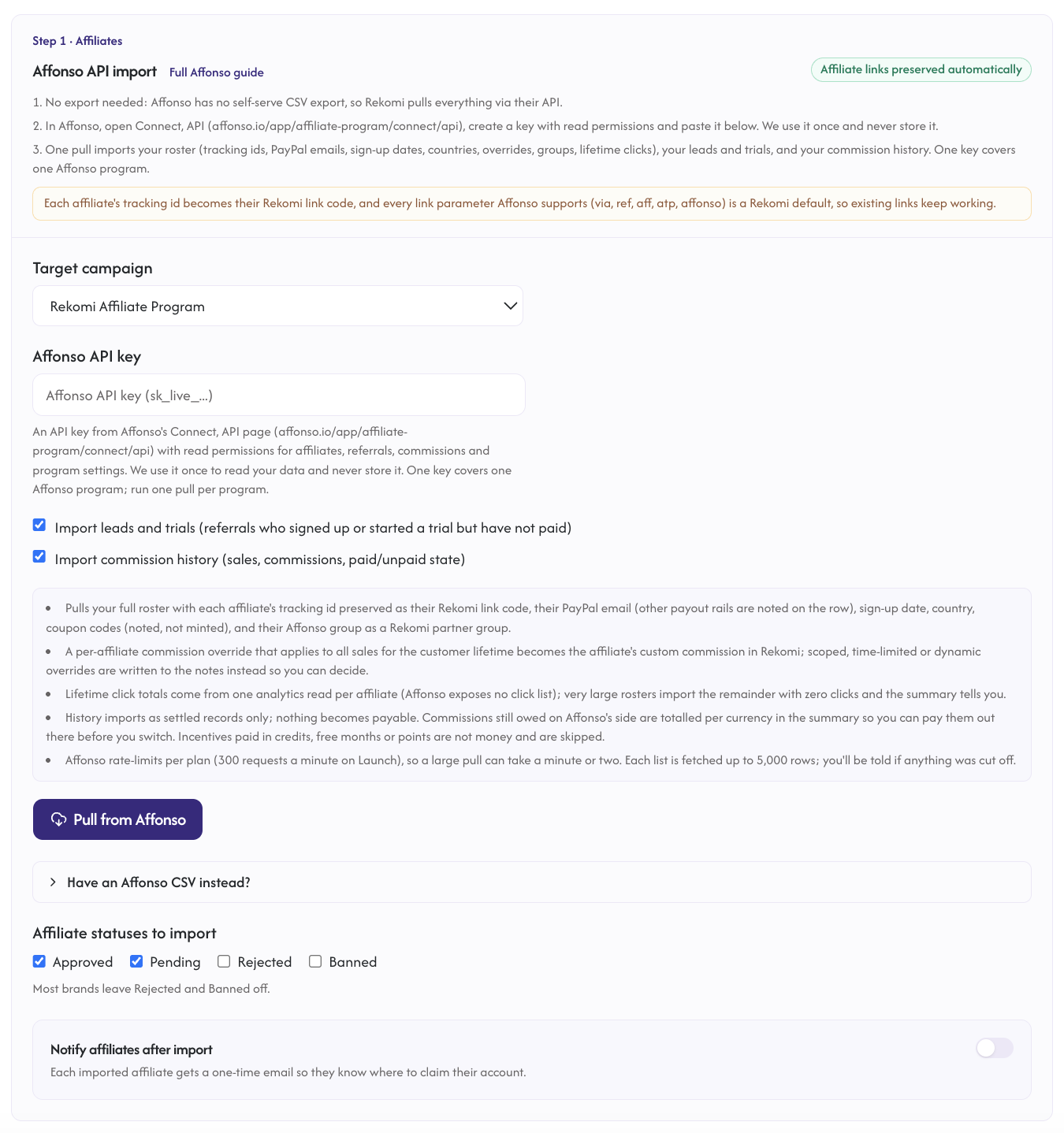
One Affonso key covers one Affonso program. If you run several programs, create a key in each and run one pull per program into its own Rekomi campaign.
What the pull imports:
- Affiliates: email, name, status (
APPROVEDimports as Approved,PENDINGas Pending,REJECTEDas Rejected; an affiliate who never finished onboarding lands Pending for you to approve), the PayPal email when PayPal is their payout method, their Affonso sign-up date (kept as the Rekomi join date), their declared invoice country, and the tracking id preserved as the Rekomi link slug so existing links keep working. - Groups: each Affonso group becomes a Rekomi partner group of the same name (matched when one already exists), and every affiliate lands in theirs. A group whose single incentive applies to all sales for the customer lifetime carries that rate; anything else keeps your campaign default.
- Per-affiliate overrides: an override that applies to all plans and products for the customer lifetime, at a plain percentage or fixed amount, becomes the affiliate's custom commission in Rekomi. Scoped (yearly plans, specific products, signups, trials), time or payment limited, dynamic, non-monetary or multiple overrides are not applied; the row notes describe them so you can decide.
- Row notes: coupon codes (Affonso creates real provider promotion codes; re-create them as Rekomi campaign coupons), non-PayPal payout rails (Wise, Payoneer, wire and so on, with the email when there is one), company name, and the override description.
- Click counts: Affonso exposes no click list, so lifetime clicks come from one analytics read per affiliate. The loop is bounded (500 affiliates, 75 seconds); affiliates past the bound import with zero clicks and the summary reports how many, with their link codes still preserved.
- Leads and trials: referrals in Affonso's
leadortrialingstate (signed up or started a trial, never paid) import as zero-money lead records attributed to their affiliate, with the customer's name, email (when Affonso's email tracking is on) and Stripe customer id. - Commission history: each commission's sale amount and commission amount (decimal amounts in your Affonso program currency), currency, date and state.
paidcommissions import as settled history;pending,pending_manual_approval,ready_for_paymentandprocessing_payoutcommissions also import as locked records (nothing becomes payable from the API pull), and their per-currency total is shown in the summary as still owed on Affonso's side so you can pay it out there before cutover;declined,refundedanddisputecommissions and refunded or failed sales are skipped; a partially refunded sale keeps the reduced commission Affonso already recorded. Subscriptions import as recurring, with Stripe customer and subscription ids riding along so existing subscriptions keep paying the same affiliate on renewals. Incentives paid in credits, free months or points are not money and are skipped (counted in the summary). - Program facts: the link parameters your Affonso program used (
via,ref,aff,atp,affonso, every one a Rekomi default) and its payment terms (commission type and rate, duration, hold days, payout threshold, payout frequency, cookie lifetime) are shown in the summary so you can match your Rekomi campaign settings.
What the pull cannot import: payable balances (settle them in Affonso, or use the Step 2 CSV flow with its preview if you have a file), click-level logs, payout records (represented by the paid state of commissions), tax forms, sub-affiliate parent links (not in Affonso's API), onboarding answers, creatives and portal settings. Each list is fetched up to 5,000 rows and Affonso rate-limits per plan (300 requests a minute on Launch), so a large pull can take a minute or two; the result tells you if a fetch was cut off.
Re-running the pull is safe: affiliates dedupe by email, history rows dedupe on Affonso's own ids, and groups are matched by name.
The CSV fallback
If you still have the file you imported into Affonso (their format is Name, Email, Tracking Parameter, PayPal Email, comma or semicolon delimited) or Affonso support emailed you an export, the CSV importer accepts it.
What the CSV importer brings across
| Field | Source column | Notes |
|---|---|---|
email | Required. Lowercased + trimmed. Primary dedup key. | |
| Full name | name or first_name + last_name | If name is present it wins; otherwise the two parts are joined with a space. |
| Status | partnership_status or status | See mapping table below. The original import file has no status column, so every row lands Pending. |
| PayPal email | paypal_email, paypal or payout_email | Optional. Preserved as the affiliate's payout destination. |
| Tracking slug | tracking_id or tracking_parameter (primary), else ?via=, ?ref=, ?aff=, ?atp= or ?affonso= extracted from a link column | If all are missing, a fresh 12-character random slug is generated. |
| Join date | created_at, joined_at or signup_date | Optional. Kept as the Rekomi join date. |
| Country | country or country_code | Optional two-letter code. |
| Clicks | clicks, click_count or total_clicks | Optional lifetime aggregate. |
Headers are matched tolerantly (case, spaces and underscores do not matter).
Status mapping
Affonso partnership_status | Rekomi |
|---|---|
APPROVED, active, accepted | Approved |
PENDING, blank, or missing | Pending (an affiliate who never finished onboarding) |
REJECTED, declined, denied | Rejected |
suspended, inactive, paused | Paused (for review) |
banned, blocked | Banned |
| anything else | Pending |
The match is case-insensitive. Approved imports get their ApprovedAt set to the Affonso sign-up date (or the import time when the file has none) so payout eligibility math works correctly.
How slug preservation works
Your affiliates do not need to share new links.
Affonso's tracking URL is brand.com/?via={tracking_id} by default, and a program can enable ref, aff, atp or affonso as well. Rekomi's default tracking URL is brand.com/?via={slug}, and all five of Affonso's parameters are built-in attribution params, so every variant is recognized out of the box. The importer registers each affiliate's tracking id (lowercased) as the new affiliate's Rekomi slug.
The slug is preserved iff:
- The tracking id is a valid alias: 3-64 characters, alphanumeric plus hyphen, no leading or trailing hyphen. Affonso allows the same shape, so this almost always holds.
- The slug is not already taken in the global Rekomi namespace (slugs are platform-wide unique, not per-org).
If both conditions hold, every existing brand.com/?via=alex (or ?ref=alex, ?atp=alex) link keeps working on Rekomi the moment you swap the tracking snippet. Collisions are logged per-row in the import job result; the affiliate is still imported with a fresh slug.
Step-by-step cutover
1. Run the API pull
Create the key under Connect, API in Affonso and run the pull under /dashboard/settings/migrate (see Import via API above). Read the summary: it reports rows imported, groups created or matched, overrides applied, what is still owed on Affonso's side, and the program terms.
2. Match your campaign settings
Use the program terms in the summary (rate, duration, hold days, payout threshold, payout frequency, cookie lifetime) to set the same rules on your Rekomi campaign, or take the chance to change them. Re-create affiliate coupon codes as Rekomi campaign coupons if your program used them.
3. Attribution params: nothing to configure
via, ref, aff, atp and affonso are all among Rekomi's 21 built-in attribution params; there is nothing to configure.
4. Settle what Affonso still owes
Commissions in Affonso's pending, manual review, approved or processing states imported as locked history. The summary totals them per currency: generate and pay those payouts in Affonso before you switch off the Affonso pixel, so nobody is paid twice and nobody is missed.
5. Opt into auto-notify (Growth+ only)
Check Notify affiliates after import and compose a short personal note. Click Send a sample to myself to preview it before the bulk send. The bulk dispatch is throttled to one email per second; a 500-row import takes about 8 minutes end to end.
6. Swap the tracking snippet
Install Rekomi's tracking snippet on your marketing site and connect your payment provider, then remove the Affonso pixel. The moment the new snippet is live, every existing affiliate link attributes to Rekomi instead of Affonso. Keep Affonso active for a 24-48 hour shadow period if you want belt-and-suspenders confidence; then cancel it.
What is NOT imported
| Data | Status | Workaround |
|---|---|---|
| Payable balances | Not from the pull | Pay them out in Affonso before cutover (the summary totals them), or use the Step 2 CSV flow with its preview if you have a file. |
| Click-level logs | Not portable | Lifetime totals import via the per-affiliate analytics reads. |
| Payout records | Represented by paid commissions | Each paid commission imports as settled history. |
| Coupon codes | Noted, never minted | Re-create them as Rekomi campaign coupons; the codes are in each affiliate's import row notes. |
| Scoped or dynamic overrides, non-cash incentives | Noted, not applied | Configure Rekomi's commission models and per-affiliate rates directly. |
| Sub-affiliate parent links, tax forms, onboarding answers, creatives | Not exposed by Affonso's API | Set up sub-affiliate recruiting and promo assets in Rekomi; affiliates upload tax forms during payout onboarding. |
Common gotchas
The pull says the key was rejected. Affonso keys are shown once and can expire; create a new one with read permissions. Since September 2026, a key inherits its creator's team role, so a key made by a member without the relevant permission is denied on those endpoints.
Groups came across with my campaign's default rate. A group whose incentives are scoped, limited, dynamic or several cannot be expressed as one Rekomi group rate, so the group is created at the campaign default and the affiliates' row notes describe the source incentives. Set the group rate you want under Affiliates, Groups.
An affiliate imported with zero clicks. Very large rosters hit the per-affiliate analytics bound (the summary says how many); their link codes are still preserved and live clicks count from day one.
Some commissions were skipped as not money. Affonso can pay incentives in credits, free months or points; those rows carry no currency and never import. The summary counts them.
Verifying the import landed clean
After the import job completes:
- Open
/dashboard/affiliatesand spot-check 3-5 rows. Confirm name, email, status, group and join date match Affonso. - Open one affiliate's detail page and confirm the tracking link is
brand.com/?via={original-tracking-id}and, where you expected one, the custom commission. - Click your own affiliate test link with the new snippet installed; confirm a click row appears under that affiliate within a few seconds.
- Compare the owed-at-source total in the summary with Affonso's pending payouts page before you pay them there.
Importing history and earnings
The API pull already imports your commission history (and leads) as locked, settled records. Use the Step 2 CSV flow instead when you have a support-provided commissions export in Affonso's API vocabulary (affiliate_email or tracking_id, sale_amount, commission_amount, commission_currency, status, sales_status, created_at), or when you want unpaid commissions made payable on Rekomi: only the CSV flow previews the exact unpaid balance and asks you to authorize it.
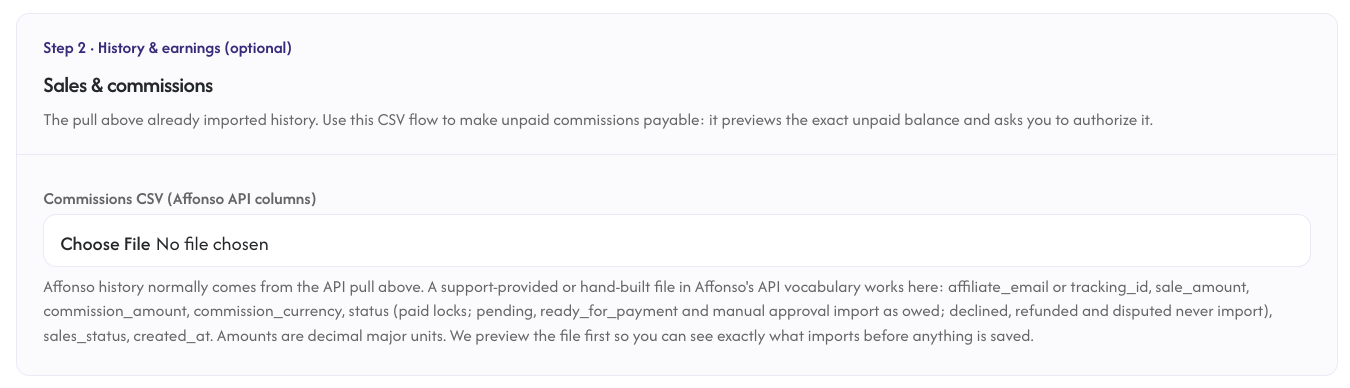
See the migrations overview for the full reference.
Where to go next
- Tracking and attribution: customize the attribution params, configure cookie window and stickiness.
- Migrating from other platforms: the broader URL-preservation matrix if you also have affiliates on other platforms.
- Plans and trials: see what each tier includes and how the 14-day free trial behaves.
- vs Affonso: side-by-side feature comparison if you are still evaluating.