

Migrating from Partnero
Move a Partnero program onto Rekomi with one API pull per program. Rekomi imports the program's partners (with ?aff= referral codes and click counts), never-purchased signups as leads, and transaction history directly from Partnero's API.

This guide is for brands switching from Partnero to Rekomi. Partnero runs affiliate, referral, and newsletter programs as separate containers. The primary path is a one-key API pull with one important scope rule: Partnero API keys are per program, so you run one import per program, each with that program's own key.
Most teams complete the cutover in a single afternoon. Migration is on Starter or higher; auto-notify is on Growth or higher.
Import via API (recommended)
- In Partnero, open the program you are migrating, then Integration → API, and create an API key. The key is shown once, and it is scoped to that one program.
- Open
/dashboard/settings/migrate, pick Partnero, choose your target Rekomi campaign, and paste the key. It is used once, in memory, and never stored, logged, or shown again. - Leave the Import leads and Import commission history toggles on (or switch either off) and click Pull from Partnero.
- Multi-program accounts: repeat per program, with each program's key, into the Rekomi campaign of your choice.
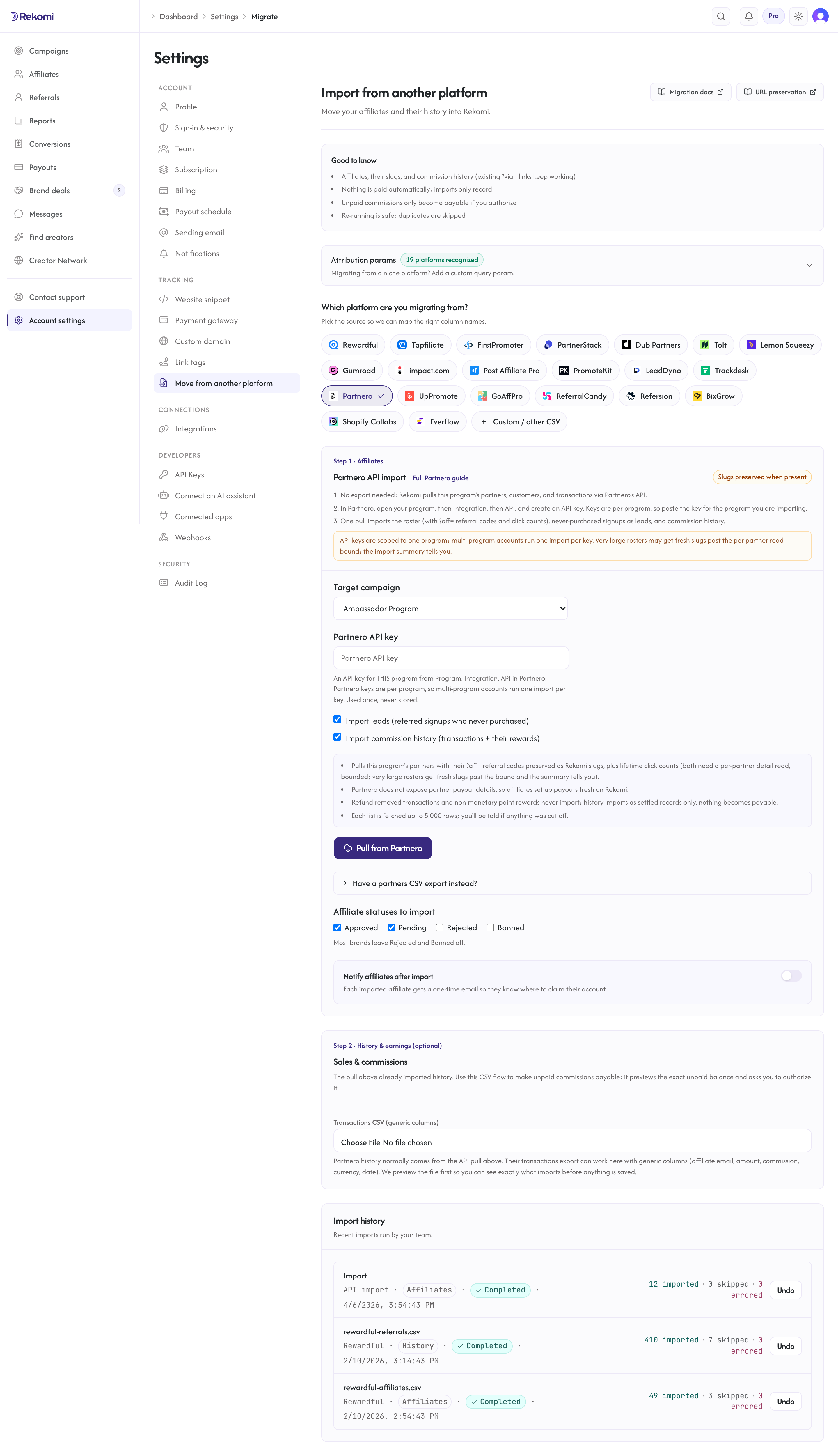
What the pull imports:
- Partners: email, name and surname, and status (
activeimports as Approved,pendingas Pending,archivedas Paused; an active-but-unapproved partner imports as Pending; deleted partners are skipped entirely). - Referral codes and click counts: both live only on Partnero's per-partner detail object, so the pull reads partner details individually, bounded by count and time. Each partner's referral code (the
?aff=value from their default referral link) is preserved as their Rekomi slug when it passes the standard slug checks, and their lifetimereferrals.clicksaggregate carries over. Very large rosters past the bound import with fresh slugs and zero clicks, and the import summary reports exactly how many. - Leads: referred customers with no transaction (tracked signups that never purchased) import as zero-money lead records attributed to their partner.
- Commission history: each transaction's sale amount plus its reward (commission) amount, per-row currency, date, and the customer's identity. Partnero reports money in decimal major units (rewards can carry three decimals, like 29.997); Rekomi converts with the currency's real minor-unit scale, rounding half away from zero. Refund-removed transactions, account credits, non-monetary point rewards, and rejected or declined rewards never import. Partnero exposes no per-reward settled state, so everything imports as settled, locked history: nothing becomes payable from the API pull.
What the pull cannot import: partner payout details (Partnero does not expose them; affiliates set up payouts fresh on Rekomi), payable balances (use the Step 2 CSV flow with its preview), coupon assignments, Partnero's manually-submitted lead queue (a different resource from tracked signups), and multi-tier override rewards (only the direct commission per transaction imports; overrides would double-count the sale). Each list is fetched up to 5,000 rows; the result tells you if a fetch was cut off.
Re-running the pull is safe: affiliates dedupe by email and history rows dedupe on Partnero's transaction keys.
The CSV fallback
Partnero's Reporting and Management export (select rows, Export, direct download) works as a roster fallback: the importer matches email, name, surname, approval status, and the key column tolerantly. Customers and transaction history only come from the API pull.
What the CSV importer brings across
| Field | Source column | Notes |
|---|---|---|
email | Required. Lowercased + trimmed. Primary dedup key. | |
| Full name | name + surname | Joined when both exist. |
| Status | approved boolean, else status | See mapping table below. |
| Tracking slug | key, partner_key, referral_key, or ?aff= extracted from a referral-link column | The partner's referral key. |
| Click count | clicks | Optional lifetime aggregate. |
Status mapping
| Partnero | Rekomi |
|---|---|
active (approved) | Approved |
active with approved = false | Pending |
pending | Pending |
archived | Paused |
deleted | Skipped by the API pull (Banned via CSV) |
| anything else, blank, or missing | Pending |
Archiving is reversible in Partnero (restore exists), so archived partners import as Paused, keeping their history importable. Reclassify any row with the bulk-status action in /dashboard/affiliates after import.
How slug preservation works
Partnero referral links carry the partner's referral key as a query parameter, most commonly ?aff=, with ?ref= and ?via= as per-program variants, for example brand.com?aff=alex. All three are built-in Rekomi attribution params, so existing Partnero links keep attributing on Rekomi the moment you swap the tracking snippet, wherever the referral key was preserved as the slug (the conditions below), whichever param variant your program used.
The importer preserves the key itself as the Rekomi slug when:
- The bounded per-partner detail read reached that partner (very large rosters past the bound get fresh slugs, reported in the summary).
- The key is a valid alias: 3-64 characters, alphanumeric plus hyphen, no leading or trailing hyphen.
- The slug is not already taken in the global Rekomi namespace.
Subdomain-style Partnero links (alex.yourbrand.com) are DNS-based and do not carry over; re-point or retire them at cutover.
Step-by-step cutover
1. Run the API pull (per program)
Create a key under Program → Integration → API and run the pull under /dashboard/settings/migrate. Repeat per program for multi-program accounts.
2. Attribution params: nothing to configure
aff, ref, and via are all built-in Rekomi attribution params, so existing links resolve to the right affiliate with zero configuration.
3. Check the import result
The import runs synchronously and shows a row-by-row result, including how many partners the detail-read bound left with fresh slugs. Every job is listed under Import history with an Undo button.
4. Opt into auto-notify (Growth+ only)
Partnero affiliates need to re-onboard payouts on Rekomi (Partnero exposes no payout details), so the notify email is worth sending: it hands each affiliate their claim link, where payout onboarding lives. Send a sample to yourself first.
5. Swap the tracking snippet
Install Rekomi's tracking snippet, then remove Partnero's Universal script. Existing ?aff= links attribute to Rekomi immediately. Keep Partnero active for a 24-48 hour shadow period; then cancel.
What is NOT imported
| Data | Status | Workaround |
|---|---|---|
| Partner payout details | Not exposed by Partnero | Affiliates set up payouts fresh via their Rekomi account. |
| Multi-tier override rewards | Deliberately skipped | Only the direct commission per transaction imports; configure Rekomi's sub-affiliate program fresh. |
| Non-monetary point/credit rewards | Deliberately skipped | Rekomi records money, not points. |
| Manually-submitted lead queue | Not imported | Partnero's submitted-deal leads are a separate resource; tracked signups DO import as leads. |
| Coupon assignments | Not imported | Mint fresh Rekomi coupon codes. |
| Newsletter-program subscribers | Not imported | This importer covers affiliate-type programs; newsletter programs export subscribers as CSV inside Partnero. |
Common gotchas
One key, one program. A pull with program A's key can never see program B. If the result looks empty or too small, check which program's key you pasted.
Three-decimal rewards. Partnero rewards can carry three decimals (29.997); Rekomi rounds to the nearest minor unit, half away from zero (3000 cents).
Very large rosters. The referral-code and click reads are per-partner and bounded (by count and wall clock) so the import stays responsive. Partners past the bound import with fresh slugs, and their old referral keys stop attributing (a recognized param name cannot resolve an unregistered key). Re-running the pull will not fix them: already-imported affiliates are skipped without slug updates. Ask support for a slug backfill instead.
Verifying the import landed clean
- Open
/dashboard/affiliatesand spot-check 3-5 rows against the Partnero source. - Open one affiliate's detail page and confirm the preserved referral key (or a fresh slug past the bound).
- Click an affiliate's existing
?aff=link with the new snippet installed; confirm a click row appears within a few seconds. - Send a sample notification to yourself before firing the bulk send.
Importing history and earnings
The API pull already imports transaction history as locked, settled records. Use the Step 2 CSV flow when you want open balances made payable on Rekomi: only the CSV flow previews the exact unpaid balance and asks you to authorize it. A Step 2 file for Partnero uses the generic columns (affiliate email, amount, commission, currency, date). See the migrations overview for the full reference.
Where to go next
- Tracking and attribution: the
aff/ref/viaparams, cookie window, and stickiness. - Migrating from other platforms: the broader URL-preservation matrix.
- Plans and trials: what each tier includes and how the 14-day free trial behaves.
Migrating from Trackdesk
Move your Trackdesk program onto Rekomi with one API pull. Rekomi imports your affiliates (with their public Affiliate IDs preserved as slugs), up to 3 years of conversion history, and matching click totals directly from Trackdesk's API.
Migrating from UpPromote
Move an UpPromote affiliate program onto Rekomi with a one-key API pull. Rekomi imports the roster, referral history, and lifetime status, and preserves sca_ref tracking links.