

Migrations from other platforms
Move your affiliate roster onto Rekomi from Rewardful, Tapfiliate, FirstPromoter, PartnerStack, Dub Partners, Tolt, Lemon Squeezy, Gumroad, impact.com, PromoteKit, LeadDyno, Trackdesk, Partnero, UpPromote, GoAffPro, ReferralCandy, Refersion, BixGrow, Shopify Collabs, Everflow, Post Affiliate Pro, or Affonso. Do-it-yourself importers for all 22 with slug preservation and optional auto-notify.
If you are switching from another affiliate platform, this page is your jumping-off point. Rekomi ships do-it-yourself importers for 22 sources - pick the dedicated guide for your platform below. Rewardful, Affonso, FirstPromoter, Tolt, Lemon Squeezy, impact.com, PromoteKit, LeadDyno, Trackdesk, Partnero, UpPromote, GoAffPro, Refersion, ReferralCandy, and Everflow are pull-based API imports: paste a key (FirstPromoter also needs your Account ID; impact.com uses an Account SID + Auth Token pair; Trackdesk uses a tenant ID + personal access token; Partnero keys are scoped per program; Refersion needs a Public Key and a Secret Key; ReferralCandy needs an Access ID and a Secret; Everflow needs a Network key plus a US/EU region choice) and Rekomi fetches everything. For Rewardful, FirstPromoter, Tolt, PromoteKit, LeadDyno, Partnero, UpPromote, and GoAffPro the pull brings the roster plus leads or history in one run (a CSV upload remains as a fallback for files you already have); impact.com's and Trackdesk's pulls bring the roster, lifetime click totals, and up to 3 years of conversion history; Everflow's pull brings the roster, click totals from the last 12 months, and up to 365 days of conversion history (Everflow's raw-data retention ceiling); Lemon Squeezy's API exposes the roster only (no history, clicks, or per-affiliate rates exist to pull); ReferralCandy's API pull is also roster-only, since ReferralCandy's API exposes no money or commission amounts at all; Refersion's API pull brings the roster (history has to come from a Step 2 CSV, since Refersion's REST API has no conversion endpoint). Tapfiliate, PartnerStack, Dub Partners, BixGrow, Shopify Collabs, and Post Affiliate Pro are CSV importers (Post Affiliate Pro accepts both its canonical semicolon Tools, Import/Export file and its grid exports). Gumroad is two-surface: the roster is a CSV upload (their dashboard's Affiliates export; no public affiliates API exists) and sales history comes from their API. On any other platform, use the Custom / other CSV option under Settings, Migrate, which lets you map your export's columns to Rekomi fields (email, name, status, referral slug, PayPal) yourself.
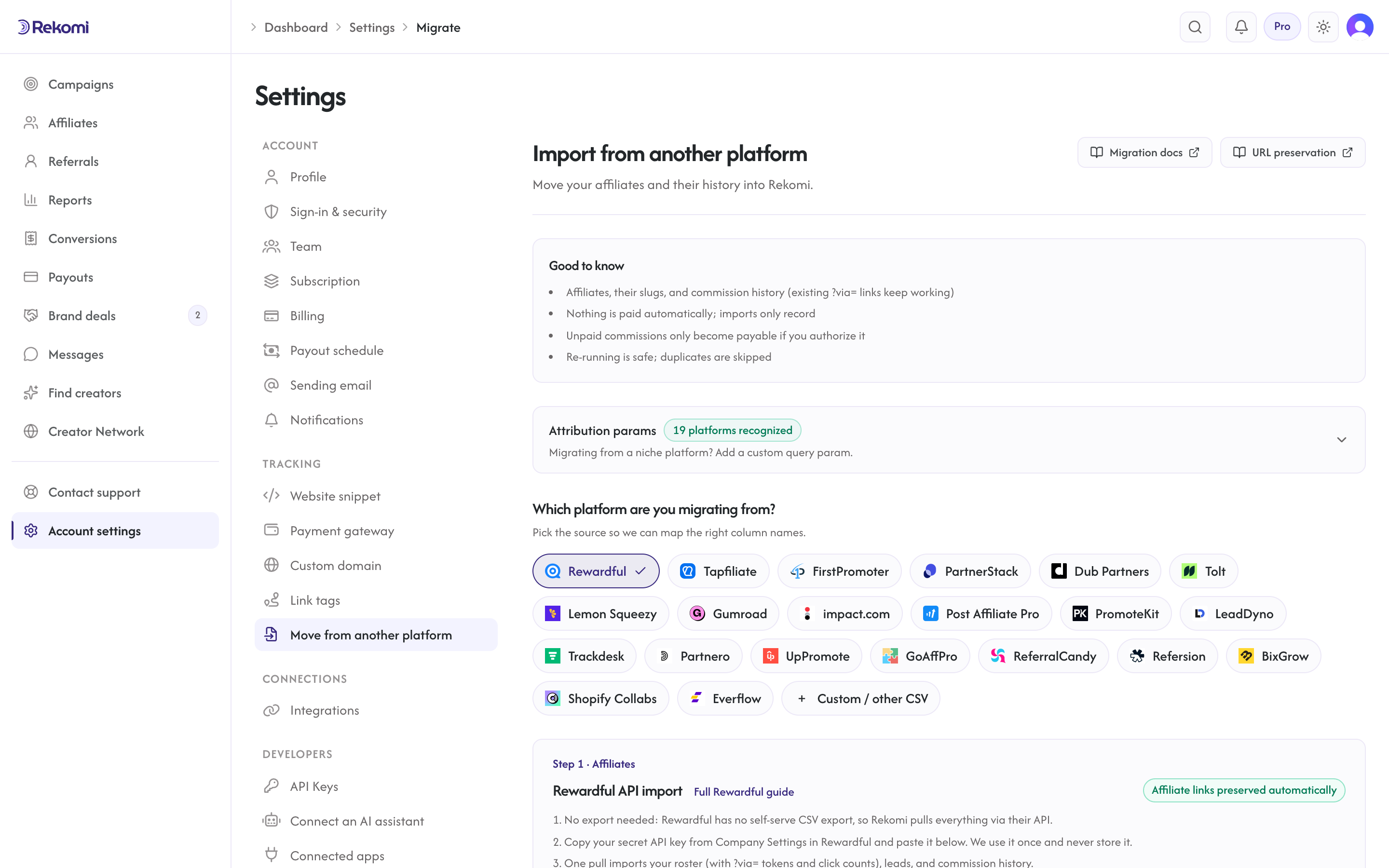
Dedicated migration guides
Each guide walks through the export flow, the exact column mapping the importer reads, the status translation, slug preservation behavior, and a step-by-step cutover plan.

Migrating from Rewardful
One-key API pull: roster + leads + history + click counts. Slugs preserved from link tokens. `?via=` links keep working.

Migrating from Tapfiliate
Emailed CSV export. Slugs extracted from the `Program_referral_link` URL. `?ref=` links keep working; leads import from the Customers export.

Migrating from FirstPromoter
API pull (key + Account ID): roster + leads + history + click counts. Slugs preserved from `ref_token`. `?fpr=` links keep working.

Migrating from PartnerStack
Emailed CSV export. Path-based URLs need reverse-proxy redirects for link continuity. Status reclassified after import.

Migrating from Dub Partners
Kebab-menu CSV export. No link column in the export, so affiliates get fresh slugs; toggle the Clicks column on to carry lifetime click counts over.

Migrating from Tolt
One-key API pull (Tolt has no dashboard export): partners + links + leads + history + click counts. `?aff=` links keep working.

Migrating from Lemon Squeezy
No CSV export exists; Rekomi pulls the roster via their API. Optional email,aff_code paste keeps `?aff=` links working.

Migrating from Gumroad
Roster via the dashboard's affiliates CSV export; sales history and per-affiliate attribution via the Gumroad API. `/a/` links cannot carry over, so slugs are fresh; history imports as settled records.

Migrating from impact.com
API pull (Account SID + Auth Token): partners + up to 3 years of actions + lifetime clicks. Links use opaque `irclickid` ids, so slugs are fresh; history imports as settled records.

Migrating from PromoteKit
One-key API pull (Pro plan or higher): roster + signed-up leads + history + click counts. Slugs preserved from link codes. `?via=` links keep working.

Migrating from LeadDyno
One-key API pull: roster + Registered leads + history + lifetime visitor counts. Slugs preserved from `?afmc=` codes, which keep working out of the box.

Migrating from Trackdesk
API pull (tenant ID + personal token, Business plan or higher): roster + up to 3 years of conversions + click totals. Public Affiliate IDs preserved as slugs.

Migrating from Partnero
One-key API pull per program (keys are program-scoped): roster + never-purchased signups as leads + transaction history. `?aff=` referral keys preserved as slugs.

Migrating from UpPromote
One-key API pull (Professional plan or higher): roster + referral history. `?sca_ref=` links keep working; CSV fallback for other plans.

Migrating from GoAffPro
One-key API pull: roster + order history. `?ref=` links keep working; goaff.pro and bit.ly short links do not.

Migrating from ReferralCandy
API pull imports the roster only (no commission data in ReferralCandy's API). FRIEND- coupon codes keep crediting on Shopify; refr.cc links do not carry over.

Migrating from Refersion
Two-key API pull (Growth plan or higher): roster with the full `rfsn` value preserved as the slug. Conversion history comes in via a Step 2 CSV.

Migrating from BixGrow
CSV-only export (no API): roster with `bg_ref` links preserved as slugs. Coupon codes are real Shopify discounts, so they keep crediting.

Migrating from Shopify Collabs
CSV-only creators export: vanity links cannot carry over, but re-scoped Shopify discount codes keep crediting creators through coupon attribution.

Migrating from Everflow
One Network-key API pull (US or EU region): partner roster + click totals from the last 12 months + up to 365 days of conversions. Links are machine-generated per offer, so slugs are fresh; re-create coupon codes in Rekomi.

Migrating from Post Affiliate Pro
CSV import that reads both export shapes (the canonical semicolon `!FIELDNAME` file and grid exports): Referral IDs preserved as slugs, `a_aid` links keep attributing, and a dedicated Step 2 transaction parser.

Migrating from Affonso
One-key API pull: roster with tracking ids preserved, PayPal emails, groups, overrides, clicks, leads and trials, and locked commission history.
Shared behavior across all 22 importers
The mechanics below apply to every source-specific guide. Read this once and the per-platform pages focus on what's unique to each.
What gets imported
Every importer brings across the same canonical shape:
- Email (required, primary dedup key, lowercased + trimmed).
- Full name (single column or
first_name+last_namejoined). - Status, normalized to Rekomi's five states: Approved, Pending, Rejected, Paused (imported for review), or Banned.
- PayPal email where the source provides it (Rewardful, Affonso when PayPal is the payout method, FirstPromoter, Tolt, PromoteKit, LeadDyno, Trackdesk where its inline payment methods expose one, and Everflow where a partner's billing is PayPal by email).
- Default tracking link, with the slug preserved from the source platform when possible. Falls back to a fresh 12-character random slug when the source field is missing, malformed, or globally taken.
- Lifetime click count, where the source exposes an aggregate (the Rewardful, FirstPromoter, Tolt, PromoteKit, and LeadDyno API pulls always do; the impact.com, Trackdesk, and Everflow pulls read it from a report on a best-effort basis; the Partnero and Affonso pulls read it per affiliate within a bounded detail loop; CSV files carry it when they include a clicks column, e.g. Dub's toggleable Clicks column or PartnerStack's performance report). Imported clicks count toward each affiliate's lifetime click totals, leaderboards, and EPC math, so nothing resets to zero. They are aggregates, not events: they do not appear in time-bucketed charts and are never payable (campaigns that pay per click (CPC) exclude them).
This is Step 1: your affiliate roster. An optional Step 2 imports their history and earnings (past conversions, commissions, leads, and customer attribution); see Importing history and earnings below. The Rewardful, Affonso, FirstPromoter, Tolt, PromoteKit, LeadDyno, and Partnero API pulls fold leads and commission history into the same run (impact.com, Trackdesk, and Everflow fold conversion history in too), so Step 2 is only needed there if you want unpaid balances made payable from a CSV.
The importer does NOT bring across:
- Per-click event history: lifetime click counts migrate (above), but the individual click events (dates, referrers, geo) are not exportable from any source platform, so time-bucketed click charts start fresh on Rekomi.
- Existing tracking links beyond the slug: imported affiliates get a Rekomi-side link, with the slug preserved when feasible (see per-platform guides for the matrix).
For GrowSurf, Reditus, or in-house systems, use the hands-on migration path: contact us via the in-app messenger and we will scope it. Hands-on help is included in early-adopter onboarding for every plan.
Importing history and earnings (Step 2)
After your affiliates are in (Step 1), upload your platform's conversions export (a different file from the affiliate roster; each guide names the exact file, e.g. Dub's Commissions export, PartnerStack's Commissions + Transactions bundle, Tapfiliate's Conversions and Customers exports, Post Affiliate Pro's transactions export in either shape) under Settings, Migrate, Step 2. This brings over each affiliate's past performance so their stats are not reset to zero, and it can keep their existing customers paying them. For Rewardful, Affonso, FirstPromoter, Tolt, PromoteKit, LeadDyno, and Partnero the API pull already imports this history (Step 2 is the CSV alternative, and the only flow that can make unpaid balances payable; for the PromoteKit, LeadDyno, Trackdesk, and Partnero slugs the Step 2 file uses the generic columns: affiliate email, amount, commission, currency, date, paid), and the impact.com and Trackdesk pulls import up to 3 years of history in the same run (always as settled records; Everflow's pull does the same for up to 365 days, its raw-data retention ceiling). Gumroad's Step 2 is an API pull instead of a file (no conversions export exists): it imports affiliate-attributed sales as settled history, skipping refunded and charged-back sales and counting partially refunded ones (imported at full value) for review. The exception is Lemon Squeezy: they expose no referral or payout history anywhere (no API, no export), so Step 2 is not available for that source.
What the history import does:
- Records past conversions and commissions, matched to the affiliate by email (or preserved slug) within the target campaign. The commission amount and date are taken from your export verbatim, not recomputed.
- Honors paid vs unpaid. The import itself only records data; Rekomi never pays anyone automatically. Rows your old platform already paid import as settled history (they show in lifetime totals but are never paid again). Rows that were still owed also import as history, and they only become payable (added to your next payout run, which you start yourself) if you explicitly authorize it on the preview screen; otherwise they are recorded as settled and Rekomi will not pay them.
- Keeps recurring commissions going. When your export includes a customer's Stripe customer/subscription id, we seed the attribution so the next
invoice.paidrenewal credits the same affiliate, within the campaign's commission window (a set period counts from the customer's first payment in the imported history, so a customer already past it does not pay). This needs your Stripe account connected and those ids present in the export. - Imports leads as leads. Rows the source explicitly marks as a lead (a referral that signed up but never bought: Rewardful's
leadstate, Affonso'sleadandtrialingreferrals, Tapfiliate's Customers-exporttrialrows, PromoteKit'ssigned_upreferrals, LeadDyno'sRegisteredleads, Partnero customers with no transaction) import as zero-money lead records attributed to their affiliate. They populate your funnel and lead counts from day one and are never payable. - Previews first. Every history import runs a dry-run preview showing how many rows import and exactly how much, if anything, Rekomi would be asked to pay, before you commit. Re-running is safe: duplicates are skipped automatically.
Voided, refunded, and fraud rows are skipped. The history import is available on Starter or higher, the same as the roster importer.
Plan requirements
| Tier | Do-it-yourself importer | Auto-notify | Hands-on help |
|---|---|---|---|
| Starter (trial) | Yes | No | Early adopters |
| Starter (paid) | Yes | No | Early adopters |
| Growth (trial) | Yes | No | Early adopters |
| Growth (paid) | Yes | Yes | Early adopters |
| Pro (trial) | Yes | No | Always |
| Pro (paid) | Yes | Yes | Always |
The importer is available on Starter or higher (paid or trialing). Auto-notify requires Growth tier or higher with an Active subscription; a trial at any tier, Pro included, cannot fan out. Trial users can compose and preview the notification (including a "send sample to myself"), but cannot fan out to imported affiliates until a payment method is on file.
When the gate fires, the API returns 402 with error: "paid_plan_required", required: "Growth", subscriptionStatus, and a trialing flag.
Choosing your destination campaign
Every importer assigns imported affiliates to one of your existing Rekomi campaigns. Pick the campaign before uploading. You can run multiple imports across multiple campaigns; the importer refuses to run a second concurrent import for the same organization until the first one finishes (prevents duplicate-affiliate races).
Auto-notify (Growth or higher)
If you want every imported affiliate to receive a sign-up invite right after the import lands, check Notify affiliates after import and write a personal note in the rich-text editor.
The personal note supports bold, italic, and link formatting (allowlisted to https links only), up to ~500 visible characters. It renders inside a brand-accent blockquote at the top of every notification email. Below it sits a single call-to-action button: Claim your account. The button opens app.rekomi.com/sign-up/affiliate with the affiliate's email prefilled, so they bind to the existing imported record on first sign-in (no duplicate accounts).
Before kicking off the real send, click Send a sample to myself. We fire a single preview email to your verified email address with the same payload your affiliates would see, plus a yellow "THIS IS A PREVIEW" banner so you can sanity-check the copy and HTML rendering.
When the bulk send fires, Hangfire throttles it to one email per second with up to 200ms jitter, so a 500-row import takes about 8 minutes end to end. The history table shows live Notifications: X sent · Y failed counters per job.
Affiliates sign in and claim
When an imported affiliate clicks the sign-up button in their email (or you share app.rekomi.com/sign-up/affiliate?email=their@email directly), Clerk creates their account. The Rekomi auto-claim handler binds the new Clerk user to the existing imported Affiliate row by matching emails. They land on their new affiliate dashboard with their tracking link already provisioned.
Skip reasons and what they mean
Per-row outcomes are visible in the import history detail panel:
| Reason | What happened |
|---|---|
missing_email | The CSV row had no email column or it was blank. |
status_excluded | The row's status was not among the statuses you checked under Affiliate statuses to import. |
already_exists | An affiliate with this email already exists in the target campaign. |
mapping_unmatched | (Lemon Squeezy) A pasted email,aff_code line matched no affiliate returned by the API pull; usually a typo or a stale email. |
row_parse_failed | The CSV row could not be parsed. Full error captured in Sentry; the operator-visible row stays generic to avoid leaking row content. |
unsubscribed | Affiliate previously unsubscribed from your org's emails. Honored at send-time. |
plan_downgraded | Org tier dropped below Growth between enqueue and send. Pending notifications stop. |
no_email | Affiliate row imported but the linked record has no email at send-time. |
tenant_mismatch | Affiliate row's organization no longer matches the import job's. Should not occur under normal use. |
affiliate_anonymized | The affiliate was anonymized between import and the throttled send. Right-to-be-forgotten honored. |
send_failed | Transient delivery failure. Full exception captured in Sentry. The row will not retry automatically; re-run the importer to retry. |
Step 2 history imports surface their own reasons in the same panel: affiliate_not_found (no roster match for the row's email, slug, or name), affiliate_excluded (the matched affiliate is Banned or Rejected), already_exists (duplicate of an earlier import), excluded_paid (you chose to skip already-paid commissions), missing_required_fields, unsupported_currency, and negative_amount. API-pull roster rows that fail individually show row_import_failed.
Security and deliverability
- HTML sanitization: your personal note is server-side sanitized to an allowlist (paragraph, line-break, bold, italic, link with https-only href). Script tags, inline styles, and non-https links are stripped.
- Recipient pinning: the Hangfire job carries only the row identifier, not the email. The worker re-resolves the affiliate's email from the database at send-time, so a poisoned queue cannot redirect mail.
- Unsubscribe honored: every email includes
List-Unsubscribeheaders and we re-check your org's unsubscribe list at send-time, not just at enqueue-time. - Throttling: one email per second per import job. Keeps you under Resend's transactional limits and well below Gmail / Microsoft 365 burst-detection heuristics for a fresh sender reputation.
- Audit log: every state transition (
migration.completed,migration.notify.queued,migration.notify.sent,migration.notify.failed,migration.notify.sample_sent) is recorded to your org's audit log for compliance and forensics.
Import via API or MCP
The dashboard importers above parse a specific vendor CSV for you. If you would rather automate the migration, or your data lives somewhere without a CSV export, you can import the same two things over the public REST API and through the MCP server (so an AI assistant can do it for you). These accept generic canonical JSON rows instead of a vendor file, and they run the exact same audited import services as the dashboard, so the money and identity rules are identical.
- Affiliates:
POST /api/v1/affiliates/import(MCP toolimport_affiliates). Dedupes by email, preserves slugs, optional status filter and notify. - Conversions and commissions:
POST /api/v1/conversions/importplus a dry-runPOST /api/v1/conversions/import/preview(MCP toolsimport_conversionsandpreview_conversion_import). Paid rows lock as settled history; unpaid rows become payable only when you passconfirmUnpaidPayout=true. Always preview first to see the unpaid balance.
Both are Starter+ for API-key callers, capped at 1,000 rows per request, rate-limited, safe to retry, and produce the same revertible import job you see in import history. Full request and response schemas are in the API reference and the MCP guide.
FAQ
Which importer should I pick if my source isn't in the list?
For GrowSurf, Reditus, or in-house systems, use the hands-on path (chat in bottom right). We will scope the import end-to-end.
Can I edit the personal note after starting the import?
No. The note is locked at upload time and replays the same content to every affiliate in that batch. If you want a different message, run a separate import with a different note, or send a broadcast from the campaign's Emails tab after the fact.
Can affiliates opt out of the notification?
Yes. Every email carries List-Unsubscribe headers and a footer unsubscribe link. Opting out skips them on this send and on every future org-scoped email until they re-subscribe.
What if I import into the wrong campaign?
The affiliate records are tied to the campaign at import time. You can change a single affiliate's campaign from /dashboard/affiliates/{id} (Manager role or higher). Bulk-reassignment is on the roadmap.
Does the importer create Clerk accounts on import?
No. We only create the Rekomi-side Affiliate row plus a default tracking link. The Clerk account is created when the affiliate signs up via their invite link. This keeps you in control of when your affiliate base appears in Clerk's user list and avoids surprise sign-up emails before you are ready.
Are sales or commissions imported too?
Yes. Use Step 2: history and earnings (see above) to upload your platform's referrals/commissions export. The import only records data; Rekomi never pays anyone automatically. Already-paid commissions import as locked history (never paid again); unpaid ones import as history too and only become payable (added to a payout run you start yourself) if you explicitly authorize it on the preview screen. Recurring commissions on existing customers continue when your export includes the Stripe customer/subscription ids and your Stripe account is connected.
My source platform's CSV has columns the importer doesn't recognize. Is that a problem?
No. The importer fuzzy-matches on header names and silently ignores unknown columns. As long as the required email column is present, the import proceeds. Unknown columns are NOT preserved in v1; if you need to retain custom fields or platform-specific metadata, contact support.
Where to go next
- Sending email: configure your own domain so migration notifications go out from
you@yourbrand.cominstead of the shared Rekomi sender. - Recruit affiliates: direct invite composer for one-off creator outreach beyond the bulk import path.
- Plans and trials: see what each tier includes and how the 14-day free trial behaves.
Install on Django
Server-side S2S is the primary path. templates/base.html head install for click capture, services/rekomi.py for HMAC-signed conversion fires. Use Celery for async if firing from Stripe webhooks.
Migrating from Rewardful
Move your Rewardful program onto Rekomi with one API pull. Rekomi imports your affiliates (with ?via= tokens and click counts), your leads, and your commission history directly from Rewardful's API; a support-provided CSV remains as a fallback.