

Migrating from Dub Partners
Move your Dub Partners affiliate roster onto Rekomi. The importer reads Dub's open-source CSV schema, carries lifetime click counts over via the toggleable Clicks column, and maps Dub's status vocabulary to Rekomi's enum when a status column is present.

This guide is for brands switching from Dub Partners to Rekomi. The importer reads Dub's CSV export (verified against the open-source schema), dedupes by email, imports each partner's lifetime click count when the export includes the Clicks column, and maps Dub's status values to Rekomi's four when a status column is present.
One structural caveat up front: Dub's partners export has no link column (a partner can hold many short links), so imported affiliates get fresh Rekomi tracking slugs; see the URL section below for what that means for existing links.
Migration is on Starter or higher; auto-notify is on Growth or higher.
What the importer brings across
| Field | Source column | Notes |
|---|---|---|
Email | Required. Lowercased + trimmed. Primary dedup key. | |
| Full name | Name | Single column, full name. |
| Status | Status, when present | Current exports do not include a status column; everyone in the All Partners table is enrolled, so rows without one import as Approved. Older exports that carry Status are mapped via the table below. |
| Lifetime click count | Clicks, when toggled on | Imports as the affiliate's historical click count (lifetime totals, leaderboards, EPC). Toggle the Clicks column on before exporting. |
| Tracking slug | not in the export | Dub's partners export has no link column, so affiliates get fresh Rekomi slugs. A hand-built partner_link or link_key column is still parsed when present. |
Dub's CSV export includes each partner's name and email plus user-toggleable columns (Group, Tags, Enrolled, Location, Clicks, Leads, Conversions, Revenue, Commissions, Net Revenue, EPC, and more; older schemas also carried ID / Country / Status / Enrolled at). The importer fuzzy-matches case-insensitively; the aggregate columns are ignored except Clicks, which carries each partner's lifetime click count over.
Status mapping
Current Dub exports carry no status column at all; every row in the All Partners table is an enrolled partner, so those rows import as Approved. When your file does carry a Status column (older exports, or a hand-built file), Dub has the most granular status vocabulary of the 8 supported platforms (8 distinct states) and the importer collapses it to Rekomi's 4-state enum:
Dub Status | Rekomi |
|---|---|
approved | Approved |
invited | Approved (the partner has a usable link) |
pending | Pending |
rejected | Rejected |
declined | Rejected |
archived | Rejected |
deactivated | Banned |
banned | Banned |
| blank or missing | Approved (everyone in the All Partners table is enrolled) |
| anything else | Pending |
The match is case-insensitive. The "invited → Approved" mapping is intentional: an invited partner in Dub has been pre-provisioned with a working tracking link, which is closer to Rekomi's Approved (link active) than Pending (no link yet).
Slugs and existing links: the honest picture
Dub's tracking URL is brand.com/?via={key} by default (using the via attribution param, same as Rewardful). Rekomi's tracking URL is also brand.com/?via={slug}, and via is one of Rekomi's 21 default attribution params, so no param config is needed.
The catch is the slug itself. Dub's partners export has no link or key column (one partner can hold many short links, e.g. dub.sh/alex-blog and dub.sh/alex-yt, so the roster CSV cannot flatten them to one), which means the importer cannot read each partner's link key from the file and imported affiliates get fresh 12-character Rekomi slugs.
If you build your own CSV, the importer does read a partner_link column (parsing the ?via= / ?ref= value) or a link_key column when present, and preserves the value when it is a valid alias (3-64 characters, alphanumeric plus hyphen, no leading or trailing hyphen) and not already taken globally. Pulling every partner's links from Dub's API into such a file, or a support-scoped API-side backfill, is how you preserve existing ?via= links at scale; contact support if link continuity is critical for your migration.
Step-by-step cutover
1. Export from Dub
In Dub, open Program → Partners. At the top of the partners table, click the ⋮ (kebab) menu and choose Export as CSV. For lists under 1,000 partners, the download starts immediately. For lists over 1,000 partners, Dub emails the CSV asynchronously - check your inbox.
When exporting, toggle the Clicks column on so each partner's lifetime click count carries over into Rekomi. The other aggregate and social columns can stay on for your local archive; the importer ignores them.
2. Upload the CSV
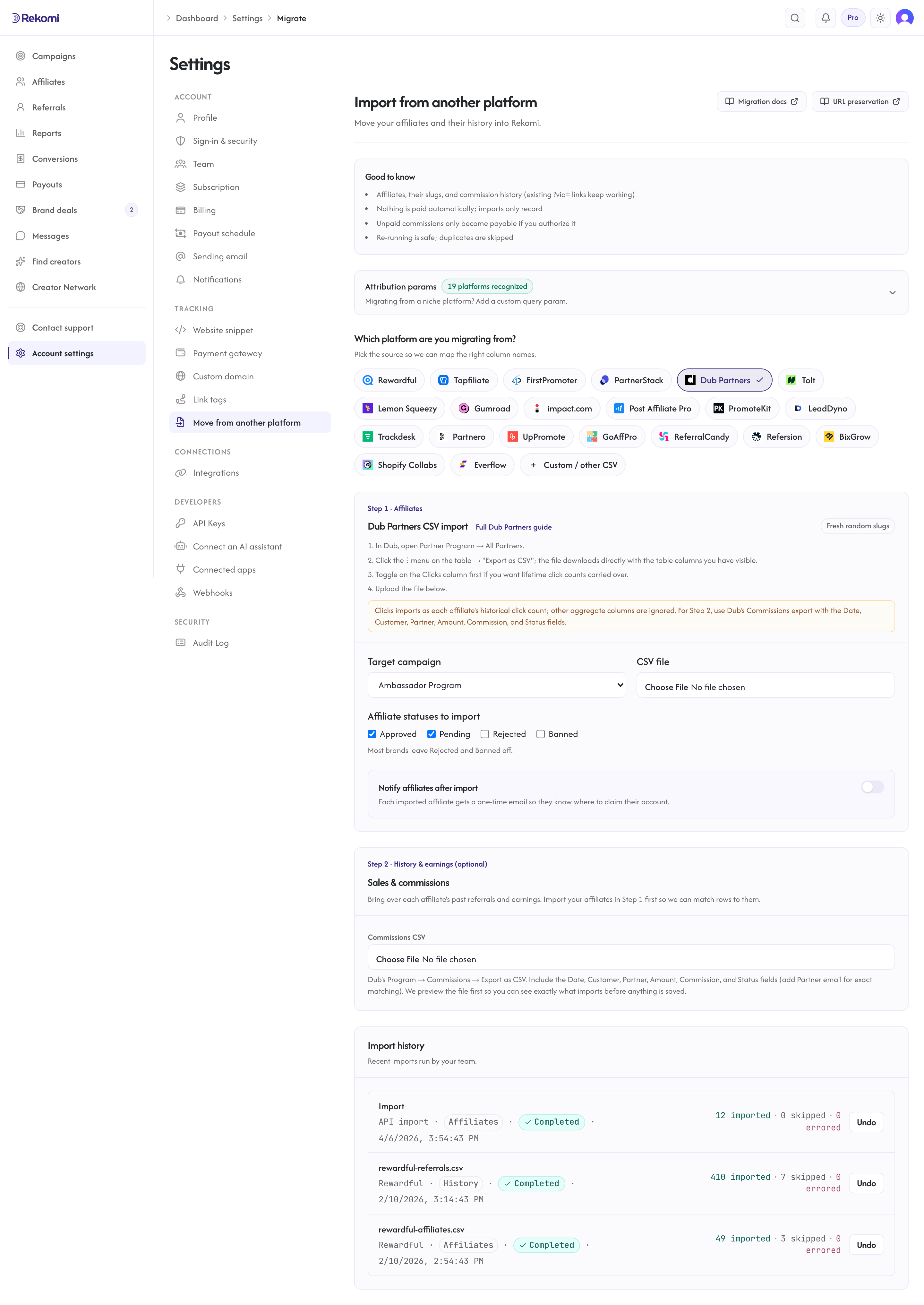
Open /dashboard/settings/migrate. Pick Dub Partners as the source, select your destination Rekomi campaign, and upload the CSV.
3. Opt into auto-notify (Growth+ only)
Check Notify affiliates after import and compose a personal note. Click Send a sample to myself to fire a preview, then let the bulk dispatch run at 1 email/sec.
4. Swap the tracking snippet
Install Rekomi's tracking snippet, remove Dub's snippet. Since via is one of Rekomi's default attribution params, every existing brand.com/?via=alex link starts attributing to Rekomi from the moment the swap is live.
5. Cancel Dub
Keep Dub active for a 24-48 hour shadow period if you want to compare numbers, then cancel. Note that any Dub short links on the dub.sh domain stop working when Dub is cancelled - affiliates who shared those instead of branded links need to update them.
What is NOT imported
| Data | Status | Workaround |
|---|---|---|
| Tracking link keys | Not in the export | Dub's partners export carries no link column; imported affiliates get fresh Rekomi slugs. Contact support for a Dub API-side backfill that preserves every link. |
Dub-hosted short links on dub.sh | Domain dependency | Affiliates need to update share links if they used dub.sh; branded brand.com/?via= links keep working via attribution params once slugs are preserved. |
| Historical click counts | Imported (toggle Clicks on) | The Clicks column imports as each affiliate's lifetime click count (lifetime totals, leaderboards, EPC). Per-click event logs (dates, referrers, geo) are not portable from any platform. |
| Lead aggregates | Not importable as rows | The roster's Leads column is a count, not records; it is ignored. Lead-type commission rows in the Commissions export that carry money import as commissions in Step 2. |
| Historical sales and commissions | Do it yourself (Step 2) | Import them via the Commissions export under Settings, Migrate, Step 2. See Importing history and earnings. |
| Description and social links | Silently ignored | If you need them as affiliate metadata, contact support; affiliate-side custom fields are on the roadmap. |
| Country | Silently ignored | Country detection works automatically from each click via geo-IP. |
| "Enrolled at" / "Payouts enabled at" | Silently ignored | Rekomi creates fresh timestamps on import. |
Common gotchas
My export is taking a long time. Lists over 1,000 partners are emailed async by Dub. Check your account owner's inbox; it usually arrives within 10-15 minutes.
Every imported affiliate got a fresh slug. Expected: Dub's partners export has no link column, so there is nothing to preserve from the file. Hand-build a CSV with a partner_link or link_key column (from Dub's API) if link continuity matters, or contact support for a backfill.
Everyone landed as Approved. Expected for current exports, which carry no status column; every partner in the All Partners table is enrolled. Bulk-reclassify via /dashboard/affiliates if some should be Pending.
Some affiliates have multiple Dub short links. Dub's CSV is one-row-per-partner and carries no links at all. To preserve all links per partner, contact support for a Dub API-side backfill.
My partner links use a custom Dub domain (go.brand.com). If your custom Dub domain points to a Dub-hosted endpoint rather than brand.com, repoint the DNS to Rekomi after the snippet swap to keep links resolving; slugs still need to be preserved (hand-built CSV or backfill) for those links to attribute.
Verifying the import landed clean
After the job completes:
- Open
/dashboard/affiliatesand spot-check 5-10 rows for name + email match. - If you toggled Clicks on, spot-check one affiliate's lifetime click total against their Dub number.
- Check the job detail panel; unless you hand-built a slug column, every row will show a fresh slug (expected, see above).
- Send a sample notification to yourself.
- Click your own test link with the new snippet live; confirm a click row appears within seconds.
Then fire the bulk auto-notify and cancel Dub.
Importing history and earnings
To bring over each affiliate's past performance, export your Commissions CSV from Dub (Program, Commissions, Export as CSV; include the Date, Customer, Partner, Amount, Commission, and Status fields) and upload it under Settings, Migrate, Step 2 (separate from the affiliate roster above).
- Past conversions and commissions are matched to the affiliate by email (add the optional "Partner email" column) or by the Partner display name, and recorded with the amount and date from your export. Amounts are read as major-unit money; verify the totals on the preview screen.
- Dub's
clickandleadcommission types are real commissions there: rows that carry money import like any other commission; zero-money rows have nothing to record and are skipped. - Commissions Dub already paid import as locked history (shown in lifetime totals, never paid again). Commissions still owed are queued for a Rekomi payout only if you authorize it on the preview screen.
- If your export includes a customer's Stripe customer/subscription id and your Stripe is connected, existing subscriptions keep paying the same affiliate on renewals.
- A dry-run preview shows what will import (and exactly how much, if anything, Rekomi would pay) before you commit. Re-running is safe. Voided and refunded rows are skipped.
See the migrations overview for the full reference.
Where to go next
- Tracking and attribution:
viaand the other 18 default attribution params. - Migrating from other platforms: URL-preservation matrix.
- vs Dub Partners: side-by-side comparison if you are still evaluating.
Migrating from PartnerStack
Move your PartnerStack affiliate roster onto Rekomi. The importer handles PartnerStack's loosely-documented CSV format via header fuzzy-matching. Tracking links use path-based URLs that need a redirect rule for full preservation; the importer handles roster, status defaults, and notifications.
Migrating from Tolt
Move your Tolt program onto Rekomi with one API pull. Tolt has no dashboard export, so Rekomi imports your partners (with link slugs and click counts), your leads, and your commission history directly from Tolt's API.