

Migrating from PartnerStack
Move your PartnerStack affiliate roster onto Rekomi. The importer handles PartnerStack's loosely-documented CSV format via header fuzzy-matching. Tracking links use path-based URLs that need a redirect rule for full preservation; the importer handles roster, status defaults, and notifications.

This guide is for brands switching from PartnerStack to Rekomi. The importer reads PartnerStack's CSV export (you'll get a 30-minute download link via email), dedupes by email, defaults imported rows to Approved (archived partners land as Paused), and fires a one-click claim invite to each affiliate.
PartnerStack is the most operationally different of the 8 supported migrations. Their CSV carries no status column beyond archived_status, and their tracking URLs are path-based (partner.brand.com/refer/alex) rather than query-string-based, so URL preservation requires an extra step. The importer brings the roster across cleanly; URL continuity is opt-in via reverse-proxy redirects.
Migration is on Starter or higher; auto-notify is on Growth or higher.
What the importer brings across
| Field | Source column | Notes |
|---|---|---|
partner_email or email | Required. Lowercased + trimmed. Primary dedup key. Fuzzy-matched. | |
| First name | partner_firstname (or partner_first / first_name) | Fuzzy-matched. Joined with last name; a combined partner_name is used when split names are absent. |
| Last name | partner_lastname (or partner_last / last_name) | Fuzzy-matched. |
| Status | archived_status | Archived partners import as Paused (they are "Inactive" in PartnerStack reporting, not rejected, and their history stays importable). Everyone else defaults to Approved. See caveat below. |
| Tracking slug | partner_key, when your file carries it | The standard Export-records bundle omits it, so those imports get fresh 12-character slugs; the Partner performance report export does carry a Partner key column and preserves it. See URL preservation below. |
| Lifetime click count | Clicks / Unique clicks, when present | Only the Partner performance report carries click aggregates; they import as each affiliate's historical click count (lifetime totals, leaderboards, EPC). |
PartnerStack does not formally document their export schema, and the columns vary by which export you ran. The importer fuzzy-matches header names (case-insensitive, synonyms accepted, including PartnerStack's own typo'd headers) so the same CSV works whether your export has partner_email or email, partner_firstname or first_name, etc. Other columns (partner_group, partner_tier, partner_joined_date, leads, customers, revenue, tags, the aggregate total_* columns) are silently ignored.
Status mapping: the operational reality
PartnerStack's export carries almost no status. Their UI segregates partners across tabs (All Partners / Pending / Declined / Removed), but the export's only status signal is archived_status: archived partners import as Paused, and the importer defaults every other row to Approved.
This is the most important thing to know about a PartnerStack migration: if you have non-Approved partners in PartnerStack, you have two options:
Option A: bulk reclassify after import
Run a single import from the All Partners tab. All rows land as Approved. Then in Rekomi, open /dashboard/affiliates, filter by name or email to find your previously-Pending/Declined/Removed partners, and use the bulk-status action to reclassify them. This is the path most brands take.
Option B: tab-by-tab import
Export each PartnerStack tab separately (All Partners, Pending, Declined, Removed) and run four separate Rekomi imports. The downside is you can't change the status default per-import (everything defaults to Approved), so you'll need to bulk-reclassify the non-Approved imports immediately after each upload. Not recommended unless you have very different metadata per tab.
URL preservation: path-based redirects
PartnerStack uses path-based tracking URLs: partner.brand.com/refer/{partner-name} or brand.com/refer/{partner-name}. Rekomi uses query-string-based URLs: brand.com/?{param}={slug} matching the attribution params you've configured.
The importer does NOT try to preserve PartnerStack's path-based URLs because there's no compatible mapping at the query-string layer. Imports from the standard Export-records bundle get fresh 12-character Rekomi slugs; when your file carries a Partner key column (the Partner performance report export does), that key is preserved as the affiliate's Rekomi slug, which makes the redirect option below much easier.
To keep existing PartnerStack links working after cutover, you have two options:
Option A: reverse-proxy redirect (preserve every link)
Configure a redirect at your edge (Cloudflare Worker, Vercel rewrite, nginx) that maps the old PartnerStack path to the new Rekomi query string:
/refer/:partner → /?via=:partner (301 redirect, preserve query string)This requires that each PartnerStack partner name matches a Rekomi slug. To make that work, customize each imported affiliate's slug in /dashboard/affiliates/{id} to match their PartnerStack partner name, OR add a partner_key column to your CSV before upload; the PartnerStack importer reads only partner_key as the slug. For any other column layout, run the import through the Custom source and map your slug column there (see the migrating from other platforms guide for the format).
For low-volume migrations (fewer than 50 affiliates), reach support; we can scope a one-time slug-rewrite as part of early-adopter onboarding.
Option B: notify affiliates of their new link (drop existing links)
If you're OK with affiliates updating their existing PartnerStack share links to new Rekomi links, skip the redirect entirely. Use auto-notify to email each imported affiliate; the email includes a Claim your account button and their new Rekomi dashboard surfaces their new tracking link.
Option B is significantly less work for the brand. The downside: any external links on creator landing pages, social bios, YouTube descriptions, etc. need to be updated by the affiliate. For programs with passive affiliates this is often a deal-breaker - use Option A.
Step-by-step cutover
1. Export from PartnerStack
In PartnerStack, open Partner Management → All Partners, then click Export. PartnerStack sends an email with a download link that expires after 30 minutes. Save the CSV locally before the link expires.
If you have segregated partners across Pending/Declined/Removed and want to bring them across with their original status, repeat the export for each tab. For most brands, exporting All Partners once and reclassifying post-import is faster.
2. Decide your URL strategy before uploading
Pick Option A (redirects) or Option B (drop links). If Option A, prepare your slug mapping now. The importer locks slugs at upload time, so changing slugs post-import means updating affiliates one by one or contacting support.
3. Upload the CSV
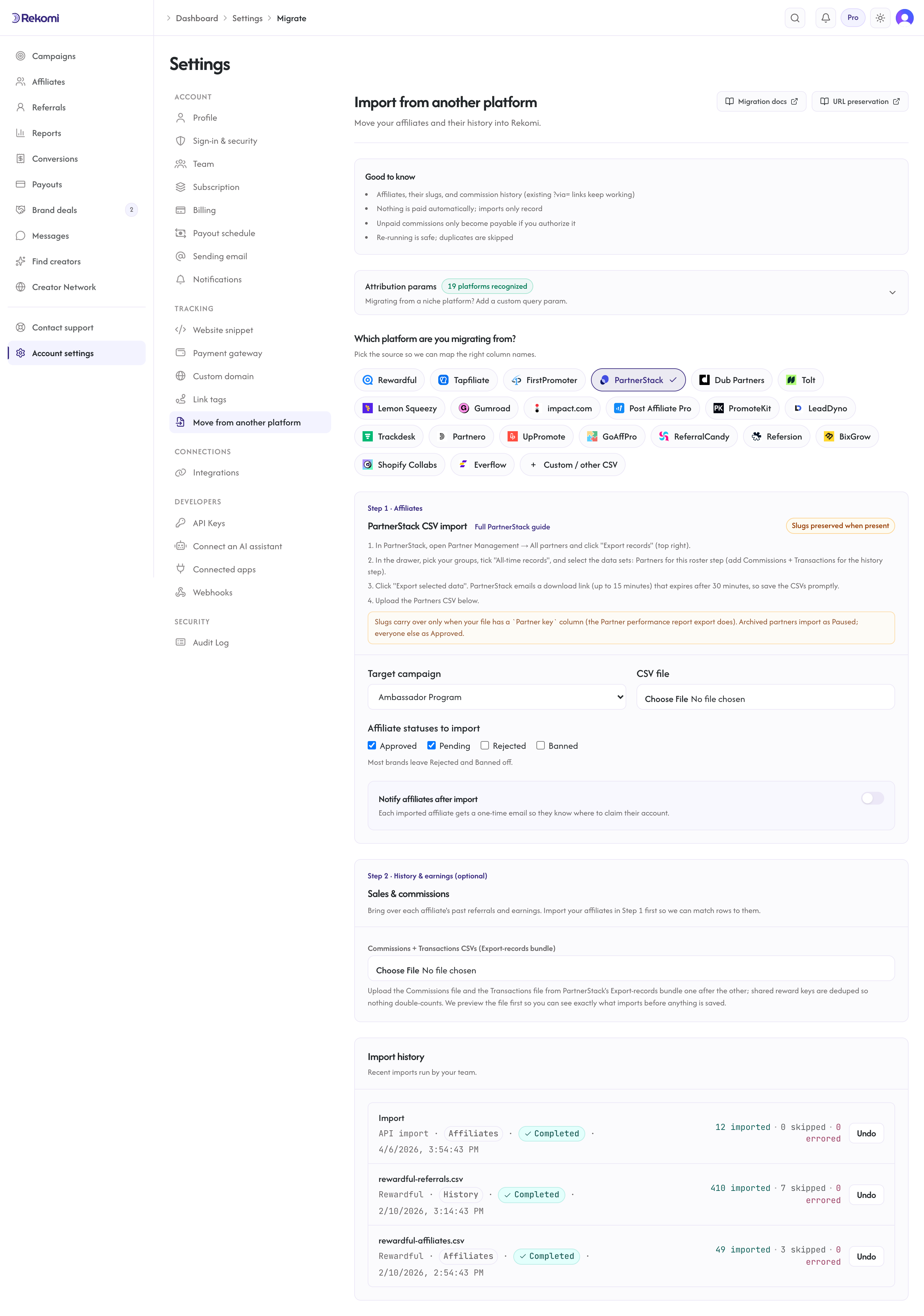
Open /dashboard/settings/migrate. Pick PartnerStack as the source, select your destination Rekomi campaign, and upload the CSV. Every row lands as Approved, except archived partners, which land as Paused.
4. Reclassify non-Approved partners
Filter your imported roster in /dashboard/affiliates and use the bulk-status action to mark Rejected or Banned the partners that were Pending/Declined/Removed in PartnerStack.
5. Customize slugs (Option A only)
If you went with the redirect strategy, customize each imported affiliate's slug now to match their PartnerStack partner name. You can do this one-by-one in /dashboard/affiliates/{id} or via the public API. For >50 affiliates, contact support for a bulk operation.
6. Opt into auto-notify (Growth+ only)
Check Notify affiliates after import and compose a personal note. If you went with Option B (no redirect), make sure to mention the link change in your note so affiliates know to update their share links.
7. Swap tracking and cancel
Install Rekomi's tracking snippet on your marketing site, set up your redirect rule if going with Option A, then cancel PartnerStack.
Affiliate vs referral vs reseller: which gets imported?
PartnerStack supports three partner types in one platform: affiliates, referral partners, and resellers. The CSV does not distinguish between them; everything in the same export comes across into the same Rekomi campaign as affiliates.
If you run separate programs for each partner type, export each program separately from PartnerStack and import them into separate Rekomi campaigns. Otherwise you'll end up with referral partners and resellers commingled with your affiliates, with different commission expectations.
For the most clean result: spin up a Rekomi campaign per partner type, export per PartnerStack program, and run one import per pair.
What is NOT imported
| Data | Status | Workaround |
|---|---|---|
| Status (Pending / Declined / Removed) | Not in CSV (only archived_status → Paused) | Bulk-reclassify post-import via /dashboard/affiliates. |
| Tracking URLs (path-based) | Incompatible scheme | Reverse-proxy redirect (Option A) or affiliate notification (Option B). |
| Partner type (affiliate / referral / reseller) | Not in CSV | Export each program separately; import to separate Rekomi campaigns. |
| Partner groups and tiers | Silently ignored | Map them to Rekomi campaigns; commission tiers configurable per-campaign. |
| Historical click counts | Performance report only | The Export-records bundle has no clicks column; upload the Partner performance report (its Clicks / Unique clicks column imports as each affiliate's lifetime click count). Per-click event logs are not portable from any platform. |
| Leads | Not in PartnerStack's exports | PartnerStack exposes no lead/referral export the importer can read; lead counts start fresh on Rekomi. |
| Historical transactions and commissions | Do it yourself (Step 2) | Import them via the Commissions + Transactions files under Settings, Migrate, Step 2. See Importing history and earnings. |
| Tags | Silently ignored | Tagging is on the Rekomi roadmap. |
Common gotchas
The download link in the email has expired. PartnerStack's links expire 30 minutes after generation. Re-export.
My imported affiliates are all Approved but some should be Pending. That's the default behavior - PartnerStack's CSV carries no status beyond archived_status (archived rows land as Paused). Bulk-reclassify via /dashboard/affiliates.
The old /refer/alex links don't work anymore. That's expected without the redirect rule. Either set up the redirect (Option A) or notify affiliates of their new link (Option B). See the URL preservation section above.
I exported from All Partners but my partner count seems low. Some PartnerStack accounts segregate inactive or archived partners into a tab not visible from All Partners. Check each tab's count individually and re-export if needed.
My CSV has columns the importer doesn't recognize. That's expected. The importer accepts any header layout; unknown columns are silently ignored. The required email (or partner_email) column is the only thing that must be present.
Note on the AppDirect acquisition
PartnerStack was acquired by AppDirect on April 14, 2026. AppDirect committed to no near-term UI or product changes for PartnerStack customers. The export format documented above is stable as of this writing; the importer's fuzzy-match approach is resilient to column reordering or renaming if the format ever shifts.
Verifying the import landed clean
After the job completes:
- Open
/dashboard/affiliatesand spot-check 5-10 rows for name + email match. - Confirm every row defaulted to Approved (filter by status).
- If you went with Option A: confirm a few affiliates' slugs match their PartnerStack partner names.
- Set up your redirect rule and test 2-3 known partner URLs end to end.
- Send a sample notification to yourself.
Then fire the bulk auto-notify and cancel PartnerStack.
Importing history and earnings
To bring over each affiliate's past performance, export your transactions / rewards CSV from PartnerStack and upload it under Settings, Migrate, Step 2 (separate from the affiliate roster above).
- Past conversions and commissions are matched to the affiliate by email (or preserved slug) and recorded with the amount and date from your export.
- PartnerStack does not document the bundle's money units; Rekomi reads them as major-unit money, so always check the preview totals against PartnerStack before committing. The commissions file also carries no currency column (your account's home currency applies to those rows).
- Commissions PartnerStack already paid import as locked history (shown in lifetime totals, never paid again). Commissions PartnerStack put on hold also import as locked history and are never made payable. Commissions still owed are queued for a Rekomi payout only if you authorize it on the preview screen.
- If your export includes the customer's payment-processor id (PartnerStack's
provider_keycolumn, the Stripe customer id for Stripe-billed programs) and your Stripe is connected, existing subscriptions keep paying the same affiliate on renewals. - A dry-run preview shows what will import (and exactly how much, if anything, Rekomi would pay) before you commit. Re-running is safe. Voided and declined rows are skipped.
See the migrations overview for the full reference.
Where to go next
- Migrating from other platforms: full URL-preservation matrix.
- Tracking and attribution: default and custom attribution params.
- Manage affiliates: bulk status reclassification flows.
- vs PartnerStack: side-by-side comparison if you are still evaluating.
Migrating from FirstPromoter
Move your FirstPromoter program onto Rekomi with one API pull. Rekomi imports your promoters (with referral tokens and click counts), your leads, and your commission history directly from FirstPromoter's API; a CSV upload remains as a fallback.
Migrating from Dub Partners
Move your Dub Partners affiliate roster onto Rekomi. The importer reads Dub's open-source CSV schema, carries lifetime click counts over via the toggleable Clicks column, and maps Dub's status vocabulary to Rekomi's enum when a status column is present.