

Migrating from impact.com
Move your impact.com partner roster onto Rekomi. Rekomi pulls partners, up to 3 years of conversion history, and lifetime click totals via the impact.com Advertiser API; nothing to export.

This guide is for brands running a partner or affiliate program on impact.com who are switching to Rekomi. impact.com's dashboard exports are report-based and vary by account, so instead of asking you to wrangle report files, Rekomi pulls everything through the impact.com Advertiser API: your partner roster, up to 3 years of actions (conversions) as historical records, and each partner's lifetime click total.
Migration is on Starter or higher; auto-notify is on Growth or higher.
What the importer brings across
The pull reads impact.com's Advertiser API (Campaigns, MediaPartners, Actions, and your account's performance-by-partner report) and imports:
| Field | Source | Notes |
|---|---|---|
| The partner's primary contact | Required. Lowercased + trimmed. Primary dedup key. Partners impact.com hides the email for (common on marketplace partners) are skipped (missing_email); invite those manually. | |
| Full name | Partner Name | The partner's account name on impact.com. |
| Status | Partner State | See the mapping table below. |
| Lifetime clicks | Performance-by-partner report | Best effort: when your account exposes no usable report, partners import with zero lifetime clicks (Rekomi tells you) and new clicks count normally from day one. |
| Conversion history | Actions, up to 3 years back | Optional checkbox, on by default. Sale amount, payout, currency, and date import verbatim as settled historical records. |
Large programs are paged automatically (up to 5,000 partners and 5,000 actions per pull; contact us and we'll do a larger pull with you).
What CANNOT be imported from impact.com
None of these are Rekomi limitations; impact.com does not expose the data to advertisers:
| Data | Why | Workaround |
|---|---|---|
| Partner payout details | impact.com pays partners itself, so bank/PayPal details never reach the advertiser. | Affiliates connect their own payout account when they claim their Rekomi dashboard. |
| Vanity referral slugs | impact.com tracking links use opaque click ids (irclickid), not per-partner vanity codes. | Imported partners get fresh Rekomi links. Rekomi recognizes irclickid in its attribution params, and your contract terms with partners govern updating their links. |
| Customer identities on past actions | The Actions API exposes a non-PII customer id only. | Past conversions import with amounts and dates; recurring attribution starts fresh with your first Rekomi-tracked conversion. |
| Contract/commission terms | Terms live in impact.com's contract objects and do not map 1:1. | Configure your Rekomi commission model per campaign; use per-affiliate overrides for special deals. |
Status mapping
impact.com partner states map to Rekomi's enum:
impact.com State | Rekomi |
|---|---|
ACTIVE | Approved |
PENDING, NOT_APPLICABLE | Pending |
DECLINED | Rejected |
SUSPENDED | Paused (reversible hold, kept for review) |
DEACTIVATED, CLOSING, CLOSED, EXPIRED | Banned |
| anything unexpected | Pending (so you review it rather than auto-approving) |
Approved imports get an ApprovedAt timestamp set to the import time so payout eligibility math works correctly. As with every importer, the status checkboxes on the import screen let you skip statuses entirely (most brands leave Rejected and Banned off).
Step-by-step
Open /dashboard/settings/migrate and pick impact.com as the source.
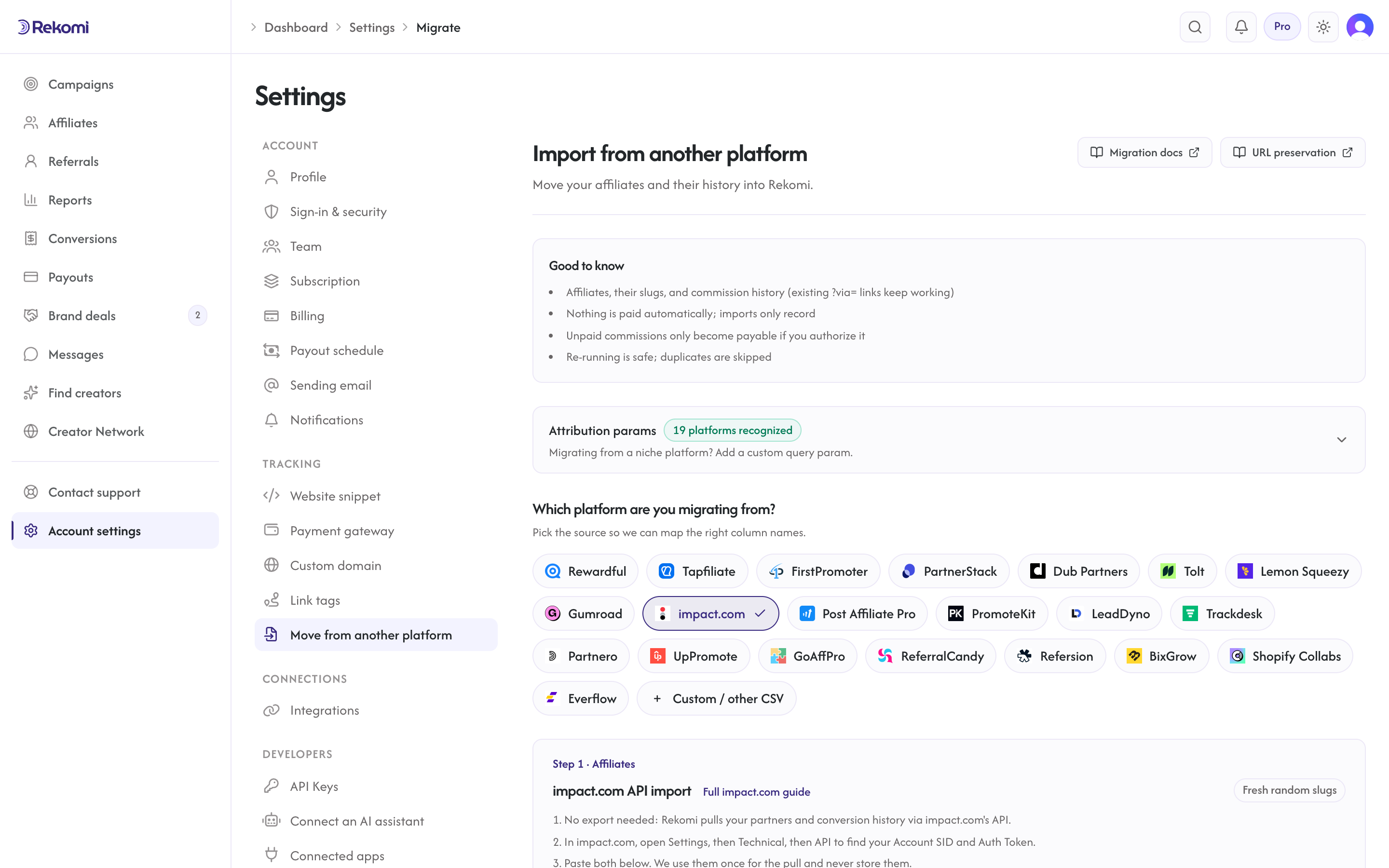
- In your impact.com dashboard, open Settings, then Technical, then API. Copy your Account SID and Auth Token.
- Paste both into the import screen. They are used once for the pull and never stored, logged, or echoed back.
- Pick your destination campaign in Rekomi, and leave Import conversion history checked to bring up to 3 years of actions over.
- Click Pull partners from impact.com. If your impact.com account runs more than one campaign, Rekomi asks which campaign to import from; pick one and it re-runs.
- Review the result: the roster and the history land as two linked jobs in Import history, each individually undoable.
How the history import behaves
- Actions import as settled historical records: they show in lifetime totals and reporting but are never payable through Rekomi, so this pull can never create balances you owe. Settle any final unpaid earnings inside impact.com before switching its program off.
REVERSEDactions (cancelled money) and negative adjustment rows are dropped, matching how the other importers treat voided or denied commissions.- Amounts keep their original currency per action; unsupported currencies error that row without affecting the rest.
- Re-running the pull is safe: partners dedupe by email and actions dedupe by their impact.com action id, so nothing doubles.
Link continuity
impact.com links route through their redirect domains and carry an irclickid parameter rather than a vanity slug, so old links cannot point at your Rekomi program. The practical cutover: import your partners, auto-notify them (Growth+) so they claim their Rekomi dashboard and grab their new link, and keep the impact.com program in wind-down until its pipeline clears. Rekomi's attribution params already recognize irclickid, so any in-flight impact.com-tagged traffic that lands on your site is still recognized during the transition.
FAQ
Do I need to keep paying impact.com during the migration?
Run both in parallel briefly. Import your roster and history into Rekomi, notify partners to claim their new links, then wind the impact.com program down once its locked pipeline clears. Because the history pull covers 3 years, you can run the import late in the wind-down for the most complete record.
Why do some partners show as skipped?
The most common reasons: the partner has no visible contact email on impact.com (marketplace partners often mask it; invite those manually from the Affiliates page), the partner already exists in the campaign from an earlier run, or their status was excluded by your checkboxes. Open the import in Import history to see the per-row reason.
Can Rekomi make my old unpaid impact.com balances payable?
No. The impact.com pull imports history as settled records only. impact.com remains responsible for paying out what partners earned there; Rekomi payouts start with your first Rekomi-tracked conversions.
Does the pull count against my impact.com API rate limit?
Yes, briefly. A large pull uses on the order of 100-300 API requests against impact.com's account-wide hourly budget. If you run other live impact.com integrations, schedule the import for a quiet hour.
Where to go next
- Migrations overview: shared mechanics for every importer (statuses filter, auto-notify, undo, skip reasons).
- Tracking and attribution: how
irclickidand your other recognized attribution params behave. - Payouts: get your partners onto Rekomi payouts once they claim their dashboards.
Migrating from Gumroad
Move your Gumroad affiliate program onto Rekomi. The roster comes from Gumroad's affiliates CSV export; sales history and per-affiliate attribution come from Gumroad's API. History imports as settled records and never retro-credits balances.
Migrating from PromoteKit
Move your PromoteKit program onto Rekomi with one API pull. Rekomi imports your affiliates (with ?via= referral codes, payout emails, and click counts), your signed-up leads, and your commission history directly from PromoteKit's API.