

Migrating from another affiliate platform
Move your affiliate or referral program to Rekomi without changing affiliate URLs. The compatibility matrix covering more than 20 platforms, the bulk-invite flow, and the custom-param config for niche cases.
The single biggest fear about switching affiliate platforms is having to email every affiliate to update their links. With Rekomi, you almost never have to.
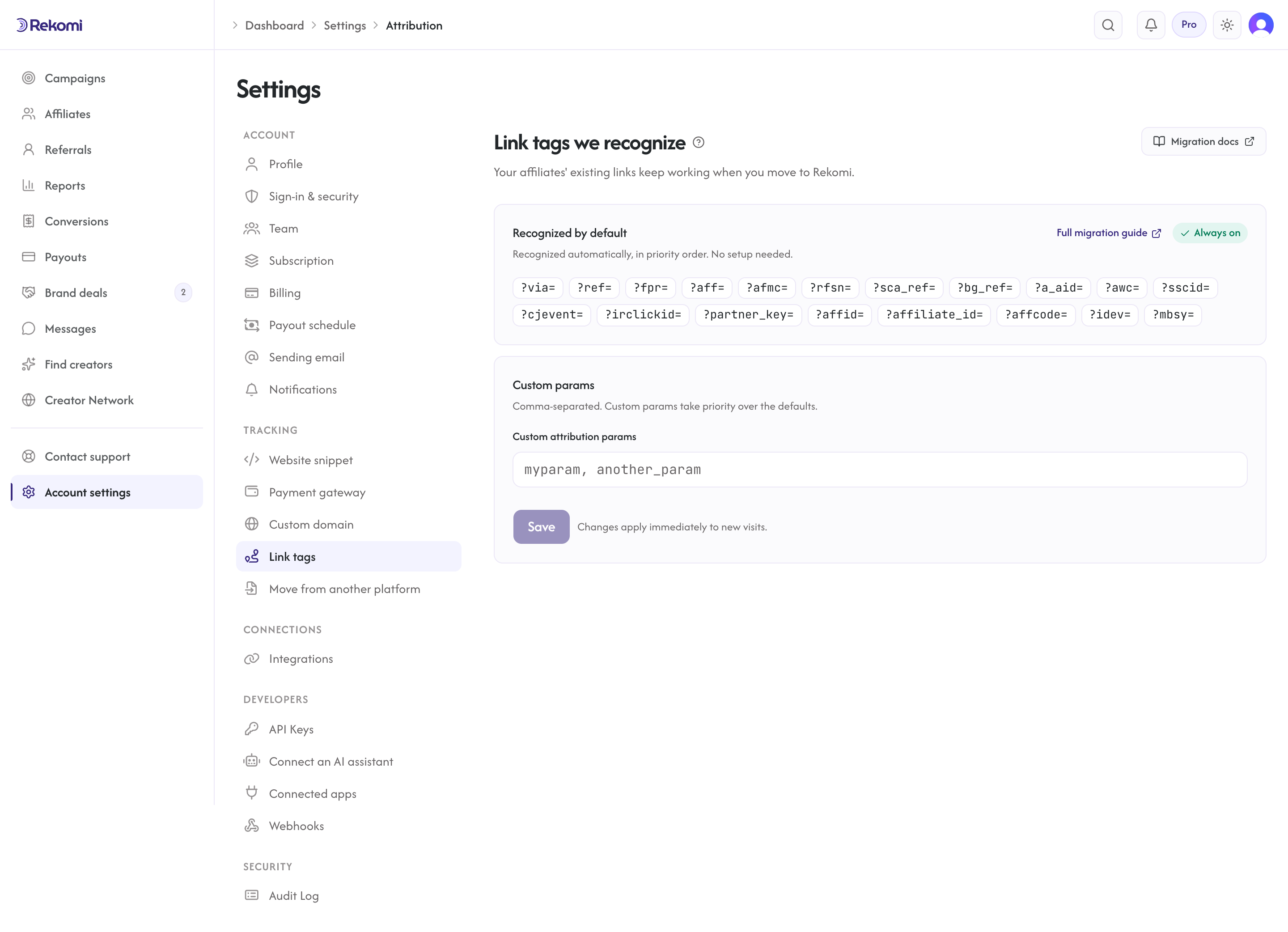
Rekomi natively recognizes the attribution query params used by more than 20 major affiliate platforms. As long as your previous platform used one of the 21 query-param conventions in the table below, your affiliates' existing referral links keep working unchanged when you swap out the JavaScript snippet on your site. Same slugs, same URLs, no affiliate outreach.
How affiliate URLs actually work (the boring truth)
Almost every affiliate platform on the market produces links that look like one of these:
https://your-brand.com/?via=alex
https://your-brand.com/?ref=alex
https://your-brand.com/?fpr=alex
https://your-brand.com/?aff=alex
The platform's JavaScript snippet on your site reads the query param (via, ref, fpr, aff, etc.) and persists the slug (alex) as the referring affiliate. The slug + the param name are the only two things that determine whether the link still attributes after migration. So the migration math is:
- Same slug + same param convention → link works as-is, no affiliate sees any difference.
- Same slug + different param → one redirect line on your reverse proxy fixes it.
- Different slug → affiliates need a new link.
Most migrations are case 1.
Native compatibility matrix
| Platform | Their query param | Works on Rekomi as-is? |
|---|---|---|
| Rewardful | ?via= | Yes |
| Affonso | ?via= (also ?ref=, ?aff=, ?atp= or ?affonso= per program) | Yes. Roster + leads + history import yourself via the Affonso importer |
| Tapfiliate | ?ref= | Yes |
| FirstPromoter | ?fpr= | Yes |
| Refersion | ?rfsn= | Yes. Roster + history import yourself via the Refersion importer |
| Affiliately | ?aff= | Yes |
| LeadDyno | ?afmc= | Yes. Roster + leads + history import yourself via the LeadDyno importer |
| Tolt | ?aff= | Yes |
| PromoteKit | ?via= | Yes. Roster + leads + history import yourself via the PromoteKit importer |
| Partnero | ?aff= (also ?ref= / ?via= per program) | Yes. Roster + leads + history import yourself via the Partnero importer |
| Lemon Squeezy | ?aff= | Yes (on your own site; see note below) |
| Post Affiliate Pro | ?a_aid= (the classic #a_aid= fragment links carry over too) | Yes. Roster + transaction history import yourself via the Post Affiliate Pro importer |
| AffiliateWP | ?ref= | Yes |
| UpPromote | ?sca_ref= | Yes. Roster + history import yourself via the UpPromote importer |
| GoAffPro | ?ref= (goaff.pro and bit.ly short links do not carry over) | Yes. Roster + history import yourself via the GoAffPro importer |
| BixGrow | ?bg_ref= (real Shopify discount codes also keep crediting) | Yes. Roster + history import yourself via the BixGrow importer |
| Friendbuy | ?ref= | Yes |
| Reditus | ?via= | Yes |
| Dub Partners | ?via= | Yes |
| iDevAffiliate | ?idev= | Yes |
| Talkable | ?mbsy= | Yes |
| Awin | ?awc= | Yes |
| ShareASale | ?sscid= | Yes |
| CJ Affiliate | ?cjevent= | Yes |
| Impact | ?irclickid= | Yes (post-redirect URL persistence). Roster + history import yourself via the impact.com importer |
| PartnerStack | ?partner_key= (query mode) | Yes for query mode; path-based mode needs a redirect rule |
| Trackdesk | link params on your own domain | Partial: direct links keep loading, but attribution uses the affiliate's Rekomi link; public Affiliate IDs import as slugs via the Trackdesk importer |
| ReferralCandy | not param-based; refr.cc short links do not carry over | Partial: continuity comes from FRIEND- prefixed store coupon codes re-scoped as Rekomi coupons (Shopify only). Roster import yourself via the ReferralCandy importer |
| Shopify Collabs | not param-based; vanity creator links do not carry over | Partial: continuity comes from native Shopify discount codes re-scoped in Rekomi (coupon-based attribution). Roster import yourself via the Shopify Collabs importer |
| Everflow | not param-based; machine-generated path tokens on Everflow's tracking domain do not carry over | Partial: continuity comes from coupon codes re-created in Rekomi. Roster + click totals + up to 365 days of history import yourself via the Everflow importer |
| Voluum / generic CPA | ?affid= | Yes |
| In-house and legacy tools | ?affiliate_id= | Yes |
| Cellxpert | ?affcode= | Yes |
If your platform is not in this list but uses a recognizable query-param convention, you can add it as a custom param under Settings > Attribution in the Rekomi dashboard.
The 3-step migration
Assuming your previous platform uses one of the 21 recognized params:
1. Import affiliates with slugs preserved
Two ways to bring your existing affiliates over with their slugs intact:
Option A: the dedicated importers (Settings > Migrate). Pick your source platform.
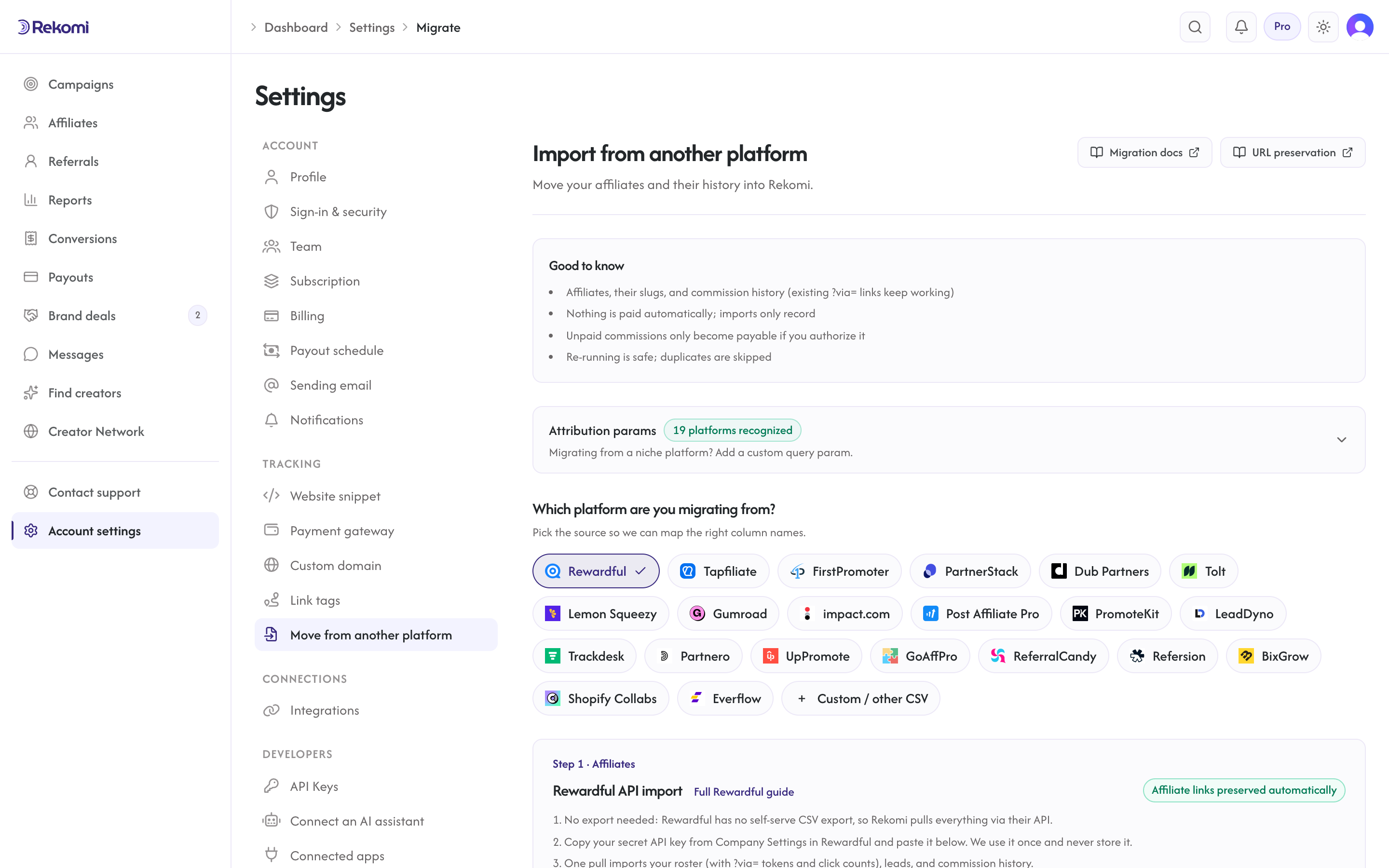
For Rewardful, Affonso, FirstPromoter, and Tolt the primary path is a one-key API pull that imports the roster (slugs preserved) plus leads, lifetime click counts, and commission history in one run; a CSV upload remains as a fallback. Lemon Squeezy is also an API pull (roster only; their API exposes no history or clicks). Tapfiliate, PartnerStack, and Dub Partners are CSV uploads. Gumroad is a CSV upload for the roster with an API pull for sales history; slugs are never preserved there (Gumroad /a/ links use opaque ids that only route inside Gumroad, so no slug exists to carry). Either way the importer reads the source platform's slug automatically:
| Source | Slug source we read |
|---|---|
| Rewardful | token/Tokens (or extracted from the link/Links URL); the API pull uses each affiliate's link token |
| Affonso | tracking_id (or tracking_parameter, or extracted from a link); the API pull uses each affiliate's tracking id |
| Tapfiliate | extracted from the Program_referral_link URL (the export has no dedicated code column; a hand-built referral_code column also works) |
| FirstPromoter | default_ref_id (v1) or ref_token/ref_id (v2); the API pull uses ref_token |
| Dub Partners | not in Dub's roster export (partners can hold many short links), so affiliates get fresh slugs; a hand-built partner_link column is parsed when present |
| Tolt | the API pull reads each partner's first link from Tolt's Links resource; on CSV, referral_code or a ?aff= link when present |
| Lemon Squeezy | Your pasted email,aff_code mapping (their API omits the codes; see note below) |
| Gumroad | none: /a/ links use opaque ids that cannot re-attribute, so affiliates get fresh slugs |
| PartnerStack | partner_key when your file carries it (the Partner performance report export does; the standard Export-records bundle does not) |
A green "Affiliate links preserved automatically" badge appears next to the platform name on the upload screen when the parser will read slugs. Every imported affiliate keeps their existing slug; their existing public referral URL (e.g. brand.com/?via=alex) continues to attribute on Rekomi unchanged.
Lemon Squeezy ?aff= continuity. Lemon Squeezy affiliate links use ?aff=, which is already in Rekomi's recognized param family, so the param side needs no configuration. The slug side is manual: Lemon Squeezy has no affiliate CSV export and their API omits each affiliate's ?aff= code (it is only visible on that affiliate's profile page in their dashboard), so the Lemon Squeezy importer accepts an optional pasted email,aff_code mapping for the codes you want preserved. Continuity applies to links landing on your own site where the Rekomi snippet runs; links that point straight at your *.lemonsqueezy.com storefront cannot be carried over by any migration tool.
Option B: Bulk invite with slugs (Affiliates page > Invite > Bulk). Toggle the paste format to email, slug, name and paste one row per affiliate:
alex@example.com, alex, Alex Example
jamie@example.com, jamie-r, Jamie Recommends
We send each invite as usual; the accept flow uses the slug you supplied. If a slug is taken or invalid, that affiliate still gets an invite but with a fresh random slug. The response surfaces those rows in a slugConflicts array so you can re-send or re-think.
Option C: MCP install assistant. Ask the connected AI assistant: "I'm migrating from FirstPromoter. Here's my affiliate list." Hand it the CSV; the assistant calls bulk_invite_affiliates with the recipients shape (per-row email + slug + name) under the hood and reports back per-row outcomes.
Single invites are free on every plan including Trial. Bulk invites require Starter or higher with an active paid subscription; the migration importers work on Starter or higher, including during a trial.
What happens when a slug is taken
Affiliate slugs are globally unique across Rekomi. If you try to migrate an affiliate with slug alex and another brand somewhere on Rekomi already has an affiliate with slug alex, your import:
- Still creates the invite / affiliate row.
- Falls back to a fresh random 12-char slug for that one affiliate.
- Bulk invites report those rows in the response's
slugConflictsfield; CSV imports fall back silently, so scan the import preview for affiliates whose slug changed. Either way you can re-send under a different slug, or ask that affiliate to update their link.
In practice this is rare for migrating brands because most affiliate slugs are name-based and the global namespace is sparse. Brands with very generic slugs (e.g. an affiliate literally named affiliate1) are the most likely to hit a conflict.
2. Swap out the JavaScript snippet on your site
Replace your old affiliate-platform script tag with the Rekomi loader. The snippet is shown on every install recipe page under Setup > Install tracking script in the dashboard.
3. Connect Stripe (or set up coupon attribution)
If your previous platform was Stripe-webhook-driven (most are), connect Stripe in the Connect payment gateway step (/dashboard/setup/connect-sales) and conversion attribution flows automatically. If you were using coupon-code attribution previously, mint per-affiliate Stripe promotion codes under each affiliate's detail page.
4. (Optional) Import historical earnings
For Rewardful, Affonso, FirstPromoter, and Tolt, the API pull in step 1 already brought leads, lifetime click counts, and commission history across; nothing more to do unless you want unpaid balances made payable. For the CSV sources, upload your platform's conversions/commissions export under Settings > Migrate > Step 2 to bring over each affiliate's past conversions and commissions so their stats are not reset to zero (rows the export explicitly marks as leads import as zero-money lead records). Already-paid commissions import as locked history (never paid again); unpaid ones are queued for a Rekomi payout only if you explicitly authorize it on the preview screen. When the export includes a customer's Stripe customer/subscription id and your Stripe is connected, we seed the attribution so existing subscriptions keep paying the same affiliate on renewals. Every history import shows a dry-run preview (including exactly how much, if anything, Rekomi would pay) before you commit, and re-running is safe. See the migrations overview for details.
That's it. Affiliates never had to update a single link, and their history comes with them.
When you DO need a redirect rule
A few cases need one extra line on your server:
Niche query-param platforms
If your previous platform used a param not in the recognized 19 (e.g. an internal tool that used ?our_aff_id= or similar), add it as a custom param in Settings > Attribution:
- Comma-separated additional params, each 2-32 chars, lowercase letters / digits / underscore / hyphen
- Up to 10 custom entries, 256 chars total
After saving, the new params are recognized by the loader on the next page load. No snippet re-paste, no affiliate outreach.
Path-based platforms (PartnerStack legacy, Impact)
PartnerStack and Impact often produce path-based links like partner.brand.com/refer/alex or offers.impact.com/c/12345/alex. These can't be migrated by query-param recognition alone because the slug is not in the URL's query string. Options:
- CNAME the old subdomain to your origin + add a path rewrite. Example for Cloudflare Workers:
addEventListener("fetch", (event) => {
  const url = new URL(event.request.url);
  const m = url.pathname.match(/^\/refer\/([a-z0-9-]+)\/?$/);
  if (m) {
    return event.respondWith(
      Response.redirect(`https://your-brand.com/?via=${m[1]}`, 302),
    );
  }
});- Email affiliates once with new links. For high-volume affiliates this is friction, but if you only have a few partners on a path-based platform, it can be the cleanest solution.
Custom platforms with completely different conventions
If your old platform did something exotic (POST-based attribution, fingerprinting, etc.), reach out to support@rekomi.com and we'll help you scope a custom integration path.
Why your previous platform pushed friction at you
Most affiliate platforms have a financial incentive to make leaving them feel painful. Inbound "drop-in migration" help is generously documented while outbound export paths stay thin; Rewardful, for example, offers no do-it-yourself referrals export. Impact's "media partner migration team" is a sales-friction tax built into the product. PartnerStack's "Concierge migration" service is the same thing in different packaging.
We don't have that incentive. The more brands that switch in, the better Rekomi gets. Drop-in compatibility with the 19 most-common params is a one-time engineering cost we paid up front so you never have to.
Programmatic migration via the MCP install assistant
If you have an AI client connected to Rekomi via MCP (Claude Desktop, Claude Code, Cursor, Continue, Zed, ChatGPT Connectors), ask it:
"I'm migrating from FirstPromoter. Here's my affiliate list as a CSV. Help me move everything over."
The assistant calls:
get_billing_stateto confirm your plan tier covers bulk-invite.get_attribution_paramsto confirm your source platform's param is in the defaults (FirstPromoter's?fpr=is).bulk_invite_affiliatesto send the branded invite emails.- Optionally
update_attribution_paramsif you need a custom param.
The entire migration runs in chat. No CSV upload UI, no copy-paste between tabs.
See also
- MCP server: the AI install assistant and more than 50 other tools
- Pixel tracking: the loader script behavior + recognized params
- Bulk affiliate invites API: the underlying endpoint the install assistant uses