

Migrating from Tolt
Move your Tolt program onto Rekomi with one API pull. Tolt has no dashboard export, so Rekomi imports your partners (with link slugs and click counts), your leads, and your commission history directly from Tolt's API.

This guide is for brands switching from Tolt to Rekomi. Tolt is a Stripe, Paddle, and Chargebee-native affiliate platform for SaaS startups. The primary path is a one-key API pull: paste your Tolt API key and Rekomi imports your partner roster (with each partner's link slug and lifetime click count), your leads, and your commission history in one run.
Most teams complete the cutover in a single afternoon. Migration is on Starter or higher; auto-notify is on Growth or higher.
Import via API (recommended)
Tolt's dashboard has no partners, customers, or commissions CSV export at all (the only dashboard CSV is the payout file in PayPal/Wise template shape), so the API pull is the only complete migration path.
- In the Tolt dashboard, open Settings → API and copy your API key.
- Open
/dashboard/settings/migrate, pick Tolt, choose your target Rekomi campaign, and paste the key. It is used once, in memory, and never stored, logged, or shown again. - Leave the Import leads and Import commission history toggles on (or switch either off) and click Pull from Tolt.
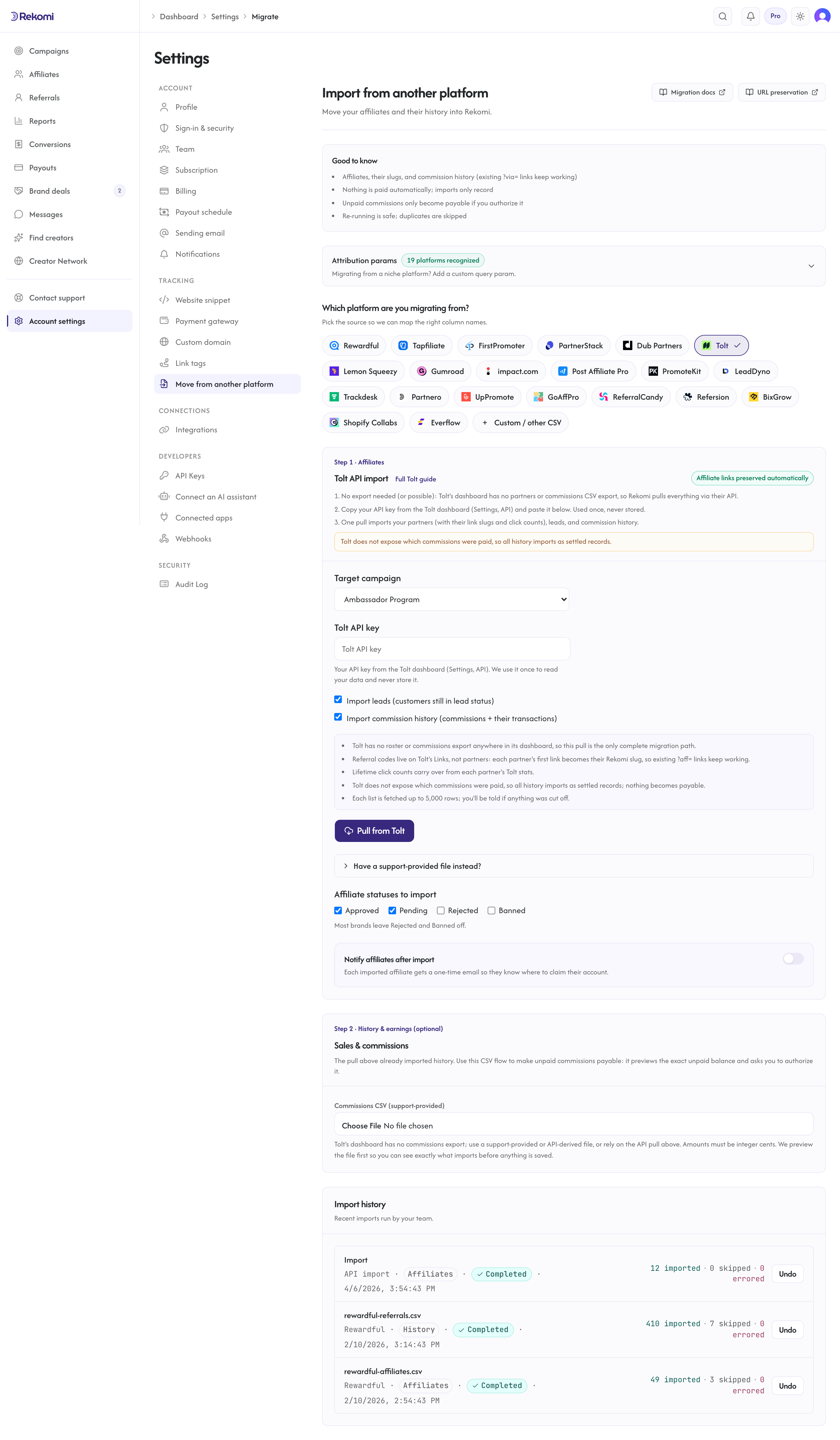
What the pull imports:
- Partners: email, name, status (API mapping:
activeimports as Approved,pendingas Pending,suspendedas Paused,rejectedas Banned), and the PayPal payout email when Tolt exposes it. - Link slugs: Tolt models referral codes on its separate Links resource, so the pull reads your links directly and preserves each partner's first link value as their Rekomi slug when the value passes the standard slug checks (3-64 characters, letters, digits, and hyphens, not already taken); a value that fails them gets a fresh slug instead. Existing
?aff=links keep working unchanged. Partners with several Tolt links get one Rekomi link; the import summary reports how many that affected. - Click counts: each partner's lifetime
total_clicksaggregate carries over into their Rekomi click counter, so leaderboards and EPC math don't reset to zero. - Leads: customers still in Tolt's
leadstatus import as zero-money lead records attributed to their partner, with the customer's name and email, so your funnel and lead counts are populated from day one. When Tolt'scustomer_idis a Stripe customer id, it rides along for recurring attribution. - Commission history: commissions joined to their transactions (Tolt reports integer cents; they import 1:1 as ISO minor units), with the sale amount, date, and customer identity from the transaction. Tolt does not expose which commissions were paid, so everything imports as settled, locked history: nothing becomes payable from the API pull. Rejected commissions are skipped.
What the pull cannot import: payable balances (use the Step 2 CSV flow with its preview if you want open balances made payable), manually-submitted-lead queues, campaign structure, and click-level logs (Tolt only exposes aggregates). Tolt's currency is program-level, so Rekomi reads your Tolt program's currency and stamps it on the imported history; your Rekomi home currency is used only when the program currency cannot be read. If your Tolt account runs several programs, the first program's currency is applied to every row, so review the totals on multi-currency accounts. If the program currency (or your home currency when Tolt exposes none) is ISK, UGX or MGA, commissions are skipped and counted as UnsupportedRepresentationRows on the pull result until Tolt confirms how it represents those three currencies; leads still import. Each list is fetched up to 5,000 rows; the result tells you if a fetch was cut off.
Re-running the pull is safe: affiliates dedupe by email and history rows dedupe on Tolt's own ids.
The CSV fallback
There is no dashboard export to upload, but a support-provided or API-derived file works with the CSV importer below (amounts must be integer cents).
What the CSV importer brings across
| Field | Source column | Notes |
|---|---|---|
email | Required. Lowercased + trimmed. Primary dedup key. | |
| Full name | name, or first_name + last_name | If name is present it wins; otherwise the two parts are joined with a space. |
| Status | status | See mapping table below. |
| PayPal email | paypal_email, payout_email, or paypal | Optional. Tolt's most common payout method; preserved as the affiliate's payout destination when present. |
| Tracking slug | referral_code (or ?aff= extracted from a referral-link column) | Best-effort. If neither is present, a fresh 12-character random slug is generated. See How slug preservation works. |
Anything else in the partner CSV (company name, country, totals) is silently ignored by the roster importer. To bring over historical sales and commissions, use the separate commissions export in Step 2 (see Importing history and earnings).
Status mapping
Tolt's partner statuses map to Rekomi's affiliate states:
Tolt status | Rekomi |
|---|---|
active | Approved |
pending | Pending |
suspended | Paused |
rejected | Rejected |
| anything else, blank, or missing | Pending |
This table applies to the CSV fallback. The API pull maps one state differently: rejected partners import as Banned.
The match is case-insensitive. suspended is a reversible, temporary deactivation in Tolt (the partner cannot earn new commissions or reach the portal until reactivated), so it maps to Paused rather than a hard Banned. You can reclassify any row with the bulk-status action in /dashboard/affiliates after import. Approved imports get an ApprovedAt timestamp set to the import time so payout eligibility math works correctly.
How slug preservation works
Tolt's referral links use the ?aff= query parameter, for example brand.com/?aff=alex. aff is one of Rekomi's built-in attribution params and works out of the box, so your affiliates' existing ?aff= links keep attributing on Rekomi the moment you swap the tracking snippet, whether or not the importer preserves the exact slug.
Slug preservation itself is best-effort for Tolt. Tolt models the referral code on its separate Links resource rather than on the Partner object, so a partner CSV export often does not include a slug column at all. The importer preserves a slug when:
- The export includes a
referral_code(orref_code/code) column, or a referral-link column (referral_link,affiliate_link,link,url) from which it can parse the?aff=value. - That value is a valid alias: 3-64 characters, alphanumeric plus hyphen, no leading or trailing hyphen.
- The slug is not already taken in the global Rekomi namespace (slugs are platform-wide unique, not per-org).
When all three hold, the affiliate keeps their exact slug. When the export carries no code and no parseable link, the affiliate gets a fresh 12-character random slug; their account still imports cleanly. You can see which slugs were preserved versus regenerated in the import job detail panel.
Step-by-step cutover
1. Run the API pull
Copy your API key from Settings → API in Tolt and run the pull under /dashboard/settings/migrate (see Import via API above). One run brings your roster, link slugs, leads, and history. There is no dashboard export in Tolt; only use the collapsed CSV option if support sent you a file.
2. Attribution params: nothing to configure for aff
aff is one of Rekomi's built-in attribution params and is always recognized; custom params only add to the list, so there is nothing to configure. This is what makes your affiliates' existing Tolt links resolve to the right affiliate on Rekomi.
3. Check the import result
The import runs synchronously and shows a row-by-row result: imported, skipped (duplicate or missing email), or errored (parse failure). Every job is listed under Import history with a per-row detail panel and an Undo button.
4. Opt into auto-notify (Growth+ only)
Check Notify affiliates after import and compose a short personal note in the rich-text editor (~500 visible characters). The note renders inside a brand-accent blockquote at the top of every notification email, above a single Claim your account button that takes the affiliate to a pre-filled Clerk sign-up.
Click Send a sample to myself to fire a preview to your own verified email before the bulk send kicks off. The bulk dispatch is throttled to one email per second with up to 200ms jitter; a 500-row import takes about 8 minutes end to end.
5. Swap the tracking snippet
Install Rekomi's tracking snippet on your marketing site, then remove the Tolt snippet (tolt.js). The moment the new snippet is live, every existing brand.com/?aff=alex link attributes to Rekomi instead of Tolt. Your affiliates do not need to know about the change.
Keep Tolt active for a 24-48 hour shadow period to compare the two sides if you want belt-and-suspenders confidence; then cancel Tolt.
What is NOT imported
| Data | Status | Workaround |
|---|---|---|
| Historical click counts | API pull only | Lifetime total_clicks aggregates import via the API pull; click-level logs are not portable. |
| Leads | API pull only | Tolt has no customers export; the API pull brings lead-status customers as zero-money lead records. Manually-submitted leads awaiting review are not exposed by Tolt's API. |
| Historical sales and commissions | API pull or Step 2 CSV | The API pull imports them as locked history; the Step 2 CSV flow additionally lets you make open balances payable after a preview. |
| Which commissions were paid | Not exposed by Tolt | "Paid" is a payout property in Tolt, not a commission status, so all history imports as settled records. |
| Custom commission rules | Not imported | Configure Rekomi's commission models directly. |
Common gotchas
My export has no referral_code column. That is expected: Tolt keeps the referral code on its Links resource, not the Partner object. Affiliates whose code is not in the file get a fresh Rekomi slug, but their existing ?aff= links keep attributing because aff is a recognized attribution param. If you need to preserve exact slugs, add a referral-link or code column to the export before downloading (if your Tolt plan supports it).
A partner is suspended in Tolt. They import as Paused (not Banned), since Tolt's suspension is reversible. Reactivate or reclassify them with the bulk-status action in /dashboard/affiliates.
My affiliates use a custom domain portal. Tolt's branded portal (e.g. affiliates.yourbrand.com) is replaced by Rekomi's affiliate area when the affiliate claims their account; their ?aff= referral links are unaffected.
Verifying the import landed clean
After the import job completes:
- Open
/dashboard/affiliatesand spot-check 3-5 rows. Confirm name, email, and status match the Tolt source. - Open one affiliate's detail page and confirm the tracking link is present (the original
?aff=slug when preserved, or a fresh Rekomi slug otherwise). - Send a sample notification to yourself and confirm the Claim your account button lands on the pre-filled Clerk sign-up.
- Click an affiliate's existing
?aff=link with the new snippet installed; confirm a click row appears under that affiliate within a few seconds.
If steps 1-4 all pass, fire the bulk auto-notify and cancel Tolt when comfortable.
Importing history and earnings
The API pull already imports your commission history (and leads) as locked, settled records. Use the Step 2 CSV flow instead when you have a support-provided commissions file, or when you want open balances made payable on Rekomi: only the CSV flow previews the exact unpaid balance and asks you to authorize it.
- Tolt records money in integer cents (the
amountfield is the partner's commission;revenueis the sale gross), so the importer reads those columns as minor units. - Past conversions and commissions are matched to the affiliate by email (or preserved slug) within the target campaign, and recorded with the amount and date from your export.
- Commissions Tolt already paid import as locked history (shown in lifetime totals, never paid again). Commissions still owed (pending or approved) are queued for a Rekomi payout only if you authorize it on the preview screen. Refunded, fraud, and rejected rows are skipped.
- A dry-run preview shows what will import (and exactly how much, if anything, Rekomi would pay) before you commit. Re-running is safe.
See the migrations overview for the full reference.
Where to go next
- Tracking and attribution: the
affparam, cookie window, and stickiness. - Migrating from other platforms: the broader URL-preservation matrix if you also have affiliates on other platforms.
- Plans and trials: see what each tier includes and how the 14-day free trial behaves.
Migrating from Dub Partners
Move your Dub Partners affiliate roster onto Rekomi. The importer reads Dub's open-source CSV schema, carries lifetime click counts over via the toggleable Clicks column, and maps Dub's status vocabulary to Rekomi's enum when a status column is present.
Migrating from Lemon Squeezy
Move your Lemon Squeezy affiliate roster onto Rekomi. Lemon Squeezy has no affiliate CSV export, so Rekomi pulls your roster (names, emails, statuses) via their API, with an optional paste-in mapping that keeps existing ?aff= links working.