

Migrating from Tapfiliate
Move your Tapfiliate affiliate roster onto Rekomi. CSV import preserves every existing referral code so ?ref= links keep working, with the gotcha that Tapfiliate emails the export rather than offering a direct download.

This guide is for brands switching from Tapfiliate to Rekomi. The importer reads Tapfiliate's standard CSV export, dedupes by email, preserves every referral_code so existing brand.com/?ref=alex links keep working, and optionally fires a personal sign-in invite to each imported affiliate.
The only thing different about a Tapfiliate migration vs. the others: Tapfiliate emails you the CSV instead of streaming a download. Plan for an extra round-trip.
Migration is available on Starter or higher; auto-notify requires Growth or higher.
What the importer brings across
| Field | Source column | Notes |
|---|---|---|
email or Email | Required. Lowercased + trimmed. Primary dedup key. | |
| First name | firstname or first_name (or Firstname) | Joined with last name into the full name. |
| Last name | lastname or last_name (or Lastname) | Joined with first name. |
| Status | Program_approved | Tri-value approval flag; mapping below. |
| Tracking slug | extracted from the Program_referral_link URL | Tapfiliate's export has no dedicated code column; the referral code lives inside the link URL (query param or trailing path segment). A hand-built referral_code / ref_code column is read first when present. |
The importer is case-insensitive on every column header, so Tapfiliate's "Firstname" works as well as "first_name". Any column the importer doesn't recognize (e.g. Affiliate_id, Signed_up_at, Signup_source, company, country) is silently ignored. The affiliates export carries no clicks column at all (Tapfiliate's click numbers are Reporting-page aggregates, API-only), so historical click counts cannot come from this file.
Status mapping
Tapfiliate's export carries a single approval flag: Program_approved. The mapping:
Tapfiliate Program_approved | Rekomi |
|---|---|
true / 1 / yes / active / approved | Approved |
false / 0 / no / disapproved | Rejected |
| blank / missing | Pending |
The match is case-insensitive. Tapfiliate's CSV cannot distinguish archived from active (archived affiliates are excluded from the export entirely). See the "archived affiliates" gotcha below.
How slug preservation works
Tapfiliate's tracking URL is brand.com/?ref={referral_code}. Rekomi's tracking URL is also brand.com/?ref={slug}: ref is one of Rekomi's 21 default attribution params, so no extra configuration is needed.
The importer extracts the referral code from each row's Program_referral_link URL (a hand-built referral_code or ref_code column wins when present) and tries to register it as the affiliate's new Rekomi slug. Preservation succeeds when:
- The extracted code is a valid alias: 3-64 characters, alphanumeric plus hyphen, no leading or trailing hyphen.
- The slug is not already taken globally.
Tapfiliate auto-generates short alphanumeric referral codes by default, which means almost every code is well-formed and rarely collides. Brands that customize codes to recognizable names (alex, growth2024, etc.) get a slightly higher collision rate but the importer logs every fallback in the job result panel.
If a row has no parseable referral link and no code column, a fresh 12-character random slug is generated; the affiliate's existing Tapfiliate link breaks.
Step-by-step cutover
1. The ref attribution param (nothing to do)
ref is one of Rekomi's 21 default attribution params and is always recognized, so Tapfiliate's ?ref= links work out of the box. Custom params only add to the list; there is nothing to configure.
2. Export from Tapfiliate
In Tapfiliate, open Affiliates and click Select All (or select the rows you want). Click Export. Tapfiliate does NOT give you a direct download - instead, it emails the CSV to your account owner's address. This is unique to Tapfiliate and is the most common point of confusion in this migration.
Wait for the email (usually a minute or two), save the attached file locally, and proceed to the next step.
3. Upload the CSV
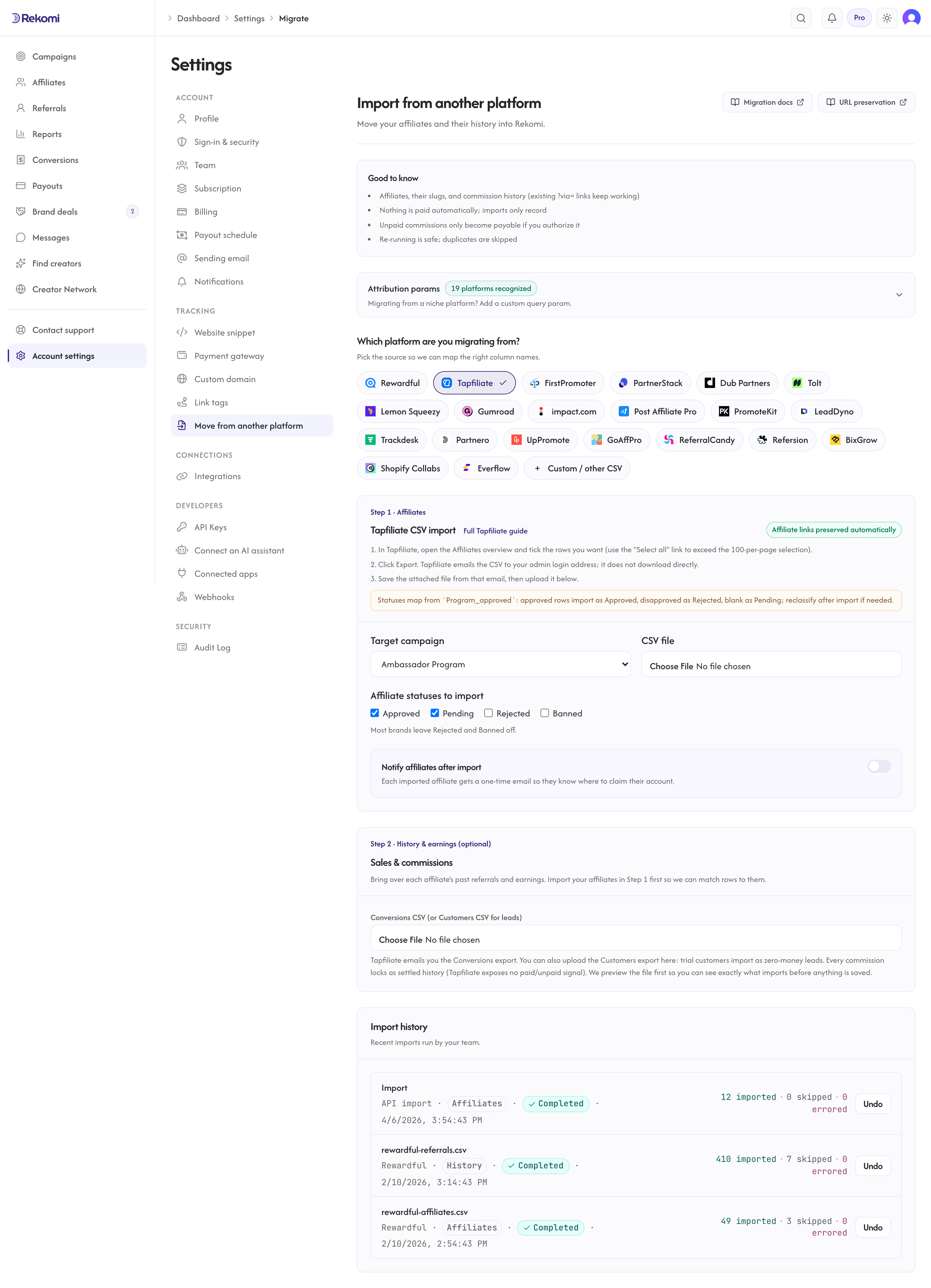
Open /dashboard/settings/migrate. Pick Tapfiliate as the source, select your destination Rekomi campaign, and upload the CSV.
4. Reclassify archived affiliates (if applicable)
Tapfiliate's CSV does NOT include archived affiliates at all, and even for non-archived rows the only state you get is the program_approved boolean. If you had affiliates in Tapfiliate's "rejected" or "blocked" buckets, they either:
- Won't appear in the CSV at all (Tapfiliate excludes them), in which case there is nothing to do - they're not migrated.
- Will appear as Pending in Rekomi (boolean blank/false) and you can mark them Rejected via the bulk-status action in
/dashboard/affiliates.
If you specifically need archived affiliates in your Rekomi org, contact support; the hands-on migration path can reconstruct them from raw Tapfiliate data.
5. Opt into auto-notify (Growth+ only)
Same flow as every other migration: check Notify affiliates after import, compose a personal note, fire a sample to yourself, then let the bulk dispatch run at 1 email/sec.
6. Swap the tracking snippet
Install Rekomi's tracking snippet, remove Tapfiliate's snippet. Every existing brand.com/?ref=alex link starts attributing to Rekomi from the moment the swap is live.
What is NOT imported
| Data | Status | Workaround |
|---|---|---|
| Archived affiliates | Excluded by Tapfiliate's CSV | Hands-on migration can reconstruct them from raw data. |
| Custom fields | Silently ignored | Contact support if you need specific fields preserved. |
| Historical click counts | Not in Tapfiliate's exports | Tapfiliate's affiliates export has no clicks column (their click numbers are Reporting-page aggregates, API-only), and per-click event logs are not portable from any platform. Click totals start fresh on Rekomi. |
| Leads (trial customers) | Do it yourself (Step 2) | Upload Tapfiliate's Customers export in Step 2: trial-status rows import as zero-money lead records attributed to their affiliate. |
| Historical conversions and commissions | Do it yourself (Step 2) | Import them via the Conversions export under Settings, Migrate, Step 2. See Importing history and earnings. |
| Tapfiliate program structure | Not imported | Set up Rekomi campaigns first; map at upload time. |
| Tapfiliate auto-approval rules | Not imported | Configure them in Rekomi via recruit affiliates workflows. |
Common gotchas
The "Export" button looks broken - nothing downloads. That's expected. Tapfiliate emails the CSV. Check the inbox of your Tapfiliate account owner.
Some affiliates were marked archived in Tapfiliate but not in my CSV. Archived affiliates are excluded from Tapfiliate's export by design. They are not migrated. If you need them, contact support.
The program_approved column is missing on some rows. They default to Pending. Bulk-approve them post-import via /dashboard/affiliates if appropriate.
My affiliates' referral codes have special characters. Tapfiliate allows hyphens in referral codes which Rekomi accepts. Underscores, slashes, dots, or other punctuation cause the slug to fail validation, and the affiliate gets a fresh random slug instead. The job detail panel lists which slugs fell back.
Verifying the import landed clean
After the job completes:
- Open
/dashboard/affiliatesand spot-check 3-5 rows for name + email match. - Spot-check one affiliate's tracking link: confirm it's
brand.com/?ref={referral_code}matching their Tapfiliate value. - Send a sample notification to yourself; confirm the Claim your account button pre-fills correctly.
- Click your own test link with the new snippet live; confirm a click row appears within seconds.
Then fire the bulk auto-notify and cancel Tapfiliate when comfortable.
Importing history and earnings
To bring over each affiliate's past performance, export your Conversions CSV from Tapfiliate (emailed, like the affiliate export) and upload it under Settings, Migrate, Step 2 (separate from the affiliate roster above). You can also upload Tapfiliate's Customers export in the same Step 2 slot: rows with trial status (Tapfiliate's lead analog) import as zero-money lead records attributed to their affiliate, so your funnel and lead counts are not reset to zero. Active/canceled customer rows are skipped there (an active customer's history arrives via the Conversions export instead).
- Past conversions and commissions are matched to the affiliate by the
Afilliate_idcode (or display name) and recorded with the amount and date from your export. Amounts are read as major units with the per-row Currency column. - Tapfiliate's
Approvedcolumn is an approval flag, not a payment status, so every imported commission locks as settled history (shown in lifetime totals, never paid by Rekomi). Disapproved rows are dropped. Settle any final open balances inside Tapfiliate before you cancel. - Tapfiliate's exports carry no Stripe customer/subscription ids and no customer email (identity is your own
Customer_id), so automatic recurring re-attribution is not available from this file; existing subscriptions can be re-linked via the hands-on migration path if needed. - A dry-run preview shows what will import before you commit. Re-running is safe. Disapproved and refunded rows are skipped.
See the migrations overview for the full reference.
Where to go next
- Tracking and attribution: full reference for
refand other attribution params. - Migrating from other platforms: URL-preservation matrix across all sources.
- vs Tapfiliate: side-by-side comparison if you are still evaluating.
Migrating from Rewardful
Move your Rewardful program onto Rekomi with one API pull. Rekomi imports your affiliates (with ?via= tokens and click counts), your leads, and your commission history directly from Rewardful's API; a support-provided CSV remains as a fallback.
Migrating from FirstPromoter
Move your FirstPromoter program onto Rekomi with one API pull. Rekomi imports your promoters (with referral tokens and click counts), your leads, and your commission history directly from FirstPromoter's API; a CSV upload remains as a fallback.