

If you’re an Ontraport customer, you can run your own Ontraport affiliate program for whatever you sell, and there are two honest ways to do it: Ontraport’s built-in Partner Programs feature, or Rekomi reading the same contact record Ontraport already keeps.
I’m going to put both routes next to each other with prices, plan tiers and a worked example (a coaching business, a $2,000 program, 10 partners) and let the numbers do the arguing. The Ontraport column is built from Ontraport’s own pricing page and docs, and since I helped build Rekomi, read my column with that in mind.
One fact sets the tone for everything below: both routes need Ontraport Pro or Enterprise, so this was never a “which one saves me on the plan” decision. It’s a “where do my sales happen, and who pays my partners” decision, and those two questions are genuinely more fun to answer.
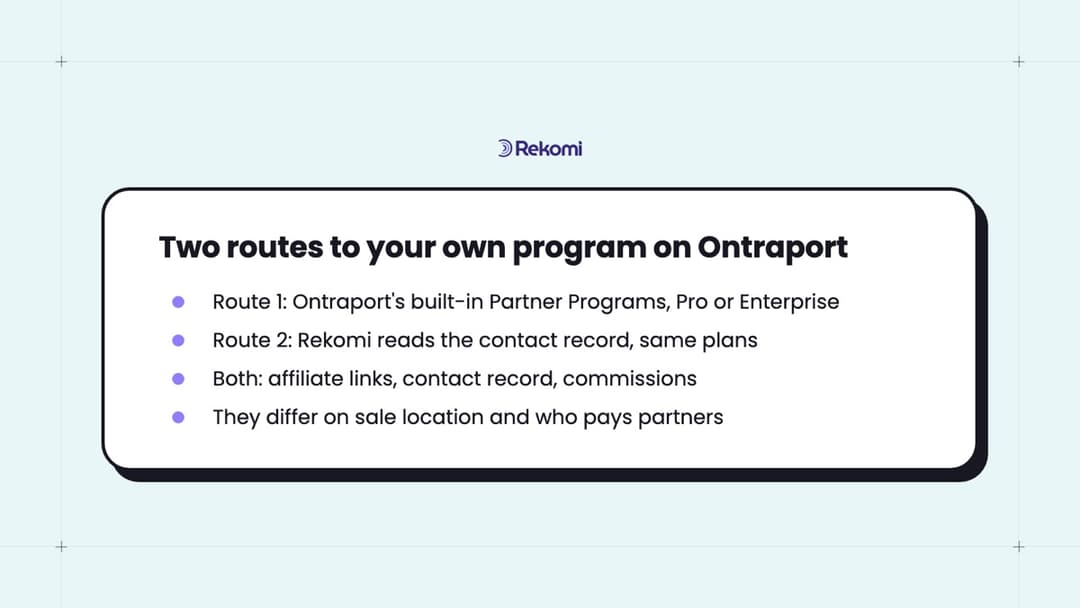
Both routes in one screen
Here’s what each route gives you and how it credits a sale, before the plan tiers and the math:
- Two routes on the same plan: Ontraport’s built-in Partner Programs, or Rekomi reading the contact record Ontraport already keeps. Both need Pro or Enterprise.
- How the built-in route works: Ontraport forms track the partner link themselves, store First and Last Referrer on the contact, and queue the commissions for you to approve. You send the payments yourself.
- How the Rekomi route works: the affiliate’s link carries a small tag, Ontraport records it as the contact’s lead source and campaign, and when a purchase happens Rekomi reads the contact back and credits the affiliate. No script and no pixel on your side.
- Where the sales come from: Ontraport bills the card on file, so the Ontraport connection brings those sales in itself; Stripe or another gateway can sit next to it for sales that happen there.
- Refunds: on the Rekomi route the commission reverses within about an hour of a refund or void; on the built-in route you catch it at the approve-then-pay step.
- Who pays the partners: on the Rekomi route, Rekomi runs the payouts and collects the tax forms; on the built-in route, you do.
- What it costs: $0 on top of your plan for the built-in route; a Rekomi plan at $29 to $99 a month plus 3% of commissions paid out for the other.
What Ontraport’s built-in Partner Programs give you, by plan
Ontraport’s native feature is good, and I want to be fair about how good: as I write this, 12 of the top 20 results for this search are Ontraport’s own support docs and videos explaining it, and they’ve earned the spot. Let me start with the plan tiers, from Ontraport’s pricing page on monthly billing, and annual billing gives you 2 months free:
| Plan | Monthly price | Partner programs & referral tracking | Lead source and conversion reporting |
|---|---|---|---|
| Plus | $83/mo | Not included | Not included |
| Pro | $124/mo | Included | Included |
| Enterprise | $249/mo | Included | Included |
Keep that last column in mind; it’s the UTM lead-source feature Rekomi’s route depends on too.
Then, from the Partner Programs docs and the feature page, here’s what a Pro or Enterprise account gets:
- 1-tier or 2-tier. In a 1-tier program, partners earn when one of their referrals buys. In a 2-tier program, a partner also earns a second, usually smaller, commission when someone they referred becomes a partner and makes a sale of their own.
- First Referrer and Last Referrer, stored on the contact. A new contact who clicks a partner link and fills out a form gets that partner as First Referrer forever, and as Last Referrer until they click a different partner’s link. An existing contact only gets Last Referrer updated. You choose which of the two gets paid.
- Tracking is automatic on Ontraport forms. Ontraport’s own wording: as long as you’re using Ontraport forms, the system automatically handles the tracking. A checkout hosted elsewhere gets the partner tracking pixel on its confirmation page.
- Percentage or flat commissions, plus a time limit on referrer credit that you set, so you’re not paying on leads you closed yourself.
- Approve, then pay. Ontraport doesn’t send the money itself; it queues commissions for you to approve and mark as paid, with a PayPal Mass Pay file as an option.
- A partner portal, promo tools and a Partner Center. Partners see their stats and get custom links, banners, lightboxes and pre-written emails, and the Partner Center can run leaderboards and launch contests. Building that center in Ontraport needs the Dynamic CMS package; the WordPress version through PilotPress does less, and either one is available from Plus upward.
My take: for a business that sells 100% through Ontraport order forms, this is a complete affiliate program with no extra software, and the First Referrer versus Last Referrer choice is a smart design. I like that it’s a switch you set instead of a rule you’re stuck with.
Where the built-in program stops
Every tool has an edge, and this one’s is easy to read straight off its own docs. I count two:
- Paying partners is your job. Approve-then-pay is a real checkpoint, and I like a checkpoint, but every month someone on your team approves the queue and sends the payments. At 10 partners that’s an hour or two; at 60 it’s a task with a name.
- One checkout ecosystem, or a pixel on every other one. Ontraport forms track themselves. Anything else needs the partner tracking pixel on the confirmation page, and a pixel only counts the sale if the buyer’s browser actually loads it (an ad blocker, or a buyer who closes the tab a second early). If the SaaS side of your business bills through Stripe Checkout, that side is pixel work.
Neither is a knock; it’s the scope of a feature bundled into a $124 plan, and plenty of businesses fit inside it.
Route two: an Ontraport affiliate program that runs on Rekomi
The second route keeps you on the same Ontraport plan and moves the affiliate program itself into Rekomi’s Ontraport integration. Ontraport keeps doing what it does best (contacts, forms, order forms, billing the card on file), and Rekomi does the affiliate part: links, applications, commissions, refunds, payouts, tax forms. And the part I find super elegant is that it reads the same contact record Ontraport already writes, so nothing new gets tracked.
Here’s how I’d frame it: Ontraport already knows where every contact came from. Rekomi just asks.
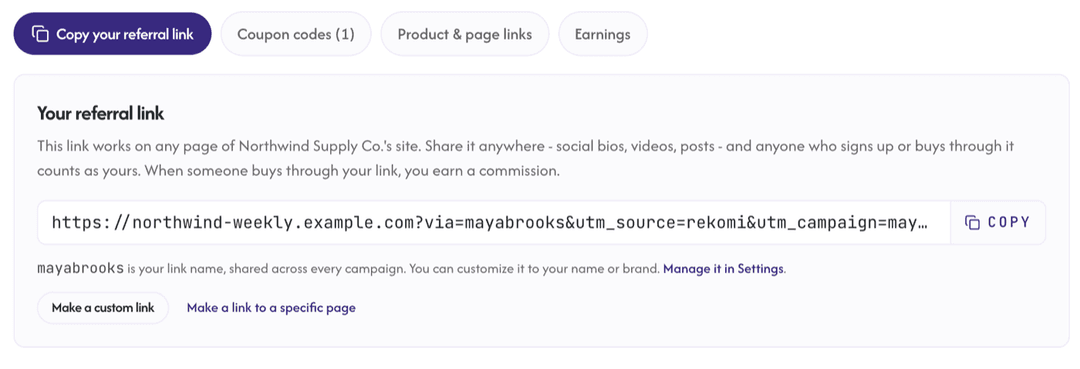
- Your affiliates’ links arrive with
utm_source=rekomiandutm_campaign=<slug>on the end, and Ontraport’s tracking script reads both. For Elena that looks likehttps://yourdomain.com/program?via=elena&utm_source=rekomi&utm_campaign=elena. - The visitor lands on a page that runs Ontraport’s tracking script (automatic on Ontraport Pages and PilotPress sites) and submits any Ontraport form, an order form included. Ontraport stores that arrival as the contact’s lead source and campaign, and it keeps both the first arrival and the latest one.
- When a purchase happens, Rekomi reads the contact back, checks that the lead source is
rekomi, resolves the campaign value to one of your affiliates, and credits the sale. The first arrival is checked first, then the latest.
Nothing runs in the buyer’s browser on Rekomi’s behalf: no Rekomi script on the page, no pixel on the confirmation page, and Rekomi never writes Ontraport’s tracking fields; it only ever reads them. That’s the whole of Ontraport affiliate tracking on this route: a UTM pair on the link and a read of the contact at sale time.
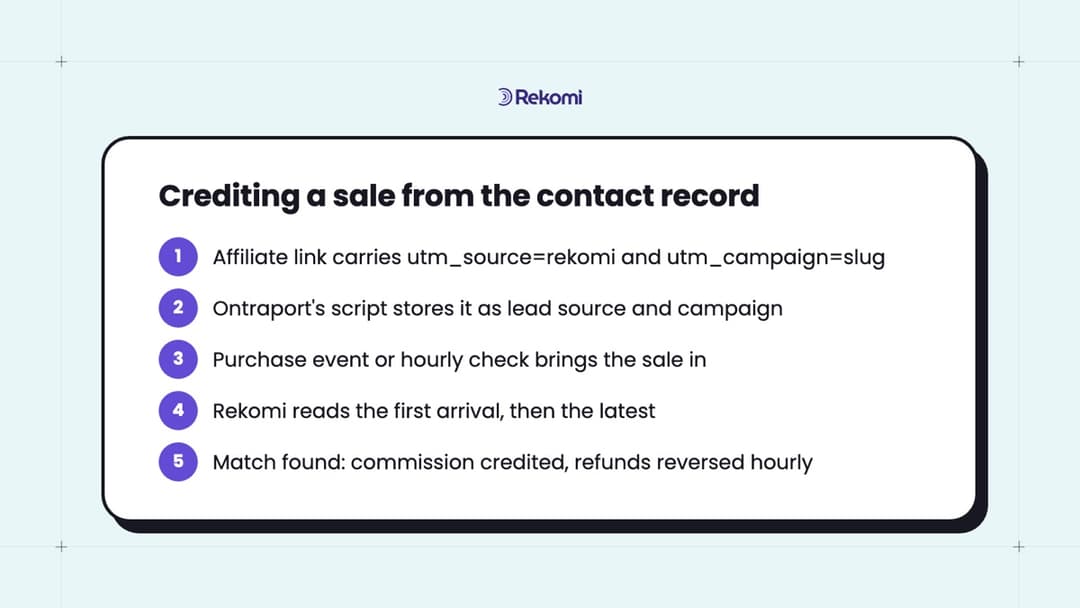
First arrival first, then the latest
Why that order? Because Ontraport updates the latest lead source on every tracked visit that carries a UTM parameter, and your own email links often carry UTMs too. A contact Elena brought in on Monday who clicks your Thursday newsletter, which carries your own campaign tag, before buying on Friday now has your newsletter as the latest arrival. The first arrival is never overwritten, so Rekomi checks it first and Elena still gets the sale.
The flip side is the case people ask about most. A contact who first arrived from a Facebook ad and later came back through Elena’s link has a first arrival that isn’t rekomi, so Rekomi moves to the latest, finds Elena, and credits her. When both arrivals name affiliates, the first one wins. So it’s first-touch with a latest-touch fallback, not last-click, not multi-touch, and I’d rather you know the exact rule than a nicer name for it.
Which Ontraport sales get credited, and how fast refunds reverse
This is the part that surprised me when I first worked through it: no Ontraport sale reaches Rekomi through Stripe, ever, because Ontraport bills the card on file through your gateway itself. So the connection is the sale source, and it listens two ways.
- Product purchase events. Rekomi registers one for each of your Ontraport products when you connect, and a daily product check picks up anything you add later.
- An hourly check of your transactions. It catches anything the events missed, and it’s how refunds and voids get noticed, since Ontraport sends no refund event. A refund reverses the commission within about an hour, and that check re-reads every credited sale from the last 120 days.
- Currency. Amounts land in your Rekomi home currency unless the transaction carries its own currency code.
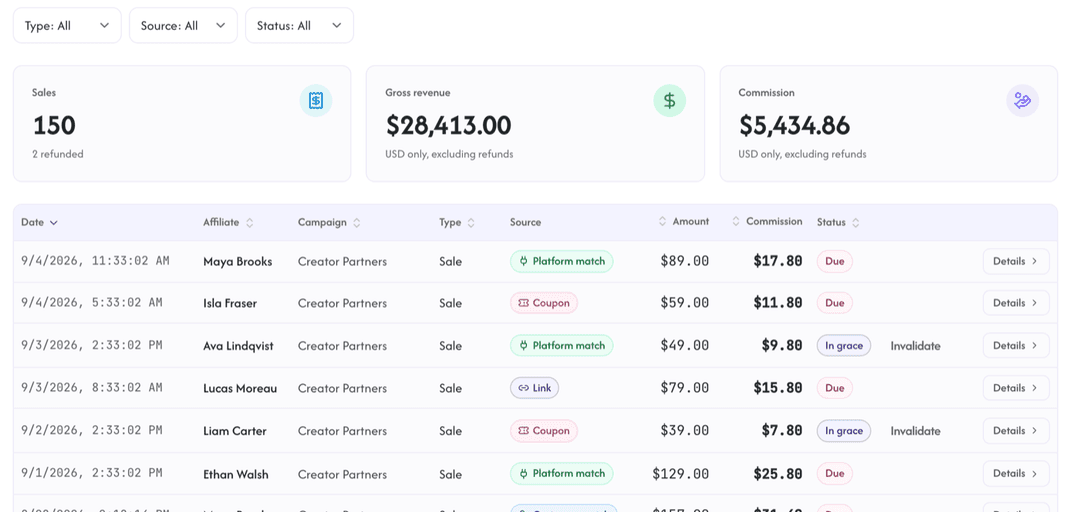
Purchase events are unsigned by Ontraport, so Rekomi treats each one as a hint and reads the contact and transaction back before recording anything. On the Sales page, a sale credited this way carries a “Platform match” label beside the link and coupon rows.
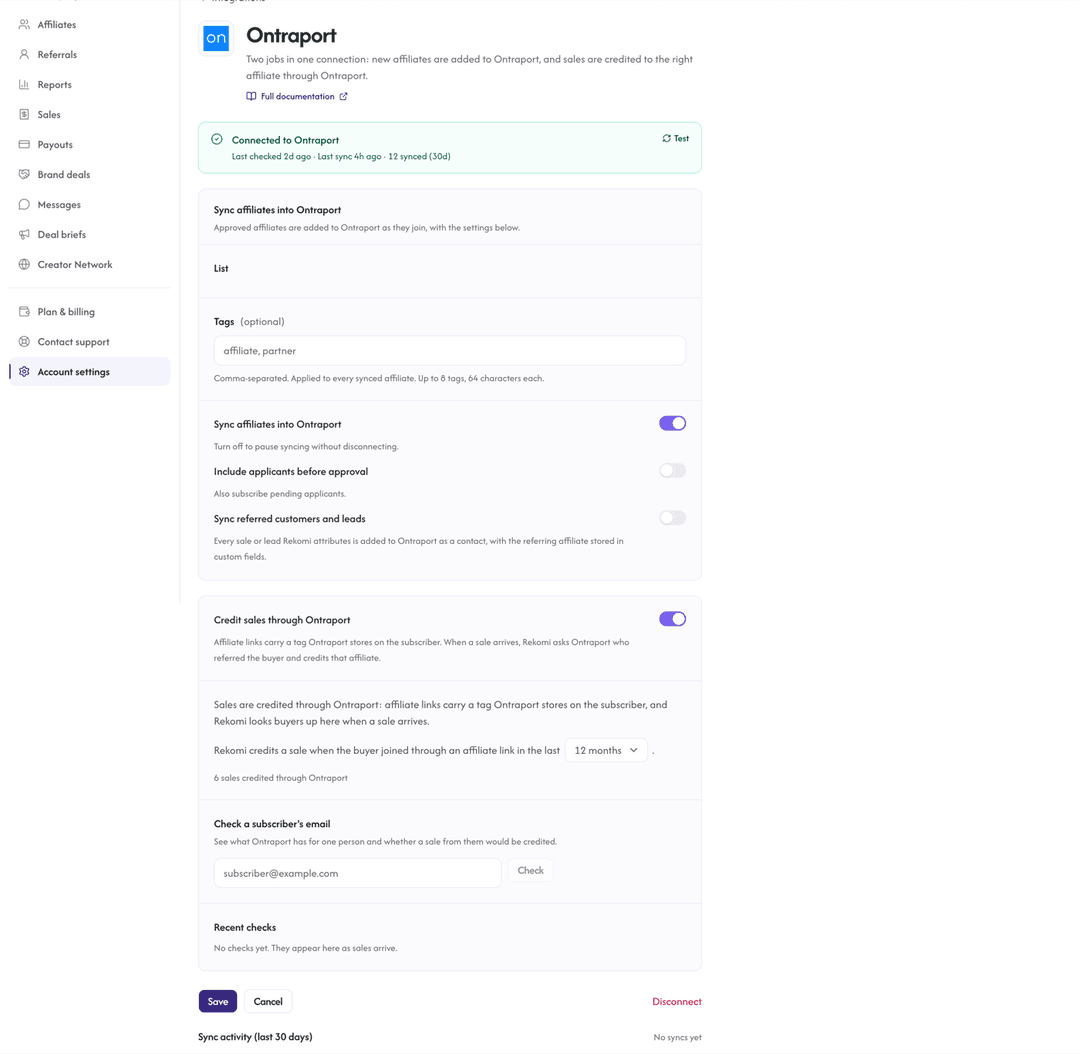
A caveat worth stating: a sale is credited only if the contact was created inside the lookback window you set on the integration page (twelve months unless you change it). The same page shows a one-sentence status: the time of the last check, whether it succeeded, and the count of credited sales.
Want to watch that status line fill in on your own account? Start a 14-day free trial, connect Ontraport with your App ID and API key, run one test opt-in, and paste the email into Check a subscriber’s email. https://app.rekomi.com/sign-up
Start a free trialYour affiliates land in Ontraport as tagged contacts
The sync half is the one most Ontraport shops turn on for the automations. When an affiliate is approved, or when they apply if you prefer, Rekomi upserts them as a contact with the Rekomi affiliate tag plus your chosen default tag, and per-campaign overrides can add more. From there it’s your Ontraport: a sequence on Tag added: Rekomi affiliate for onboarding, a partners-only segment, whatever you’d build for any other cohort.
Two details are worth knowing. The sync never touches the lead source or campaign fields, so the record the sales check reads stays exactly as Ontraport wrote it. And Ontraport’s 180 requests per minute are shared between the sync and the sales reads, so Rekomi caches each buyer briefly and waits two minutes before re-reading if Ontraport answers 429.
With Credit sales on, Rekomi also registers a new-contact webhook, so a contact who arrived through an affiliate link is recorded as that affiliate’s lead before any purchase. And one optional switch, off by default, Sync referred customers and leads, writes every credited sale or lead back into Ontraport as a tagged contact with a Rekomi referring affiliate field, matched on email.
Setup: an App ID, an API key, and one test opt-in
Setup is short, so let me give it to you as the four steps it actually is.
- In Ontraport, go to Administration, then Integrations, then Ontraport API Instructions and Key Manager, and copy your App ID and API Key.
- In Rekomi, open Integrations in the sidebar, click the Ontraport card, paste both, and click Connect. Rekomi verifies the credentials, registers purchase events for each product and confirms it can read contacts, and the status line is populated on the spot.
- Leave Credit sales through Ontraport on. It sits next to Sync affiliates into Ontraport and it’s on from the moment you connect. No payment gateway connection is needed for Ontraport sales.
- Test it: open an affiliate link, submit an Ontraport form with a fresh email, then run that email through Check a subscriber’s email on the Ontraport page. It reports whether the contact exists, whether its lead source and campaign name one of your affiliates, and whether we’d credit a sale from it. One opt-in verifies the whole path!
The one thing to check on your side is that the pages affiliate links land on run Ontraport’s tracking script. Ontraport Pages and PilotPress already do; a page hosted anywhere else needs the tracking code added, or the arrival is never recorded, however the visitor got there. The full walkthrough is in the Ontraport docs.
The plan you need for either route: Pro or Enterprise
I want this one in a heading because it’s where people hope for a shortcut, and there isn’t one. Ontraport’s pricing page puts “Partner programs & referral tracking” and “Lead source and conversion reporting” on Pro and Enterprise only, and the UTM support doc says it plainly: UTM tracking is available to Ontraport Pro accounts and above.
Rekomi’s read-back is built on that UTM lead-source capture. So both routes need Pro or Enterprise, and the honest comparison is “same Ontraport plan, different affiliate layer,” never “Rekomi as the cheaper-plan route.” If you’re on Plus today, the real question is whether the $41/month step to Pro is worth it for an affiliate program at all, and the worked example below answers that.
The worked example: a coaching business, a $2,000 program, 10 partners
Let me run a realistic one, because the routes only separate once there are numbers in them.
The setup: an Ontraport Pro account at $124/month, a $2,000 group coaching program sold through an Ontraport order form, 10 partners, mostly alumni, a 20% commission of $400 a sale, and 10 partner sales a month between them. That’s $20,000 a month in referred revenue and $4,000 a month in commissions.
Route one, the built-in program
It costs $0 on top of the plan. Ontraport tracks the order form, sets First and Last Referrer on each buyer, and queues 10 commissions for approval. Someone approves them, sends 10 payments (PayPal Mass Pay turns that into one upload), and chases whatever paperwork your accountant wants. The effective cost is the $4,000 in commissions plus an hour or two of admin a month, and at this size that’s a very fair trade.
Route two, Rekomi on the same account
It’s the same $124 Ontraport plan, plus Rekomi Growth at $49/month, because Starter’s $29 caps payouts at $2,500 a month and this program pays out $4,000. Add the flat 3% on commissions paid out, which is $120 here. Total software: $169/month, or 0.85% of the $20,000 in referred revenue, and that’s the entire bill!
For that $169, the 10 payouts run for you through Stripe Express, bank deposits or PayPal, and the W-9/W-8 collection and 1099-NEC prep are handled. A refunded $2,000 sale pulls its $400 commission back within about an hour. And a sale you make through Stripe or another connected gateway lands in the same program under the same partners. Add a 2-tier layer and the math stays legible, because a sub-affiliate override applies to the recruit’s commission, not the sale: a 10% override pays the recruiter $40 on a $400 commission, so you pay $440 total, 22% of the sale rather than 30%.
I love how cleanly the decision falls out of one line: $169 a month buys you the payout rail and the second gateway. If 10 partners paid by hand is fine and every sale is an Ontraport order form, keep the $169; the built-in feature earns its spot at that size.
But if you’d rather never run a payout by hand again, or the SaaS side of your business bills through Stripe, $169 against a year of monthly admin and a pixel on every non-Ontraport checkout is close to a no-brainer.
Side by side: the built-in program and Rekomi on the same account
I went back and forth on whether a table would flatten the nuance here, and landed on writing the nuance into the rows. Read the “where the sale can happen” row first; it decides most cases.
| Ontraport’s built-in Partner Programs | Rekomi, reading the Ontraport record | |
|---|---|---|
| Ontraport plan needed | Pro or Enterprise | Pro or Enterprise; UTM lead source is Pro and above |
| Where the sale can happen | Ontraport forms automatically; other checkouts with the partner pixel | Ontraport forms through the connection; Stripe and other gateways through their own connections |
| What identifies the affiliate | First Referrer and Last Referrer on the contact | Lead source and campaign on the contact, first arrival then latest |
| 2-tier | Built in | Sub-affiliate overrides, a percentage of the recruit’s commission |
| Refunds | Nothing automatic in the docs; you’d catch them at the approve-then-pay step | Reversed within about an hour by the hourly check |
| Paying partners | You approve and pay, PayPal Mass Pay available | Payouts run for you: Stripe Express, bank deposits, PayPal |
| Tax forms | Not described in the Partner Programs docs | W-9/W-8 collected, 1099-NEC prepped |
| Software cost on top of the plan | $0 | $29 to $99/month plus 3% of commissions paid out |
If the table reads as “both are good,” that’s because both are; the swing rows are sale location, payouts and tax forms.
Things people ask before picking a route
These are the five I hear most, direct answer first.
Does Ontraport have an affiliate program?
Yes, for running your own: Ontraport ships a built-in Partner Programs feature on Pro and Enterprise, and Rekomi runs a program on the same account by reading the contact’s lead source and campaign. (Ontraport’s own partner program, which pays people for referring accounts to Ontraport, is a different thing and not what this article is about.)
Can I run Ontraport’s built-in Partner Programs and Rekomi at the same time?
Yes, and it’s a sensible way to migrate. Rekomi reads the UTM lead source and campaign fields and never writes them, while the built-in feature uses its own First and Last Referrer fields, so on the contact record they don’t collide. Just decide which one owes the commission on each product, or you’d owe two commissions on one sale.
Do I need Ontraport’s tracking script on my landing pages?
Yes. Ontraport records the lead source and campaign only on pages running its script. Ontraport Pages and PilotPress have it already; anything hosted elsewhere needs the tracking code added, or there’s nothing for Rekomi to read.
Do I need to connect Stripe for Ontraport sales?
No. Ontraport bills the card on file through your gateway itself, so those sales never arrive as Stripe events; the Ontraport connection brings them in on its own. Connect Stripe only for sales that actually happen on Stripe, like a subscription sold through Stripe Checkout on your own site. Recurring and one-time Stripe products both credit.
Which Ontraport plan do I need?
Pro or Enterprise, for either route. The built-in feature is gated to those plans on Ontraport’s pricing page, and so is the UTM lead-source capture Rekomi reads, so Plus doesn’t work for either. Definitely price the $41/month step to Pro against the commissions you expect first.
Do this next
Two verdicts, one per reader, and both are good places to be.
If you’re on Pro and every sale is an Ontraport order form: turn on the built-in Partner Programs this week and pay your partners from the approval queue. It’s a complete program for $0 on top of your plan; revisit the day the payout admin or a second gateway starts costing you hours.
If you sell through Stripe or several gateways, or you’re done paying partners by hand: connect Ontraport to Rekomi with your App ID and API key, leave Credit sales on, and run one test opt-in through Check a subscriber’s email. Your Ontraport plan doesn’t change; the affiliate layer does.
Open dashboard Start a 14-day free trial View pricing

